|
VOOZH | about |
|
VOOZH | about |
| Digital Storage Capacity | 480 GB |
| Hard Disk Interface | NVMe |
| Connectivity Technology | SATA |
| Brand | Corsair |
| Special Feature | Portable |
| Hard Disk Form Factor | 2280 Inches |
| Hard Disk Description | Nvme |
| Compatible Devices | Compatibility: M.2 2280 Interface Connector |
| Installation Type | Internal Hard Drive |
| Color | Black |
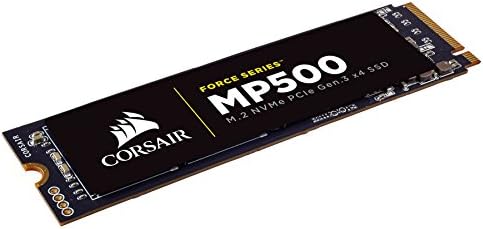
CORSAIR Force MP500 series M.2 SSDs deliver high performance, quick system boot ups, blazing fast transfer speeds and ultimate reliability in a compact form factor.
The CORSAIR NVMe PCIe boosts blazing fast bandwidth, allowing you to access your data, load files and launch games with speeds up to 4x faster than SATA 3.0.
Additional protection to enhance reliability and extend life of the drive.
Monitor S.M.A.R.T attributes and SSD health status with support for over-provisioning, secure wipe, disk cloning, FW update and more.
CORSAIR NVMe M.2 SSD enables a new level of performance in a compact form factor.
30um gold finger thickness improves contact to the motherboard and provides vibration resistance to ensure reliability in vigorous conditions.
Additional error bit correction and improved data retention while supporting the latest generation NAND.
The CORSAIR NVMe PCIE boosts bandwidth, allowing you to access all of your data, load files and launch games with speeds up to 4x faster than SATA 3.0.
CORSAIR NVMe M.2 SSDs enable a new level of performance in a compact form-factor. Select from 120GB, 240GB and 480GB sizes.
Additional protection to enhance reliability and extend life of the drive. Support for over-provisioning, secure wipe, disk cloning, FW update and more.
Additional error bit correction and improved data retention, while supporting the latest generation NAND. Work and play knowing you’re backed by CORSAIR 3-year warranty.
| Digital Storage Capacity | 480 GB |
|---|---|
| Hard Disk Interface | NVMe |
| Connectivity Technology | SATA |
| Additional Features | Portable |
| Hard Disk Form Factor | 2280 Inches |
| Compatible Devices | Compatibility: M.2 2280 Interface Connector |
| Specific Uses For Product | personal, gaming, business |
| Media Speed | Up to 3,000 MB/s |
| Cache Memory Installed Size | 480 |
| Data Transfer Rate | 3938 Megabits Per Second |
| Form Factor | M.2 2280 |
| Hardware Connectivity | PCI Express x4 |
| Hardware Platform | Mac |
| Hard-Drive Size | 480 GB |
|---|---|
| Item Weight | 0.02 Pounds |
| Unit Count | 1.0 Count |
| Color | Black |
|---|
CORSAIR FORCE Series MP500 480GB NVMe PCIe Gen3 x4 M.2 SSD Solid State Storage, Up to 3,000MB/s
Share:
Found a lower price? Let us know. Although we can't match every price reported, we'll use your feedback to ensure that our prices remain competitive.
Fields with an asterisk * are required
| Brand | Corsair |
|---|---|
| Model Number | CSSD-F480GBMP500 |
| Hard Disk Description | Nvme |
| Built-In Media | SSD (1) |
| Model Name | Force MP500 |
| Manufacturer | Corsair Memory Only |
| Global Trade Identification Number | 00843591096737 |
| UPC | 843591096737 |
| Mfr Part Number | CSSD-F480GBMP500 |
| Item Type Name | Corsair Force MP500 Series M.2 SSD 480GB |
| Warranty Description | 3 Years |
| Best Sellers Rank |
|
| ASIN | B01N7GDWE2 |
| Customer Reviews |
4.5 out of 5 stars |
| Installation Type | Internal Hard Drive |
|---|
CORSAIR Force MP500 series M.2 SSDs deliver high performance, quick system boot ups, blazing fast transfer speeds and ultimate reliability in a compact form factor. The Force MP500 allows you to access all of your data, load files and launch games up to 4x faster than SATA3 6Gbps SSDs. Available in various capacities including 120GB, 240GB and 480GB models, and compatible with Microsoft Windows, Mac OS X and Linux, with no special driver or administrative rights required.
Customer Reviews, including Product Star Ratings help customers to learn more about the product and decide whether it is the right product for them.
To calculate the overall star rating and percentage breakdown by star, we don’t use a simple average. Instead, our system considers things like how recent a review is and if the reviewer bought the item on Amazon. It also analyzed reviews to verify trustworthiness.
Learn more how customers reviews work on AmazonThis is my first experience with an m.2 drive and it's an amazing experience. I have a sata3 ssd on my old computer and it is still plenty fast as a boot drive. This is a whole other beast, it has ssd speeds for a couple seconds and then takes off like a rocket. I finished my ryzen build, started windows ten installer, made a cup of coffee in my keurig grabbed it and sat down and it was done. The feeling was priceless. This thing is insane for intensive workloads and is tiny, the pictures don't give it justice, it's so small it just looks like a part of your motherboard. If you need a boot drive the price is right for these as long as your motherboard supports it. Do yourself a favor and don't leave that m.2 slot empty. Corsair has made a crazy product with a very reasonable price tag.
I really love this drive. Computer boots up super fast in about 11 seconds from a cold start. The entire system is fully loaded when you get past the login screen. It is much smaller than you think it is. I stuck this in an Asrock Z270 Extreme 4, and it is pretty tiny where it is sitting at the bottom of the board. Whenever I point it out to people where the hard drive is on my motherboard, they are always surprised, almost as if they don't believe it. Super small, super fast. After installing Windows 10 on this, I had 84 GB left. The drive came in at 111 GB. I knew what I was getting. This drive has been a great staple to my new computer build. It has been fun to have such a fast and responsive computer. Thank you, Corsair.
Amazing technology. I've been building computers since DOS. Memory, CPUs, and busses all got faster, but the clunky, mechanical hard drives stayed pretty much the same. Now that's all changed. Plug one of these into your PCIe M.2 slot, and you'll like computers again. I was so impressed I upgraded motherboards, CPUs and RAM in two computers, and built a third, just so I could use this technology. Instead of 2-3 minutes to boot, it's now ~ 30 seconds from power on to desktop. My new motherboard even has a fast boot option that's so fast you don't even have time to enter bios. You'd have to clear CMOS to get in once you select fast boot. (I can live with 30 second boot times). If you already have a board with an empty PCIe M.2 slot, and your bios allows booting from PCIe, this is a no brainer upgrade. If your motherboard doesn't have an M.2 slot but will boot from PCIe, there are adapter boards for M.2 to PCIe. If your board doesn't have an M.2 slot, and won't boot to PCIe, it's time to change boards and whatever else you have to upgrade, just so you can use this. You won't be sorry. It's the most amazing upgrade in decades, IMHO. Check the size of your C drive now, and make sure you get one that's big enough.
My old system started getting memory errors so I decided to build a mid level gamer around a Kaby Lake i3 chip. This is my first NVMe M.2 drive and the results are pretty amazing. Would probably be better if I went up to a better CPU. However, the real world performance is hardly noticeable from my previous cheapo Kingston SSD drive. Sure the Crystal scores are 10x better, but I really don't notice it that much, if at all. That was even from my old 2500k system compared to this new one. The price was right so I'm not too upset about the purchase. I just may think twice about getting one of these types of drives in the future since the real world performance just isn't there. I installed this as my boot drive in my new system and Windows 10 installed with no issues. The system boots up in about 10 seconds, which is about 5 seconds faster than my previous system with the much slower drive. All new games run at mid to high level settings (1080p) smooth as silk.
System specs:
CPU: i3-7100
Motherboard: MSI B250 PC MATE
Video: Zotac 1050 2GB
Memory: HyperX FURY Black 16GB Kit (2x8GB) 2133MHz DDR4
Boot Drive: Corsair Force MP500 Series M.2 SSD 240GB Internal Drive
My old system started getting memory errors so I decided to build a mid level gamer around a Kaby Lake i3 chip. This is my first NVMe M.2 drive and the results are pretty amazing. Would probably be better if I went up to a better CPU. However, the real world performance is hardly noticeable from my previous cheapo Kingston SSD drive. Sure the Crystal scores are 10x better, but I really don't notice it that much, if at all. That was even from my old 2500k system compared to this new one. The price was right so I'm not too upset about the purchase. I just may think twice about getting one of these types of drives in the future since the real world performance just isn't there. I installed this as my boot drive in my new system and Windows 10 installed with no issues. The system boots up in about 10 seconds, which is about 5 seconds faster than my previous system with the much slower drive. All new games run at mid to high level settings (1080p) smooth as silk.
System specs:
CPU: i3-7100
Motherboard: MSI B250 PC MATE
Video: Zotac 1050 2GB
Memory: HyperX FURY Black 16GB Kit (2x8GB) 2133MHz DDR4
Boot Drive: Corsair Force MP500 Series M.2 SSD 240GB Internal Drive
This M.2 drive made my computer wildly fast overnight. It already had a lot of horsepower under the hood so to speak but I never realized how much it was being held back by my traditional hard disks. I can count on one hand the number of seconds that pass from hitting the login screen to actively using applications on my desktop. I did have to move my Documents and Downloads folders to a secondary hard disk on account of this drive's relatively small size, but value for money this is one of the best shots in the arm you can give your computer to boost performance if your motherboard supports it.
For reference, the rest of my computer is an i5-6600K CPU on an MSi Z170A Gaming M5 motherboard with two GTX 970 graphics cards. I also have a couple HDDs for storage and a regular SATA SSD for games. All in all everything inside except for this M.2 drive and the SATA SSD are at least a few years old and this upgrade has it running better than the day I put its current set of parts together.
Worked very good, as expected
I had a 1TB SSD and before that 2 SSDs in a RAID 0 configuration. I was never happy with the performance of my SSD. Samsung made all the SSDs, but they just seem to lose performance. It was not just due to the known bug on their drives, asynchronous I/O appears to lag at times.
I bought the M.2 drive as an OS drive. I used a RAID 0 setup with standard drivers for my applications and data, and I use a 4TB drive for my backups. All of this runs on my X-99 Deluxe mobo. I love the performance of Windows 10 on the M.2 drive. I have read a review saying better prices and performance drives have come out since this drive. I cannot speak to other M.2 drives. I can say I am happy with my purchase and recommend this to anyone who is looking for a fast OS drive.
Very fast in my X370 Ryzen 1800X system. My motherboard has two M.2 mounts, but only 1 will run this at max speeds (Ultra).
For sequential reads/writes it's amazingly fast... for 16k block size, 2GB/s write, 7.2GB/s reads!!
phantom@phantom-desktop ~ $ dd if=/dev/zero of=output.dat bs=16k count=60k
61440+0 records in
61440+0 records out
1006632960 bytes (1.0 GB, 960 MiB) copied, 0.500716 s, 2.0 GB/s
phantom@phantom-desktop ~ $ dd if=output.dat of=/dev/null bs=16k count=60k
61440+0 records in
61440+0 records out
1006632960 bytes (1.0 GB, 960 MiB) copied, 0.138911 s, 7.2 GB/s
At idle however, I measure 44c temps with a laser temp probe, but only at 1 small spot on the drive. With decent case cooling/fans, this shouldn't be a problem. As always, perform frequent backups. All manufacturers have had SSD drives that have failed suddenly months or years down the road.
Windows8.1Pro
Ryzen 1800x
X370GT3で使用中。
MLC NAND搭載でM.2タイプのNVMe SSDという条件で、
速度の速いタイプで調べると意外に種類は少なめ。
そこで発売されたばかりとおぼしきこのMP500を発見。
CORSAIRはDDR系のメモリーでは安定したブランドだったのでこれに決めました。
値段の安いPLEXTOR M8Peと迷いましたが書き込みが高速なので動画編集などをするときはこちらが有利かと思います。
大きめのメモリーを搭載することでRyzenのパワーをより引き出してくれると思われます。
MLCを搭載しているため書き込み耐性が高くあらゆる作業に最適です。
ネットを見るときもキャッシュが高速になるので重いページも表示が楽になりました。
Windows8.1Pro
Ryzen 1800x
X370GT3で使用中。
MLC NAND搭載でM.2タイプのNVMe SSDという条件で、
速度の速いタイプで調べると意外に種類は少なめ。
そこで発売されたばかりとおぼしきこのMP500を発見。
CORSAIRはDDR系のメモリーでは安定したブランドだったのでこれに決めました。
値段の安いPLEXTOR M8Peと迷いましたが書き込みが高速なので動画編集などをするときはこちらが有利かと思います。
大きめのメモリーを搭載することでRyzenのパワーをより引き出してくれると思われます。
MLCを搭載しているため書き込み耐性が高くあらゆる作業に最適です。
ネットを見るときもキャッシュが高速になるので重いページも表示が楽になりました。
Installation was very easy on Alienware 15R3. MIgration of Win 10 OS from HDD to SSD was also very easy. Very happy with its performance too!
Cuando cambie mi DD mecánico por este la diferencia fue notable, la utilizo para windows y algunos programas que requieren rapidez.
Windows arranca en 10 segundos y ya estas trabajando en lo que vayas a hacer. Es caro este tipo de discos duros pero cada peso que gasté lo vale.
preso nel 2016 (più o meno) oggi 2025 va ancora bene ed è veloce. Dopo 10 anni non sento il bisogno di averne uno più veloce, rallenta solo se si riempie fino all'orlo (ma credo siano tutti cosi) Comunque rispetto ad un ssd sata3 c'è un mare di differenza. La tecnologia NVME è fenomenale. Lo dovrò cambiare purtroppo solo per ragioni di spazio. Consiglio a tutti almeno 1 tera e chi ha un ufficio tecnico almeno 2 Terabyte
I use this drive with an enclosure to boot windows on my Mac and it's great boot drive. Runs window perfectly, even heavy duty programs like IDEs and simulation software (Altium Designer). The 120 GB model is kind of small, perfect for a boot drive, but I would suggest another drive for files or a game library.