VOOZH about

URL: https://steamcommunity.com/app/596420/allnews/

⇱ Steam Community :: Steam Audio


👁 Image
👁 STEAM
Show
All News
Steam Audio 4.6.0: Wwise support
Dec 17, 2024
👁 Image
We've just released Steam Audio 4.6.0[github.com], and with it, we're excited to announce our Wwise plugin! This lets you use the full range of spatial audio functionality available in Steam Audio -- including HRTF, occlusion, physics-based sound propagation, and baking -- in projects that use Wwise.

Steam Audio 4.6.0 also adds tight integration between the Wwise plugin and the Unity and Unreal Engine plugins, so you can easily configure existing Unity or Unreal Engine projects to use a Wwise project containing spatial audio functionality powered by Steam Audio.

👁 Image
The Wwise plugin supports all the platforms supported by Steam Audio: Windows (32-bit, 64-bit), Linux (64-bit), macOS (Intel, Apple Silicon), Android (armv7, arm64, x86), iOS.

Refer to the documentation[valvesoftware.github.io] for the Wwise plugin for further instructions on how to integrate it with your Wwise projects, Unity projects, Unreal Engine projects, or custom game engines.

For more details on this release, refer to the release notes[github.com].
Steam Audio
59
4
Steam Audio Open Source Release
Feb 19, 2024
👁 Image
We are excited to announce that with the latest release of Steam Audio[github.com], the complete source code of the Steam Audio SDK is now available as open source. With this release, our goal is to provide more control to developers, which will lead to better experiences for their users, and hopefully valuable contributions back to the wider community of developers using Steam Audio.

This comes after receiving a lot of valuable feedback and contributions from the community to the plugins already available as open source (Unity, Unreal, and FMOD Studio), and we want to bring those same benefits to the core SDK. This will allow developers to tailor the SDK to their needs, and deliver improved experiences to everyone using the technology. We will also continue our ongoing work on Steam Audio, including the release of bug fixes and new features.

👁 Image
The choice of what features we work on is often driven by the needs of internal projects. For instance, during the development of Half-Life: Alyx, we spent a lot of time working on our hybrid reverb and pathing features, which we later released as part of Steam Audio 4.0.0. These priorities might not always align with partner priorities, so we want to remove roadblocks that prevent partners from implementing spatial audio features that require access to the core Steam Audio SDK. As an example, we may be working on fixing a performance issue in Steam Audio affecting an internal project, but a partner may need Steam Audio ported to a console platform. Making the entire SDK available as open source allows partners to manage the port themselves, and optimize it for their needs, while also allowing them to contribute their changes back if desired.

The entire Steam Audio codebase[github.com], including both the SDK and all plugins, is now released under the Apache 2.0 license[choosealicense.com]. This allows developers to use Steam Audio in commercial products, and to modify or redistribute it under their own licensing terms without having to include source code. We welcome contributions from developers who would like to fix bugs or add features to Steam Audio; for more details, see the files https://github.com/ValveSoftware/steam-audio/blob/master/LICENSE.md and https://github.com/ValveSoftware/steam-audio/blob/master/CONTRIBUTING.md in the GitHub repository.
Steam Audio
354
37
Steam Audio 4.1.0 Release
Jul 5, 2022
We've just released Steam Audio 4.1.0[valvesoftware.github.io]. This release includes a major update to the Steam Audio Unreal Engine plugin, bringing it up to date with the latest features of the Steam Audio SDK. This is also the first release in which the Unreal Engine plugin is released alongside the other plugins and the core SDK.

👁 Image
The major new features of the Unreal Engine plugin in this release include:

FMOD Studio support
If you are using FMOD Studio as your audio middleware in your Unreal Engine project, the Steam Audio Unreal Engine plugin now works with the Steam Audio FMOD Studio plugin. Events authored in FMOD Studio can use occlusions, reverb, etc. simulated by Steam Audio in Unreal Engine levels.

macOS and Linux support
The Unreal Engine plugin now supports Windows (64-bit Intel), macOS (64-bit Intel), Linux (64-bit Intel), and Android (32-bit ARM, 64-bit ARM, and 32-bit Intel). Note that precompiled macOS binaries are not provided out of the box, but Unreal Engine will automatically compile the plugin for macOS when you open a project that uses the plugin. Precompiled binaries for macOS will be provided in a subsequent patch release.

Sublevel support (including streaming sublevels)
Geometry can be tagged in any sublevel referenced by a level. Whether the sublevels are loaded automatically along with the main level, or streamed in based on a level streaming volume or any custom logic, Steam Audio will update occlusion, reflections, and reverb automatically.

Dynamic geometry in Blueprint classes
Any Blueprint class can now be configured to be a Steam Audio dynamic object, and Steam Audio will automatically update occlusion, reflections, and reverb as instances of the Blueprint class move through your levels.

Baked data exported to .uassets
Level geometry (both static and dynamic) as well as baked sound propagation data is now stored in .uasset files that are referenced by Steam Audio components. This simplifies the packaging workflow for your projects.

Latest Steam Audio SDK features
In addition to the above, this release of the Steam Audio Unreal Engine plugin includes all the latest features of the core Steam Audio SDK, such as pathing, hybrid reverb, and more.

Going forward, updates to the Unreal Engine plugin will continue to be available on GitHub, including source code and pre-built binaries. The version of Steam Audio built into Unreal Engine will be periodically updated, but the latest versions will always be available on GitHub.

For the full release notes for this release, click here[github.com].
Steam Audio
29
2
Steam Audio 4.0.0 Release
Jul 22, 2021
We've just released Steam Audio 4.0.0[github.com], which is a major update to Steam Audio. This release includes new features and an updated API that is more flexible than previous releases. Because this is a major update, the version numbering we used so far was no longer sufficient: we have updated from 2.0-beta.20 (the previous release) to 4.0.0 (the next available integer).

This release includes features that were developed or significantly enhanced during the development of Half-Life: Alyx.

👁 Image
The major new features in this release include:

Pathing
Pathing is a new way of baking sound propagation from a moving source to a moving listener. This involves placing probes in the scene, and calculating shortest paths between each pair of probes. At run-time, this baked data is used to calculate how sound propagates from the moving source to the moving listener, and spatialize the sound accordingly. If a baked shortest path is occluded by dynamic geometry (like a door), Steam Audio can recalculate alternate shortest paths on the fly. Steam Audio also applies a diffraction model to paths that bend around corners or through doorways, etc. This feature is useful for modeling how sound emitted by an occluded source reaches the player through doors or windows instead of directly through walls.

Hybrid Reverb
When rendering reflections or reverb, Steam Audio can use convolution reverb (which is defined in terms of an impulse response) or parametric reverb (which is defined in terms of a small set of parameters, like decay time). Convolution reverb results in more accurate reproduction of early reflections and directionality, but requires more CPU. Parametric reverb requires less CPU, but cannot reproduce early reflections as accurately, especially in outdoor spaces. Hybrid reverb is a hybrid of the two: the early reflections are rendered using an impulse response, and the later reverb tail is rendered using parametric reverb. The transition between the two types of reverb is smooth and controllable, as is the length of the reverb tail. This feature is useful for trading off reverb quality and performance.

Unity Plugin: Additive Scenes
The Unity plugin now has full support for additive scenes. Multiple scenes can be opened additively in the editor, and exported separately. Scenes can be additively loaded and unloaded freely at run-time, and Steam Audio will automatically update occlusion, reflections, and pathing simulation to account for the changes.

C API Redesign
The Steam Audio C API has been significantly redesigned, with the goal of increasing the flexibility available to developers and sound designers. Developers can control when and how often simulations are run, and can perform arbitrary post-processing before using the simulation results for rendering. For example, after simulating reverb, the length of the reverb tail can be increased or decreased based on the game state. Simulation results can also be used outside of spatial audio rendering: for example, the results of pathing simulation can be used to drive enemy AI.

Due to the major changes in the API and plugin design, this release is not backwards-compatible with previous releases. In-place upgrades are not recommended for existing projects, except those in the earliest stages of development.

This release includes updates to the Unity plugin, FMOD Studio plugin, and C API. An update to the Unreal plugin will be released separately.

For the full release notes for this release, click here[github.com].
Steam Audio
37
1
Dynamic Geometry with Embree in Unreal
May 1, 2020
Starting with Steam Audio v.2.0-beta.17[valvesoftware.github.io], Steam Audio supports dynamic geometry when modelling all sound propagation effects, including occlusion, transmission, source-dependent reflections, and listener-centric reverb. This functionality requires using the Embree ray tracer.

This functionality will be available in the Unreal Engine from version 4.25.


(This video contains audio; you may have to unmute it to listen.)

In particular, Steam Audio handles rigid-body motion of objects, which means an actor with a Static Mesh component can move, rotate, or be scaled, and Steam Audio will update the acoustics appropriately. Deformable or breakable Static Meshes are not supported.

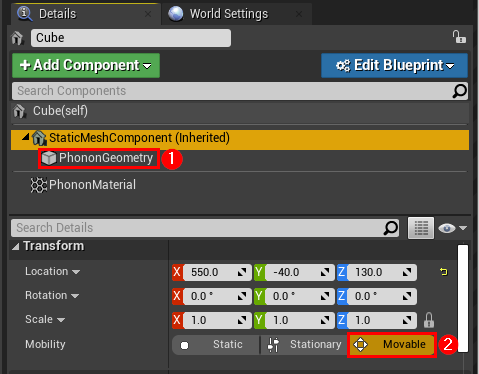
To use this functionality in Unreal, first enable Embree as described in the documentation. Next, attach a Phonon Geometry component to a Static Mesh Component of any Actor in your level that should be treated as dynamic geometry, such as a door. Configure the Phonon Material properties of the Actor as needed, then click Export to export the geometry data to a file. Now, at run-time, when the Actor moves (either through scripting, physics, or user interaction), Steam Audio will automatically update acoustics to match.

👁 Image
Steam Audio
28
3
Beta 18: Expanded Android support, Spatial Blend
Apr 21, 2020
We've just released Steam Audio 2.0-beta.18[github.com], which includes support for a wider range of CPU architectures on Android, performance and quality improvements, and several bug fixes. Below are some of the highlights.

Expanded Android Support
Previous versions of the Steam Audio SDK have supported Android devices that can run 32-bit ARM (armv7) code only. Starting with 2.0-beta.18, the Steam Audio SDK supports a much wider range of Android devices, by providing binaries for 64-bit ARM (armv8/arm64/aarch64), 32-bit Intel (x86), and 64-bit Intel (x86_64/x64) processors as well.

The Unity plugin now supports Android builds for ARMv7, ARM64, and x86 targets. Building a Unity project for ARM64 requires the IL2CPP scripting backend.

The FMOD Studio plugin also now supports Android builds for ARMv7, ARM64, and x86 targets.

Improved Spatial Blend
Sound designers often want to transition between using highly positional HRTF for sounds that are far enough away from the listener, and un-spatialized stereo audio clips for sounds that are very close to the listener. At Valve, we've used this approach in Counter-Strike: Global Offensive, and Half-Life: Alyx. For example, the same weapon sound could be rendered with HRTF if an enemy is firing the weapon, but as a stereo clip if it's the player firing. To ensure a smooth transition between spatialized and un-spatialized audio as the listener approaches the source, we've added a new spatial blend parameter to the Steam Audio binaural effect. As the value of this parameter is ramped down from 1 to 0, the audio smoothly changes from spatialized to un-spatialized, without phasing artifacts.

This functionality is also available in the Unity plugin. To use it, just adjust the Spatial Blend slider on Unity's built-in Audio Source component. Refer to the documentation for more details.

Release Notes
The full release notes for this release are here.[github.com]
Steam Audio
36
4
Beta 17: Unreal Engine 4.24 Update
Oct 30, 2019
We've recently updated the Steam® Audio Unreal Engine integration with the latest Beta 17 API. This version will be part-and-parcel of UE 4.24 and bolsters Steam® Audio performance with support for multi-threaded environmental effect simulation, Intel® Embree, and AMD Radeon Rays.

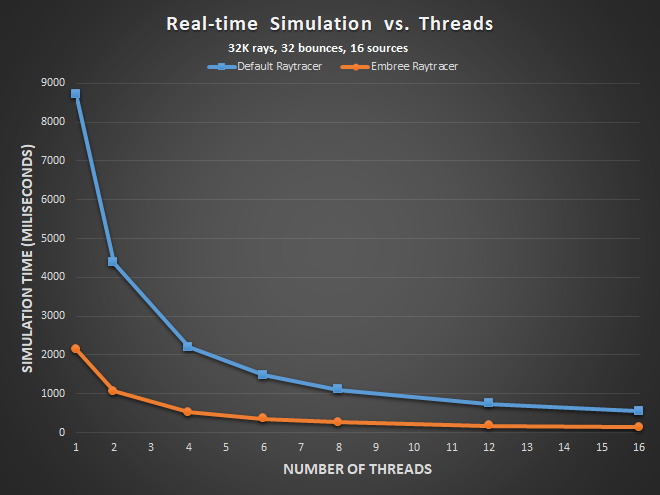
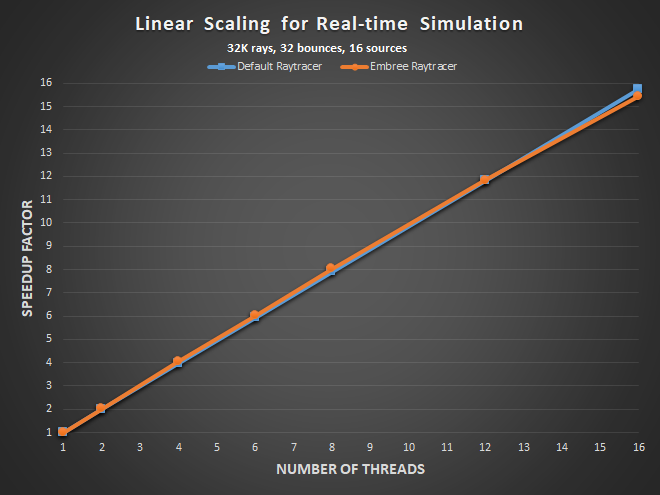
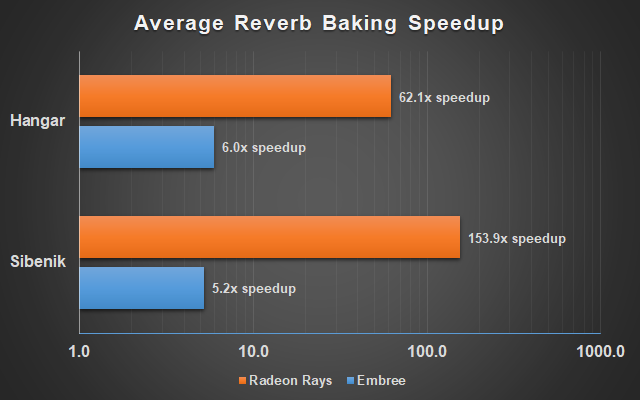
Each of these features provide developers with significant performance boosts compared to simulating environmental effects with the built-in Steam® Audio raytracer on a single thread. Radeon Rays, which runs on any OpenCL 1.2 compatible GPU, can provide 50-150X speed-ups. Intel® Embree, which runs on the CPU, can provide speed-ups of around 20X when using recent 4-core CPUs. The built-in raytracer also benefits significantly from the new multi-threading support and its performance scales linearly with the number of threads.

👁 Image
👁 Image
Figure: (Top) Absolute time (in milliseconds) for real-time simulation of environmental effects vs. number of threads. (Bottom) Linear scaling for real-time simulation of environmental effects vs. number of threads. Simulations were performed on Intel Xeon Platinum 8124 CPU @ 3 GHz for 32K rays, 32 bounces, and 16 sources.


👁 Image
Figure: Speedup when baking reverb using Radeon Rays vs. Embree (single-threaded) vs. Steam Audio's built-in ray tracer (single-threaded), for two scenes: Sibenik cathedral (80k triangles) and a Hangar scene from the Unity Asset Store (140k triangles). Speedups are averaged over a range of simulation settings and probe grid densities, and plotted using a logarithmic scale, shown in the graph are relative to Steam Audio's built-in ray tracer.

This is already up in Epic's UE main branch for 4.24[github.com], Unreal developers wanting to take early advantage of all these features can simply compile this main branch. If you prefer to grab your engine from the Epic launcher, this release will be available in the upcoming UE 4.24 Preview.

Thanks to Doğa Can Yanıkoğlu[github.com] and Charles Alexander[github.com] for their contributions to this Steam® Audio update and with additional features such as support for level transitions and improved geometry tagging.

Full Changelist
  • Updates Steam® Audio API to Beta 17 (h/t @dyanikoglu).
  • Adds scene reinit on level transitions (h/t @dyanikoglu).
  • Improved geometry tagging (h/t @muchcharles).
  • Add support for RadeonRays and Embree raytracers.
  • Better settings organization.
  • Add support for multiple phonon sources.
  • Ensure scene exports are reloaded between editor sessions.
  • Ensure Android and 32-bit builds falls back cleanly to Phonon (if project is configured with Embree or Radeon).
  • Various stability improvements.
If you have any questions and/or feedback on this release, please feel free to post in the discussion forums or open an issue on GitHub[github.com].

 
Steam Audio
27
1
Beta 17: Dynamic Geometry with Embree
Apr 29, 2019
Starting with Steam Audio v.2.0-beta.17[valvesoftware.github.io], Steam Audio supports dynamic geometry when modeling all sound propagation effects, including occlusion, transmission, source-dependent reflections, and listener-centric reverb. At this time, this functionality requires the use of the Embree ray tracer, which is supported on Windows, Linux, and macOS. In addition to the C API, this functionality is available in the Unity plugin (as well as the FMOD Studio plugin, when used in conjunction with the Unity plugin).


(This video contains audio; you may have to unmute it to listen.)

In particular, Steam Audio handles rigid-body motion of objects, which means an object can move, rotate, or be scaled, and Steam Audio will update the acoustics appropriately. Deformable or breakable objects are not supported.

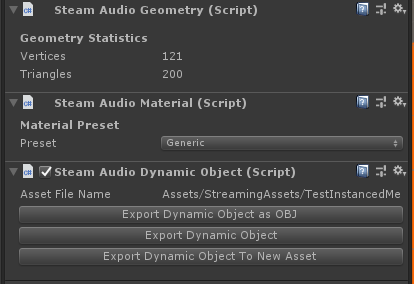
To use this functionality in Unity, first enable Embree as described in the documentation. Next, attach a Steam Audio Dynamic Object component to any GameObject that should be treated as dynamic geometry, such as a door. Configure the material properties of the dynamic object as needed, then click Export to export the geometry data to a file. Now, at run-time, when the dynamic object moves (either through scripting, physics, or user interaction), Steam Audio will automatically update acoustics to match.

👁 Image
You can also attach Steam Audio Dynamic Object components to prefabs, and export their geometry data to a file. In this case, not only does Steam Audio handle the motion of prefab instances, it also updates the acoustics when prefabs are instantiated or destroyed. For example, as the above video shows, as soon as a wall object is added to the scene, we start hearing reflections from it. Once four walls and a roof are added, we automatically have reverb.

NOTE: Steam Audio v2.0-beta.16 introduced a more limited form of dynamic geometry support in the Unity plugin. This feature only modeled occlusion and transmission due to dynamic objects, and involved using Unity's built-in ray tracer. While this feature requires less work in terms of geometry tagging and scene setup, the new functionality introduced in v2.0-beta.17 supports dynamic geometry when modeling the full range of acoustic phenomena.
Steam Audio
38
1
Beta 17: Dual Reserved Queue Support with Radeon Rays
Feb 21, 2019
We've just released Steam® Audio 2.0-beta.17[valvesoftware.github.io], which includes several new features, including support for real-time indirect sound simulation using AMD Radeon™ Rays. Previously, Radeon™ Rays was supported only for baking. With this release, Radeon™ Rays and AMD TrueAudio Next can be combined to perform indirect sound simulation and rendering on the GPU without interfering with graphics or general GPU compute. This blog post discusses how this works.

Previously, on Steam® Audio...
Over the last few releases, we have added features to the Steam® Audio that enable the GPU to be used in different ways for accelerating spatial audio computations.

In 2.0-beta.13, we added support for TrueAudio Next. This feature uses the Resource Reservation capability of supported AMD GPUs to carve out a portion of the GPU (called a "reserved queue") dedicated to audio convolution processing. This allows the GPU to be used for significantly speeding up spatial audio rendering, while ensuring that audio and graphics do not interfere with each other. The result is stable graphics frame rates, and fast, glitch-free audio processing.

👁 Image
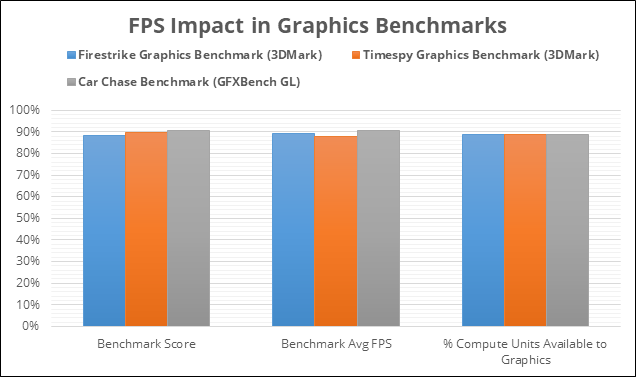
Figure: Impact on GPU rendering performance when reserving 4 CUs for TrueAudio Next processing. The plots show the average FPS observed on various GPU benchmarks when run at the same time as a TAN benchmark using Steam®® Audio. Measurements obtained using a Radeon™ RX 480 GPU with 4 reserved CUs, 256 total convolution channels and 1.3s IRs. All values are shown as a percentage of a baseline that is obtained when the TAN benchmark is not running. For example, reserving 10% of the available CUs reduces the average FPS in the Timespy benchmark by about 10%.

In 2.0-beta.15, we added support for Radeon™ Rays. This feature runs on any GPU supporting OpenCL 1.2 or later, and uses the GPU to accelerate indirect sound simulation (ray tracing and related processing). Since the reserved queue was used by TrueAudio Next, Radeon™ Rays would run on the remainder of the GPU, along with graphics and general compute. If used for real-time simulation, it would therefore interfere with graphics frame rates, which is why this feature was restricted to baking only.

What's new?
Starting with AMD Radeon™ Software Adrenalin 2019 Edition v19.2.1, AMD GPUs support up to two reserved queues. In other words, the GPU compute units can be divided into three sets: 2 reserved queues, and 1 general queue. This feature (called "Dual RTQ") only requires a driver update.

In 2.0-beta.17, Steam® Audio runs Radeon™ Rays on the second reserved queue, thereby isolating indirect sound simulation from graphics as well. This way simulation (using Radeon™ Rays), convolution (using TrueAudio Next), and graphics can all be run on the same GPU without interfering with each other. This results in stable frame rates, glitch-free audio processing, and low-latency indirect sound simulation.

How Dual RTQ works
As an example, consider a Radeon™ RX Vega 64, which contains 64 Compute Units (CUs). A maximum of 16 CUs (25% of the GPU) can be used in all reserved queues combined. One way to partition this would be:
  • First reserved queue, 4 CUs. Used by TrueAudio Next.
  • Second reserved queue, 8 CUs. Used by Radeon™ Rays.
  • Remainder of the GPU, 52 CUs. Used for graphics and general compute.
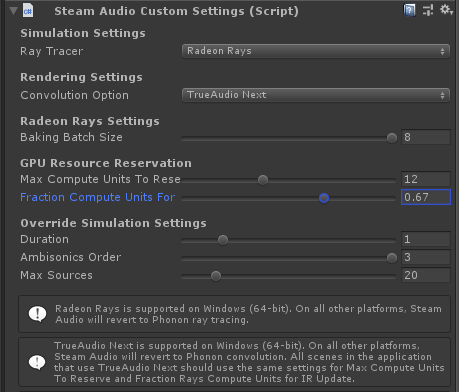
This can be set up using the Steam® Audio Unity Plugin as follows. Begin by attaching a Steam® Audio Custom Settings component to the Steam® Audio Manager Settings GameObject. Then in the Inspector tab, configure it as follows:

👁 Image
  • Set Max Compute Units To Reserve to 12. This is the total number of CUs used in both reserved queues combined (4 for TrueAudio Next + 8 for Radeon™ Rays).
  • Set Fraction Compute Units for IR Update to 0.67 (approximately 2/3). This is the fraction of reserved CUs to be used for Radeon™ Rays. (0.67 * 12 total reserved CUs = 8 CUs for Radeon™ Rays).
The remaining 52 CUs will be used for graphics and general compute.

Performance
Below are representative speedup numbers for various simulation scenarios with varying numbers of CUs reserved for Radeon™ Rays. All measurements were obtained on an Intel® Core i7 5930K (Haswell E) CPU, along with an AMD Radeon™ RX Vega 64 GPU, running Windows 10 64-bit and AMD Radeon™ Software Adrenalin 2019 Edition v19.2.1.

Rays / Bounces / Sources
Time (4 CUs)
Time (8 CUs)
Time (16 CUs)
Speedup 4 -> 8
Speedup 8 -> 16
8192 / 8 / 4
24.8
16.4
13.2
1.5
1.2
8192 / 8 / 16
67.9
44.3
32.3
1.5
1.4
8192 / 32 / 4
74.5
45.7
34.1
1.6
1.3
8192 / 32 / 16
202.1
115.7
74.2
1.7
1.6
32768 / 8 / 4
62.1
35.8
22.9
1.7
1.6
32768 / 8 / 16
184.6
102.7
62.3
1.8
1.6
32768 / 32 / 4
233.7
126.1
74.1
1.9
1.7
32768 / 32 / 16
687.8
361.5
198.6
1.9
1.8
Table: All of the above numbers correspond to an IR duration of 2.0 seconds, and 1st order Ambisonics. All times are in milliseconds.

Based on the above numbers, 4 CUs are sufficient to simulate 4 sources with 8k rays and 32 bounces at a 10 Hz update rate. With 8 CUs, a ~10 Hz update rate can be achieved with 16 sources, 32k rays, and 8 bounces. Also, as the number of CUs dedicated to Radeon™ Rays is increased, the speedups increase roughly linearly, especially when the amount of simulation work is high (many rays, many bounces, and/or many sources).

Learn More at GDC!
Interested in learning more about how Steam® Audio uses TrueAudio Next and Radeon™ Rays to accelerate spatial audio on GPUs? Join us at GDC 2019, where we'll talk about Steam® Audio, TrueAudio Next, Resource Reservation on AMD GPUs, and more!

Session: Powering Spatial Audio on GPUs Through Hardware, Software, and Tools (Presented by AMD)
Track: Audio
Date/Time: Wed, Mar 20, 12:30pm

Click here for more information.
Steam Audio
28
6
Beta 16: Dynamic Geometry Support
Nov 1, 2018
We've just released Steam Audio 2.0-beta.16[valvesoftware.github.io], in which the Unity plugin now provides support for occlusion of sound by dynamic geometry. The support for dynamic geometry is only applicable to occlusion and transmission; reflections and reverb do not support dynamic geometry.


(This video contains audio; you may have to unmute it to listen.)

To make this work, Steam Audio uses Unity's built-in ray tracer, which can be enabled by attaching the Steam Audio Custom Settings component to a GameObject, and setting Ray Tracer Option to Unity. When using the Unity ray tracer, you don't need to tag objects with Steam Audio Geometry components; any GameObject with a collider can potentially occlude sound. To configure which colliders can occlude sound, you can move the occluders to appropriate layers, and configure Steam Audio to only use those layers for occlusion. This can be done in the Steam Audio tab (Window > Steam Audio), under Layer Mask. Note that materials are still specified by attaching Steam Audio Material components to the relevant GameObjects.

For more information, refer to the Unity plugin documentation.
Steam Audio
26
5
👁 Image
Loading
No more content. So sad.
©
Privacy Policy Legal Accessibility Cookies Steam Subscriber Agreement © Valve Corporation.
View mobile website