|
VOOZH | about |
|
VOOZH | about |
Follow @symextensions for updates to the 412 extensions that we track. What is this?
Symphony Extensions tracks Symphony CMS extensions that are hosted on Github.
Host your extension on Github and make sure the repository has a good README and an extension.meta.xml file. Then sign in to this site using your GitHub profile where you will see a list of your public repositories. Pick one, and add it to the site. When you make changes, just update the XML file in your repository and we do the rest.
It is an XML file that you add to your repository to describe your extension. You can include a name and description, developer contact details, version history, changelog, dependencies and more. Please read the documentation for a full list. You can use the lint tool to check your XML against the schema before submitting your extension to the site.
This site is now run by the community @symextensions. The site was created by nickdunn. Contact him at @nickdunn
Please report it here.
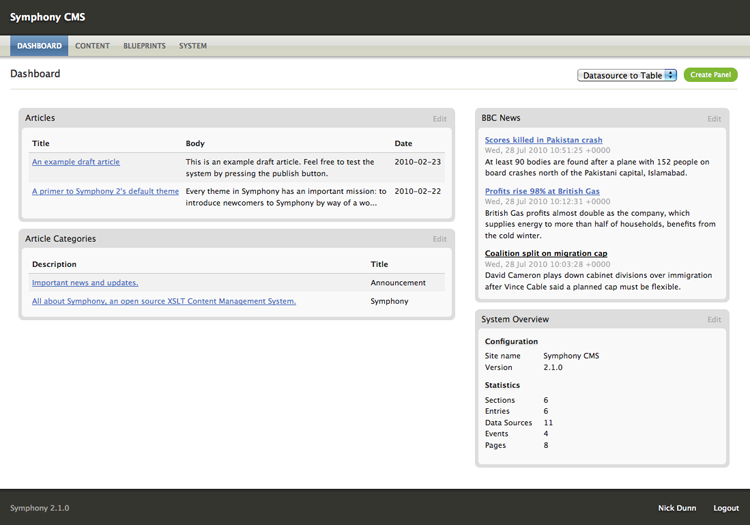
Provide a Dashboard summary screen with configurable panels
Clone URLhttps://github.com/symphonists/dashboard.git
Add as a submodulegit submodule add https://github.com/symphonists/dashboard.git extensions/dashboard --recursive
| 2.x.x | 2.1.x | 2.2.x | 2.3.x | 2.4.x | 2.5.x | 2.6.x | 2.7.0 | 2.7.1 | 2.7.2 | 2.7.3 | 2.7.4 | 2.7.5 | 2.7.6 | 2.7.7 | 2.7.8 | 2.7.9 | 2.7.10 |
|---|---|---|---|---|---|---|---|---|---|---|---|---|---|---|---|---|---|
| No | 1.4 | 1.5.2 | 1.8.0 | No | 2.1.0 | 2.1.0 | 2.1.0 | 2.1.0 | 2.1.0 | 2.1.0 | 2.1.0 | 2.1.0 | 2.1.0 | 2.1.0 | 2.1.0 | 2.1.0 | 2.1.0 |
| Symphony Version | Extension version |
|---|---|
| 2.7.10 | 2.1.0 |
| 2.7.9 | 2.1.0 |
| 2.7.8 | 2.1.0 |
| 2.7.7 | 2.1.0 |
| 2.7.6 | 2.1.0 |
| 2.7.5 | 2.1.0 |
| 2.7.4 | 2.1.0 |
| 2.7.3 | 2.1.0 |
| 2.7.2 | 2.1.0 |
| 2.7.1 | 2.1.0 |
| 2.7.0 | 2.1.0 |
| 2.6.x | 2.1.0 |
| 2.5.x | 2.1.0 |
| 2.4.x | No |
| 2.3.x | 1.8.0 |
| 2.2.x | 1.5.2 |
| 2.1.x | 1.4 |
| 2.x.x | No |
To provide a Dashboard summary screen for users. Dashboard "panels" can contain any information. This extension provides the framework for building a Dashboard, and provides four basic panel types. Other extensions can provide their own panel types.
Once installed "Dashboard" will appear in the "Default area" dropdown when you create a new author. If you choose this, the author will be shown the dashboard when they log in.
There are five core panel types:
<div /> perhaps) to include in the panel.The delegates that Dashboard provides means that other extensions can supply their own dashboard panels. These include:
To provide panels your extension needs to implement (subscribe to) two delegates:
public function getSubscribedDelegates() {
 return array(
 array(
 'page' => '/backend/',
 'delegate' => 'DashboardPanelRender',
 'callback' => 'render_panel'
 ),
 array(
 'page' => '/backend/',
 'delegate' => 'DashboardPanelTypes',
 'callback' => 'dashboard_panel_types'
 ),
 );
}
There are two additional delegates to provide UI for panel settings, and its validation:
array(
 'page' => '/backend/',
 'delegate' => 'DashboardPanelOptions',
 'callback' => 'dashboard_panel_options'
),
array(
 'page' => '/backend/',
 'delegate' => 'DashboardPanelValidate',
 'callback' => 'dashboard_panel_validate'
),
These are optional unless your panel configuration requires user input.
The callback function should return the handle and name of your panel(s) by adding a new key to the types array:
public function dashboard_panel_types($context) {
 $context['types']['my_dashboard_panel'] = 'My Amazing Dashboard Panel';
}
This will define a panel of type my_dashboard_panel. Make this name as unique as possible so it doesn't conflict with others.
Each panel has a configuration screen. There are default options for all panels ("Label" and "Position"), but you can add additional elements to the configuration form using the DashboardPanelOptions delegate:
public function dashboard_panel_options($context) {
 // make sure it's your own panel type, as this delegate fires for all panel types!
 if ($context['type'] != 'my_dashboard_panel') return;

 $config = $context['existing_config'];

 $fieldset = new XMLElement('fieldset', NULL, array('class' => 'settings'));
 $fieldset->appendChild(new XMLElement('legend', 'My Panel Options'));

 $label = Widget::Label('Option 1', Widget::Input('config[option-1]', $config['option-1']));
 $fieldset->appendChild($label);

 $context['form'] = $fieldset;

}
The above code creates a fieldset which will be appended to the panel configuration form. The fieldset contains a single textfield with the label "Option 1". The $config array contains existing saved options, so you can pre-populate your form fields when editing an existing panel.
Upon saving, all form fields named in the config[...] array will be saved with this panel instance, and provided to the panel as an array when it renders.
Subscribe to the DashboardPanelRender delegate to render your panel on the dashboard.
public function render_panel($context) {
 if ($context['type'] != 'my_dashboard_panel') return;

 $config = $context['config'];
 $context['panel']->appendChild(new XMLElement('div', 'The value of Option 1 is: ' . $config['option-1']));
}
First check that you should output your own panel. $context['panel'] contains an XMLElement that is an empty panel container to which you can append children. The saved configuration for the panel is presented in the $context['config'] array.
2.1.022 January 2019
Symphony 2.5.0 to 2.x.x
2.0.201 June 2018
Symphony 2.5.0 to 2.x.x
2.0.122 March 2017
Symphony 2.5.0 to 2.x.x
2.0.031 July 2015
Symphony 2.5.0 to 2.6.x
1.8.016 January 2015
Requires Symphony 2.3.x
1.7.008 August 2014
Requires Symphony 2.3.x
1.6.009 March 2012
Requires Symphony 2.3.x
1.5.101 June 2011
Symphony 2.2 to 2.2.5
1.415 May 2011
Requires Symphony 2.1.x