VOOZH about

URL: https://addons.mozilla.org/en-GB/firefox/addon/dictionary-anyvhere/

⇱ Dictionary Anywhere – Get this Extension for 🦊 Firefox (en-GB)


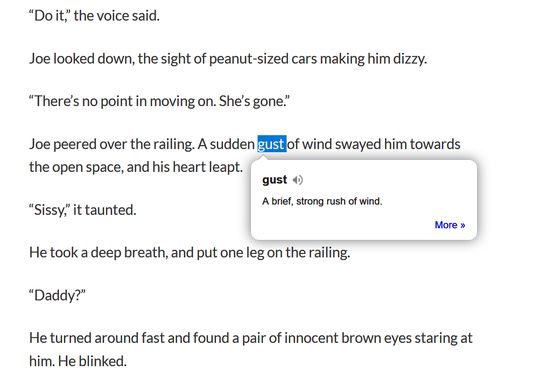
Dictionary Anywhere extension helps you stay focused on what you are reading by eliminating the need to search for meaning, Double-clicking any word will view its definition in a small pop-up bubble. Now you never have to leave what you are reading to search meaning for the words you don't know.

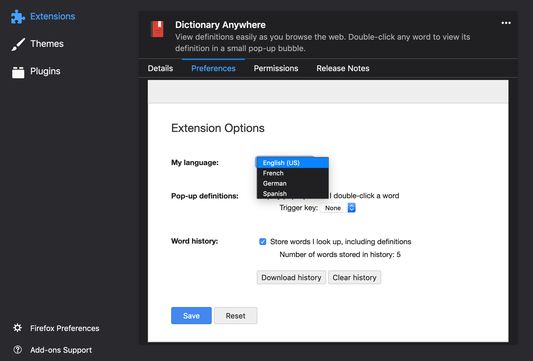
It also supports Spanish, German, French language alongside English.

To change the language:
  • Navigate to Add-ons page,
  • Choose Extensions in sidebar,
  • Choose Dictionary Anywhere,
  • Click on options (preferences on mac),
  • Select the language you want, and save.

You can now download the words and meanings you searched for, so that you can practice them later, this will help increase your vocabulary.

Enjoy Reading Uninterrupted!!!

You can report bugs and feature request on Github.

Note:
You can report bugs and feature request on Github.

Note:
1. If you are using Firefox version 62 and below, Please Enable dom.webcomponents.shadowdom.enabled in about:config

2. Extension does not work in reader mode because content scripts are not allowed to operate in reader mode. More details can be found at https://bugzilla.mozilla.org/show_bug.cgi?id=1371786

3. Extension does not work in pdf because content scripts are not allowed to operate in pdf. More details can be found at https://bugzilla.mozilla.org/show_bug.cgi?id=1454760

Required permissions:

  • Access your data for all web sites
Version
1.2.0
Size
48.71 kB
Last updated
a year ago (11 May 2025)
Version History
Add to collection

The developer of this extension asks that you help support its continued development by making a small contribution.

Contribute now