VOOZH about

URL: https://addons.thunderbird.net/en-US/seamonkey/addon/mouse-gestures-suite/

⇱ Mouse Gestures Suite :: Add-ons for SeaMonkey


Welcome to SeaMonkey Add-ons.

Add extra features and styles to make SeaMonkey your own.

Close

On the go?

Check out our Mobile Add-ons site.

Close
πŸ‘ Icon of Mouse Gestures Suite

Mouse Gestures Suite 2.5.1 Requires Restart

by Lemon Juice

Mouse gestures for SeaMonkey & Firefox: navigate & execute commands using mouse gestures (with single mouse button) and rocker gestures (by pressing 2 mouse buttons). Also: scroll wheel navigation, page scrolling, tab scrolling.

Β« Β»

About this Add-on

Mouse Gestures for Seamonkey & Firefox

⚠️This extension is not compatible with Firefox 57 and later! Firefox 57 marks the end of era of powerful mouse gesture extensions. Firefox removed support for extensions that can do almost anything with the browser and replaced it with a much more limited extensions API. This extension would need to be completely rewritten and even then it wouldn't do most of what Mouse Gestures Suite was capable of.

Your alternatives:
a) Switch to one of mouse gestures extensions that are compatible with Firefox 57+ and accept their limited functionality.
b) Switch to SeaMonkey or Waterfox where Mouse Gestures Suite still works and is expected to work for some time.
c) Switch to a completely different browser but there don't seem to be any powerful mouse gesture extensions, either - but Vivaldi has somewhat best offer in this regard.

This extension will never be rewritten for Firefox 57+, it's been a nice journey while it lasted. However, it will be maintained to work in Waterfox and SeaMonkey. More discussion and ideas here.
_____________________________________________________________________

Mouse Gestures Suite is based on (abandoned) Firefox extension All-in-One Gestures and has been modified to work with Seamonkey and later also with Firefox (since ver. 1.5.0). Many fixes and improvements have been made and new features added.

Main features:

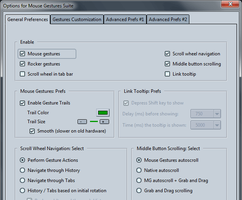
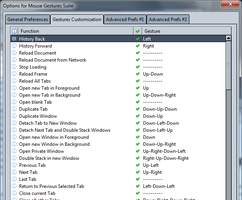
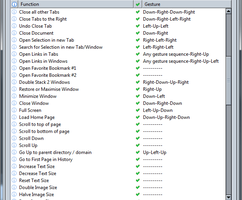
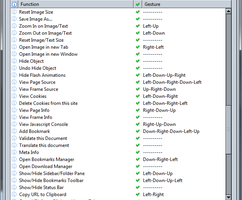
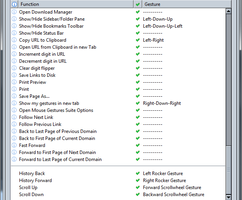
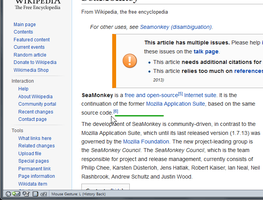
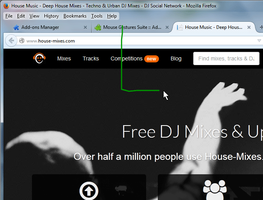
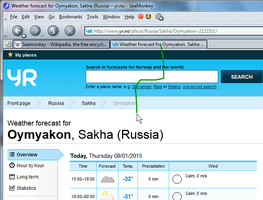
Mouse gestures - performed by moving the mouse with a button depressed allow you to quickly navigate through pages, open/close tabs and windows and perform many other commands without having to use toolbar buttons, menus or keyboard shortcuts. A gesture consists of a series of mouse movements in one of 4 directions (up, down, left, right).

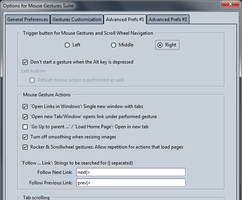
Rocker gestures - invoked by pressing one mouse button and then the other while keeping the first one pressed. By default used to go back and forward in browsing history but can be customized to do something else.

Scroll wheel in tab bar - you can switch between tabs by scrolling mouse wheel over the tab bar.

Scroll wheel navigation - perform your favourite actions by pressing a mouse button and scrolling mouse wheel at the same time.

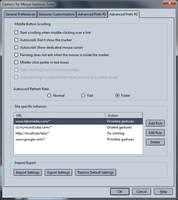
Middle button scrolling - auto scroll pages or textareas by clicking the middle mouse button once (pressing and releasing) and then control the scrolling speed by moving the mouse or using arrow keys. Grab and Drag options allow you to scroll by moving the mouse while the middle button is depressed.

Link tooltip - see details about links as you hover over them with your mouse. Useful especially for browsing without the status bar like in full screen mode.

All the above features work in the Browser component. Mouse and rocker gestures also work in Mail, Message, Mail Compose and View Page Source windows β€” the gesture movements are the same as those in Browser, however not all actions work in those other window types since not all of them are applicable there β€” see help for detailed information.

Custom functions are supported: you can easily use mouse gestures to invoke any main menu item action (under File, Edit, View, etc.) or any custom script you write.

If you have any other mouse gestures extensions they may conflict with each other so please disable or uninstall them before trying out this one.

Full documentation is available here.

Versions 1.7.0 and later are compatible with multi-process Firefox (e10s). Pale Moon users - please use version 1.6.3.

Version Information

Version 2.5.1 262.6 KiB Works with Firefox 25.0 - 56.*, SeaMonkey 2.22 - 2.53.*

* fix: gestures customization in options stopped working in Firefox 56
* fix: gestures for opening favourite bookmarks stopped working in Firefox 53

See complete version history

close

Permissions

πŸ‘ [Warning]

Some add-ons ask for permission to perform certain functions. Since you’re in control of your Thunderbird, the choice to grant or deny these requests is yours.

Please note this add-on uses legacy technology, which gives it access to all browser functions and data without requesting your permission.

πŸ‘ Footer logo

Privacy Policy  |  Report Trademark or Copyright Infringement  |  Legal Notices  |  Report Misuse of Thunderbird Trademark  | Report a bug

Except where otherwise noted, content on this site is licensed under the
Creative Commons Attribution Share-Alike License v3.0 or any later version.