|
VOOZH | about |
|
VOOZH | about |
JavaScript Object Notation (JSON) is a lightweight data-interchange format that is widely used in web applications and APIs to transmit data between servers and clients. JSON is a popular choice for data storage and exchange due to it being human-readable, platform-independent, and capable of supporting complex data structures. In this article, we’ll explore five useful JSON tools that can help you improve your productivity.
👁 5 Useful JSON Tools To Improve Your ProductivityJump ahead:
The Replay is a weekly newsletter for dev and engineering leaders.
Delivered once a week, it's your curated guide to the most important conversations around frontend dev, emerging AI tools, and the state of modern software.
JSON Crack is a powerful tool for visualizing JSON data that allows us to quickly and easily create interactive visualizations to help us understand our data better.
For example, assume we had a JSON structure that looks like the following:
{
 "person":{
 "name":"John",
 "age":20,
 "address":{
 "street":"123 Main Street",
 "city":"New York"
 }
 }
}
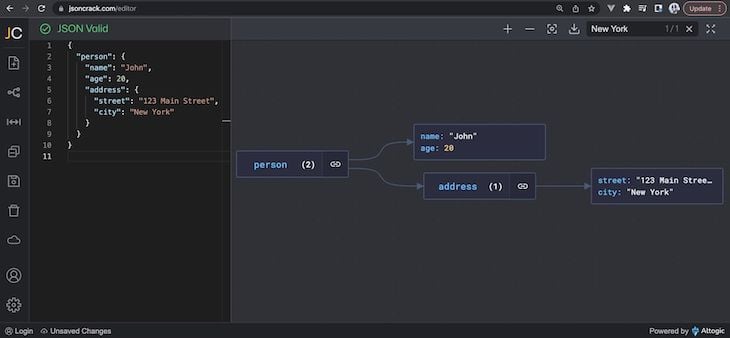
This JSON structure contains information about a person that includes their name, age, and address. We could use JSON Crack to quickly create a visualization of the data, allowing us to quickly and easily view all the information at once.
👁 Data Visualization With JSON Crack
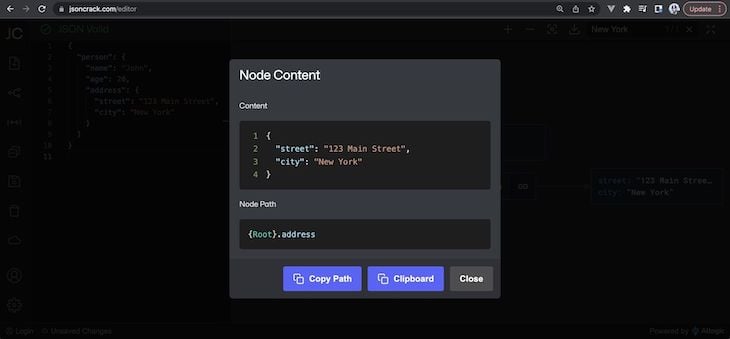
If we were to select a certain node in our graphical JSON tree, we can get more information about the node and its children:
👁 Selecting A Certain Node In Our Graphical JSON Tree
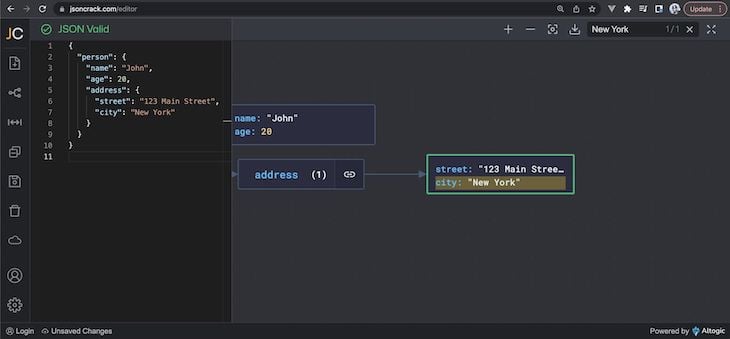
We’re also able to use the search bar to quickly search for a node in our JSON tree by searching for certain key names or values:
👁 Searching For A Specific Node In Our JSON Tree Using The Search Bar
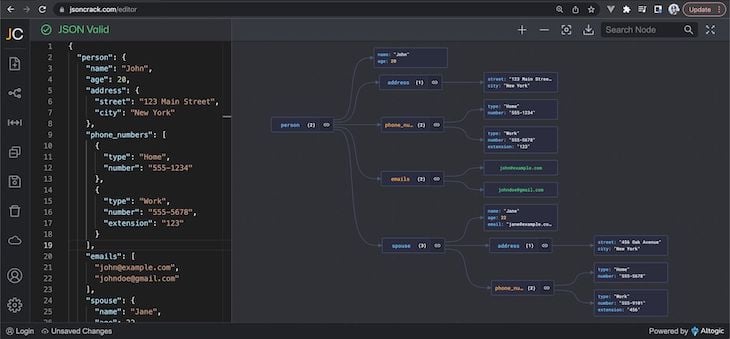
JSON Crack becomes even more useful in situations where we have a large complex JSON structure. As an example, if we were to observe a JSON structure like the following:
{
 "person": {
 "name": "John",
 "age": 20,
 "address": {
 "street": "123 Main Street",
 "city": "New York"
 },
 "phone_numbers": [
 {
 "type": "Home",
 "number": "555-1234"
 },
 {
 "type": "Work",
 "number": "555-5678",
 "extension": "123"
 }
 ],
 "emails": [
 "[email protected]",
 "[email protected]"
 ],
 "spouse": {
 "name": "Jane",
 "age": 22,
 "address": {
 "street": "456 Oak Avenue",
 "city": "New York"
 },
 "phone_numbers": [
 {
 "type": "Home",
 "number": "555-5678"
 },
 {
 "type": "Work",
 "number": "555-9101",
 "extension": "456"
 }
 ],
 "email": "[email protected]"
 }
 }
}
JSON Crack makes it easy for us to get a quick overview of the data, which can identify any potential issues or areas that need improvement:
👁 JSON Crack Giving Us A Data Overview
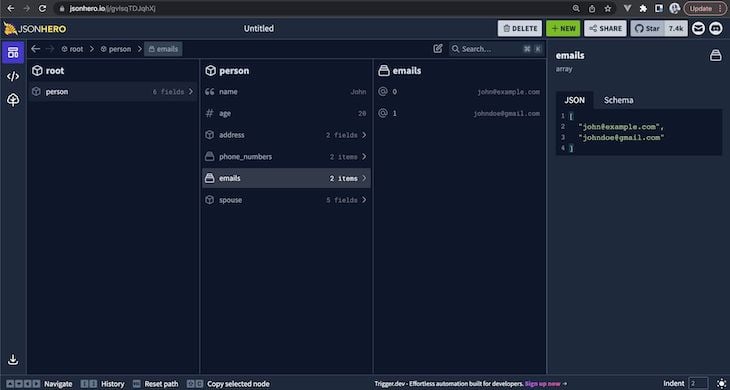
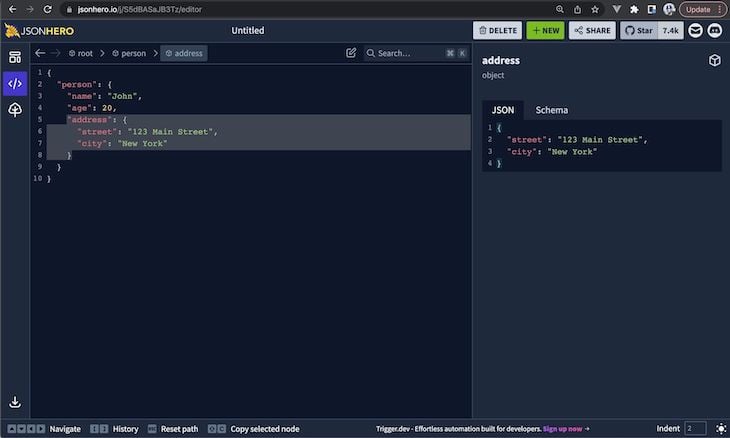
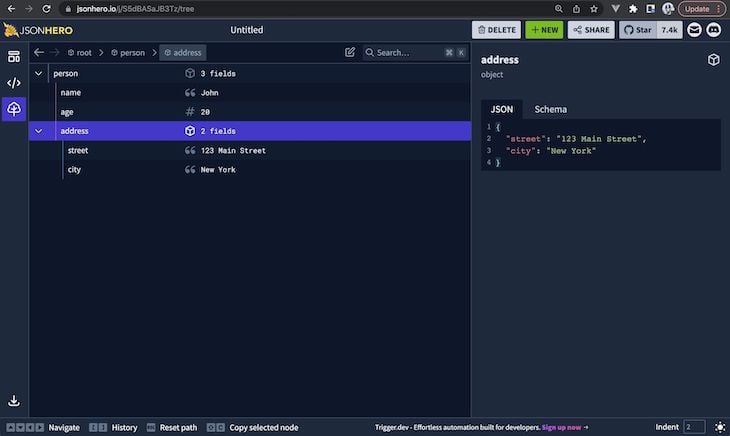
JSON Hero is another JSON viewer that allows us to explore and navigate our JSON data quickly and easily. Instead of providing a graphical visualization like JSON Crack, it allows us to see the structure of JSON in either a column, tree, or JSON layout.
In the column layout, we’re able to view the children nodes of our JSON structure in separate columns:
👁 Viewing The Children Nodes Of Our JSON Structure
In the JSON layout, we’re able to see the structure of our data in standard JSON but with the capability to select certain fields to gather more information:
👁 Viewing The Structure Of Our Data In Standard JSON
In the Tree layout, we can see our JSON structure displayed as a tree with nested branches used to reflect the child nodes of a parent:
👁 JSON Structure Displayed In A Tree Layout
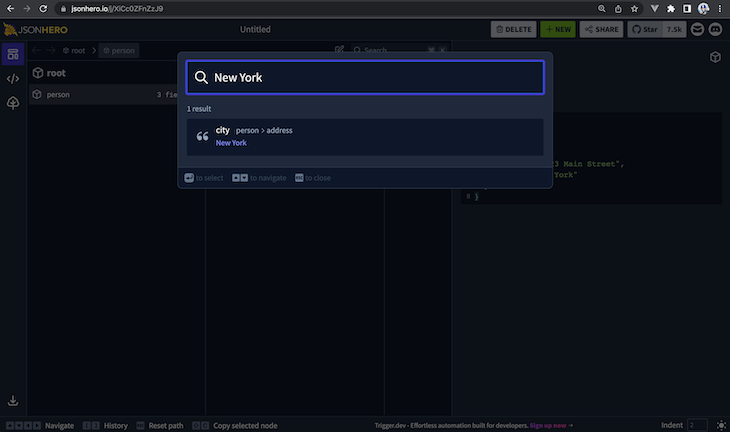
JSON Hero also provides a powerful search capability where we’re able to search our entire JSON structure quickly by searching for key names, key paths, or values.
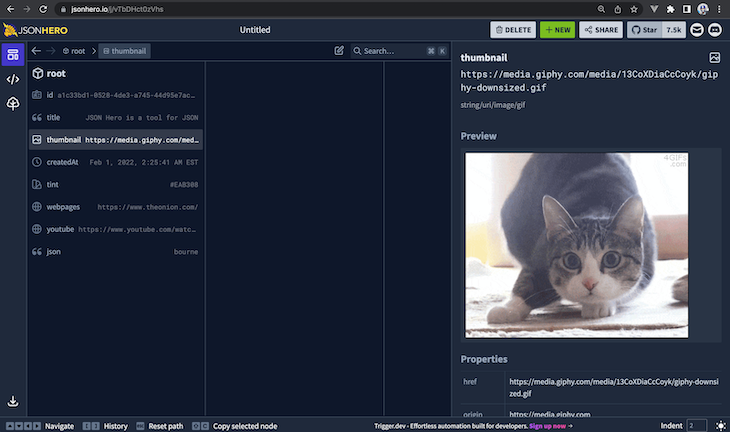
Lastly, JSON Hero also provides a very helpful content-preview capability where the application automatically infers the content of JSON string values to help show a preview. This works for date values, image URLs, colors, website URLs, and more:
👁 JSON Hero Content's Preview Capability
JSON Formatter & Validator is a tool that helps format JSON data in a readable and organized manner. It automatically indents and formats JSON data making it easier to read and understand.
Assume we had the following unformatted JSON structure:
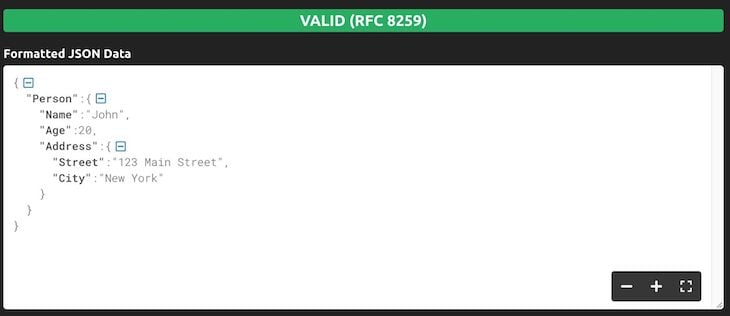
{"Person":{"Name":"John","Age":20,"Address":{"Street":"123 Main Street","City":"New York"}}}
The above JSON is valid but missing any indentation or line breaks, which make it difficult to read. JSON Formatter & Validator can help quickly format and beautify the JSON data:
👁 JSON Formatter And Validator Helping Format JSON Data
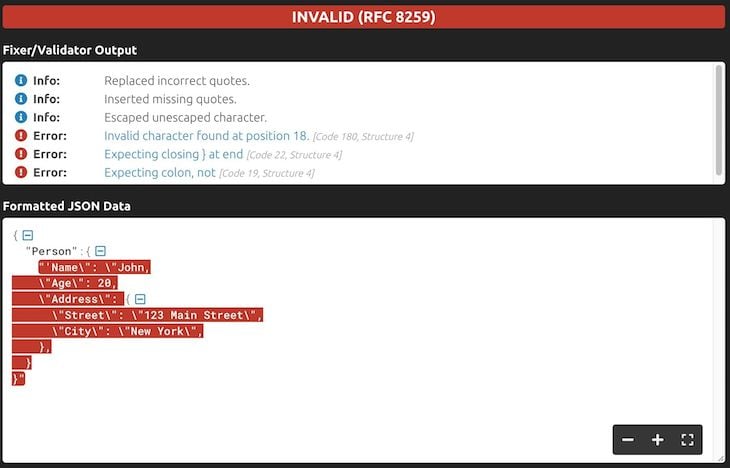
The JSON Formatter & Validator tool can also notify us of common JSON errors like incorrect quotes, missing quotes, trailing commas, etc. If we were to provide the following invalid JSON structure:
{
 'Person': {
 'Name": "John,
 "Age": 20,
 "Address": {
 "Street": "123 Main Street",
 "City": "New York",
 },
 }
}
JSON Formatter will repair some of the issues it notices but also provide us with a breakdown of other errors that we’ll need to fix on our own:
👁 JSON Formatter Listing Errors
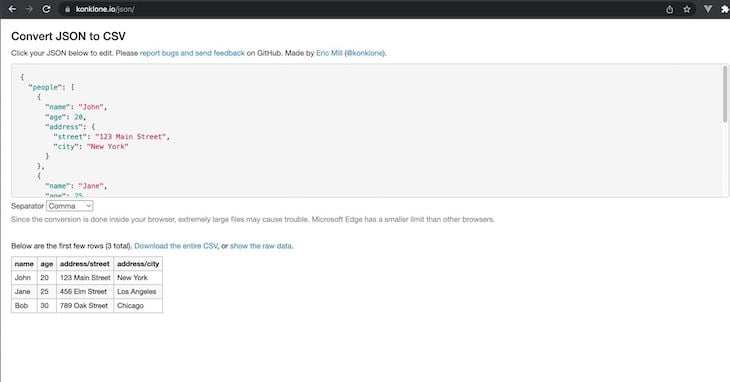
There exist many different tools that help convert JSON data to other formats like XML, CSV, YAML, etc. One tool that I’ve liked within this category is Konklone.io, built by Eric Mill, because it acts as a lightweight and simple tool to help quickly convert JSON data into CSV.
When pasting JSON data structured to contain an array of values like the following:
{
 "people": [
 {
 "name": "John",
 "age": 20,
 "address": {
 "street": "123 Main Street",
 "city": "New York"
 }
 },
 {
 "name": "Jane",
 "age": 25,
 "address": {
 "street": "456 Elm Street",
 "city": "Los Angeles"
 }
 },
 {
 "name": "Bob",
 "age": 30,
 "address": {
 "street": "789 Oak Street",
 "city": "Chicago"
 }
 }
 ]
}
The tool helps surface a preview of the CSV data that’s been converted from JSON:
👁 A Preview Of CSV Data Converted From JSON
We’re then able to download the entire generated CSV for later use. One thing to keep in mind when using this tool is that because the JSON to CSV conversion is all done inside the browser, attempting to convert large JSON data into CSV may cause some issues.
The last item we’ll talk about today is JSON Schema, which allows us to validate our JSON data against a schema. To understand the helpfulness of this concept, it’s important to first understand what a JSON Schema is.
A JSON Schema is a declarative language that describes the expected structure and content of JSON data. The Schema can include information about the data types of fields, minimum and maximum values, patterns, and other constraints. For example, let’s consider the simple JSON object example we used earlier to represent information about a person:
{
 "person":{
 "name":"John",
 "age":20,
 "address":{
 "street":"123 Main Street",
 "city":"New York"
 }
 }
}
Even with this simple structure, there are many ways that this data could be represented differently. For example, the "name" key could be represented as "person_name" and the "age" key could be represented as "person_age". Additionally, the "address" key could be represented as "person_address" but contain a single string value:
{
 "person":{
 "person_name":"John",
 "person_age":20,
 "person_address": "123 Main Street, New York"
 }
 }
}
Both examples above describe the same person and are equally valid. However, they’re still structured differently. How JSON data should be structured depends entirely on how it’s meant to be used within an application. This is where JSON Schema comes in.
We can use JSON Schema to validate that our data adheres to a specific structure. Ajv is one popular validator tool for JavaScript applications that allows us to create a schema and then validate JSON against that schema. Here’s an example of using Ajv to validate one of the above JSON examples against a schema:
import Ajv from "ajv"

const ajv = new Ajv()

const schema = {
 type: "object",
 properties: {
 name: {type: "string"},
 age: {type: "number", minimum: 0, maximum: 150},
 address: {
 type: "object",
 properties: {
 street: {type: "string"},
 city: {type: "string"},
 },
 required: ["street", "city"],
 },
 },
 required: ["name", "age", "address"],
 additionalProperties: false,
};

const data = {
 name: "John",
 age: 30,
 address: {
 street: "123 Main Street",
 city: "New York"
 }
}

const validate = ajv.compile(schema)
const valid = validate(data)

// if not valid, console.log the validation errors
if (!valid) console.log(validate.errors)
The schema we’ve defined above describes a JSON object with three properties: name (string), age (a number between zero to 150), and address (an object that contains two string properties: street and city). All properties are required and no additional properties beyond those explicitly listed in the schema are allowed.
Outside of validators, many other implementations and tools exist within the capability of using a JSON Schema. These include schema generators, format converters, and other utilities. The Implementations section of the JSON Schema website highlights a list of these other tools and implementations.
JSON Schema can help us avoid any potential issues down the line by providing us with a way to validate our JSON data against a pre-defined schema. This ensures that our JSON data is always structured correctly, which can help prevent any unexpected errors or discrepancies in our applications. For more additional reading, the Understanding JSON Schema section of the JSON Schema is helpful.
As we’ve seen in this article, there are many different tools available to help us work with JSON data. From visualizing and exploring data with JSON Crack, formatting it with JSON Formatter & Validator, converting it to other formats like CSV with Konklone.io, and validating it against a schema with JSON Schema — these tools can help make working with JSON data much easier and more efficient.
Learn how to build a full React Native auth system using Better Auth and Expo — with email/password login, Google OAuth, session persistence, and protected routes.
Compare the top AI development tools and models of June 2026. View updated rankings, feature breakdowns, and find the best fit for you.
Learn how Bloom filters reduce database lookups for username availability checks while preserving correctness at scale.
Learn how to test Nuxt apps with Vitest, @nuxt/test-utils, runtime mocks, server route mocks, and Playwright e2e tests.
Would you be interested in joining LogRocket's developer community?
Join LogRocket’s Content Advisory Board. You’ll help inform the type of content we create and get access to exclusive meetups, social accreditation, and swag.
Sign up now