|
VOOZH | about |
|
VOOZH | about |
The decision between Astro and Next.js for a content-heavy site isn’t really about which framework is more capable. On paper, Next.js comes out ahead. The real question is what you’re paying for at runtime. When most of your pages are static, like blog posts, docs, marketing pages, or rarely updated product listings, every server-rendered React component adds compute you don’t actually need. In this article, we build the same content site in both frameworks so you can clearly see what each one costs and what you get in return.
👁 ImageThe Replay is a weekly newsletter for dev and engineering leaders.
Delivered once a week, it's your curated guide to the most important conversations around frontend dev, emerging AI tools, and the state of modern software.
Astro’s core idea is simple: HTML is the default, and JavaScript only shows up when you actually need it. That’s the island’s architecture, or partial hydration. You can render a fully static article with zero JavaScript, then layer in interactivity for something like a search widget using client:load, without touching the rest of the page.
Next.js starts from the other side. It’s a React framework, so every page includes a React runtime. Even if you’re using getStaticProps and have no interactive components, you’re still shipping a non-trivial JavaScript bundle because Next.js hydrates the page for interactivity that might never be used. The App Router and React Server Components in Next.js 13+ soften this a bit, but the model is still React-first.
What this means in practice is pretty clear. Astro content pages often ship 0 KB of JavaScript, outside of any islands you explicitly add. The same page in Next.js usually comes with around 90–130 KB of framework JavaScript before you’ve even added your own code.
We’ll build a minimal tech blog with the following requirements:
Both projects will follow this logical shape, though the file conventions differ:
# Astro project
src/
 pages/
 index.astro ← Home page
 posts/
 [slug].astro ← Dynamic post pages
 content/
 posts/
 hello-world.md
 building-with-astro.md
 components/
 PostCard.astro
 LiveCounter.tsx ← The one React island

# Next.js project (App Router)
app/
 page.tsx ← Home page
 posts/
 [slug]/
 page.tsx ← Dynamic post pages
content/
 posts/
 hello-world.md
 building-with-astro.md
components/
 PostCard.tsx
 LiveCounter.tsx ← Client component
Both frameworks will read from the same Markdown files. Create these under content/posts/:
---
title: "Hello World"
date: "2024-01-15"
excerpt: "Getting started with our new tech blog."
---

Content begins here. Markdown is the common denominator.
Astro’s content system revolves around Content Collections, a typed, schema-validated way to read structured content straight from the filesystem. You define a collection once, and Astro takes care of parsing, type inference, and even slug generation for you.
src/content/config.ts
import { defineCollection, z } from 'astro:content';

const posts = defineCollection({
 type: 'content',
 schema: z.object({
 title: z.string(),
 date: z.string(),
 excerpt: z.string(),
 }),
});

export const collections = { posts };
This schema gives you autocomplete and runtime validation: any post missing title fails the build, not silently at runtime.
src/pages/index.astro
The home page fetches all posts inside the component’s frontmatter block, which runs at build time (or at request time in SSR mode, but we’re staying static here):
---
import { getCollection } from 'astro:content';
import PostCard from '../components/PostCard.astro';

// This executes at BUILD TIME. No server needed at runtime.
const posts = await getCollection('posts');
const sorted = posts.sort(
 (a, b) => new Date(b.data.date).valueOf() - new Date(a.data.date).valueOf()
);
---

<html lang="en">
<head>
 <meta charset="utf-8" />
 <title>Tech Blog</title>
</head>
<body>
 <h1>Recent Posts</h1>
 {sorted.map(post => (
 <PostCard
 title={post.data.title}
 date={post.data.date}
 excerpt={post.data.excerpt}
 href={`/posts/${post.slug}`}
 />
 ))}
</body>
</html>
The --- fences delineate what Astro calls the component script. Everything inside runs on the server (or at build time in static mode). Everything outside is the template. There is no client/server boundary negotiation. The output of this file is pure HTML.
src/pages/posts/[slug].astro
Dynamic routes in Astro require a getStaticPaths function that returns every path that should be pre-rendered:
---
import { getCollection } from 'astro:content';

export async function getStaticPaths() {
 const posts = await getCollection('posts');
 return posts.map(post => ({
 params: { slug: post.slug },
 props: { post },
 }));
}

const { post } = Astro.props;
const { Content } = await post.render();
---

<html lang="en">
<head>
 <title>{post.data.title}</title>
</head>
<body>
 <article>
 <h1>{post.data.title}</h1>
 <time>{post.data.date}</time>
 <Content />
 </article>
</body>
</html>
getStaticPaths tells Astro’s build system exactly how many HTML files to generate. If you have 50 posts, you get 50 .html files written to disk at build time. The runtime for these files is a CDN, with no Node process and no cold starts.
This is where Astro’s island model becomes tangible. We want a component that shows the current number of posts by fetching an API. This cannot be static, because it changes. But it shouldn’t prevent the rest of the page from being static either.
// src/components/LiveCounter.tsx
import { useState, useEffect } from 'react';

export default function LiveCounter() {
 const [count, setCount] = useState<number | null>(null);

 useEffect(() => {
 fetch('/api/post-count')
 .then(r => r.json())
 .then(data => setCount(data.count));
 }, []);

 return (
 <div className="counter">
 {count === null ? '—' : `${count} posts published`}
 </div>
 );
}
In the Astro page, you import and hydrate it with a directive:
---
import LiveCounter from '../components/LiveCounter.tsx';
---

<!-- Everything around this is static HTML -->
<header>
 <h1>Tech Blog</h1>
 <!-- Only this component ships JavaScript to the browser -->
 <LiveCounter client:load />
</header>
client:load tells Astro to hydrate this component immediately on page load. Other directives include client:idle (hydrate when the browser is idle) and client:visible (hydrate when scrolled into view). Every other .astro component on the page ships zero JavaScript.
Running astro build produces this output:
dist/
 index.html ← Pre-rendered, ~4 KB HTML
 posts/
 hello-world/
 index.html ← ~6 KB HTML
 building-with-astro/
 index.html ← ~6 KB HTML
 _astro/
 LiveCounter.abc123.js ← ~45 KB (React + component)
The JS bundle is loaded only for pages containing an island. A post page with no interactive components ships 0 bytes of JavaScript.
The App Router is the current Next.js paradigm. Server Components run on the server (at build time in static export mode, or per-request in the default mode), while Client Components are marked with 'use client' and hydrate in the browser.
app/page.tsx
import { getAllPosts } from '@/lib/posts';
import PostCard from '@/components/PostCard';

// Server Component — runs on the server, can be async
export default async function HomePage() {
 const posts = await getAllPosts();

 return (
 <main>
 <h1>Recent Posts</h1>
 {posts.map(post => (
 <PostCard key={post.slug} {...post} />
 ))}
 </main>
 );
}
This looks similar to the Astro version, and in terms of behavior, it is. The component runs server-side. The key difference is in the runtime. Next.js renders it through React, so the client doesn’t just get static HTML. It also receives React hydration data and the RSC payload, so React can take over the DOM afterward.
lib/posts.ts
import fs from 'fs';
import path from 'path';
import matter from 'gray-matter';

const postsDir = path.join(process.cwd(), 'content/posts');

export interface Post {
 slug: string;
 title: string;
 date: string;
 excerpt: string;
}

export function getAllPosts(): Post[] {
 const files = fs.readdirSync(postsDir);

 return files
 .filter(f => f.endsWith('.md'))
 .map(filename => {
 const slug = filename.replace('.md', '');
 const raw = fs.readFileSync(path.join(postsDir, filename), 'utf-8');
 const { data } = matter(raw);

 return {
 slug,
 title: data.title,
 date: data.date,
 excerpt: data.excerpt,
 };
 })
 .sort((a, b) => new Date(b.date).valueOf() - new Date(a.date).valueOf());
}
app/posts/[slug]/page.tsx
import { getAllPosts } from '@/lib/posts';
import { getPostBySlug } from '@/lib/posts';
import { MDXRemote } from 'next-mdx-remote/rsc';

// Tells Next.js which paths to pre-generate
export async function generateStaticParams() {
 const posts = getAllPosts();
 return posts.map(post => ({ slug: post.slug }));
}

export default async function PostPage({
 params,
}: {
 params: { slug: string };
}) {
 const { frontmatter, content } = await getPostBySlug(params.slug);

 return (
 <article>
 <h1>{frontmatter.title}</h1>
 <time>{frontmatter.date}</time>
 <MDXRemote source={content} />
 </article>
 );
}
generateStaticParams is Next.js’s equivalent of Astro’s getStaticPaths. Both produce the same set of pre-rendered HTML files. The output structure is different, though. Next.js writes to .next/ and requires the Next.js server to serve them in production (unless you use output: 'export' for a true static export).
// components/LiveCounter.tsx
'use client'; ← This directive is required

import { useState, useEffect } from 'react';

export default function LiveCounter() {
 const [count, setCount] = useState<number | null>(null);

 useEffect(() => {
 fetch('/api/post-count')
 .then(r => r.json())
 .then(data => setCount(data.count));
 }, []);

 return (
 <div>{count === null ? '—' : `${count} posts`}</div>
 );
}
The use client boundary works differently from Astro’s island model. In Astro, you start with zero JavaScript and opt in at the component level. In Next.js, everything is built around React by default, so you explicitly mark interactive pieces with use client, but the framework still ships its runtime to handle the Server and Client component split.
So even with something like a LiveCounter, React is still part of what gets sent to the browser. The directive only controls whether the component runs as a Server or Client component, not whether React itself is included.
The most significant architectural difference surfaces when content changes. An Astro static site requires a rebuild to update a post. A Next.js deployment can use Incremental Static Regeneration (ISR) to regenerate individual pages in the background without a full rebuild.
// app/posts/[slug]/page.tsx (with ISR)
export const revalidate = 3600; // Regenerate at most once per hour

export default async function PostPage({ params }) {
 // Next.js will call this fresh after the revalidation window
 const post = await fetchPostFromCMS(params.slug);
 return <article>{/* ... */}</article>;
}
Astro’s answer to this is its own SSR adapter mode plus a manual stale-while-revalidate strategy at the CDN layer, but ISR is native to the Next.js deployment model on Vercel. This is a concrete advantage for sites backed by a headless CMS where content editors publish frequently and cannot wait for a CI pipeline to run.
The tradeoff is pretty straightforward. ISR only works if there’s a Next.js server in the loop. On Vercel, that’s mostly invisible. If you’re self-hosting, you need a Node.js process running all the time, and once you add per-page revalidation, the operational overhead starts to creep in.
A static Astro site avoids all of that. You can deploy it to any file host like Cloudflare Pages, GitHub Pages, or S3 with CloudFront, no server required. Cache invalidation is also simple: rebuild, then bust the CDN when the new build is ready.
To reproduce these numbers, build and serve both projects locally so you can inspect the network payloads side by side. For the Astro project, run astro build to write the static output to dist/, then serve it with npx serve dist. For the Next.js project, add output: 'export' to next.config.js so it produces a comparable static export, run next build, then serve the result with npx serve out.
# Astro
npm run build # writes to dist/
npx serve dist # serves on http://localhost:3000

# Next.js (static export)
npm run build # writes to out/ with output: 'export' set
npx serve out # serves on http://localhost:3000
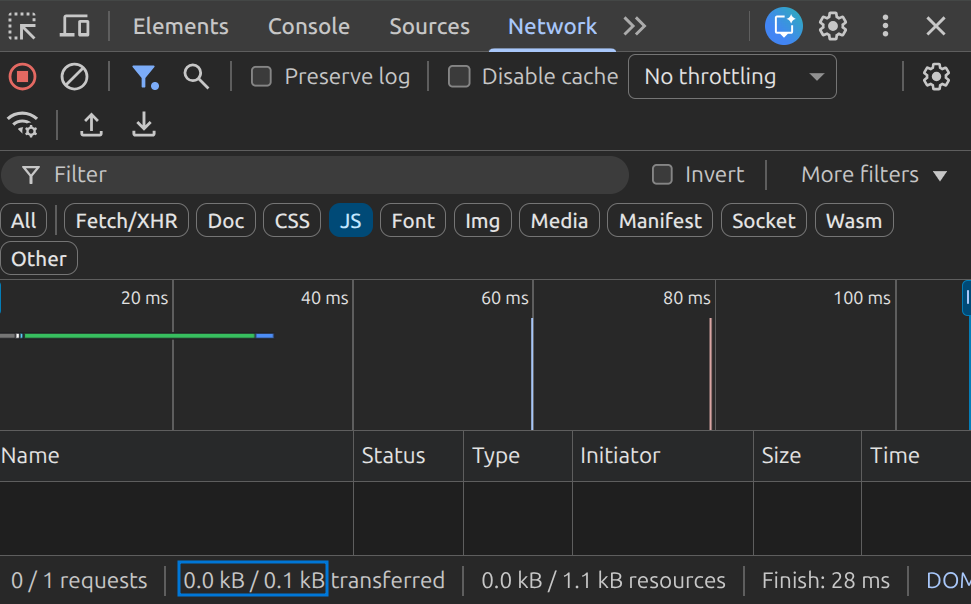
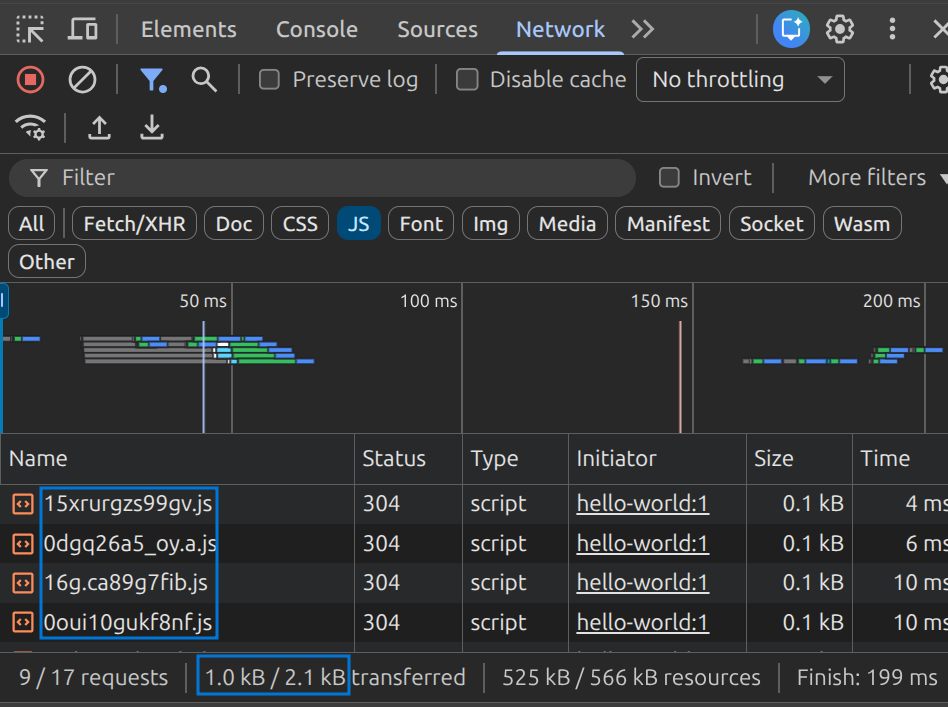
Once both are running, open Chrome DevTools on a post page (for example,/posts/hello-world), go to the Network tab, and filter by JS. Reload the page with the cache disabled (Cmd+Shift+R on macOS, Ctrl+Shift+R on Windows) so every asset is fetched fresh. On the Astro post page, you will see no JavaScript files loaded at all, because no client:* directive was used on that route.
On the Next.js page, you will see the framework chunks (framework-*.js, main-*.js, and a page-specific chunk) loaded regardless of whether the page has any interactive components. Summing those chunks gives you the ~2 KB figure.
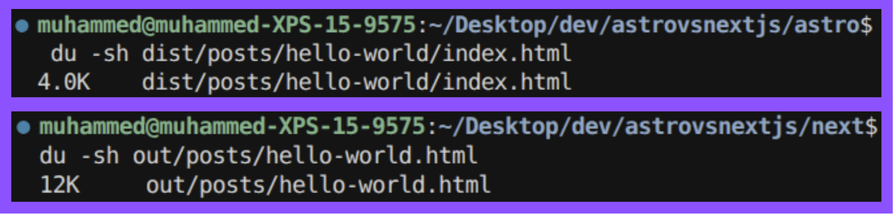
To check the HTML file size directly, run du -sh dist/posts/hello-world/index.html for Astro and du -sh out/posts/hello-world.html for Next.js. The Next.js file is slightly larger because the build inlines the RSC payload as a self.__next_f.push(...) script block at the bottom of the HTML, which has no equivalent in Astro’s output.
With ISR enabled on Next.js (not static export), the Time to First Byte (TTFB) for a cache miss becomes the server response time, typically 300–800ms before the page is regenerated and cached. Astro’s model has no equivalent concept because there is no server.
Note: The figures here will be significantly higher for sites with more content.
Astro is a better fit when content is the product. Think documentation, blogs, marketing pages, and portfolios. You get a stronger performance baseline out of the box, simpler deployment, and the island model pushes you to be deliberate about every bit of JavaScript you ship.
Next.js starts to make more sense when your content site begins to behave like an application. Things like authentication, cart state, real-time data, or layouts that blend heavily dynamic and static pages in one place. ISR is especially useful for large sites with frequent CMS updates. And the React ecosystem is simply deeper, from UI libraries to animations to form handling.
A sharper way to frame it is this: if you removed all interactivity, would your site still work?
For a blog, yes.
For a SaaS marketing site with an embedded demo, probably.
For a docs site with a live code playground, not entirely, but even then, only the playground actually needs JavaScript. That’s exactly the kind of problem Astro’s island model is built to handle.
There’s no doubt that frontends are getting more complex. As you add new JavaScript libraries and other dependencies to your app, you’ll need more visibility to ensure your users don’t run into unknown issues.
LogRocket is a frontend application monitoring solution that lets you replay JavaScript errors as if they happened in your own browser so you can react to bugs more effectively.
👁 LogRocket Dashboard Free Trial BannerLogRocket works perfectly with any app, regardless of framework, and has plugins to log additional context from Redux, Vuex, and @ngrx/store. Instead of guessing why problems happen, you can aggregate and report on what state your application was in when an issue occurred. LogRocket also monitors your app’s performance, reporting metrics like client CPU load, client memory usage, and more.
Build confidently — start monitoring for free.
Debugging Next applications can be difficult, especially when users experience issues that are difficult to reproduce. If you’re interested in monitoring and tracking state, automatically surfacing JavaScript errors, and tracking slow network requests and component load time, try LogRocket.
LogRocket captures console logs, errors, network requests, and pixel-perfect DOM recordings from user sessions and lets you replay them as users saw it, eliminating guesswork around why bugs happen — compatible with all frameworks.
LogRocket's Galileo AI watches sessions for you, instantly identifying and explaining user struggles with automated monitoring of your entire product experience.
The LogRocket Redux middleware package adds an extra layer of visibility into your user sessions. LogRocket logs all actions and state from your Redux stores.
👁 ImageModernize how you debug your Next.js apps — start monitoring for free.
Learn how to test Nuxt apps with Vitest, @nuxt/test-utils, runtime mocks, server route mocks, and Playwright e2e tests.
I had four weeks to build a complete app from scratch using AI tools like OpenCode and Claude Opus: here’s how it went.
Learn how to build a reusable Vue 3 table engine that powers tables, cards, and lists with shared sorting and pagination logic.
Compare the best React chart libraries for 2026, including Recharts, Nivo, visx, Apache ECharts, MUI X Charts, and more.
Hey there, want to help make our blog better?
Join LogRocket’s Content Advisory Board. You’ll help inform the type of content we create and get access to exclusive meetups, social accreditation, and swag.
Sign up now