|
VOOZH | about |
|
VOOZH | about |
Fetching and manipulating data without using a global state was something out of the ordinary. TanStack Query, formerly known as React Query, gives us this opportunity. It has two main functions, useQuery and useMutation. In this article, let’s take a look and dive into mutations in TanStack Query.
Jump ahead:
The Replay is a weekly newsletter for dev and engineering leaders.
Delivered once a week, it's your curated guide to the most important conversations around frontend dev, emerging AI tools, and the state of modern software.
TanStack Query is one of the best libraries for fetching, caching, synchronizing, and updating asynchronous data in your React app. It’s super easy to use, has zero-config, and helps you solve state management issues and control your app’s data before it controls you. TanStack Query has three main concepts: queries, mutations, and query invalidation.
First, I want to show you a simple example of using TanStack Query to get data. Then, we’ll discuss each concept using the example code:
import { QueryClient, QueryClientProvider, useQuery } from 'react-query';

// this creates the client
const queryClient = new QueryClient();

export default function App() {
 return (
 // make the client available everywhere
 <QueryClientProvider client={queryClient}>
 <Users />
 </QueryClientProvider>
 );
}

function Users() {
 // this fetches users data from the server
 const { isLoading, error, data } = useQuery('users', fetchUsers);
 // in the fetching state
 if (isLoading) {
 return <span>Loading...</span>;
 }
 // in the isError state
 if (error) {
 return <span>{`An error has occurred: ${error.message}`}</span>;
 }
 // in the isSuccess state and we got users data
 return (
 <ul>
 {data.map(user => (
 <li key={user.id}>{`${data.name} ${data.lastName}`}</li>
 ))}
 </ul>
 );
}
Above, we created a QueryClient. This is the start of our app, and then we made it available everywhere through the QueryClientProvider. QueryClientProvider uses React Context under the hood to make QueryClient throughout the app. This way, it won’t re-render our app and will only provide access to the client via useQueryClient.
A query is an asynchronous data source bound to a unique key. TanStack Query uses the useQuery Hook to get the data. In the example, our useQuery takes two parameters, a unique key for the query and a function that returns a Promise.
The useQuery returns the following:
isLoading: In the fetching stateerror: The query is in the isError state, and you can get it through the error propertydata: The query is in the isSuccess state, and you can get it through the data propertyWhat are mutations and query invalidation? Let’s discuss them in the following sections.
We call these mutations when we want to create, update, or delete data on the server. So, mutations are a side effect on the server. To achieve this in TanStack Query, we will use the useMutation Hook, as shown below:
function NewUser() {
 const { isLoading, isSuccess, error, mutate } = useMutation(createUser);

 if (isLoading) {
 return <span>Loading...</span>;
 }

 if (error) {
 return <span>{`An error has occurred: ${error.message}`}</span>;
 }

 return (
 <div>
 {isSuccess && <span>User added successfully</span>}

 <button onClick={() => mutate({ name: 'Gapur', lastName: 'Kassym' })}>
 Create User
 </button>
 </div>
 );
}
In the example above, our useMutation requires a single createUser parameter. This is the function to create a new user. The useMutation returns the following:
isLoading: In performing stateisSuccess: If the mutation was successfulerror: The mutation is in the isError state, and you can get it through the error propertymutate: A function you can call with variables to cause a mutationuseQuery and useMutation are used for queries and return loading, error, and status fields. They also have the same callbacks as onSuccess, onError, and onSettled. So, they look similar, but they have two main differences. First, useQuery will take care of executing the query immediately and then perform background updates if it is necessary.
For mutations, this will give you a function mutate that you can call whenever you want to do a mutation. And secondly, you can call the same useQuery call multiple times on different components and return the same cached result. useMutation will not store the result in the cache and will return the response of the mutation.
If we want to directly update the data at any point in the mutation lifecycle, useMutation provides us with callback functions for side effects:
onMutate: Fires before the mutation function firesonError: Will fire if the mutation failsonSuccess: Fires when the mutation is successfulonSettled: Will fire when the mutation succeeds or failsAs an example, let’s say we have an article, and we’ll update the title. Then the mutation will return a new modified article, like so:
const mutation = useMutation({
 updateArticleTitle,
 onSuccess: newArticle => {
 // update article view directly via setQueryData
 queryClient.setQueryData(['articles', id], newArticle);
 },
 onError: (error, variables, context) => {
 console.log(error);
 },
});
Above, we use setQueryData to update the query cache directly.
However, it isn’t easy to directly update the data. This is because if we need to update a list item, the position of our item can be changed. So, we need to write more code. This is where invalidation comes into play:
const mutation = useMutation({
 updateArticle,
 onSuccess: () => {
 // refetch the articles list
 queryClient.invalidateQueries('articles');
 },
});
It’s really simple. We just tell TanStack Query which query you want to invalidate. Also, invalidating the entire list is safer than trying to update the list item directly.
useMutation returns the mutate and mutateAsync functions. The mutate returns nothing and just performs a mutation. But, mutateAsync returns a promise with the result. You will just work as an async function:
const mutation = useMutation(updateArticle);

const onSubmit = async formData => {
 try {
 await mutation.mutateAsync(formData);
 } catch (error) {
 console.log('An error has occured: ', error);
 }
};
You have full control over the mutation and must catch errors yourself. However, in practice, we will use the mutate function almost everywhere, except when we want to run multiple mutations at the same time and wait for them to complete.
Sometimes, you need to update the list of data. How can we do this? As I said before, we can do this with the mutateAsync function. We will loop and run multiple mutations in parallel by calling mutateAsync:
const mutation = useMutation(updateArticle);

const articlesWithMutation = articles.map(article =>
 mutation.mutateAsync(article.id, 'New Title'),
);

try {
 await Promise.all(articlesWithMutation);
} catch (error) {
 console.log('An error has occured: ', error);
}
Above, we map the articles array, call the mutateAsync mutation, and then wait for all the mutations to complete via Promise.all.
First, we need to create a new React project. We can do this with the following lines of code:
npx create-react-app react-query-todo-example --template typescript
Great. Now, we can start installing dependencies. I will use pnpm:
pnpm add axios react-query
Then, to work with the API, I’m going to create a simple server. You can check the API code here. It has three endpoints:
/todos: GET endpoint for fetching to-do list/todos: POST endpoint to create a new to-do/todos/:id: DELETE endpoint to delete to-do by IDI am going to use axios to work with HTTP requests:
export async function fetchTodos(): Promise<Todo[]> {
 try {
 const todos = await axios.get("/todos");
 return todos.data;
 } catch (e) {
 throw e;
 }
}

export async function createTodo(text: string) {
 try {
 await axios.post("/todos", { text });
 } catch (e) {
 throw e;
 }
}

export async function deleteTodo(id: string) {
 try {
 await axios.delete(`/todos/${id}`);
 } catch (e) {
 throw e;
 }
}
Next, I will do a fetch query to get all the to-dos using useQuery:
export function App() {
 const queryClient = useQueryClient();
 const { status, data, error } = useQuery("todos", fetchTodos);

 const { mutate } = useMutation(deleteTodo, {
 onSuccess: () => {
 queryClient.invalidateQueries("todos");
 },
 });

 if (status === "loading") {
 return <div className="loader">Loading...</div>;
 }

 if (status === "error") {
 return <div className="error">{`Error: ${error}`}</div>;
 }

 return (
 <div className="app">
 <h1>React Query Todo Example</h1>

 <NewTodo />

 <TodosList todos={data} onDelete={(todoId: string) => mutate(todoId)} />
 </div>
 );
}
Last, I will implement the NewTodo component with useMutation to create a new to-do request:
export function NewTodo() {
 const [todo, setTodo] = useState("");

 const queryClient = useQueryClient();

 const { status, error, mutate } = useMutation(createTodo, {
 onSuccess: () => {
 queryClient.invalidateQueries("todos");
 setTodo("");
 },
 });

 if (status === "error") {
 return <div className="error">{`An error has occurred: ${error}`}</div>;
 }

 const isButtonDisabled = todo === "" || status === "loading";

 return (
 <div className="new-todo">
 <input
 type="text"
 value={todo}
 placeholder="Create a new todo"
 onChange={(e) => setTodo(e.target.value)}
 />
 <button
 className="add-btn"
 disabled={isButtonDisabled}
 onClick={() => mutate(todo)}
 >
 Add
 </button>
 </div>
 );
}
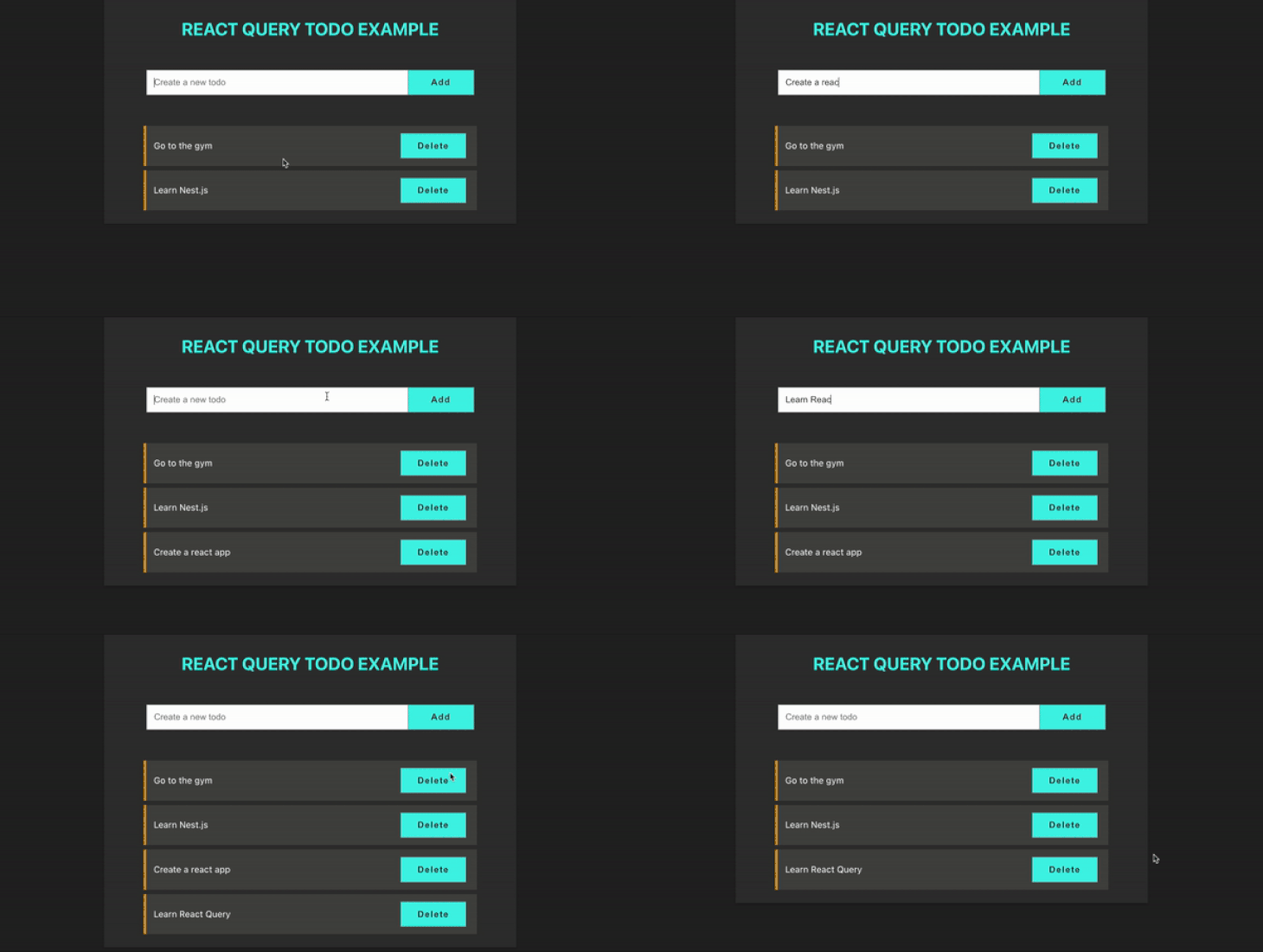
And that’s it! This is the final app:
👁 Final Example of a React Query App
In React development, I used various ways to manage data state. After using TanStack Query, I can say that it is a more powerful and easier-to-use library. useMutation handles all update, create, and delete requests. Optimistic updates are one of the key benefits of using TanStack Query mutations, so I recommend you try it.
Thanks for reading. I hope you found this piece useful. Happy coding!
Install LogRocket via npm or script tag. LogRocket.init() must be called client-side, not
server-side
$ npm i --save logrocket

// Code:

import LogRocket from 'logrocket';
LogRocket.init('app/id');
// Add to your HTML:

<script src="https://cdn.lr-ingest.com/LogRocket.min.js"></script>
<script>window.LogRocket && window.LogRocket.init('app/id');</script>
TSRX adds first-class control flow, conditional hooks, and scoped styles to React via a TypeScript compiler extension — no new framework required.
Learn how to build a full React Native auth system using Better Auth and Expo — with email/password login, Google OAuth, session persistence, and protected routes.
Compare the top AI development tools and models of June 2026. View updated rankings, feature breakdowns, and find the best fit for you.
Learn how Bloom filters reduce database lookups for username availability checks while preserving correctness at scale.
Hey there, want to help make our blog better?
Join LogRocket’s Content Advisory Board. You’ll help inform the type of content we create and get access to exclusive meetups, social accreditation, and swag.
Sign up now