|
VOOZH | about |
|
VOOZH | about |
Editor’s note: This article was updated by Yan Sun on 1 October 2024 to cover recent improvements to index access handling in TypeScript 5.5.
👁 How To Dynamically Assign Properties To An Object In TypeScriptDynamic property assignment is the ability to add properties to an object as needed, rather than defining them upfront. This is useful when properties are conditionally assigned in different parts of the code.
In TypeScript, we can dynamically assign properties to an object using the following methods:
Record utility type: With the Record type, we can create an object type with specified keys and values, as in Record<string, string>, where both the keys and values are of type stringMap data type: Using a Map object allows dynamic property assignment, although it lacks strong typing{name?: string}, we can enable dynamic assignmentPartial utility type: The Partial utility type makes all properties of a type optional, allowing us to initialize an object with any combination of the propertiesIn this article, we will explore how to benefit from both JavaScript’s dynamism and TypeScript’s type safety, particularly when working with dynamic property assignments.
Consider the following example code:
const organization = {}
organization.name = "Logrocket"
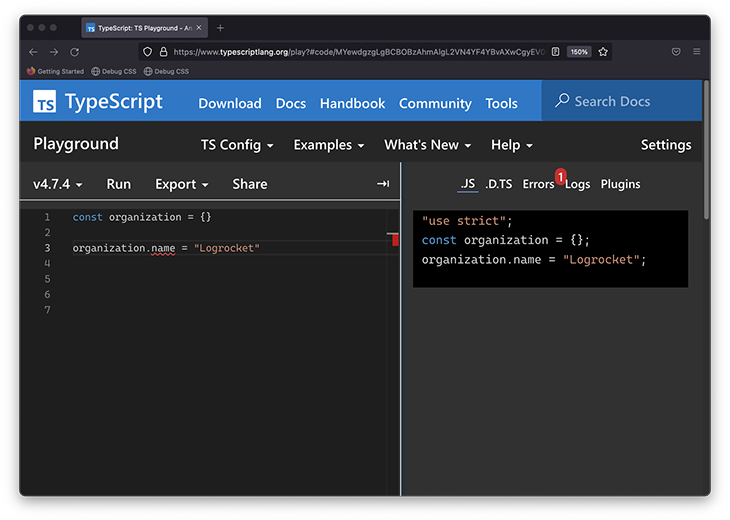
This seemingly harmless piece of code throws a TypeScript error when dynamically assigning the name property to the organization object:
👁 An Error Is Thrown When Dynamically Assigning A Property To An Object
See this example in the TypeScript Playground.
The source of confusion, perhaps rightly justified if you’re a TypeScript beginner, is: how could something so simple be such a problem in TypeScript?
In short, if we can’t define the variable type at declaration time, we can use the Record utility type or an object index signature to solve this. But in this article, we’ll work through the problem itself and toward a solution that should work in most cases.
The Replay is a weekly newsletter for dev and engineering leaders.
Delivered once a week, it's your curated guide to the most important conversations around frontend dev, emerging AI tools, and the state of modern software.
Generally speaking, TypeScript determines the type of a variable when it is declared. This determined type stays the same throughout our application. There are exceptions to this rule, such as when considering type narrowing or working with the any type, but otherwise, this is a general rule to remember.
In the earlier example, the organization object is declared as follows:
const organization = {}
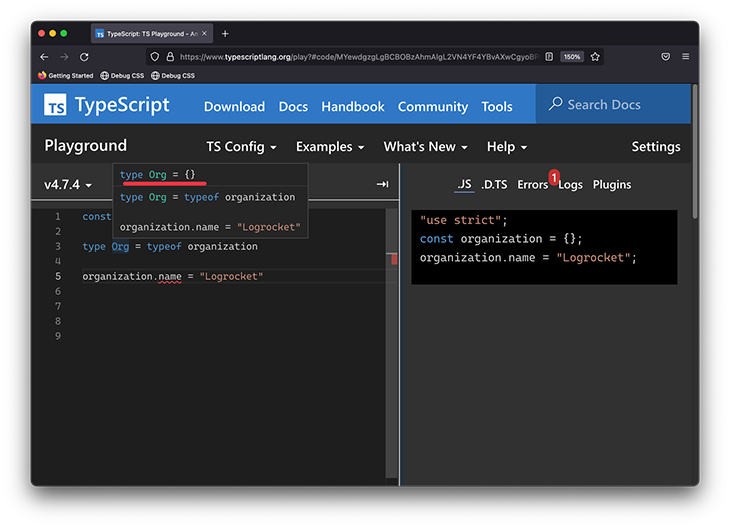
No explicit type is assigned to this variable, so TypeScript infers a type of organization based on the declaration to be {}, i.e., the literal empty object.
If we add a type alias, we can explore the type of organization:
type Org = typeof organization
👁 Exploring The Literal Object Type
See this in the TypeScript Playground.
Then, if we try to reference the name prop on this empty object literal:
organization.name = ...
We will receive the following error:
Property 'name' does not exist on type ‘ {}‘
There are many ways to solve the TypeScript error here. Let’s consider the following:
This is the easiest solution to reason through. At the time we declare the object, go ahead and type it, and assign all the relevant values:
type Org = {
 name: string
}

const organization: Org = {
 name: "Logrocket"
}
See this in the TypeScript Playground.
This approach eliminates any surprises. By clearly stating what this object type is and declaring all relevant properties upfront, we ensure clarity and avoid unexpected behavior.
However, this is not always feasible if the object properties must be added dynamically, which is why we’re here.
Occasionally, the properties of the object need to be added at a time after they’ve been declared. In this case, we can use the object index signature as follows:
type Org = {[key: string] : string}
const organization: Org = {}
organization.name = "Logrocket"
See this in the TypeScript Playground.
In the example, we explicitly type the organization variable to the following: {[key: string] : string}, which allows this type to have properties with any string key and string value.
We might be used to object types having fixed property types:
type obj = {
 name: string
}
However, we can also substitute the name property for a “variable type.” For example, if we want to define any string property on obj:
type obj = {
 [key: string]: string
}
Note that the syntax is similar to how we’d use a variable object property in standard JavaScript:
const variable = "name"
const obj = {
 [variable]: "Freecodecamp"
}
The TypeScript equivalent is called an object index signature.
Moreover, note that we could type key with other primitive types such as string, number, symbol, or literal types:
// number
type Org = {[key: number] : string}

// string
type Org = {[key: string] : string}

//symbol
type Org = {[key: symbol] : string}
We can use nested indexed signatures to represent complex data structures. It allows us to handle dynamic properties in a nested structure:
type Org = {
 [key: string]: {
 [key: string]: string;
 };
}
const organization: Org = {}
organization.hr = {
 manager: "John"
}
Here, the Org type represents a data structure with properties with string keys, and each property can also be an object with string keys and string values.
We can go one step further to define a type with deeply nested index signatures. The example below demonstrates the ability to assign dynamic properties to deeply nested objects:
type DeeplyNestedOrg ={
 [key: string]: {
 [key: string]: {
 [key: string]: string;
 };
 };
}
const nestedOrganization: DeeplyNestedOrg = {}
nestedOrganization.hr = {
 manager: {
 name: "John",
 address: "123 edward st"
 }
}
See the TypeScript playground.
Sometimes, a limited set of properties is known upfront. We can use the index signature and mapping types to create objects with properties named after union types:
type Departments = 'Finance' | 'Technology' | 'HR';
type Org = {
 [name in Departments]: { name: string}
}
type OrgHierachy = Partial<Org>
const organization: OrgHierachy = {}
organization.HR = {
 name: 'Human resource'
}
See the TypeScript playground.
The above example defines a type Org with keys based on a union of department names. The OrgHierachy type uses the Partial utility type to make all the properties optional, giving us the flexibility to not assign all the departments.
Record utility typeThe Record utility type allows us to construct an object type whose properties are Keys and property values are Type. It has the following signature: Record<Keys, Type>.
In our example, Keys represents the string type. The solution here is shown below:
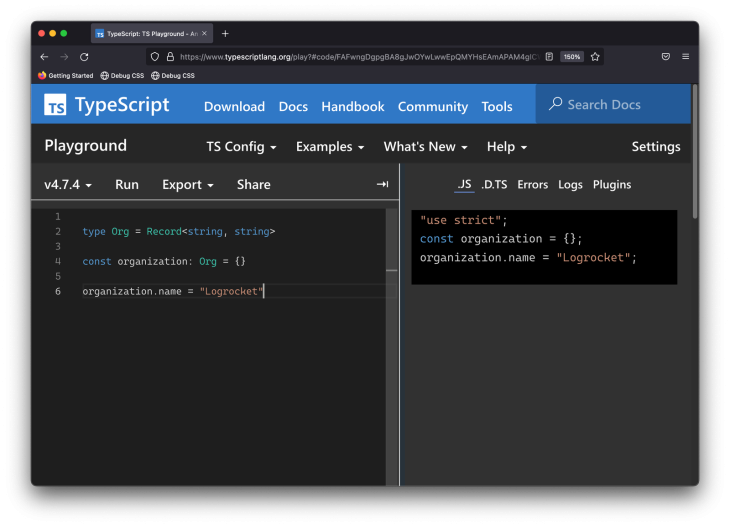
type Org = Record<string, string>

const organization: Org = {}

organization.name = "Logrocket"
Instead of using a type alias, we can also use an inline type:
const organization: Record<string, string> = {}
👁 Using The Record Utility Type
See this in the TypeScript Playground.
Map data typeA Map object is a fundamentally different data structure from an object, but for completeness, we could eliminate this problem using Map.
Consider the starting example rewritten to use a Map object:
// before
const organization = {}
organization.name = "Logrocket"

// after
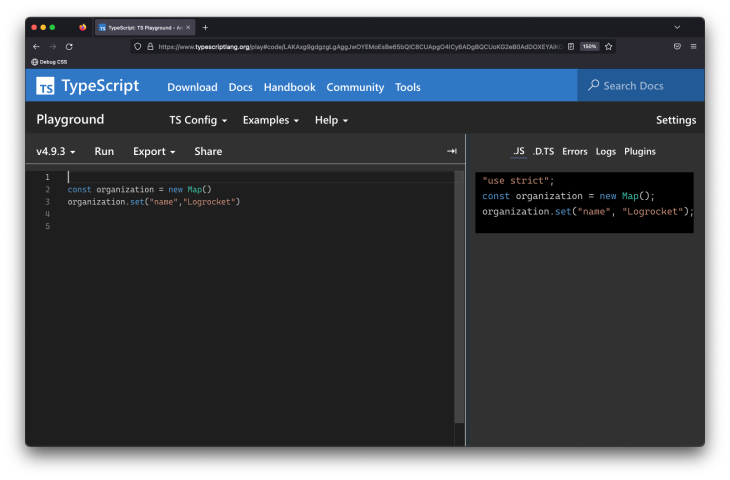
const organization = new Map()
organization.set("name","Logrocket")
With Map objects, we’ll have no errors when dynamically assigning properties to the object:
👁 Dark Background Typescript Playground Showing Map Object No Errors
See this in the TypeScript Playground.
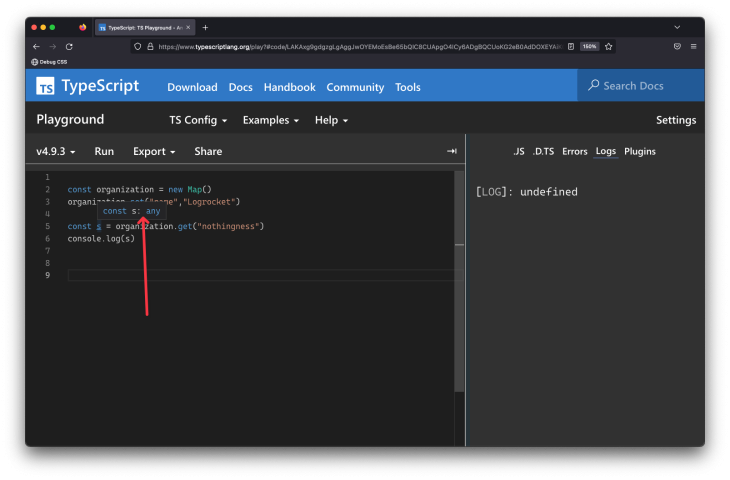
This seems like a great solution initially, but the caveat is that the Map object is weakly typed. We can access a nonexisting property and get no warnings at all:
const organization = new Map()
organization.set("name","Logrocket")

// Property nothingness does not exist. No TS warnings
const s = organization.get("nothingness")
console.log(s)
See the TypeScript Playground.
Unlike the standard object, an initialized Map has the key and value types as any — i.e., new () => Map<any, any>. Consequently, the return type of the s variable will be any:
👁 Dark Background Typescript Playground Showing Constant S With Type Any Indicated By Red Arrow
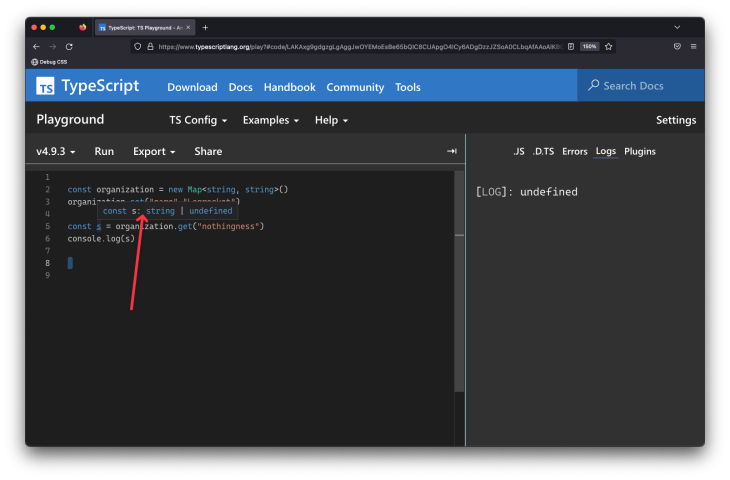
When using Map, at the very least, I recommend passing some type of information upon creation. For example:
const organization = new Map<string, string>()
organization.set("name","Logrocket")
const s = organization.get("nothingness")
console.log(s)
The variable s will still be undefined, but we won’t be surprised by its code usage. We’ll now receive the appropriate type for it:
If we truly don’t know what the keys of the Map will be, we can go ahead and represent this at the type level:
const organization = new Map<unknown, string>()
Similarly, if we’re not sure what the keys or values are, be safe by representing this at the type level:
const organization = new Map<unknown, unknown>()
object propertyWhile not always feasible, if we know the specific property to be dynamically assigned, we can declare it as an optional property during object initialization as shown below:
const organization : {name?: string} = {}
organization.name = "Logrocket"
See the TypeScript Playground.
If you don’t like the idea of using optional properties, you can be more explicit with the typing:
const organization : {name: string | null} = {
 name: null
}
organization.name = "Logrocket"
See the TypeScript Playground.
TypeScript type assertion is a mechanism that tells the compiler the variable’s type and overrides what it infers from the declaration or assignment. With this, we are telling the compiler to trust our understanding of the type because there will be no type verification.
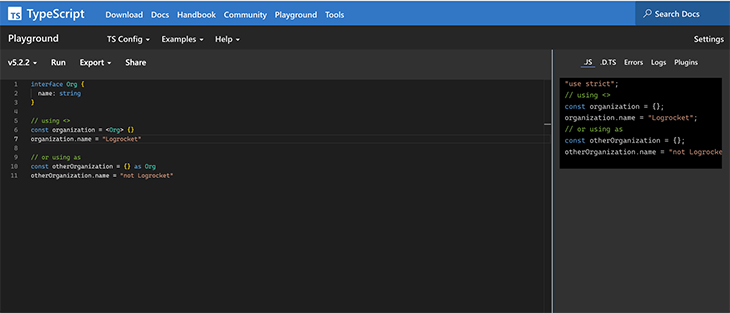
We can perform a type assertion by either using the <> brackets or the as keyword. This is particularly helpful with the dynamic property assignment because it allows the properties we want for our object to be dynamically set. After all, TypeScript won’t enforce them.
Let’s take a look at applying type assertions to our example:
interface Org {
 name: string
}

// using <>
const organization = <Org> {}
organization.name = "Logrocket"

// or using as
const otherOrganization = {} as Org
otherOrganization.name = "not Logrocket"
👁 Dark Background Typescript Playground Showing Dynamic Property Assignment Using Type Assertion
See the TypeScript Playground.
Note that, with type assertions, the compiler trusts that we will enforce the type we have asserted. This means if we don’t, for example, set a value for
organization.name, it will throw an error at runtime that we will have to handle ourselves.
Partial utility typeTypeScript provides several utility types that can be used to manipulate types. These utility types include Partial, Omit, Required, and Pick.
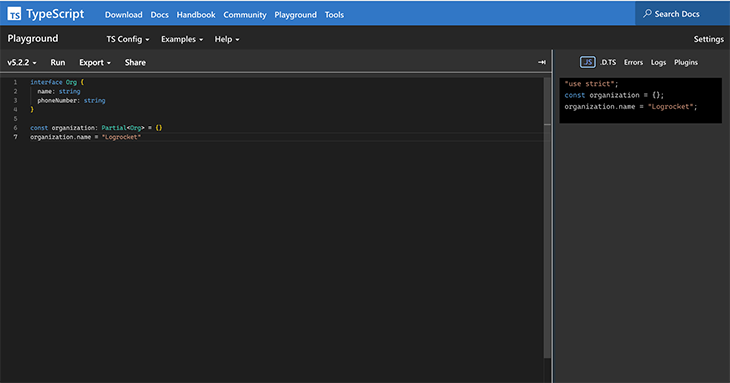
We will focus specifically on the Partial utility type for dynamic property assignments. The Partial utility type takes a defined type and makes all of its properties optional. Thus, we can initialize our object with any combination of its properties, from none to all, as each one is optional:
interface Org {
 name: string
 phoneNumber: string
}

const organization: Partial<Org> = {}
organization.name = "Logrocket"
In our example, we defined our organization object as the type partial Org, which means we can choose not to set a phoneNumber property:
See the TypeScript Playground.
In this article, we explored the different options for setting properties dynamically in TypeScript. These options can be grouped by their similarities.
This group of options allows us to define the type of keys allowed without limiting what possible keys can exist. The options in this group include:
Record utility typeMap data type (with key/value typing)With these approaches, we can define the string type for the object key and decide what types to support as values, like String, Number, Boolean, or Any:
// Using an Object Index Signature
const object1: {[key: string]: string} = {}
object1.name = "Tammy"

// Using the Record Utility Type
const object2: Record<string, number> = {}
object2.count = 10

// Using the Map data type
const object3 = new Map<string, any>()
object3.set("name", "Tammy")
object3.set("count", 10)
object3.set("isFull", false)
Pro: The main benefit of these methods is the ability to dynamically add properties to an object while setting expectations for the possible types of keys and values.
Con: The main disadvantage of this way is that we can’t predict what keys our objects will have, so some references may or may not be defined. An additional disadvantage is that if we decide to define our key signature with type Any, then the object becomes even more unpredictable.
This set of object assignment methods shares a common feature: the definition of optional properties. This means the range of possible properties are known but some may not be set. The options in this group include:
Partial utility typeSee this example in the TypeScript Playground, or the code block below:
// Optional object properties
interface Obj {
 name?: string
 size?: number
}

interface FullObj {
 name: string
 size: number
}

const object1: Obj = {}
object1.name = "Rocket"

// Partial Utility Type
const object2: Partial<FullObj> = {}
object2.size = 10

// Type Assertion
const object3 = <FullObj> {}
object3.name = "New Rocket"
Note: While these options mean that the possible keys are known and may not be set, TypeScript’s compiler won’t validate undefined states when using type assertions. This can lead to unhandled exceptions during runtime. For example, with optional properties and the
Partialutility type,namehas typestringorundefined. Meanwhile, with type assertions,namehas typestring.
Pro: The advantage of this group of options is that all possible object keys and values are known.
Con: The disadvantage is that while the possible keys are known, we don’t know if they have been set and will have to handle the possibility that they are undefined.
When working with dynamic object properties (especially for using optional properties), type guards can be useful for ensuring type safety and preventing runtime errors. Type guards are a powerful TypeScript feature that allows us to check a variable’s type at runtime and conditionally execute code based on the result.
In TypeScript 5.5, a new improvement called “Control Flow Narrowing for Constant Indexed Accesses” was introduced.
This improvement narrows expressions of the form obj[key] when both obj and key are effectively constant. For example, prior to 5.5, TypeScript would throw an error with the following code. Now, TypeScript can determine that obj[key] is a string after the typeof check, improving type safety and flexibility in similar scenarios:
type Org = Record<string, unknown>
const organization: Org = {name: 'Logrocket', staffCount: 1000}
function f1(obj: Org, key: string) {
 if (typeof obj[key] === "string") {
 // Now okay, previously was error
 obj[key].toUpperCase();
 }
}
In this article, we explored several ways to dynamically assign properties to TypeScript objects while maintaining type safety. Key approaches include using:
Record utility typeMap data typePartial utility typeEach method offers flexibility in managing dynamic properties while adhering to TypeScript’s strong typing system. Choosing the right approach depends on the use case, whether you prioritize key predictability or type safety.
If you’d like to read more on this subject, please check out my cheatsheet on the seven most-asked TypeScript questions on Stack Overflow, or tweet me any questions. Cheers!
LogRocket lets you replay user sessions, eliminating guesswork by showing exactly what users experienced. It captures console logs, errors, network requests, and pixel-perfect DOM recordings — compatible with all frameworks, and with plugins to log additional context from Redux, Vuex, and @ngrx/store.
With Galileo AI, you can instantly identify and explain user struggles with automated monitoring of your entire product experience.
Modernize how you understand your web and mobile apps — start monitoring for free.
TSRX adds first-class control flow, conditional hooks, and scoped styles to React via a TypeScript compiler extension — no new framework required.
Learn how to build a full React Native auth system using Better Auth and Expo — with email/password login, Google OAuth, session persistence, and protected routes.
Compare the top AI development tools and models of June 2026. View updated rankings, feature breakdowns, and find the best fit for you.
Learn how Bloom filters reduce database lookups for username availability checks while preserving correctness at scale.
Would you be interested in joining LogRocket's developer community?
Join LogRocket’s Content Advisory Board. You’ll help inform the type of content we create and get access to exclusive meetups, social accreditation, and swag.
Sign up now