|
VOOZH | about |
|
VOOZH | about |
React 18 alpha has been released, which is very exciting! But can we use it with TypeScript?
👁 How to Use TypeScript with React 18 AlphaThe answer is “yes,” but we need to do a couple of things to make that happen. This post will show you what to do.
The Replay is a weekly newsletter for dev and engineering leaders.
Delivered once a week, it's your curated guide to the most important conversations around frontend dev, emerging AI tools, and the state of modern software.
Let’s create ourselves a vanilla React TypeScript app with Create React App:
yarn create react-app my-app --template typescript
Now let’s upgrade the version of React to @next:
yarn add react@next react-dom@next
This will leave you with entries in the package.json that use React 18. It will likely look something like this:
 "react": "^18.0.0-alpha-e6be2d531",
 "react-dom": "^18.0.0-alpha-e6be2d531",
If we run yarn start, we’ll find ourselves running a React 18 app. Exciting!
So let’s try using the ReactDOM.createRoot API. It’s this API that opts our application in to using React 18’s new features. We’ll open up index.tsx and make this change:
-ReactDOM.render(
- <React.StrictMode>
- <App />
- </React.StrictMode>,
- document.getElementById('root')
-);
+const root = ReactDOM.createRoot(document.getElementById('root'));
+
+root.render(
+ <React.StrictMode>
+ <App />
+ </React.StrictMode>
+);
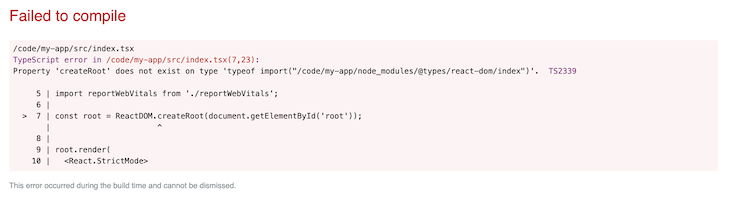
If we were running JavaScript alone, this would work. Because we’re using TypeScript as well, however, we’re now confronted with an error:
Property 'createRoot' does not exist on type 'typeof import("/code/my-app/node_modules/@types/react-dom/index")'. TS2339
👁 TypeScript Throws an Error for the createRoot Property
This is the TypeScript compiler complaining that it doesn’t know anything about ReactDOM.createRoot. This is because the type definitions that are currently in place in our application don’t have that API defined.
Let’s upgrade our type definitions:
yarn add @types/react @types/react-dom
We might reasonably hope that everything should work now — alas, it does not. The same error is presenting. TypeScript is not happy.
If we take a look at the PR that added support for the APIs, we’ll find some tips. If you look at one for next.d.ts, you’ll find this info, courtesy of Sebastian Silbermann:
/**
 * These are types for things that are present in the upcoming React 18 release.
 *
 * Once React 18 is released they can just be moved to the main index file.
 *
 * To load the types declared here in an actual project, there are three ways. The easiest one,
 * if your `tsconfig.json` already has a `"types"` array in the `"compilerOptions"` section,
 * is to add `"react/next"` to the `"types"` array.
 *
 * Alternatively, a specific import syntax can to be used from a typescript file.
 * This module does not exist in reality, which is why the {} is important:
 *
 * ```ts
 * import {} from 'react/next'
 * ```
 *
 * It is also possible to include it through a triple-slash reference:
 *
 * ```ts
 * /// <reference types="react/next" />
 * ```
 *
 * Either the import or the reference only needs to appear once, anywhere in the project.
 */
Let’s try the first item on the list. We’ll edit our tsconfig.json and add a new entry to the "compilerOptions" section:
"types": ["react/next", "react-dom/next"]
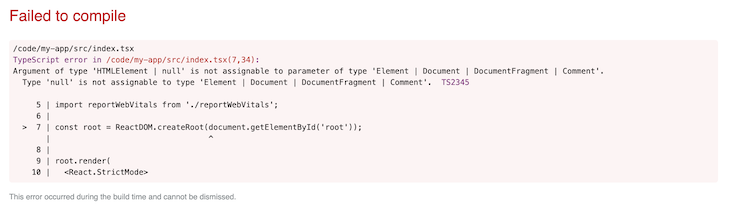
If we restart our build with yarn start, we’re now presented with a different error:
Argument of type 'HTMLElement | null' is not assignable to parameter of type 'Element | Document | DocumentFragment | Comment'.

Type 'null' is not assignable to type 'Element | Document | DocumentFragment | Comment'. TS2345
👁 TypeScript Throws an Error for the HTMLElement | null Type
Now this actually has nothing to do with the issues with our new React type definitions. They are fine. This is TypeScript saying, “It’s not guaranteed that document.getElementById('root') returns something that is not null. Since we’re in strictNullChecks mode, you need to be sure root is not null.”
We’ll deal with that by testing whether we do have an element in play before invoking ReactDOM.createRoot:
-const root = ReactDOM.createRoot(document.getElementById('root'));
+const rootElement = document.getElementById('root');
+if (!rootElement) throw new Error('Failed to find the root element');
+const root = ReactDOM.createRoot(rootElement);
And with that change made, we have a working React 18 application using TypeScript. Enjoy!
LogRocket lets you replay user sessions, eliminating guesswork by showing exactly what users experienced. It captures console logs, errors, network requests, and pixel-perfect DOM recordings — compatible with all frameworks, and with plugins to log additional context from Redux, Vuex, and @ngrx/store.
With Galileo AI, you can instantly identify and explain user struggles with automated monitoring of your entire product experience.
Modernize how you understand your web and mobile apps — start monitoring for free.
TSRX adds first-class control flow, conditional hooks, and scoped styles to React via a TypeScript compiler extension — no new framework required.
Learn how to build a full React Native auth system using Better Auth and Expo — with email/password login, Google OAuth, session persistence, and protected routes.
Compare the top AI development tools and models of June 2026. View updated rankings, feature breakdowns, and find the best fit for you.
Learn how Bloom filters reduce database lookups for username availability checks while preserving correctness at scale.
Would you be interested in joining LogRocket's developer community?
Join LogRocket’s Content Advisory Board. You’ll help inform the type of content we create and get access to exclusive meetups, social accreditation, and swag.
Sign up now