|
VOOZH | about |
|
VOOZH | about |
Have you ever tried to run complex computations or calculations to find it takes forever and slows down your processes?
👁 Intro to GPU.jsThere are many ways to solve this problem, such as using web workers or background threads. GPU takes away the processing load from your CPU, giving your CPU more room for other processes. Meanwhile, web workers still run on your CPU but on different threads.
In this beginner’s guide, we’ll demonstrate how to use GPU.js to perform complex mathematical computations and improve the performance of JavaScript apps.
The Replay is a weekly newsletter for dev and engineering leaders.
Delivered once a week, it's your curated guide to the most important conversations around frontend dev, emerging AI tools, and the state of modern software.
GPU.js is a JavaScript acceleration library built for the web and Node.js for general-purpose programming on graphical processing units (GPGPU). It allows you to hand over complex and time-consuming computations to GPUs rather than CPUs for faster computations and operations. There is also a fallback option: in situations where GPU is not on your system, the functions will still run on your regular JavaScript engine.
When you have a complex computation to perform with your system, you essentially pass this burden to your system’s GPU instead of your CPU, thereby increasing processing speed and time.
High-performance computing is one of the main advantages of using GPU.js. If you’re looking to start parallel computations in the browser without any prior knowledge of WebGL, GPU.js is the library for you.
There are countless reasons why you should use GPU to perform complex calculations, far too many to explore in one post. Below are some of the most noteworthy benefits of using GPU.
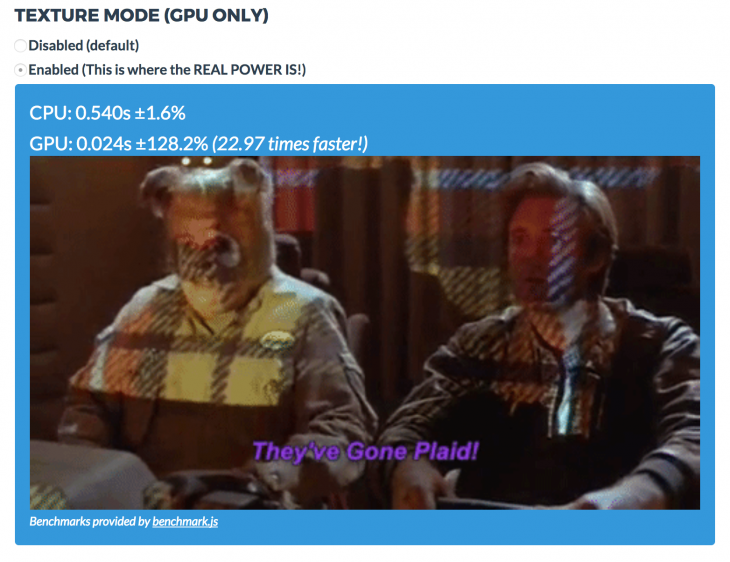
If you think your processors are up to the task and you don’t need GPU.js, take a look at the result below from running computations with this GPU and CPU.
As you can see, GPU is 22.97 times faster than CPU.
Given that level of speed, it’s as if the JavaScript ecosystem has been given a rocket to ride on. GPU helps websites load even faster, especially sites that have to perform complex computations on the front page. You no longer need to worry about using background threads and loaders since GPU can run the computations 22.97 times faster than the regular CPU would.
The gpu.createKernel method creates a GPU accelerated kernel transpiled from a JavaScript function.
Running the kernel function in parallel with GPU results in faster computations — 1–15 times faster, depending on your hardware.
To show how to use GPU.js to calculate a complex computation faster, let’s spin up a quick, practical demo.
Installation:
sudo apt install mesa-common-dev libxi-dev // using Linux
npm:
npm install gpu.js --save

// OR

yarn add gpu.js
Require GPU.js in your Node project.
import { GPU } from ('gpu.js')

// OR
const { GPU } = require('gpu.js')

const gpu = new GPU();
In the example below, the computation is done in parallel on the GPU.
First, generate a large set of data.
 const getArrayValues = () => {

 //Create 2D arrary here
 const values = [[], []]

 // Insert Values into first array
 for (let y = 0; y < 600; y++){
 values[0].push([])
 values[1].push([])

 // Insert values into second array
 for (let x = 0; x < 600; x++){
 values\[0\][y].push(Math.random())
 values\[1\][y].push(Math.random())
 }
 }

 //Return filled array
 return values
 }
Create the kernel (another word for a function that runs on a GPU).
 const gpu = new GPU();

 // Using `createKernel()` method to multiply the array
 const multiplyLargeValues = gpu.createKernel(function(a, b) {
 let sum = 0;
 for (let i = 0; i < 600; i++) {
 sum += a\[this.thread.y\][i] * b\[i\][this.thread.x];
 }
 return sum;
 }).setOutput([600, 600])
Call the kernel with the matrices as parameters.
 const largeArray = getArrayValues()
 const out = multiplyLargeValues(largeArray[0], largeArray[1])
The output:
console.log(out\[y\][x]) // Logs the element at the xth row and the yth column of the array
console.log(out\[10\][12]) // Logs the element at the 10th row and the 12th column of the output array
You can run your benchmarks by following the steps specified on GitHub.
npm install @gpujs/benchmark

const benchmark = require('@gpujs/benchmark')

const benchmarks = benchmark.benchmark(options);
The options object contains various configurations you can pass to the benchmark.
Head to the official GPU.js website to see a complete benchmark of the computations. This will help you understand how much speed you can gain using GPU.js for your complex computations.
In this tutorial, we explored GPU.js in detail, broke down how it works, and demonstrated how to perform parallel computations. We also showed how to set up GPU.js in your Node.js application.
Keep coding!
There’s no doubt that frontends are getting more complex. As you add new JavaScript libraries and other dependencies to your app, you’ll need more visibility to ensure your users don’t run into unknown issues.
LogRocket is a frontend application monitoring solution that lets you replay JavaScript errors as if they happened in your own browser so you can react to bugs more effectively.
👁 LogRocket Dashboard Free Trial BannerLogRocket works perfectly with any app, regardless of framework, and has plugins to log additional context from Redux, Vuex, and @ngrx/store. Instead of guessing why problems happen, you can aggregate and report on what state your application was in when an issue occurred. LogRocket also monitors your app’s performance, reporting metrics like client CPU load, client memory usage, and more.
Build confidently — start monitoring for free.
Build dynamic LLM routing in Next.js with OpenRouter, TanStack AI, task classification, model fallbacks, and cost-aware routing.
TSRX adds first-class control flow, conditional hooks, and scoped styles to React via a TypeScript compiler extension — no new framework required.
Learn how to build a full React Native auth system using Better Auth and Expo — with email/password login, Google OAuth, session persistence, and protected routes.
Compare the top AI development tools and models of June 2026. View updated rankings, feature breakdowns, and find the best fit for you.
Hey there, want to help make our blog better?
Join LogRocket’s Content Advisory Board. You’ll help inform the type of content we create and get access to exclusive meetups, social accreditation, and swag.
Sign up now