|
VOOZH | about |
|
VOOZH | about |
In this article, I’ll cover the underlying reason behind the Expected server HTML to contain a matching <tag> in <tag> error. This error is caused by React hydration, which is a conversion process for pre-rendered HTML. React hydration is generally used to add interactivity to pre-rendered HTML generated by the server.
👁 A Look At React Hydration And Pre-Rendered HTMLThis article will provide a closer look at React hydration and pre-rendered HTML. We will look at the underlying APIs and how they work, as well as a common hydration error, and how to troubleshoot it.
Jump ahead:
hydrateRoot APIhydrateRootThe Replay is a weekly newsletter for dev and engineering leaders.
Delivered once a week, it's your curated guide to the most important conversations around frontend dev, emerging AI tools, and the state of modern software.
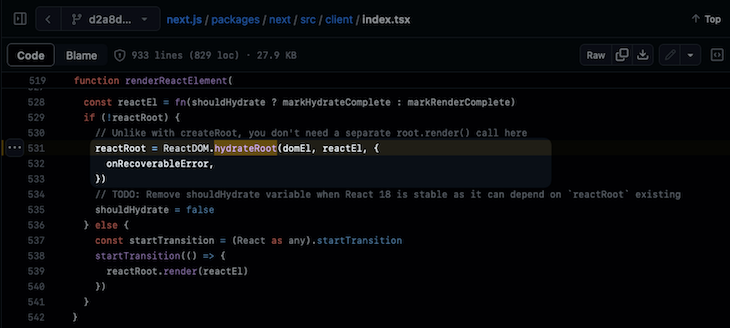
hydrateRoot APIA popular framework like Next.js uses React hydration under the hood. As such, we might not be familiar with it because it is usually pre-configured deep inside the Next.js framework. As you can see in the picture below, Next.js is using a React DOM API called hydrateRoot inside the rendering function:
👁 Using The HydrateRoot React DOM API
The hydrateRoot API can also be implemented within other frameworks, such as Gatsby and Astro. Although we probably won’t use the hydrateRoot API by ourselves, it is important to understand how it works so we can handle all the pitfalls and errors that come with it.
React hydration bridges the gap between server-side and client-side rendering. It adds interactivity to static HTML generated on the server, enhancing initial rendering speed and SEO compared to traditional single-page apps.
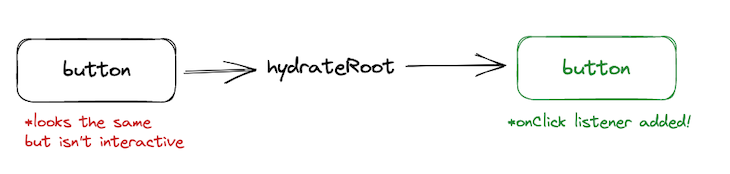
With React hydration, visitors to your page will be served a static HTML from the server. After it loads, React will “attach” all of the event listeners, such as state, effect, etc., to their respective elements. The hydration API that is provided by React will take that HTML and find the button that you want to attach the onClick listener on:
hydrateRootTo understand why hydration needs to happen, we need to understand how React sees the static HTML that needs to be hydrated.
This is a generated static HTML using the React DOM API called renderToString:
import { renderToString } from 'react-dom/server';

const html = renderToString(<App />);
After running the code, we get something like this:
<h1>Counter App</h1>
<button>
 You clicked me
 <!-- -->0<!-- -->
 times
</button>
When we see this piece of HTML code, it simply renders a heading with text containing Counter App and a button that might be a counter. But, we don’t have the JavaScript listeners for that, so clicking the button won’t change anything.
If we compare them to the React code, we are adding functionalities such as onClick like so:
export default function App() {
 const [count, setCount] = React.useState(0);

 return (
 <>
 <h1>Counter App</h1>
 <button onClick={() => setCount(prev => prev + 1)}>
 You clicked me {count} times
 </button>
 </>
 );
}
Hydration will be in charge of attaching the onClick event listener using the JavaScript code that is fetched on the client side. It will also be responsible for the entire interactivity of the page, such as the incrementing count.
That hydration happens by using the hydrateRoot API like this:
import { hydrateRoot } from 'react-dom/client';
import App from './App.js';

hydrateRoot(document.getElementById('root'), <App />);
After getting the pre-rendered HTML from the document file, the hydrateRoot API will match them with your App component to make sure that there is no mismatch.
Now let’s talk about why this error happens:
👁 A Common Hydration Error In React
When we are hydrating a server-rendered HTML, React expects the rendered contents to be identical to the server-rendered contents. So when you have a heading that contains App Counter in the App.jsx file, React is going to assume that you have it on your server-rendered HTML.
React will actually treat differences as errors, but the errors won’t come out in the production. Still, you need to fix them, because they can lead to a slower app, or even worse, the event handlers might get attached to the wrong elements.
It’s important that the server-rendered HTML of the app strictly conforms to a specific structure, like so:
<div id="root"><h1>Counter App</h1><button>You clicked me <!-- -->0<!-- --> times</button></div>
There can’t be any extra whitespace or new lines.
Let’s say that we have an app that renders the current date to the exact millisecond using ISO string date function:
export default function App() {
 return <div>{new Date().toISOString()}</div>;
}
This is the server-rendered HTML that we get from the renderToString API:
<div>2023-08-23T09:14:11.745Z</div>
When we hydrate the server-rendered HTML later on, there is no chance that the date is going to be the same as the server-rendered HTML. This causes the dreaded hydration error:
👁 A Common Hydration Error In React
Pretty simple right? Here’s a list of the most common causes leading of hydration errors from the React docs:
typeof window !== 'undefined' in your rendering logicwindow.matchMedia in your rendering logicThere are two ways to fix the hydration error we saw above. The first way is by using the supressHydrationWarning props:
export default function App() {
 return <div suppressHydrationWarning={true}>{new Date().toISOString()}</div>;
}
This should be used if a single element attribute or text contents will be different no matter the case, like an ISO string date. You can silence the error by setting the supressHydrationWarning props to true.
This solves the error and is a great solution if you want to fix simple text mismatches like this date example.
useEffect HookIf you have a more complex app that has different contents between the client and server content, you’ll need to use this second solution. The second solution is to set values inside the useEffect Hook instead of directly in the JSX.
For example, you have a logic that differentiates if you want dark mode or light mode based on the hours. If the hours indicate that it is later than 12 AM, we want to show dark mode. Otherwise, we want to show light mode:
export default function App() {
 return (
 <h1>
 {new Date().getHours() > 12 ? "Dark Mode" : "Light Mode"}
 </h1>
 );
}
You can fix the error by creating a React state called isDark and putting the logic inside the useEffect function. We can then use the isDark state to conditionally render dark mode or light mode:
export default function App() {
 const [isDark, setIsDark] = useState(false);

 useEffect(() => {
 setIsDark(new Date().getHours() > 12);
 }, [])

 return (
 <h1>
 {isDark ? "Dark Mode" : "Light Mode"}
 </h1>
 );
}
By using this method, the server-rendered HTML will use the default value of useState first, so it matches the data from when we ran hydrateRoot. Then after the app mounts, it will change the contents based on the logic.
Hydration errors are a common occurrence, especially when dealing with elements like pre-rendering an exact ISO string date. While it is possible to suppress warnings to manage these errors, it’s important not to overuse them. To handle different contents between the client and server, you can move the logic after the app is mounted using the useEffect Hook.
Install LogRocket via npm or script tag. LogRocket.init() must be called client-side, not
server-side
$ npm i --save logrocket

// Code:

import LogRocket from 'logrocket';
LogRocket.init('app/id');
// Add to your HTML:

<script src="https://cdn.lr-ingest.com/LogRocket.min.js"></script>
<script>window.LogRocket && window.LogRocket.init('app/id');</script>
Build dynamic LLM routing in Next.js with OpenRouter, TanStack AI, task classification, model fallbacks, and cost-aware routing.
TSRX adds first-class control flow, conditional hooks, and scoped styles to React via a TypeScript compiler extension — no new framework required.
Learn how to build a full React Native auth system using Better Auth and Expo — with email/password login, Google OAuth, session persistence, and protected routes.
Compare the top AI development tools and models of June 2026. View updated rankings, feature breakdowns, and find the best fit for you.
Hey there, want to help make our blog better?
Join LogRocket’s Content Advisory Board. You’ll help inform the type of content we create and get access to exclusive meetups, social accreditation, and swag.
Sign up now