|
VOOZH | about |
|
VOOZH | about |
The HTTP request-response model is the primary communication model of the web. In this model, a client (usually a browser) sends a request for a resource to a server, the server processes the requests, then sends back a response accordingly. For this communication to happen, both the server and the client must establish a connection (e.g., a TCP connection), and when the request-response cycle ends, the connection will be closed.
👁 ImageThis model was sufficient for early web applications, because early websites were only displaying static content. But as the web evolved, the need arose to allow servers send data to clients without a client requesting it first. This led to push technology.
Push technology is a style of internet-based communication in which the request for a given transaction is initiated by the server. For example, in timeline updates in social media apps, the server pushes data to the client without the client requesting it.
As the HTTP request-response model was not designed for these use cases, different mechanisms were invented. These mechanisms are server-sent events (SSE) and WebSockets.
In this article, we will learn about server-sent events and WebSockets, including how they work and their individual use cases, so you can make an informed decision about which to use in your next project.
The Replay is a weekly newsletter for dev and engineering leaders.
Delivered once a week, it's your curated guide to the most important conversations around frontend dev, emerging AI tools, and the state of modern software.
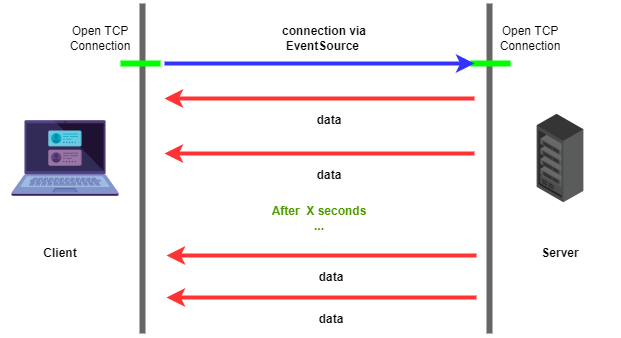
As the name suggest, server-sent events are a push technology that allows the client to receive data automatically from the server through an HTTP connection. In this case, after an HTTP connection has been established between the server and the client, the server can send automatic updates.
SSEs are sent via the normal HTTP protocol, and browser clients will have to register to the event source via the JavaScript API EventSource. The source of the event will be passed to EventSource during instantiation, which will handle connection to the source so clients will get updates sent automatically.
You can think of SSEs as a long-running HTTP request that sends data out to the client whenever the server wants.
👁 Representation of Server-Sent Events
As illustrated in the diagram above, SSEs are unidirectional, so they allow sending data from the server to the client only. SSEs are designed to be more efficient than long polling, and include some great features:
SSEs transmit data in text-encoded UTF-8.
WebSocket is a communication protocol that provides bidirectional communication channels over a single TCP connection. Unlike SSEs, which are transmitted over simple HTTP, WebSocket has its own protocol called – you guessed it – the WebSocket Protocol.
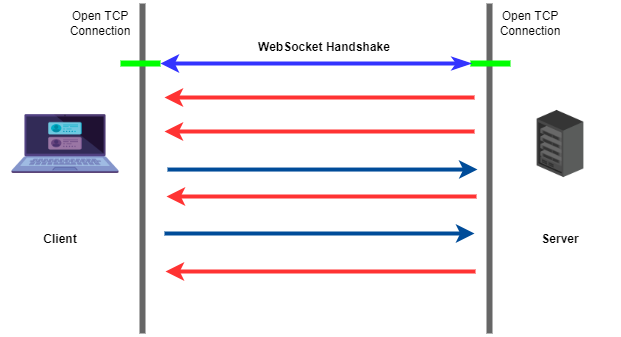
A WebSocket connection starts as a normal HTTP connection which through the WebSocket handshake is upgraded to a WebSocket connection. The handshake starts as an HTTP request from the client with a special UPGRADE header, then the server receives the request, processes it, and switches to the WebSocket protocol if the request is accepted.
When this handshake is complete, then bidirectional communication is possible; the client can send data to the server and the server can also send data back to the client.
The following are sample WebSocket Protocol handshake requests.
Client request:
GET /chat HTTP/1.1
Host: server.example.com
Upgrade: websocket
Connection: Upgrade
Sec-WebSocket-Key: x3JJHMbDL1EzLkh9GBhXDw==
Sec-WebSocket-Protocol: chat, superchat
Sec-WebSocket-Version: 13
Origin: http://example.com
Server response:
HTTP/1.1 101 Switching Protocols
Upgrade: websocket
Connection: Upgrade
Sec-WebSocket-Accept: HSmrc0sMlYUkAGmm5OPpG2HaGWk=
Sec-WebSocket-Protocol: chat
As mentioned earlier, the server will switch protocols if the handshake is successful. The status code for a successful switch in protocols is 101.
👁 Depiction of websocket handshake
WebSocket can transmit data in both UTF-8 encoded text and in binary format. Transmitting data in binary can increase the speed of transmission and interpretation of data, as all the values of a byte can be used in encoding.
If data is encoded in text (UTF-8 in this case), only the binary values corresponding to characters in UTF-8 encoding are utilized. Binary encoding has the benefit of efficiency.
You might have noticed that WebSocket can do what SSE can do and more, so why not just use WebSockets only?
SSE is best used when it’s not necessary to send data from client to server. For example, in status updates and push notification applications, the data flow is from the server to the client only. This is what SSE is designed for, so WebSocket would be overkill. It’s always wise to use the best tool for the job.
WebSocket is best used when we need real time, two-way communication, like in chatting apps or multiplayer games. WebSocket was designed to handle those kind of use cases.
In this article, we have discussed the HTTP request-response model and how it is not sufficient for pushing data from the server to client.
We also learned that server-sent events are long running HTTP requests through which the server can send data to the client whenever it wants. WebSocket, on the other hand, is a completely new protocol that uses HTTP for connection, then proceeds to the WebSocket handshake before two way communication can be established.
Install LogRocket via npm or script tag. LogRocket.init() must be called client-side, not
server-side
$ npm i --save logrocket

// Code:

import LogRocket from 'logrocket';
LogRocket.init('app/id');
// Add to your HTML:

<script src="https://cdn.lr-ingest.com/LogRocket.min.js"></script>
<script>window.LogRocket && window.LogRocket.init('app/id');</script>
Build dynamic LLM routing in Next.js with OpenRouter, TanStack AI, task classification, model fallbacks, and cost-aware routing.
TSRX adds first-class control flow, conditional hooks, and scoped styles to React via a TypeScript compiler extension — no new framework required.
Learn how to build a full React Native auth system using Better Auth and Expo — with email/password login, Google OAuth, session persistence, and protected routes.
Compare the top AI development tools and models of June 2026. View updated rankings, feature breakdowns, and find the best fit for you.
Would you be interested in joining LogRocket's developer community?
Join LogRocket’s Content Advisory Board. You’ll help inform the type of content we create and get access to exclusive meetups, social accreditation, and swag.
Sign up now