|
VOOZH | about |
|
VOOZH | about |
When building any software system, data integrity is always important. Any software engineer will have to deal with the traditional race condition, which occurs when two users or systems attempt to modify the same data object.
👁 Nodejs File LockingMore often than not in web development, we run into issues with locking database records or processes. This includes data objects as well as actual files, depending on what you’re working on. In Node.js, file locking uses concepts similar to locking other data objects in software development.
In this article, I’ll walk you through how to achieve file locking in Node.js, relating it back to more general concepts you see in locking, like database records and processes. I’ve also included some example code that utilizes the proper-lockfile npm package. Finally, I’ve created a sample project on GitHub that you can use to follow along. Let’s get started!
The Replay is a weekly newsletter for dev and engineering leaders.
Delivered once a week, it's your curated guide to the most important conversations around frontend dev, emerging AI tools, and the state of modern software.
Node.js includes many functions for file management, including the ability to perform the traditional CRUD functions as well as the ability to operate synchronously and asynchronously.
In the code below, we have both an asynchronous and a synchronous function reading a file:
// example originally copied from https://nodejs.dev/learn/reading-files-with-nodejs

const fs = require('fs')

// asynchronous
fs.readFile('/Users/joe/test.txt', 'utf8' , (err, data) => {
 if (err) {
 console.error(err)
 return
 }
 console.log(data)
})

// synchronous
try {
 const data = fs.readFileSync('/Users/joe/test.txt', 'utf8')
 console.log(data)
} catch (err) {
 console.error(err)
}
Other functions with the Node.js fs package that are most often used with files include:
writeFile and writeFileSyncappendfile and appendFileSyncunlinkSync and unlinkstate and stateSyncmkdir and mkdirSyncThere are many others within the fs and path packages in Node.js.
Specific to locking files in Node.js, we use the fs.stat() functionality to get information about when the file was created and last updated, similar to the code below:
// this code was copied from https://attacomsian.com/blog/nodejs-get-file-last-modified-date

const fs = require('fs');

// fetch file details
try {
 const stats = fs.statSync('file.txt');

 // print file last modified date
 console.log(`File Data Last Modified: ${stats.mtime}`);
 console.log(`File Status Last Modified: ${stats.ctime}`);
} catch (error) {
 console.log(error);
}
There are many ways that you can lock a file in a system with Node.js. The biggest challenge you’ll encounter with file locking is that different operating systems deal with actually locking a file in different ways.
When dealing with files, Node.js passes control over to the OS. Therefore, to lock your file in software, you have to use an intermediary service to listen and control your files. One way to do that would be utilizing a database record to record who has access to a file.
A more granular approach is seen in the way the npm package proper-lockfile handles it, using mkdir to generate .lock files and tracking the status with fs.stat().
Looking into the proper-lockfile source code, you’ll see that it uses fs.mkdir() to create a .lock file:
// aquire the lock
// code was copied from https://github.com/moxystudio/node-proper-lockfile/blob/master/lib/lockfile.js

const lockfilePath = getLockFile(file, options);

// Use mkdir to create the lockfile (atomic operation)
options.fs.mkdir(lockfilePath, (err) => {
 if (!err) {
 // At this point, we acquired the lock!
 // Probe the mtime precision
 return mtimePrecision.probe(lockfilePath, options.fs, (err, mtime, mtimePrecision) => {
 // If it failed, try to remove the lock..
 /* istanbul ignore if */
 if (err) {
 options.fs.rmdir(lockfilePath, () => {});

 return callback(err);
 }

 callback(null, mtime, mtimePrecision);
 });
 }
Then, proper-lockfile uses fs.stat() to track the file updates and verify that the file is locked:
// check if file is still locked
// code was copied from https://github.com/moxystudio/node-proper-lockfile/blob/master/lib/lockfile.js

// Resolve to a canonical file path
resolveCanonicalPath(file, options, (err, file) => {
 if (err) {
 return callback(err);
 }

 // Check if lockfile exists
 options.fs.stat(getLockFile(file, options), (err, stat) => {
 if (err) {
 // If does not exist, file is not locked. Otherwise, callback with error
 return err.code === 'ENOENT' ? callback(null, false) : callback(err);
 }

 // Otherwise, check if lock is stale by analyzing the file mtime
 return callback(null, !isLockStale(stat, options));
 });
});
Finally, when it’s time to remove the lock, proper-lockfile uses fs.rmdirSync() to remove the created .lock file and free it up for usage:
// free lock
// code was copied from https://github.com/moxystudio/node-proper-lockfile/blob/master/lib/lockfile.js

// Resolve to a canonical file path
resolveCanonicalPath(file, options, (err, file) => {
 if (err) {
 return callback(err);
 }

 // Skip if the lock is not acquired
 const lock = locks[file];

 if (!lock) {
 return callback(Object.assign(new Error('Lock is not acquired/owned by you'), { code: 'ENOTACQUIRED' }));
 }

 lock.updateTimeout && clearTimeout(lock.updateTimeout); // Cancel lock mtime update
 lock.released = true; // Signal the lock has been released
 delete locks[file]; // Delete from locks

 removeLock(file, options, callback);
});
As a practical example, we’ll leverage proper-lockfile to see Node.js file locking in action. In my sample project, I have two programs that are super simple. Both attempt to write to the same file but utilize proper-lockfile to control the file access. In both cases, the programs do the following:
The code below shows the first program attempting to access and write to the file:
'use strict';
const lockfile = require('proper-lockfile');
const lockingUtility = require('../utility');
(async () => {
 try {
 // apply lock
 console.log('FIRST PROGRAM: locking file');
 await lockfile.lock(lockingUtility.exampleFile);
 // sleep to create condition where file is locked while second program running
 await lockingUtility.sleep(5000);
 // do work
 console.log('FIRST PROGRAM: writing to file');
 lockingUtility.writeFile(lockingUtility.exampleFile, 'FIRST');
 // release lock
 console.log('FIRST PROGRAM: release lock');
 await lockfile.unlock(lockingUtility.exampleFile);
 } catch (error) {
 console.log(error);
 }
})();
The second program then attempts to access the same file, retrying up to ten times while the file is locked:
'use strict';
const lockfile = require('proper-lockfile');
const lockingUtility = require('../utility');
(async () => {
 let checkFile = false;
 // sleep to create condition where file is locked by first program
 await lockingUtility.sleep(5000);
 // attempt to do this 10 times
 for (let i = 0; i < 9; i++) {
 console.log(`SECOND PROGRAM: attempt ${i} at file lock`);
 const checkFile = await lockfile.check(lockingUtility.exampleFile);
 try {
 if (checkFile) {
 console.log('SECOND PROGRAM: file is locked so wait a second');
 await lockingUtility.sleep(1000);
 } else {
 console.log('SECOND PROGRAM: file is free now');
 // aquire lock
 console.log('SECOND PROGRAM: locking file');
 await lockfile.lock(lockingUtility.exampleFile);
 // do work
 console.log('SECOND PROGRAM: writing to the file');
 lockingUtility.writeFile(lockingUtility.exampleFile, 'SECOND');
 // release lock
 console.log('SECOND PROGRAM: release lock');
 await lockfile.unlock(lockingUtility.exampleFile);
 // break out of loop
 break;
 }
 } catch (error) {
 console.log(error);
 }
 }
 // write out file contents to screen
 lockingUtility.outputFile(lockingUtility.exampleFile);
})();
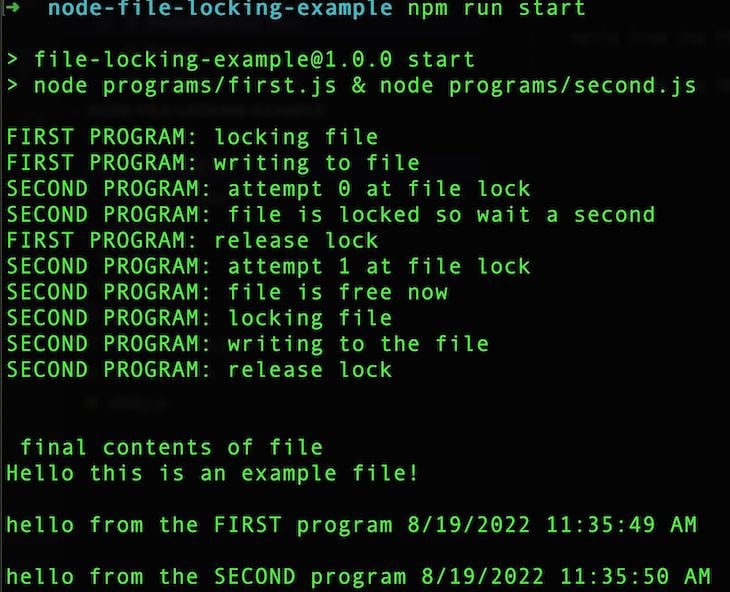
If you run the start npm script in your console, you’ll note the behavior through the logging from both programs:
👁 Npm Start Script Logging Behavior
If you notice in the console statement, the following occurred:
first program locked the filefirst program did work on the filesecond program attempted to lock the file but had to wait as it encountered the lockfirst program then released the lock, thereby freeing the file for accesssecond program saw that the file was free, locked it, and did its work, freeing the fileIf you notice the output at the end, you’ll see that the entries in the file differ only by one second. The first program finished, and then the second program completed.
It’s important to note that this only works as long as you are using proper-lockfile in both programs. In Node.js, you can still access a file directly using the fs package. The idea here is that proper-lockfile provides a mechanism to monitor file access and thus achieve locking.
As I mentioned earlier, you could achieve a similar behavior with mechanisms like a database table that is consulted for which records are locked etc.
In both cases, you leverage an intermediary mechanism to control access to avoid a race condition.
In this post, we discussed a method of locking files with Node.js. We covered the basics and reasoning of why controlling resources and files is important, and we then covered an example of file locking in Node.js using proper-lockfile.
There are many ways to achieve file locking, thereby providing a greater sense of control of resources in Node.js projects. The ideas are the same in that you want to achieve data integrity in your systems, and locking files is one way to achieve that.
As a web developer myself, I rarely have to work directly with file locking. However, I do routinely have to deal with resource allocation, which is a very similar concept to what we are doing here with files.
The npm package proper-lockfile provides a great example of a methodology on how to achieve resource allocation in your projects. I recommend checking out the GitHub repo, as well as the Node.js documentation on the file system.
Thanks for reading my post! Follow me on rhythmandbinary.com and Twitter at @AndrewEvans0102.
Deploying a Node-based web app or website is the easy part. Making sure your Node instance continues to serve resources to your app is where things get tougher. If you’re interested in ensuring requests to the backend or third-party services are successful, try LogRocket.
👁 LogRocket Network Request MonitoringLogRocket lets you replay user sessions, eliminating guesswork around why bugs happen by showing exactly what users experienced. It captures console logs, errors, network requests, and pixel-perfect DOM recordings — compatible with all frameworks.
LogRocket's Galileo AI watches sessions for you, instantly identifying and explaining user struggles with automated monitoring of your entire product experience.
LogRocket instruments your app to record baseline performance timings such as page load time, time to first byte, slow network requests, and also logs Redux, NgRx, and Vuex actions/state. Start monitoring for free.
Learn how to build a full React Native auth system using Better Auth and Expo — with email/password login, Google OAuth, session persistence, and protected routes.
Compare the top AI development tools and models of June 2026. View updated rankings, feature breakdowns, and find the best fit for you.
Learn how Bloom filters reduce database lookups for username availability checks while preserving correctness at scale.
Learn how to test Nuxt apps with Vitest, @nuxt/test-utils, runtime mocks, server route mocks, and Playwright e2e tests.
Hey there, want to help make our blog better?
Join LogRocket’s Content Advisory Board. You’ll help inform the type of content we create and get access to exclusive meetups, social accreditation, and swag.
Sign up now