VOOZH about

URL: https://blog.logrocket.com/ux-design/hero-section-examples-best-practices/

⇱ 10 best hero section examples and what makes them effective - LogRocket Blog


2025-12-04
5257
#ui design
Shalitha Suranga
183775
102

Editor’s note: This blog was last updated in December 2025 to provide examples of the best hero sections, cover steps for creating an effective hero section, and answer the most frequently asked questions about hero sections. Special thanks to the original author, Chinwe Uzegbu, for her contributions to the first version of this post.

👁 Website Window

What’s a hero section?

A hero section is the first, visually prominent UI block at the top of a web page or digital product screen. Its job is to welcome users, present the product value at a glance, and effectively guide them to a desired primary action. It improves the first user impression with the product using a compelling headline, supporting copy, and CTAs (call-to-action), and other visual enhancements.

Most modern websites and other digital products display hero sections right after the primary header segment, usually the product logo and the primary navigation area, or construct the whole main header area within the hero section. It can cover the whole or a large portion of the visible area of the initial screen to grab the user’s attention.

What a hero section isn’t

Hero sections share some similarities with other well-known UI element definitions, but it’s not a:

  • Banner — Banner is a generic term for any eye-catching rectangular component on screen. The hero section has visually prominent design concepts of a banner, and can be considered a special form of banner
  • Above the fold — Above the fold is the initial area of a screen that the user can see without scrolling down. The hero section is not a synonym of above the fold, but it’s always located within the above the fold.
  • Landing page — A landing page is a whole web page that advertises a specific product, and a hero section can be a part of it.
  • Navigation menu — Hero section isn’t a navigation menu. It offers one or two primary navigation actions via CTAs, but isn’t a replacement for the primary navigation or a form of a generic navigational component
  • Carousel — Carousel is an interactive, slideshow-like component that displays multiple pages within one limited rectangular area. The hero section isn’t a carousel, but you can turn a hero section into a carousel to display several hero pages within one hero component

Benefits of adding a hero section

A well-designed, visually prominent, and user-friendly hero section provides you with the following benefits:

  • Welcomes users — An effective hero section makes a good first impression by highlighting the overall product’s impact and benefits in a friendly way
  • Summarizes the product’s purpose — The hero section is the first element the user sees, so it can effectively describe the product’s purpose and benefits to users
  • Provides instant actions for users — A well-designed hero section implements quick actions to guide users to select the most predictable user actions, such as signing up, accessing the product, starting a free trial, comparing available plans, reading documentation, etc.
  • Increases conversion rate — A welcoming, effective hero section can advertise your digital product better than a paid advertising banner and invite more people to try your product, reducing the bounce rate
  • Improves user familiarity — Every website and other digital products have hero sections, so adding one for your product makes your product look and feel like other products, improving user familiarity based on Jakob’s law
  • Visual enhancement — A hero section typically brings imagery and colors, breaking the boredom, so it can positively affect the user’s mood with more visual appeal

When to avoid a hero section

The hero section creates a good first impression, but that doesn’t mean you should aim to include it in every single product you design — in some scenarios, adding a meaningful hero section is practically impossible. If we do so, users may find it annoying, unwanted, unclear, and finally, user engagement will drop.

If your design scenario falls into one of the situations below, avoid using a hero section to keep user engagement up and reduce initial user interaction time:

  • Browse-first products — Digital products that hold many browsable items should prioritize browsing as the first user interaction without generally welcoming and offering browsing as the primary CTA. So, adding marketing-focused hero sections to ecommerce, news, and forums isn’t necessary and just affects user engagement
  • Multiple key actions — If your product interface is a dashboard-like screen that needs to offer multiple primary actions, adding a hero section with some CTAs can bias features and affect the visibility of other widgets or segments
  • Simple task-oriented products — If your product is a simple task-oriented tool (think of an image converter or chatbot), adding a hero section delays the primary interaction
  • Limited spaces — In limited screens, especially mobile screens, prioritizing navigation and other key elements over using a hero section improves usability
  • Returning users — Frequent users of your product usually wish to use the product rather than go through a hero section, since the first impression has already happened

The rule of thumb is to avoid using a hero section if you can’t create a meaningful one for a particular design scenario.

Anatomy of a hero section

Core elements

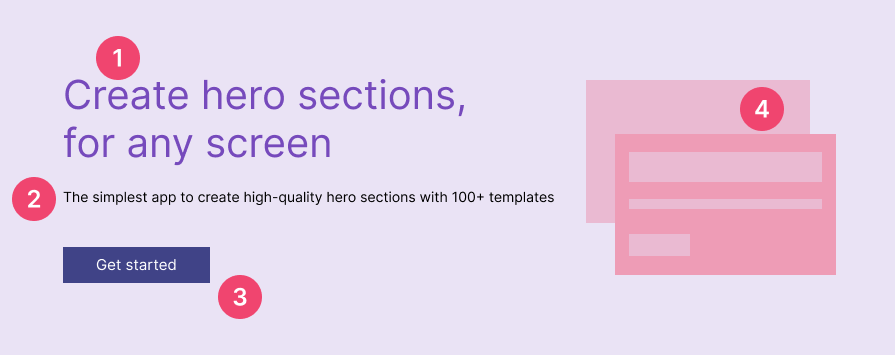
A hero section has four primary elements that you should be familiar with:

👁 Elements Of A Hero Section
Elements of a generic hero section component
  1. Heading — A headline with a larger font size states the purpose of the product. This is usually a single sentence that describes the product to users; however, some modern hero sections implement dynamic headline text with animations to get more advertising benefits
  2. Supporting copy — A short text block, usually displayed in normal paragraph font size, that appears after the primary heading to give more context/description, elaborate on benefits, and direct users to a primary action
  3. CTAs (call-to-action) — One primary CTA button for the most predictable, important action, and a secondary button for a suitable secondary action (only if needed), lets users choose the desired action instantly without spending time visiting the navigation menu or other pages
  4. Hero visual — A visual element to grab the user’s attention, create a good, memorable first impression, and set the user’s mood for the product context. This can be a static image, an animation, or an interactive component based on the designers’ preference and the foundational product design philosophy

Optional elements

A standard hero section contains the above four elements, but you can undoubtedly go beyond it and use the following optional elements with your creative design skills:

  • Aesthetic background layers — Plain background color, gradient, pattern layers, and image carousels improve the overall visual aesthetics of the hero section, and background videos can deliver complex messages in a creative way than a static hero image
  • Quick user inputs — Capturing quick user inputs via text boxes or other input elements can hint about how fast the CTA’s user flow is, and actually help users reach the CTA flow’s result faster. e.g., capturing the user’s email for the sign-up CTA
  • Pre/post-hero utility strip — A small block, usually a text block with icons to include details that improve the user’s trust. This can be placed either before the core hero elements or after, based on the effectiveness of the placement

Like any other UI/UX elements, there aren’t any rules about elements in a hero section, so you can innovate hero sections by adding new hero section elements.

Screen, accessibility, and performance constraints

Using your creative design skills while also caring for responsiveness, accessibility, and performance eventually creates welcoming, usable, and effective hero sections. Here is why you should design under screen, accessibility, and performance constraints while including the above core and optional elements:

  • Screen — Your page should adjust its hero section optimally for the user’s screen size to offer the same, optimized usability and a good first impression for all users. It’s not practical and effective to squeeze all hero section elements for smaller screens, or scatter elements in larger screens — creating a similar, optimized hero section UX in multiple screens by respecting screen constraints should be your ultimate goal
  • Accessibility — Aesthetics can affect accessibility, and on the other hand, caring a lot for accessibility can limit your creativity in aesthetics. Creating aesthetics by strategically preventing accessibility issues is the best way to solve the critical accessibility constraint. e.g., analysing the whole hero background video and applying the most suitable darkening layer opacity to improve foreground element readability, and also make the video well-visible
  • Performance — On slow network connections and low-end devices, hero images, background videos, and interactive components can affect initial page load times and delay the initial user interaction point. Being creative often requires resources, so balancing creativity and performance can be challenging, but vector graphics, lazy-loading, pre-loading, and web-optimized media formats help manage performance constraints well.

Best hero section examples

Here are some hand-picked, well-designed hero section examples that you can use as inspiration to create a great hero section for your digital product:

1. Minimalistic hero — Medium

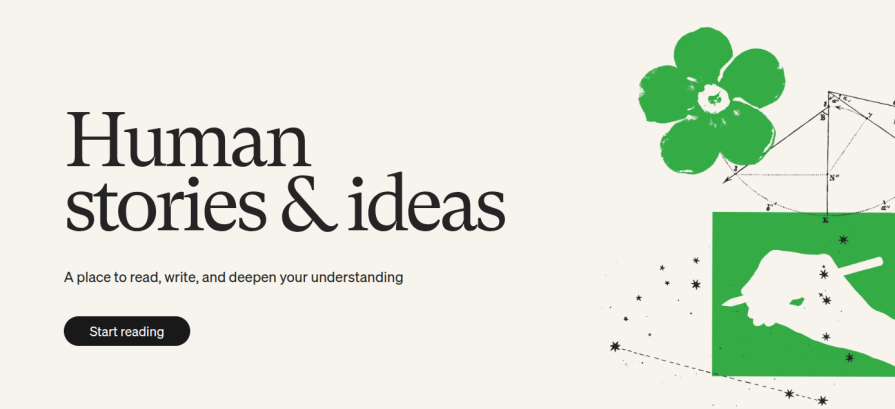
A minimalistic hero section effectively uses minimalism as the core design philosophy and gives a simple but powerful and clear first impression. This hero section type uses short, optimized headings, supporting copies, CTA labels, and minimalistic visuals without excessive optional elements for aesthetic purposes.

Medium is a popular publishing platform that connects writers with worldwide readers. It uses a very minimalistic, clean design on every product screen and prioritizes content over visual aesthetics. The site has an ultra-minimalistic hero section, with only one CTA:

👁 Hero Section Of Medium Landing Page
The hero section of the Medium platform’s landing page

Medium’s minimalistic hero section succeeds because of these design elements:


Over 200k developers and product managers use LogRocket to create better digital experiences

👁 Image
Learn more →

  • Simple but powerful content — This hero section only uses a three-word heading, a short supporting text, one CTA, and a basic illustration without excessive visuals. Its design proves that simplicity can be a powerful marketing strategy
  • Optimized CTA — The CTA button matches the primary purpose of the whole platform, so users can instantly get started without thinking twice about the CTA button
  • Well-thought positioning — Minimalism can be boring if you pack elements together or use excessive whitespace. This hero section cleverly balances the spacing between hero section elements for a comfortable visual experience

2. Input-capture hero — GitHub

The input-capture hero section type displays an input element for a CTA to make the particular CTA-related user flow short and smooth. This hero section type can contribute to increasing the conversion rate since it can hint that the particular input is what you all need for a smooth user flow start. Input capture heroes work best for product sign-ups and product onboarding, e.g., creating a personal website by asking for a subdomain

GitHub is a popular collaborative software development platform. Its landing page has an inviting hero section with a professional design and active color selections. This hero section extends the primary CTA with a text input element to enter the user’s email and continue with the signup process:

👁 GitHub Landing Page Hero Section
The hero section of the GitHub platform’s landing page

This hero section includes the following design considerations to make it more effective:

  • Confident, friendly, and inviting tone — The hero section advertises the product in a confident tone and invites users to the platform in a friendly way, smoothly guiding them to the input-capture CTA. The hero section even plays a minimal animation when the user hovers over the primary CTA
  • Extended CTA design — GitHub captures the user’s email just before the CTA to hint that the registration process is so smooth, increasing the overall conversion rate
  • Distraction-free, active background — It uses active neon color distribution with some friendly 3D characters as the hero section background for a distraction-free, active theme

3. Split-column hero — Sketch

A split-column hero section goes beyond the traditional linear flow in hero design by using two columns for the heading, supporting copy, and CTA. Most split-column designs allocate the whole left column for the heading to prioritize welcoming users and marketing the product with a powerful, short heading.

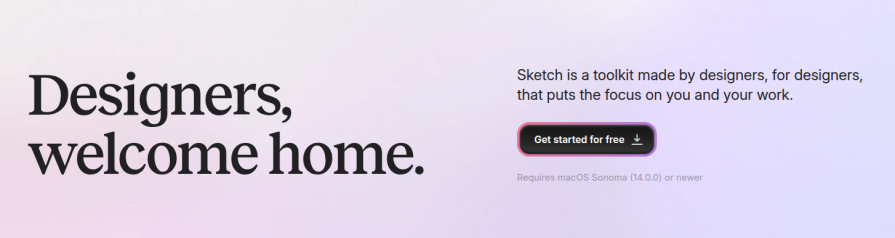
Sketch is a popular, fully featured design software for macOS. The landing page of the Sketch app uses the split-column hero section type and separates the heading and other elements into two columns, as shown in the following preview:

👁 Sketch Split-Column Hero Section
The hero section of the Sketch app’s landing page

This hero section succeeds because of these design elements:

  • Creative layout — Changes the traditional hero section layout to greet users first, and then advertise and display the CTA, implying that the product is well-known to all designers
  • One CTA button, two different signifiers — Instead of a simple text-only CTA, this hero section uses an icon button. Its label invites the user to get started, and the icon implies that the user needs to download software before getting started
  • Effective but neutral CTA hint — The text block after the CTA button states system requirements effectively in a grey color font without affecting the welcoming hero section theme. This also fills the excessive whitespace in the second column

4. Product preview hero — Cursor

The product preview hero section type includes an actual screenshot or a real product-like interactive prototype of the advertised digital product as the hero visual. This hero type lets users see how the product looks before using the product without letting them manually browse a product preview page via a CTA.

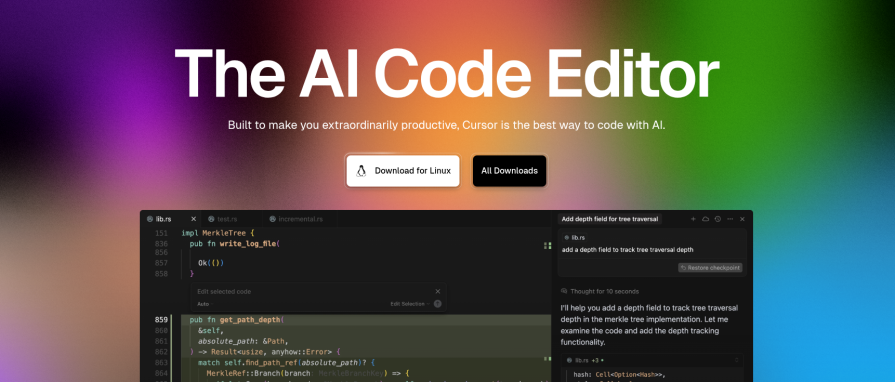
Cursor is a modern, AI-powered code editor that lets developers boost coding productivity with generative AI. Its landing page uses a colorful hero section with a preview of the actual product:

👁 Product Preview Hero Section
The hero section of the Cursor code editor

This hero section includes the following design considerations to make it more effective:

  • Active, energetic background — It uses slightly faded neon colors to highlight confidence and energy without affecting the overall minimalistic appearance of the website
  • Dynamic primary CTA button — The primary CTA offers an instant action to download the product with a dynamic label and icon based on the user’s operating system (e.g., shows “Download for Linux” with the Linux’s official mascot icon on GNU/Linux platforms)
  • Excellent product preview placement — The code editor preview appears as a real window and indicates the primary features of the product — it doesn’t take up more hero section space or get cropped into a smaller preview

5. Product showcase hero — Zoom

A product showcase hero describes the highlight features and capabilities of the advertised product using a product showcase video or interactive hero visual. This hero type typically uses a short, pausable, repetitive product showcase video/animation to summarize the product faster since users can learn the product in detail once onboarded.

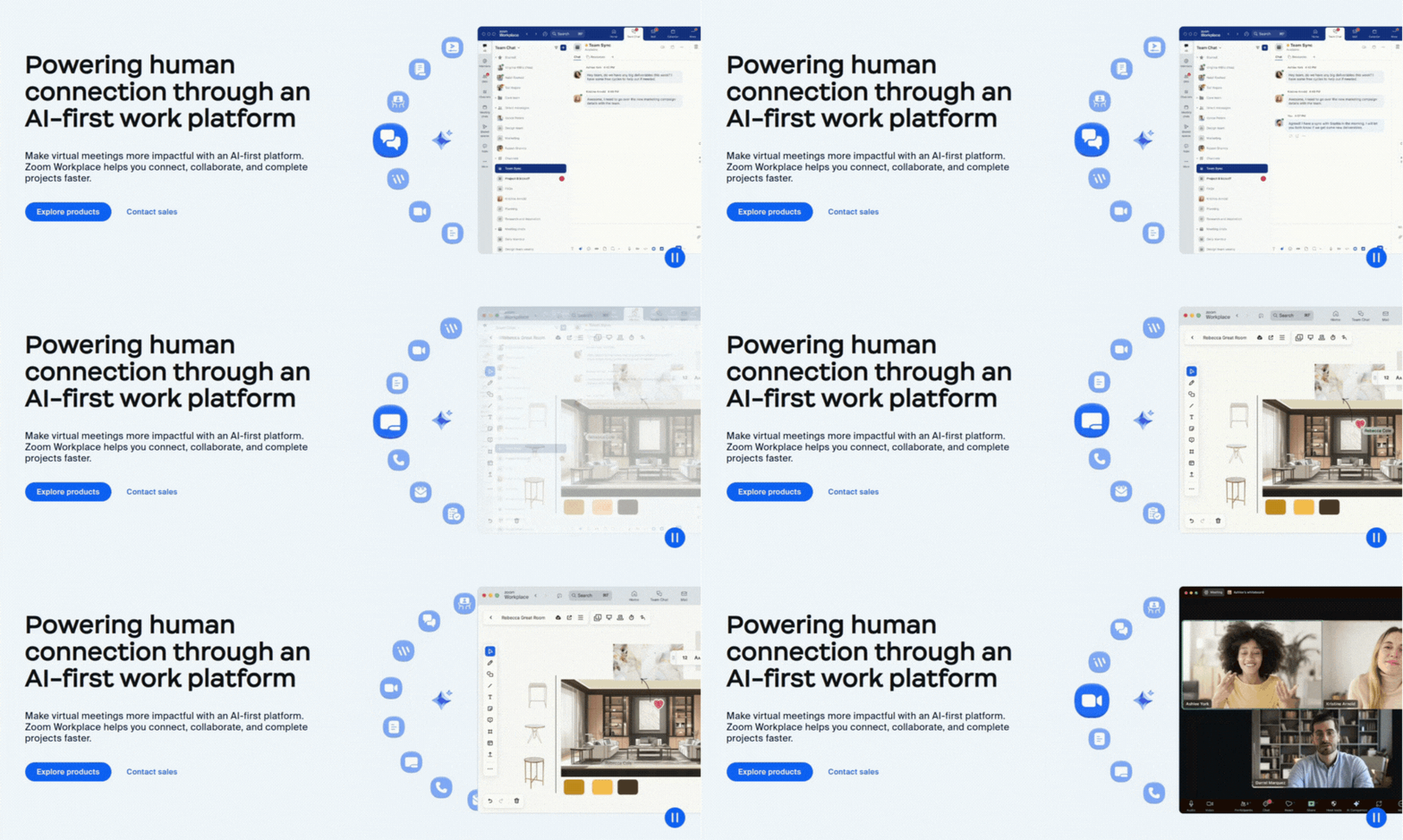
Zoom is a popular communication platform that offers video conferencing, live chat, audio communication, and collaborative features. The Zoom platform’s website integrates a product showcase video into its hero section as follows:

👁 Product Showcase Hero Section Of Zoom
The hero section of the Zoom platform’s landing page

This hero section succeeds because of these design elements:

  • Effective product showcase — The hero video segment effectively advertises the whole platform in a short video by showing previews of primary features
  • Concise text blocks — The heading and supporting text block draw the big picture of the Zoom platform by stating the purpose and features in just three short sentences
  • Better spacing and typography — Each element in the hero section uses enough margins to separate the textual segment and video showcase into two groups, and optimal font sizes to properly fill the hero section, also keeping necessary whitespace

6. Animated hero — Contiant

The animated hero section type animates hero section elements to improve visual aesthetics and display more information by making the hero section dynamic. This hero type dynamically changes headings and supporting copy text, highlights words or segments, and includes animations for the hero visual. Some animated heroes use microinteractions to make the hero section more engaging.

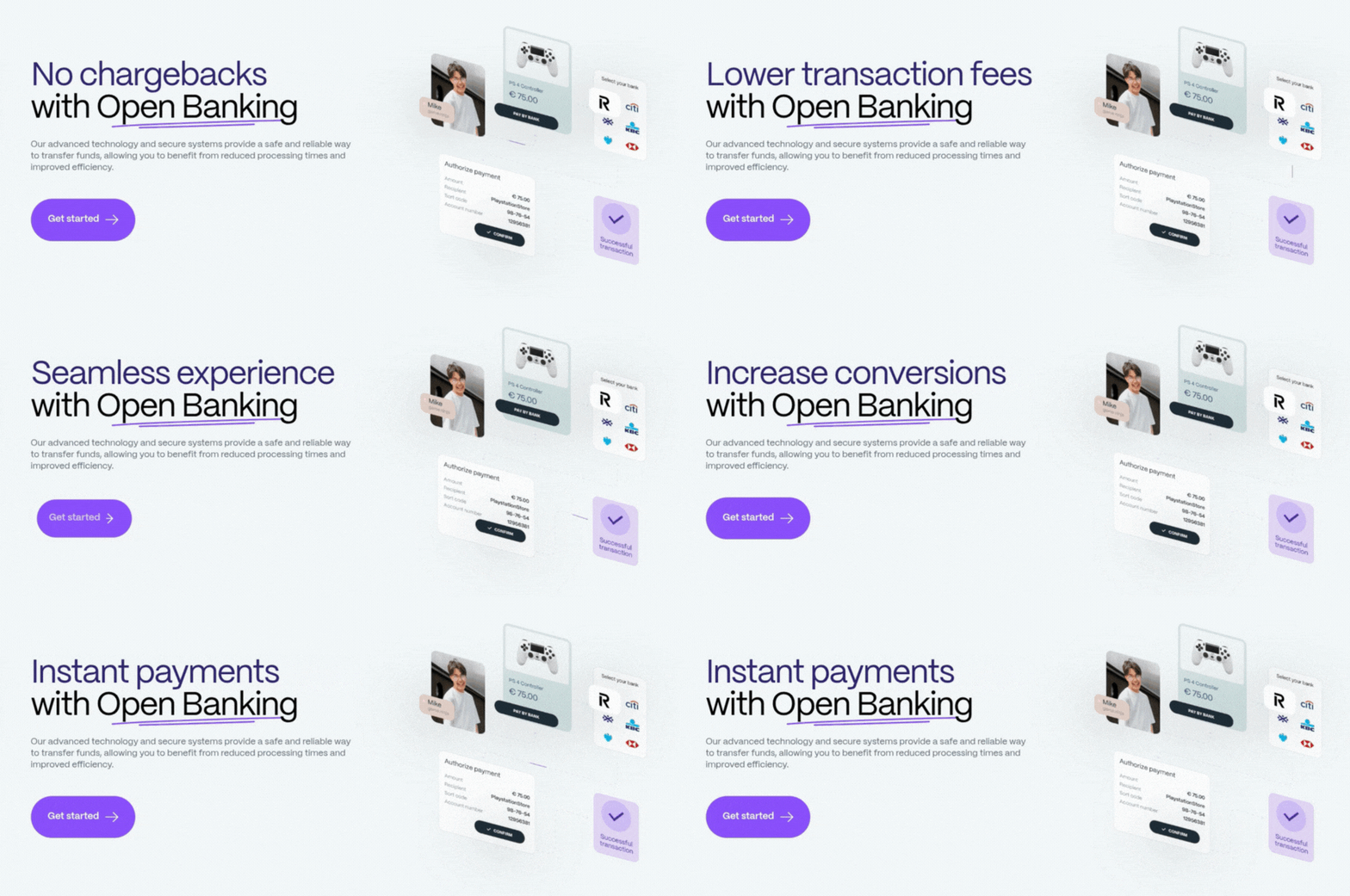
Contiant is another good example of animation in a hero section. This innovative open-banking-based payment platform website features a minimal hero section design with an animated heading, a concise description block, and an interactive, descriptive animation:

👁 Animated Hero Section Contiant
The hero section of the Contiant website

This hero section succeeds because of these design elements:

  • Dynamic heading — The first segment of the heading changes over time with a sliding effect and advertises the product’s benefits effectively
  • Creative double underline — The heading sentence highlights the “Open Banking” term with a creative double underline without using the traditional typography underline
  • Interactive, animated diagram — The right side of the hero section includes a simple, animated, interactive diagram that depicts the flow of a sample financial transaction. It animates arrows, moves slightly with mouse movements, and faces the CTA side as a UX-friendly visual enhancement

7. Typing-effect hero — Codecademy

The typing-effect hero is a special subtype of the animated hero section type. It uses a realistic typing effect to dynamically change the heading. The typing effect provides a powerful, creative, marketing-friendly way to erase a part of the heading and add new parts to progressively deliver more information about the product using a single heading segment. Compared to the general animated type, the typing-effect hero is more suitable for technology, computer, software development, and AI-related domains.

Codecademy is a popular online learning platform that offers various courses for developers, data scientists, AI engineers, and security engineers. The Codecademy website’s homepage has a unique hero section that attracts visitors with a dynamic heading and a slideshow:

👁 Typing Effect Hero Section
The hero section of the Codecademy website

This hero section succeeds because of these design elements:

  • Dynamic heading — The heading uses a typing effect and changes the last word to construct different sentences. The typing effect uses a coding font with a blinking cursor element and syncs with the slideshow to make the hero section visually attractive and related to technology and coding
  • CTA section group — Codecademy groups two primary CTA elements and one secondary CTA link into a frame and names it as “Get started today” to boost the user’s decision-making speed
  • Minimalistic creativity — The heading and slideshow images use layered positioning using maximalist design principles without affecting the overall minimalistic design theme

8. Full-size video background hero — Nissan

The full-size video background hero type uses a full-size, smoothly-looped video for the whole hero section background. This type usually extends the hero section over the product header section, which includes the primary navigation bar and the logo. This hero type uses strategies like headings with no supporting copy, well-thought-out positioning, foreground element backdrops, and opacity layers to make the video well-visible while also keeping core hero elements attention-grabbing.

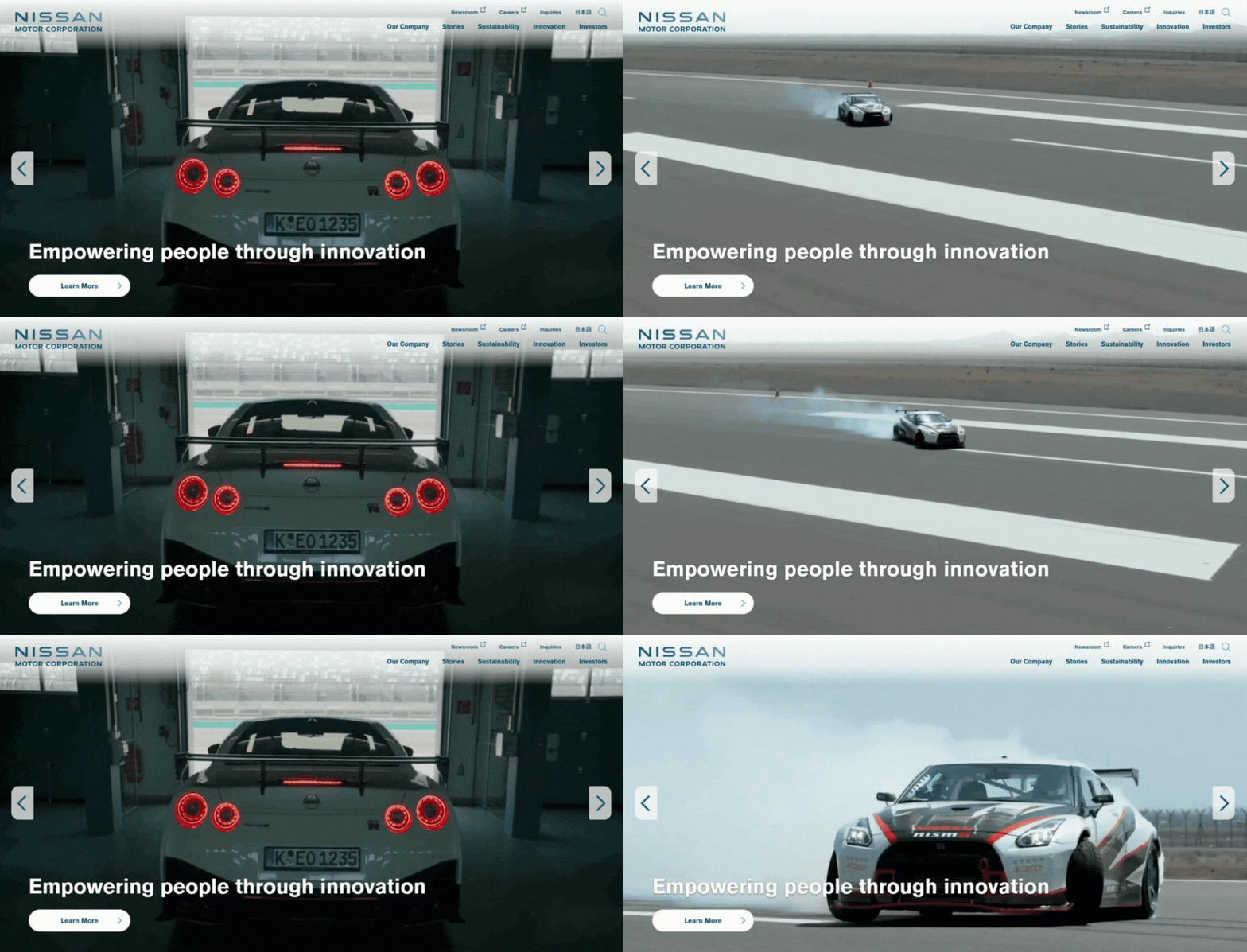
Nissan is a well-known Japanese multinational automotive manufacturer. Nissan’s official global website has a hero section that covers the whole header section and includes a powerful, marketing-friendly background video:

👁 Full Size Video Background Hero
The hero section of the Nissan website

This hero section includes the following design considerations to make it more effective:

  • Excellent background video — The background video advertises its products’ quality, stability, and technology, and has colors that match the hero section’s color scheme
  • Video and element positioning — The hero section video goes under the main navigation and video without affecting the overall visibility of those elements. Alongside this, the hero section heading, CTA, and slider navigation controls are positioned in a way that doesn’t obstruct the video
  • No supporting text block — The hero section doesn’t include a description block to prioritize the video and hint that no introduction is needed to describe its business, since it was founded almost a century ago

9. Pre/post-hero utility strip — Krisp

The pre/post-hero utility strip refers to an optional hero section element that appears before or after hero section elements. It usually contains icons and text. The pre/post-hero utility strip pattern offers a powerful way to let the user know about a crucial product capability without affecting the heading, supporting copy, and other hero section elements.

Krisp is a popular AI-powered note-taking and noise cancellation software that works with all popular online corporate communication apps like Zoom. The Krisp website’s hero section advertises the product well by also cleverly using the space before the headline for a pre-hero utility strip:

👁 Pre Or Post Hero Section Utility Strip
The hero section of the Krisp product landing page

This hero section includes the following design considerations to make it more effective:

  • Effective pre-heading element — Krisp effectively uses a pre-hero utility strip highlight that its software will work on all popular corporate communication platforms, boosting confidence in the advertising purpose of the hero section
  • Textual tags on the product preview — It displays notable features within the static product preview image to describe the product without taking the user’s focus away from the CTA and heading section
  • Effective, non-distractive highlights — Krisp uses a gradient fill and simple bold text to highlight important text segments rather than using intrusive styles

10. Carousel hero — Tesla

The carousel hero type displays multiple hero section pages within one hero area by autoplaying the next page under a specific interval and providing manual carousel controls like pause, next, and previous buttons. This hero type either switches the whole hero page at once or switches a part of it, e.g., switching hero images by keeping other core elements static

Tesla is a popular American multinational automotive and sustainable energy company. Its official website uses a carousel hero section to effectively advertise several vehicle models:

👁 Example Of Tesla Hero Section
The hero section of the Tesla official website

This hero section includes the following design characteristics to make it more effective:

  • Carousel with consistent CTAs — This hero section switches the whole hero page at once, keeping the same CTA group format, so users can easily locate the desired action even when pages are switching
  • Smooth transition — The simple fading animation for the hero page transition event lets the users know that the page has switched without distracting them
  • Better element positioning — Hero section elements are positioned in a way that they don’t obstruct vehicles in the hero carousel images, and they keep the necessary space among them to adhere to the website’s foundational minimalistic design philosophy

Hero section pattern comparison

Pattern CTA Input before CTA Hero visual type Layout Accessibility notes When to use
Minimalistic 1 primary, no secondary No Illustration, no dynamic motion Single column High contrast, simple For products that follow an ultra-minimalistic design philosophy
Input-capture 1 primary, no secondary Yes (e.g., email, username, subdomain-like key inputs) Abstract backgrounds, slight motion with basic interactions like mouse movement Single column focus-visible on input When the primary CTA’s user flow can be improved with a short user input
Split-column 1 primary, optional secondary Optional Neutral imagery, like gradients and abstract backgrounds Two columns Avoiding foregroud-background color blends Try if you need to experiment effectiveness of a non-linear hero flow
Product preview 1 primary,
optional secondary
Optional Static preview, real-product-like prototype, abstract backgrounds Single or two columns Readability of primary elements in the product preview For small or medium-size software product landing pages
Product showcase 1 primary,
optional secondary
Optional Video showcase, interactive showcases, Plain color backgrounds Single or two columns Pausing the showcase video, microinteractions accessibility For large software product landing pages
Animated 1 primary,
optional secondary
Optional Multiple animated visual segments, microinteractions Single or two columns Microinteractions accessibility, avoiding distractive animations Product design teams that prioritize aesthetics and creative design
Typing-effect 1 primary,
optional secondary
Optional Minimal imagery, plain-color backgrounds Single or two columns Typing effect duration For technology, computer, software development, and AI-related products
Full-size video background 1 primary,
optional secondary
Optional None (only the background video layer) Single or two columns Foreground element readability For automotive, sports, futuristic technology-related product designs
Pre/post-hero utility strip 1 primary,
optional secondary
Optional Static or slightly dynamic visuals Single or two columns Text readability of the utility strip When you have a product capability that doesn’t fit well in the heading or supporting copy
Carousel 1 primary,
optional secondary
No Switching hero images Single or two columns Manual carousel controls, carousel page duration When multiple products are available for advertising

Best practices for designing better hero sections

Create effective, high-quality hero sections that welcome users and increase conversion rate with the following best practices:

  • Use only elements that bring value — Users see the hero section first and tend to judge the whole product from it, so you should prevent user cognitive overload by avoiding visual clutter in hero sections
  • Use concise sentences and CTA labels — A well-designed hero section should help any visitor understand the product in a few seconds, and offer instant, self-explanatory CTA buttons to continue with intended actions
  • Use a welcoming and confident tone — Speaking confidently about the product, and also being friendly and welcoming, is the secret behind turning a random visitor into a user through the hero section
  • Use high-quality but lightweight imagery — Hero sections expand over a large percentage of the screen, so you should use high-resolution imagery or vector graphics. They also should load instantly instead of on demand (lazy-loaded)
  • Form a better flow — Connect elements from the headline to the CTA section and form a virtual visual flow from what they describe. A generic hero section introduces the product from the heading, elaborates benefits in the description block, and offers instant actions from CTAs
  • Properly handle screen, accessibility, and performance constraints — Make sure that the hero section maintains its effectiveness in small (mobile), medium (tablet), large (computer), and very large (TV) screens, depending on the user base. Optimize it for all users ethically, considering their abilities. The hero section should appear fairly fast on slow network connections and low-end devices
  • Be fair and ethical with advertising — Using attention-grabbing, powerful sentences in the heading, supporting copy, and pre/post-hero utility strip is great, but make sure that you are speaking the truth about your product.

How to design an effective hero section

Anyone can create a hero section by assembling hero section sub-elements or using a pre-designed template, but you should consider going through the following steps if you wish to create an effective, high-quality hero section that brings benefits for both users and business organizations:

  1. Always start with a low-fidelity version of the hero section, such as a simple pen-and-paper sketch, to define the content and user interactions first, before thinking about higher-level UI details. You can sketch several hero section versions before deciding on one
  2. Brainstorm with headings and choose the most engaging, welcoming, marketing-friendly, and confident one
  3. Write a concise supporting text block that connects with the overall idea of the heading and invites the user to see the CTA section
  4. Identify the most predictable, crucial action that most users wish to do and that brings benefits to the organization (e.g., signing up, downloading the product, etc.). Choose an effective, concise CTA label for the primary action. After that, choose a secondary CTA if there’s an alternative flow that benefits users and the organization
  5. Select the best low-fidelity hero section and start turning it into a high-fidelity hero section design
  6. Position hero section sub-elements within the hero section space and decide on the most suitable visual enhancement using your creative design skills. Finalize the base hero section by adding UI signifiers
  7. Finalize the hero section by adding extra hero section sub-elements only if they bring value (e.g., pre-heading section, small neutral descriptions after CTAs, etc.)

FAQs about hero section design

Before creating an effective hero section for your digital product, review the following most frequently asked questions.

What exactly should be in a hero section?
A generic hero section consists of a heading, supporting text block, CTA button, and visual enhancement to get the user’s attention, welcome them, and offer instant actions to continue using the product. Designers can extend a generic hero section with optional elements to include more information or to improve aesthetics

What are other elements that you can add to the hero section?
You can add a pre/post-hero element, a description block after the CTA section, and a text input before the primary CTA button. There are other ways to innovate as well, but make sure that they bring value to the user.

How big should a hero section be?
Cover a large portion of the visual screen. Some hero sections cover the whole visible screen, and some cover a part of it. Decide on your approach based on the elements that appear after the hero section and your design preferences.

What makes a hero section effective?
A welcoming, visually prominent, and thought-out design with a confident, friendly language tone makes a hero section effective.

Should hero sections have video backgrounds?
This depends on the designer’s preferences and product domain. If designers can advertise the product without affecting the other parts of the website/app, video backgrounds make the hero section more effective (e.g., the Nissan website).

Can you add a hero section to any digital product and get the same benefits?
No, in some scenarios, adding a hero section affects user engagement, e.g., browse-first products, products run on smaller devices, etc.

Is the primary navigation menu a part of the hero section?
No, but you can expand the hero section to go under the navigation menu region if you use a hero background video or image

How important is the whitespace in hero sections?
Using whitespace is a practical and effective way to reduce cognitive load in hero sections and emphasize core hero section elements, so using necessary whitespace is so important in any hero section

Should I use creative humor in hero sections?
Creative humor becomes a powerful marketing strategy in most design scenarios, but make sure that humor positively affects your brand and that the product domain is suitable for humorous advertising. Creative humor is not discouraged, but most designers prefer being confident and direct in hero sections rather than adding humor. Deciding this with your product owners is the best way.

How effective are microinteractions in hero sections?
Using microinteractions is undoubtedly an effective strategy to improve accessibility, user engagement, and overall visual look and feel. A well-thought-out microinteraction can even make a hero section memorable with positive emotions, e.g., 3D characters in GitHub’s hero section

Should the hero section prioritize user goals or business goals?
Both. A good hero section helps user accomplish their goals by also seamlessly embedding business strategies to achieve business goals, the same as you create user-centric products that satisfy business goals.

Conclusion

In this article, we discussed the basics of hero section design, popular hero section types, learned best practices, and evaluated some popular digital products that implement well-designed, effective hero sections. We also created a step-by-step guide to create a better hero section design and answered some FAQs.

A hero section is the element that the user sees first, so you should create it properly with a welcoming, confident, high-quality design to improve the first impression and increase the conversion rate. A well-designed hero section not only boosts organization revenue but also guides every user to accomplish their needs productively.

A general hero section that modern users are familiar with has several core elements, but you aren’t limited to strictly using them only — you are free to innovate new hero section types and various visual improvements using your creative design skills to evolve hero section design for the next UI/UX design era.

LogRocket helps you understand how users experience your product without needing to watch hundreds of session replays or talk to dozens of customers.

👁 Image

LogRocket's Galileo AI watches sessions and understands user feedback for you, automating the most time-intensive parts of your job and giving you more time to focus on great design.

See how design choices, interactions, and issues affect your users — get a demo of LogRocket today.

👁 Image
👁 Image
👁 Image

Stop guessing about your digital experience with LogRocket

Get started for free

Recent posts:

AI made design faster, but did it make it less intentional?

AI has accelerated design execution, but speed can come at the expense of intentionality. Learn how UX teams can preserve product thinking and judgment.

👁 Image
Eric Chung
Jun 18, 2026 ⋅ 9 min read

Full-stack and server-side UX experiments: Testing beyond the frontend

UX testing is not limited to layouts, copy, and visual design. Full-stack and server-side experiments help teams evaluate how backend logic, APIs, algorithms, and product flows affect the overall user experience.

👁 Image
Shalitha Suranga
Jun 16, 2026 ⋅ 3 min read

Bayesian UX testing: A clearer way to interpret A/B test results

In A/B, A/B/n, or multivariate testing scenarios, using p-value with traditional null-hypothesis-based statistical analysis is so common, and most designers […]

👁 Image
Shalitha Suranga
Jun 9, 2026 ⋅ 3 min read

Multi-armed bandits in UX experiments: Faster testing with smarter traffic splits

Traditional A/B testing splits traffic evenly, but multi-armed bandits dynamically send more users to the better-performing version. Here’s how the method works, where it helps, and when UX teams should use it over classic A/B testing.

👁 Image
Shalitha Suranga
Jun 2, 2026 ⋅ 4 min read
View all posts