|
VOOZH | about |
|
VOOZH | about |
As a web developer, you may come across a task that requires you to utilize the local GPU to improve application performance. WebGPU is a cutting-edge technology that promises to transform how we process machine learning workloads in the browser.
👁 Using WebGPU to Accelerate ML Workloads in the BrowserIn this article, we embark on a journey to explore the remarkable fusion of WebGPU and machine learning, discovering how this potent combination accelerates ML workloads right within the confines of your browser. We’ll delve into the mechanics of WebGPU, understand its implications for GPU computing, and unlock the potential of running machine learning models directly within web applications.
The Replay is a weekly newsletter for dev and engineering leaders.
Delivered once a week, it's your curated guide to the most important conversations around frontend dev, emerging AI tools, and the state of modern software.
In the past, graphics and machine learning tasks were largely separate domains.
Graphics rendering was primarily handled by the GPU, and machine learning was executed on traditional CPUs. As web applications and user expectations evolved, there emerged a need for more seamless integration of graphics and machine learning to deliver richer and more interactive web experiences.
Users wanted web applications that could not only display visually stunning graphics, but also perform complex tasks, such as real-time image recognition, natural language processing (NLP), and recommendation systems. This required a shift towards leveraging the immense parallel processing power of GPUs.
The machine learning workflow consists of two main steps:
GPUs play a crucial role in accelerating the training and inference operations, particularly neural networks. Here’s how GPUs contribute to faster and more efficient machine learning:
WebGPU is a new standard that addresses the need to harness the capabilities of modern GPUs in web development. It provides an API for utilizing the GPU in a web-friendly manner. WebGPU is designed to work seamlessly with both graphics rendering and machine learning tasks, bridging the gap between these traditionally separate domains.
WebGPU enables efficient GPU utilization for graphics by allowing developers to create and manage graphics pipelines, rendering commands, and shaders directly in JavaScript or other web programming languages. This results in smoother animations, more realistic 3D graphics, and better overall user experiences.
WebGPU is not just limited to graphics tasks; it also enables web developers to utilize the power of GPUs for machine learning. With WebGPU, developers can leverage the GPU’s parallel processing capabilities to accelerate neural network computations.
WebGPU opens up exciting possibilities for web-based AI applications. Here are some real-world use cases where the combination of WebGPU and ML can shine:
Before diving into the implementation, it’s crucial to ensure that you are using a browser that supports WebGPU. At the time of writing, Google Chrome Dev and Firefox were among the browsers with experimental support for WebGPU.
I have used Google Chrome Dev in this tutorial, so you start it up and enable WebGPU with the following command:
google-chrome-unstable --enable-unsafe-webgpu --enable-features=Vulkan,UseSkiaRenderer
In this section, we will use WebGPU to load an image classification model using TensorFlow.js to predict what a particular image displays. To do this, create an HTML file and paste in the following code:
<canvas id="webgpu-canvas" width="224" height="224"></canvas>
<!-- Load TensorFlow.js. This is required to use MobileNet. -->
<script src="https://cdn.jsdelivr.net/npm/@tensorflow/[email protected]"> </script>
<!-- Load the MobileNet model. -->
<script src="https://cdn.jsdelivr.net/npm/@tensorflow-models/[email protected]"> </script>
<!-- Replace this with your image. Make sure CORS settings allow reading the image! -->
<img id="img" src="https://i.imgur.com/DhAdgKs.jpg" crossorigin="anonymous"></img>
<div id="result">Predicted:</div>
<!-- HTML -->
<!-- Place your code in the script tag below. You can also use an external .js file -->
<script>
 // Define an async function to use await
 async function init() {

 // Check for WebGPU support
 if (navigator.gpu) {
 try {
 const canvas = document.getElementById('webgpu-canvas');
 const context = canvas.getContext('webgpu');
 const device = await navigator.gpu.requestAdapter();
 // const gpu = await device.requestGpu();

 // The rest of your code for model loading and inference
 const img = document.getElementById('img');
 // Load the model.
 const model = await mobilenet.load();
 // Classify the image.
 const predictions = await model.classify(img);
 console.log('Predictions: ');
 console.log(predictions);
 // Display the result
 document.getElementById('result').innerText = `Predicted: ${predictions[0].className}`;
 } catch (error) {
 console.error('WebGPU initialization error:', error);
 }
 } else {
 console.error('WebGPU is not supported in this environment.');
 }
 }

 //...
init();
</script>
The code above demonstrates how to use WebGPU for machine learning inference using a pretrained MobileNet model from TensorFlow.js. It consists of several key components: HTML elements, <script> tags for importing libraries, and JavaScript for initializing WebGPU, loading a model, and making predictions.
The HTML portion begins by defining a canvas element with an id of webgpu-canvas and specific width and height attributes. This canvas will be used for rendering output. The code also includes a placeholder image (with CORS settings allowing image reading) and a div with an id of result to display the prediction outcome.
The <script> tags in the HTML document load the necessary libraries. First, it loads TensorFlow.js using a CDN link; then, it loads the MobileNet model from TensorFlow.js. The model is pretrained for image classification tasks.
The JavaScript code starts by defining an asynchronous function called init. This function is used for initialization and further code execution. It checks for WebGPU support using navigator.gpu. If WebGPU is supported, it proceeds to initialize WebGPU by getting the canvas context, requesting a GPU adapter, and loading the MobileNet model.
After loading the model, it classifies the provided image (referenced by its ID img). The classification result is logged to the console, and the predicted class label is displayed in a div as the result.
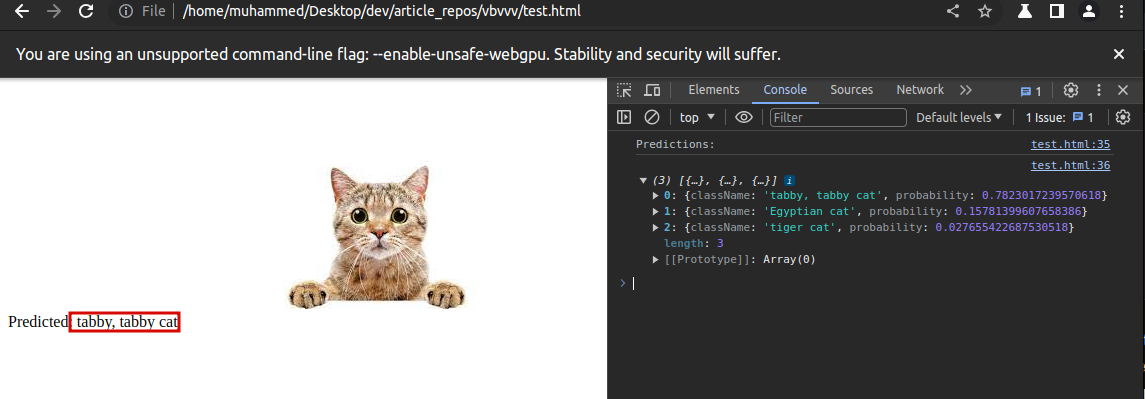
When you open the file on the browser, you will see the prediction:
👁 An Image of a Tabby Cat, which the Model Correctly Classified
In conclusion, the combination of WebGPU and machine learning represents a powerful advancement in the field of web development. As machine learning continues to evolve, the need for faster and more efficient ways to process ML workloads within web applications becomes essential.
WebGPU addresses some of the limitations of previous web-based GPU technologies by providing developers with low-level control over GPU resources and improved performance through parallel processing, platform independence, and enhanced security. These attributes make WebGPU an ideal candidate for accelerating ML workloads in web applications.
Debugging code is always a tedious task. But the more you understand your errors, the easier it is to fix them.
LogRocket allows you to understand these errors in new and unique ways. Our frontend monitoring solution tracks user engagement with your JavaScript frontends to give you the ability to see exactly what the user did that led to an error.
👁 LogRocket Dashboard Free Trial BannerLogRocket records console logs, page load times, stack traces, slow network requests/responses with headers + bodies, browser metadata, and custom logs. Understanding the impact of your JavaScript code will never be easier!
TSRX adds first-class control flow, conditional hooks, and scoped styles to React via a TypeScript compiler extension — no new framework required.
Learn how to build a full React Native auth system using Better Auth and Expo — with email/password login, Google OAuth, session persistence, and protected routes.
Compare the top AI development tools and models of June 2026. View updated rankings, feature breakdowns, and find the best fit for you.
Learn how Bloom filters reduce database lookups for username availability checks while preserving correctness at scale.
Would you be interested in joining LogRocket's developer community?
Join LogRocket’s Content Advisory Board. You’ll help inform the type of content we create and get access to exclusive meetups, social accreditation, and swag.
Sign up now