|
VOOZH | about |
|
VOOZH | about |
Next.js Route Handlers work well when your API is small, internal, and closely tied to the UI. They make it easy to ship quickly inside a single framework, which is why many teams start there. But as API logic grows to include business rules, validation, third-party integrations, background work, and heavier request volume, the file-based handler model can become harder to structure and maintain.
👁 When to move API logic out of Next.jsA common response is to move that logic into a separate backend service. In some cases, that is the right choice. But it also adds operational overhead, including separate deployments, CORS management, and the need to keep frontend and backend types in sync across a network boundary.
There is another option.
Instead of moving your API out of the application entirely, you can move the logic out of the Next.js abstraction while keeping it in the same project. That approach gives you a clearer backend boundary, stronger end-to-end type safety, and a runtime model that is often easier to reason about as the system becomes more complex.
In this article, we’ll examine when it makes sense to move API logic out of Next.js Route Handlers, how that pattern works with ElysiaJS, and what you gain in structure, type safety, and long-term maintainability by doing so.
The Replay is a weekly newsletter for dev and engineering leaders.
Delivered once a week, it's your curated guide to the most important conversations around frontend dev, emerging AI tools, and the state of modern software.
In Next.js, type safety across the network is often enforced by convention. You validate inputs with Zod on the server, then define separate TypeScript interfaces on the client. That works until one side changes and the other doesn’t. The app still builds, but the contract has already drifted.
That same tension shows up in other validation-heavy stacks too, which is why LogRocket recently broke down when to use TypeScript, Zod, or both at the application boundary.
ElysiaJS approaches this differently through Eden Treaty. Instead of manually sharing types, your API becomes a typed object the frontend can import directly. Routes, parameters, and response types are inferred from the server definition itself. The API contract lives in one place.
Under the hood, this is powered by an inline validation system using TypeBox. A single schema definition handles multiple concerns at once:
That makes API drift much harder to introduce. If you change a response shape, TypeScript can immediately flag dependent usage on the frontend. The feedback loop shifts from runtime debugging to compile-time errors.
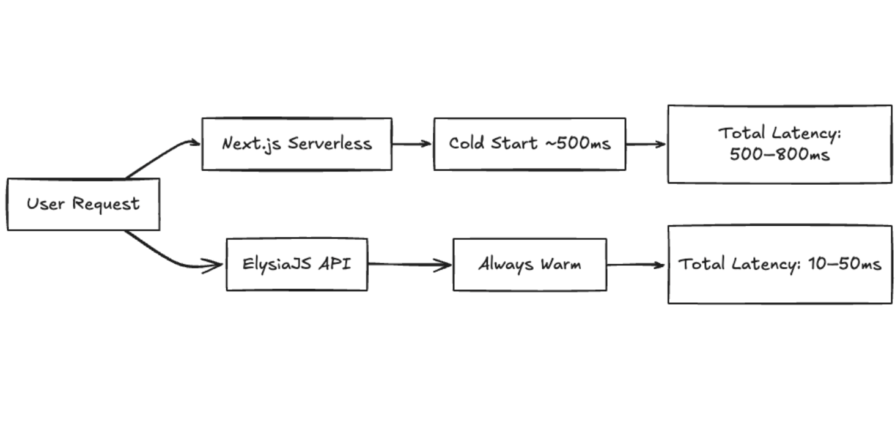
Next.js API routes are often deployed in a serverless model. That works well when you want scale-to-zero economics and minimal operational overhead, but it also introduces cold starts. A few hundred milliseconds may not sound like much, but on user-facing APIs, it adds up quickly.
For a refresher on what Next.js gives you before you introduce another abstraction, see LogRocket’s walkthrough on using Next.js Route Handlers.
Moving API logic into a long-lived process changes that behavior. With ElysiaJS running on Bun or Node.js, the server stays warm, so requests can be handled without serverless startup overhead.
That does not automatically make serverless the wrong choice. If your traffic is spiky, low volume, or mostly internal, Route Handlers may still be the simpler default. But for frequently hit APIs, background work, or backend logic that keeps growing, the serverless-first model starts to feel less convenient.
If your needs are still lightweight, newer Next.js patterns like after() for post-response work may cover some of the same ground without requiring a dedicated API layer.
That raises a natural question: is Elysia stable enough compared to something like Express?
The difference is less about raw maturity and more about where complexity lives.
Express is mature and widely used, but it typically relies on separate middleware and libraries for validation, typing, and documentation. That flexibility is powerful, but it also means teams often assemble those pieces differently across a codebase.
Elysia takes a more integrated approach. Validation, typing, and documentation are defined in the same place and derived from the same schema. That reduces the number of moving parts and makes the API easier to reason about as it grows.
The tradeoff is ecosystem size. Express has years of middleware behind it. Elysia’s ecosystem is smaller, so teams need to be comfortable with a more opinionated stack.
From a performance perspective, ElysiaJS also benefits from precompiling route logic at startup instead of repeatedly layering work into request-time middleware. When paired with Bun, that can translate to higher throughput and lower latency under sustained load.
The bigger practical win, though, is consistency. As complexity grows, it becomes easier to keep validation, contracts, and responses aligned instead of letting the API turn into a collection of slightly different patterns.
Most teams do not want to rewrite their stack. The goal is to improve structure without changing how the application is deployed.
This setup keeps everything inside a single Next.js app while moving API logic into Elysia.
In a standard Next.js setup, endpoints are split across files:
app/api/
├── tasks/
│ └── route.ts # GET /api/tasks, POST /api/tasks
└── tasks/
 └── [id]/
 └── route.ts # GET, PATCH, DELETE /api/tasks/:id
Each file handles parsing, validation, and response shaping independently.
With Elysia, the same functionality can be defined in one place:
import { Elysia, t } from "elysia"
import { swagger } from "@elysiajs/swagger"
import { store } from "./store"

export const app = new Elysia({ prefix: "/api" })
 .use(swagger({ path: "/docs" }))
 .get("/tasks", () => store.list())
 .post("/tasks", ({ body }) => store.create(body), {
 body: t.Object({
 title: t.String({ minLength: 1 }),
 priority: t.Union([
 t.Literal("low"),
 t.Literal("medium"),
 t.Literal("high"),
 ]),
 }),
 })
 .get("/tasks/:id", ({ params, error }) => {
 const task = store.get(params.id)
 return task || error(404, { message: "Task not found" })
 })
 .patch(
 "/tasks/:id",
 ({ params, body, error }) => {
 const task = store.update(params.id, body)
 return task || error(404, { message: "Task not found" })
 },
 { body: t.Object({ done: t.Boolean() }) }
 )

export type App = typeof app
Parsing and validation are handled by the framework, and types are inferred directly from the schema.
In Next.js, file structure usually determines routing. Once you move logic into Elysia, you give up that convention because Elysia uses its own router. The bridge between them is a single catch-all route file:
app/api/
└── [[...slugs]]/route.ts # catches everything under /api/**
That file contains almost no Next.js logic. It simply forwards requests to the Elysia fetch handler. Because Next.js expects named HTTP method exports, you can export app.fetch for each method you want to support.
It is also important to set the "/api" prefix on the Elysia constructor so its internal router matches the full incoming path correctly.
With Eden Treaty, the frontend can import the API type directly. That means:
Changes to the server surface immediately as TypeScript errors in the client.
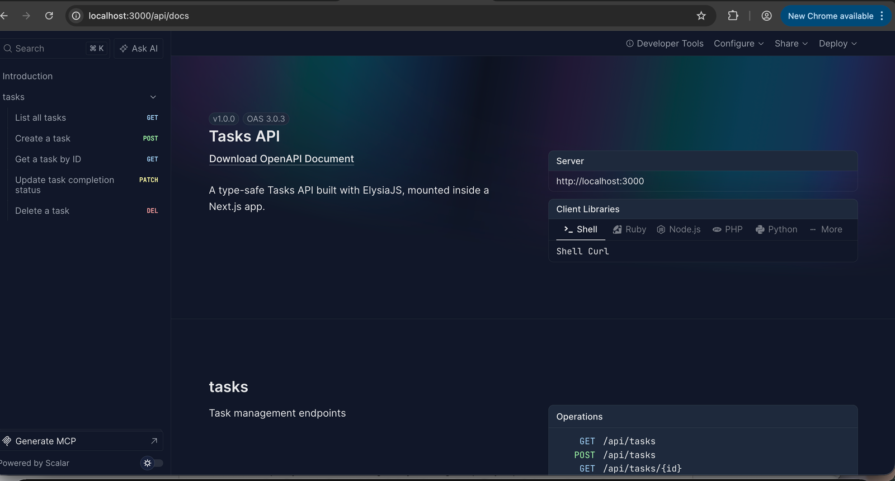
Elysia can generate an OpenAPI specification from the same schema you already use for validation and expose it through Swagger UI at /api/docs.
This is what that looks like in practice:
Because Elysia exposes a standard OpenAPI spec, you can also generate clients with existing tooling:
import createClient from "openapi-fetch"
import type { paths } from "./generated"

const client = createClient<paths>({
 baseUrl: "/api",
})

const { data } = await client.POST("/tasks", {
 body: { title: "Write article", priority: "high" },
})
This replaces manually written fetch calls and separate interfaces. The client stays in sync because it is generated from the same schema.
A common concern is whether adding a dedicated API layer means adding a separate deployment. It doesn’t. This setup still ships as a single Next.js application. The Elysia app lives in a library file, and the catch-all route is still a normal Next.js file.
Deploying to Vercel or a Docker container works much the same way. In this setup, the main configuration change is adding Elysia as an external package in next.config.js so Next.js loads it at runtime instead of trying to bundle it through its usual server pipeline:
// next.config.js
experimental: {
 serverComponentsExternalPackages: ["elysia"]
}
The split is straightforward. Pages, layouts, and Server Components stay in Next.js. Endpoints that need stronger validation, a public contract, or a cleaner backend structure move into Elysia.
That gives you a useful seam without forcing a multi-service architecture.
If your endpoints are mostly thin internal shims for Server Components, Route Handlers are usually still the simpler choice. If you are building public APIs, shared contracts, or more complex backend logic, a dedicated Elysia layer starts to make more sense.
Here’s a quick comparison:
| Feature | Next.js Route Handlers | Dedicated Elysia layer |
|---|---|---|
| Primary use | Internal shims for RSCs | Public APIs and complex logic |
| Type safety | Manual shared interfaces | Automatic Eden Treaty |
| Validation | External libraries like Zod | Native TypeBox-based validation |
| Execution | Serverless-first models | High-throughput, long-lived processes |
| Structure | Unopinionated files | Modular controllers and services |
Those differences matter less when an API is still small, but they become much more visible once multiple consumers and more complex workflows depend on the same contract.
The real cost of an API is rarely writing the first version. It is coming back months later to add one field and spending two hours figuring out what breaks, where the validation lives, and which consumers are depending on the old shape.
Route Handlers do not give you much structural help there. Elysia does. The difference shows up most clearly in schema sharing, documentation, and keeping the API contract consistent over time.
Imagine you have a Zod schema wired into a form for client-side validation and a separate validation block inside your Route Handler for the same data. Same shape, two files, no real connection between them.
Then someone tightens a constraint on the server, forgets to update the form, and the API starts rejecting submissions that passed client-side validation. Nobody notices until a user hits the error.
That is the kind of drift Elysia is designed to reduce. Define the shape once, and both the route and the form can read from it:
import { t } from "elysia"

export const TaskSchema = t.Object({
 title: t.String({ minLength: 1, maxLength: 200 }),
 priority: t.Union([
 t.Literal("low"),
 t.Literal("medium"),
 t.Literal("high"),
 ]),
})
Your route can use TaskSchema directly. Your form can import the same object. Change the schema once, and both layers update together.
Documentation drifts for the same reason contracts do: it usually lives somewhere else.
You write a route, plan to update the docs later, get pulled into another PR, and suddenly your Swagger page describes an API that no longer exists. Elysia’s Swagger plugin avoids that problem by generating the OpenAPI spec from the same TypeBox schemas you already wrote for validation.
export const app = new Elysia({ prefix: "/api" })
 .use(
 swagger({
 path: "/docs",
 documentation: {
 info: { title: "Tasks API", version: "1.0.0" },
 },
 })
 )
 .post("/tasks", ({ body }) => store.create(body), {
 body: TaskSchema,
 detail: { summary: "Create a new task", tags: ["Tasks"] },
 })
That means a mobile client or third-party integration can point standard OpenAPI tooling at /api/docs and generate a typed client from the actual API contract, not a manually maintained side document.
Schema sharing and generated docs both point to the larger issue: API drift tends to happen quietly.
It is almost never one dramatic mistake. It is a renamed field under deadline pressure, a response shape extended in one route but not another, or two developers returning slightly different error formats because the pattern lives only in habit.
In a Route Handler codebase, TypeScript stops at the network boundary. You can change a response shape on the server, the build still passes, and the client breaks at runtime.
With Eden Treaty, the frontend imports the type of the Elysia app directly, so the compiler can check the full round trip. Rename a field on the server, and every dependent client usage fails at compile time. The problem shows up during development instead of in production.
Next.js Route Handlers are a sensible default for APIs that are small in scope, primarily internal, and closely coupled to the UI. They support fast iteration and, for many applications, provide enough structure without adding unnecessary complexity.
That model becomes less effective, however, as the API takes on more business logic, stricter validation requirements, shared contracts, or higher request volume. At that stage, moving the logic into a dedicated ElysiaJS layer can provide clearer separation of concerns, stronger type guarantees, and a more maintainable foundation over time, without requiring a separate backend service.
The advantage of this approach is its balance: you retain a single application and deployment model, while introducing a more explicit backend boundary within the same codebase.
If your Route Handlers remain straightforward, there is little reason to replace them. But if they are starting to function as an improvised backend framework, migrating even a single endpoint into Elysia is often enough to determine whether the additional structure is justified.
Debugging Next applications can be difficult, especially when users experience issues that are difficult to reproduce. If you’re interested in monitoring and tracking state, automatically surfacing JavaScript errors, and tracking slow network requests and component load time, try LogRocket.
LogRocket captures console logs, errors, network requests, and pixel-perfect DOM recordings from user sessions and lets you replay them as users saw it, eliminating guesswork around why bugs happen — compatible with all frameworks.
LogRocket's Galileo AI watches sessions for you, instantly identifying and explaining user struggles with automated monitoring of your entire product experience.
The LogRocket Redux middleware package adds an extra layer of visibility into your user sessions. LogRocket logs all actions and state from your Redux stores.
👁 ImageModernize how you debug your Next.js apps — start monitoring for free.
Learn how to test Nuxt apps with Vitest, @nuxt/test-utils, runtime mocks, server route mocks, and Playwright e2e tests.
I had four weeks to build a complete app from scratch using AI tools like OpenCode and Claude Opus: here’s how it went.
Learn how to build a reusable Vue 3 table engine that powers tables, cards, and lists with shared sorting and pagination logic.
Compare the best React chart libraries for 2026, including Recharts, Nivo, visx, Apache ECharts, MUI X Charts, and more.
Hey there, want to help make our blog better?
Join LogRocket’s Content Advisory Board. You’ll help inform the type of content we create and get access to exclusive meetups, social accreditation, and swag.
Sign up now