|
VOOZH | about |
|
VOOZH | about |
Editor’s note: This post was updated on 12 November 2024 by Hussain Arif with enhanced syntax, refined explanations of Babel and SWC integration, clearer code examples, and additional context on performance benchmarks and configuration options.
👁 ImageThe Replay is a weekly newsletter for dev and engineering leaders.
Delivered once a week, it's your curated guide to the most important conversations around frontend dev, emerging AI tools, and the state of modern software.
At its core, Babel , and SWC are two transpilers that convert newer versions of JavaScript/TypeScript code into older and more compatible JavaScript code.
There are a few differences between them, some of them include:
At their core, Babel and SWC are both transpilers that convert newer versions of JavaScript/TypeScript code into older and more compatible JavaScript code.
Despite having similar core functionalities, there are considerable differences between the two. Here are the biggest ones to consider:
Now we’ve learned what transpilers are, and how Babel and SWC compare to each other. Let’s look into how Babel works under the hood.
Babel reads the source code based on the configs you define for it and compiles newer JavaScript features such as arrow functions or optional chaining. This process is carried out with Babel’s three major tools:
You might’ve have seen the phrases “JavaScript + SWC” or “TypeScript + SWC” being thrown around on projects on the Internet. In this portion of the article, you will learn what exactly SWC is — and why you should switch to it.
SWC is an alternative transpiler for JavaScript. Many businesses have rewritten various parts of their code with it.
For example:
Why have these companies all swapped to SWC?
Well, SWC is written in Rust, which makes it much faster than Babel. Rust is known for its performance and reliability; and it’s also particularly performant because of its effective garbage collection.
Garbage collection is a memory management approach that frees up resources by removing obsolete data objects. Since Rust decides which memory resources are no longer necessary at compile time while also not having to run continuously, it dynamically frees up those resources, reducing processing time and bringing major performance gains to the table.
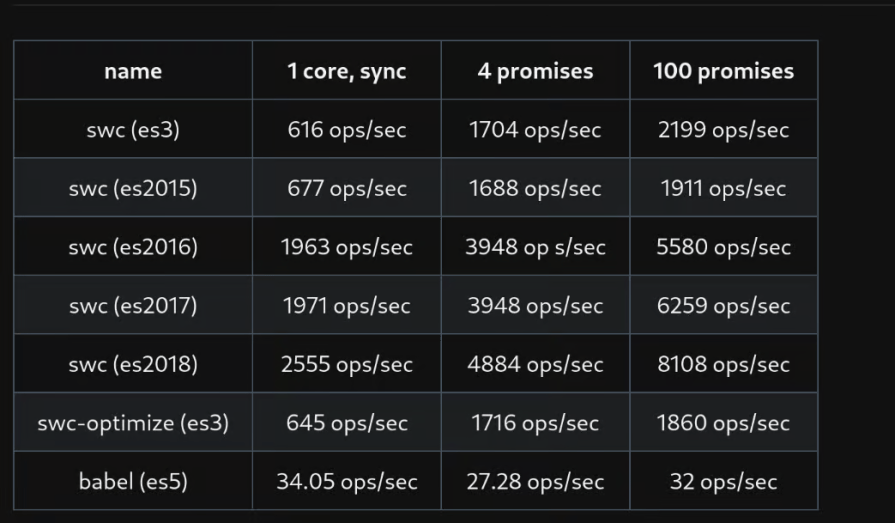
The SWC team has a whole page dedicated to showing off its speed. Here’s a chart that compares its speed with Babel and showcases its progress in performance over the years:
Code transpiling can be an expensive process. That’s why having a transpiler written in Rust helps to streamline any bulkiness. We’re gonna explore this further, but first, we should determine if we need a transpiler at all.
There are some cases where a transpiler might not be necessary. If you’re building a simple project that mostly relies on a well-supported version of JavaScript like ES3, you should be fine without a transpiler. For example, the code below will work on almost every browser:
// we print it, but we don't agree with it
function saySomething (something) {
 console.log(`${something}. But don't tell anyone.`);
}

saySomething("I don't like Javascript!");
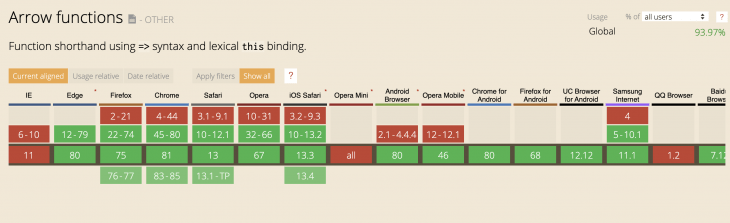
If you’re building a simple project that relies on newer versions of JavaScript like arrow functions , but the browsers you need to support also do support those new features. For example, running the below code in a newer version of Chrome (45+) should be fine:
// we print it, but we don't agree with it
const saySomething = something => {
 console.log(`${something}. But don't tell anyone.`);
};

saySomething("I don't like Javascript!");
If we feed this code into the SWC transpiler, we get this JavaScript output:
var saySomething = function(something) {
 console.log("".concat(something, ". But don't tell anyone."));
};
saySomething("I don't like Javascript!");
Notice that the transpiler used keywords and functions like concat and var to ensure compatibility across different JavaScript interpreter versions. In fact, according to Mozilla’s documentation, you can run this code on the first version of Google Chrome!
Outside of these cases, we still need transpilers in our applications. Browsers use different types of JavaScript engines like V8 (Chrome), SpiderMonkey (Firefox), and Chakra (IE). This means that even with a standard JavaScript specification, the timing of getting standards in different browsers and the level of their support is varied extensively.
As a result, we need a consistent handling of our JavaScript code across many different browsers. Transpilers allow us to stress less about breaking things or losing the chance to use new features.
Our reliance on transpilers is not just limited to instances where we’re converting ES6 or TypeScript to ES5. Transpilers bring the future of JavaScript to us, while also letting us handle various cases of JavaScript conversion, like ES2019. This is an incredibly powerful tool for today’s developers.
In this section, we’ve established why we need transpilers. Now let’s test SWC usage with a simple setup, and then compare its relative performance and speed to Babel.
SWC can be installed as a package from the NPM package manager.
Start by running this command in the root of your directory:
# use `cd` to go to the right directory and then run
mkdir swc_project
cd swc_project
# initialize a package.json
npm init

#install swc core as well as its cli tool
npm i -D @swc/core @swc/cli
By running this, we now have both the SWC core as well as the CLI. The core package will help us in our build setup, while the CLI package can be run with a command in the terminal.
As a first step, we focus on the CLI tool to transpile our JavaScript files. Imagine that we have the below JavaScript file, which exists in the root of directory:
// async.js
const axios = require("axios");

async function getData() {
 try {
 const response = await axios.get(
 "https://jsonplaceholder.typicode.com/todos/1"
 );
 console.log(response.data);
 } catch (error) {
 console.error(error);
 }
}
getData();


// result:
// ▶Object {userId: 1, id: 1, title: "delectus aut autem", completed: false}
Let’s try using SWC’s transpiler on the code snippet above:
# running this command will emit the transpiled data to stdout
# and it will be printed out in the terminal
npx swc ./async.js

# running this command will create a new file called `output.js`
# with the transpiled data
npx swc ./async.js -o output.js

# running this will create a new directory called `transpiledDir`
# and will transpile all the files within the original directory
npx swc ./swc_project -d transpiledDir
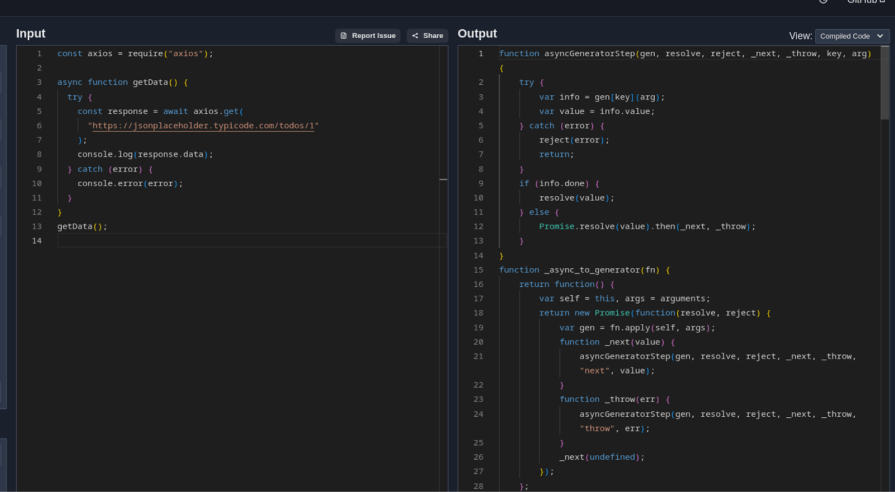
You can use this SWC playground to see what the transpiled file looks like. A portion of the transpiled output looks like this:
As a second step, we want to include SWC as a tool in our build system. For this one, we want to use Webpack as a more advanced and configurable builder.
For starters, let’s take a look at how our package.json would look for a setup of Webpack and SWC. With this setup, we can run npm run-script build to let webpack build our package; additionally, we can run npm run-script start to let Webpack serve our application:
{
 "name": "swc_learn",
 "version": "1.0.0",
 "description": "Tutorial project",
 "main": "async.js",
 "scripts": {
 "test": "echo \"Error: no test specified\" && exit 1"
 },
 "author": "",
 "license": "ISC",
 "dependencies": {
 "axios": "^1.7.7",
 "react": "^18.3.1",
 "react-dom": "^18.3.1",
 "regenerator-runtime": "^0.14.1"
 },
 "devDependencies": {
 "@swc/cli": "^0.4.1-nightly.20240914",
 "@swc/core": "^1.7.39",
 "css-loader": "^7.1.2",
 "html-loader": "^5.1.0",
 "html-webpack-plugin": "^5.6.3",
 "sass": "^1.80.4",
 "sass-loader": "^16.0.2",
 "style-loader": "^4.0.0",
 "swc-loader": "^0.2.6",
 "webpack": "^5.95.0",
 "webpack-cli": "^5.1.4"
 }
}
The above configuration for building and starting an application is stored in a webpack.config.js file, which will automatically be picked up by Webpack. There are a few things going on in this file:
output: We are setting the name and location for Webpack to output your bundles, assets, and files including all the transpiled filesdevServer: We are serving our Webpack app through this config by telling Webpack where to serve the content from as well as defining a port to listen for requests onHTMLWebpackPlugin: We are defining this plugin to make the process of serving our HTML file with Webpack bundles included easierBut the most important part of this config is the swc-loader, which allows us to transpile JavaScript files with .js or .jsx file extensions:
// global dependencies
//filename: webpack.config.js
const path = require('path');
const HTMLWebpackPlugin = require("html-webpack-plugin");

module.exports = {
 mode: "development",
 output: {
 path: path.resolve(__dirname, './dist'),
 filename: 'index_bundle.js'
 },
 devServer: {
 contentBase: path.join(__dirname, 'dist'),
 compress: true,
 port: 9000
 },
 module: {
 rules: [
 {
 test: /\.jsx?$/ ,
 exclude: /(node_modules|bower_components)/,
 use: {
 // `.swcrc` in the root can be used to configure swc
 loader: "swc-loader"
 }
 },
 {
 test: /\.html$/,
 use: [
 {
 loader: "html-loader",
 options: { minimize: true }
 }
 ]
 },
 {
 test: /\.scss/i,
 use: ["style-loader", "css-loader", "sass-loader"]
 }
 ]
 },
 plugins: [
 new HTMLWebpackPlugin({
 filename: "./index.html",
 template: path.join(__dirname, 'public/index.html')
 })
 ]
};
With swc-loader set up in our Webpack config, we’ve come halfway to successfully transpiling our JavaScript files. But we still need to instruct SWC on how exactly to transpile our files. As it turns out, SWC has a similar approach to Babel here. You’ll have to config file in the root directory called .swcrc to carry this process out. Let’s see what this config looks like for a project that wants to transpile TypeScript.
In this config, we’re using the test config as a Regex to only match with files that have a .ts file extension. Additionally, with the jsx.parser config, we are instructing SWC which parser to use for the transpilation (could be typescript / ecmascript).
However, we still have more control over the syntax parsing by defining which options of the transpilation are intended for our use case. For example, in this example, we are interested in transpiling Typescript decorators and dynamic imports, but ignore transpiling files with .tsx file extension:
// .swcrc

{
 "$schema": "https://swc.rs/schema.json",
 "test": ".*.ts$",
 "jsc": {
 "parser": {
 "syntax": "typescript",
 "tsx": false,
 "decorators": true,
 "dynamicImport": true
 }
 }
}
Now, let’s imagine that we want to use React in our webpack SWC example above. As we know, in React we can use a certain file extension called .jsx for writing React components:
// App.jsx

// global dependencies
import React from 'react';
import ReactDOM from 'react-dom';

const App = () => {
 return <h1>My SWC App</h1>;
};

ReactDOM.render(<App />, document.querySelector("#root"));
Serving this file through Webpack needs the correct webpack loader which we already have and defined above. It also requires the right transpilation settings in .swcrc file. Now with this approach, we are using the latest features of modern JavaScript (ES2024) as well as supporting .jsx file when transpiling. Additionally, if we need extra transpilation settings for our React project, we’ll have plenty of settings on hand:
// .swcrc

{
 "jsc": {
 "parser": {
 "syntax": "ecmascript",
 "jsx": true
 }
 }
 }
The speed of a transpiler is critical since it is baked into the build process. Of course, many developers find that any time that can be saved in this area is precious. Let’s see how these two tools compare in terms of speed.
First, we can compare the two transpilers in an artificial way. We’ll run code transformation for Babel and SWC in a synchronous manner. As we know, JavaScript is single-threaded, making it impossible to run heavy computations in asynchronously. All things considered, this method still gives us an indicator of the speed comparison. Let’s test these benchmark comparisons run on a single core CPU (tests performed by the maintainer of SWC project):
| Transform | Speed (operation/second) | Sample Runs |
|---|---|---|
| SWC (ES3) | 616 ops/sec | 88 |
| Babel (ES5) | 34.05 ops/sec | 58 |
This indicates that even with a more expensive process of ES3 transformation for SWC, the speed of SWC transpilation is evident compared to Babel.
Now, if we want to benchmark a more realistic scenario, we can run samples against await Promise.all(), which is a more expensive and real scenario for handling the operations in JavaScript. With this benchmark, the number of CPU cores and parallel computations come into play. In another benchmark that was run, two experiments were done. Both used a computer with 8 CPU cores with a parallelism of 4.
The first experiment ran with 4 promises:
| Transform | Speed (operation/second) | Sample runs |
|---|---|---|
| SWC (ES3) | 1704 ops/sec | 73 |
| Babel (ES5) | 27.28 ops/sec | 40 |
The second experiment ran with 100 promises:
| Transform | Speed (operation/second) | Sample runs |
|---|---|---|
| SWC (ES3) | 2199 ops/sec | 54 |
| Babel (ES5) | 32 ops/sec | 6 |
Note — if you are interested in running the tests yourself and comparing these benchmarks, you can clone this repository and then run the following commands in terminal:
# clone and cd into the cloned repository
git clone https://github.com/swc-project/node-swc.git
cd node-swc

#Node.js benchmark runner, modeled after Mocha and bencha, based on Benchmark.js.
npm i benchr -g

// run the multicore.js or any other benchmarks under /benches directory
benchr ./benches/multicore.js
The main thing we can spot in these numbers is that the performance of Babel drops in async operations as Babel works on an event loop. This is in contrast to SWC which runs on a worker thread and can nicely scale up with the number of CPU cores.
In general, we see a clear speed gap between the two tools, as SWC tends to be around 20 times faster than Babel on a single thread and CPU core basis while being around 60 times faster in a multi-core async operation process.
We have covered the basics of transpilers in this article together and compared two of the JavaScript transpilers based on setup, execution, and speed perspective. By doing this, we have learned that:
If you’re using Babel and thinking about transitioning to SWC for faster build time, make sure to:
Having said that, the idea behind SWC sounds promising — we will all keep an eye on its progress.
Install LogRocket via npm or script tag. LogRocket.init() must be called client-side, not
server-side
$ npm i --save logrocket

// Code:

import LogRocket from 'logrocket';
LogRocket.init('app/id');
// Add to your HTML:

<script src="https://cdn.lr-ingest.com/LogRocket.min.js"></script>
<script>window.LogRocket && window.LogRocket.init('app/id');</script>
Claude Code vs. OpenCode in a real Next.js refactor: benchmark results, mistakes, prompts, and when to use each CLI agent.
Every time you explain your team’s coding standards to Claude, you are doing work that should be reusable. The same […]
Learn how to move beyond one-shot prompting in Claude with structured workflows for AI-assisted coding, debugging, PR reviews, documentation, testing, and automation.
Learn how to build advanced Next.js forms with rule engines, client-side previews, Server Actions, and server-validated form logic.
Hey there, want to help make our blog better?
Join LogRocket’s Content Advisory Board. You’ll help inform the type of content we create and get access to exclusive meetups, social accreditation, and swag.
Sign up now