Scaling workflows with Claude Cowork at your organization
A playbook for rolling out Claude Cowork across your organization.
 |
VOOZH | about |
This guide serves as an operating-model for how skills, plugins, and connectors compose to transform work across departments. It answers the question you’ll face once Cowork is set up and you’re ready to roll it out to your teams: "we've deployed Cowork, now how do we think about building and governing the workflows that make it valuable?"
The organizations getting the most from AI aren't the ones with the best prompts — they're the ones that treat adoption as an organizational design problem.
Who this is for: Admins, AI CoE leaders, transformation teams and department leads — anyone responsible for making Claude Cowork work across the org. You won't build every workflow yourself — that happens through internal champions and power users who build for their teams. Your job is strategy, champion selection, and enablement.
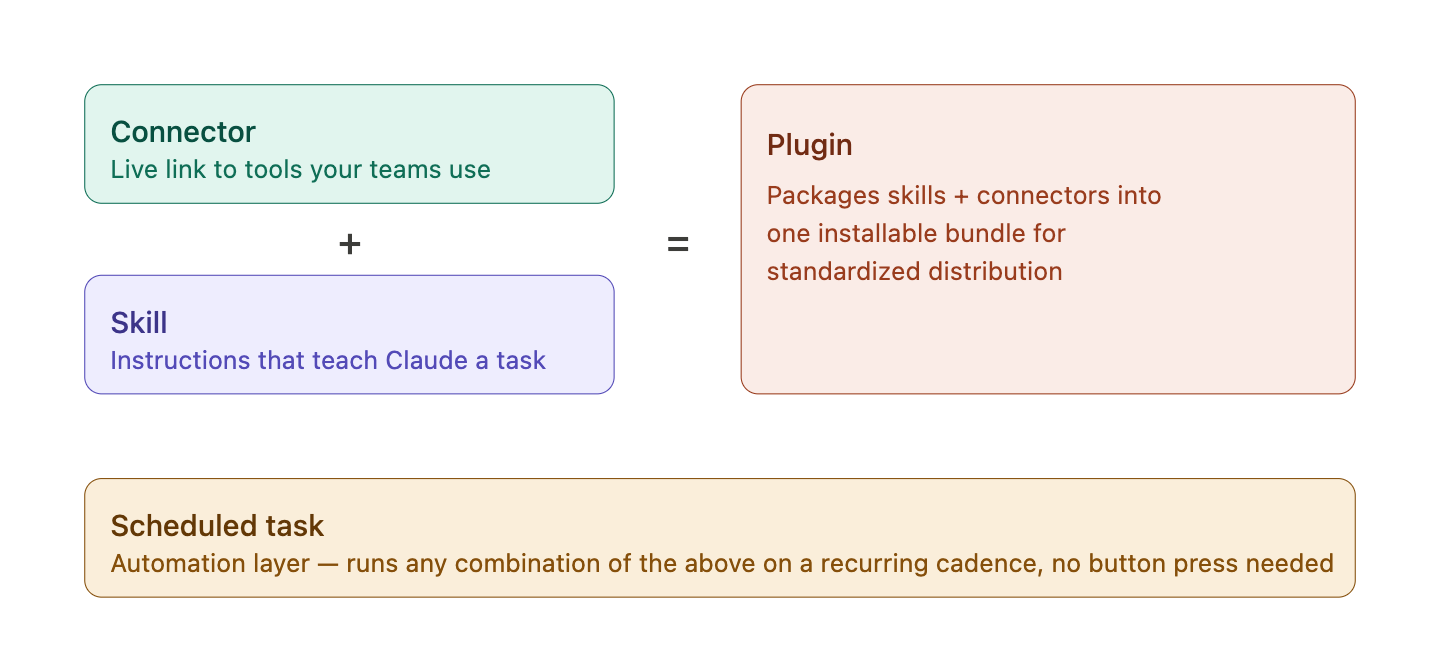
| Component | What it does | Help center |
|---|---|---|
| Connectors | Make your data accessible to Claude Cowork. Give Claude Cowork access to tools your teams use — Google Drive, Slack, Salesforce, GitHub, etc. | Connectors |
| Skills | Instructions that tell Claude how to do a specific task — skills work for simple tasks and multi-step workflows. | Skills |
| Plugins | Packages of skills + connectors, distributed to specific teams or your whole org. | Plugins |
| Scheduled tasks | Run skills automatically on a cadence — daily reports, weekly digests, recurring data pulls. | Scheduled tasks |
Here's how skills, connectors and plugins combine for a single finance workflow:
A finance team member asks Claude to reconcile the December cash account. The Finance plugin is installed, so Claude loads the reconciliation skill (step-by-step instructions for matching GL to bank). The data-warehouse connector retrieves the trial balance and transactions. Claude runs the comparison, flags discrepancies, and writes the workpaper back. One request, three pieces: connector feeds it data, skill directs Claude, plugin delivers it.
Skills, connectors and plugins scale beyond unique workflows for individuals. Taking finance as an example, here’s the typical flow for individual expertise to become an organizational capability:
Skills and plugins can drive horizontal workflows across your org, too. For example, an org-wide branding skill released by the design team could be provisioned by admins for every user of Cowork. Now when the Finance team creates charts, they always abide by the Org’s branding skill guidelines. Other workflows that cut across departments include Performance review skills that help managers draft self-reviews or compile peer feedback or a Company wiki built by connecting Claude Cowork to your knowledge base paired with skills that know how to search and synthesize it.
That’s the flywheel — personal expertise becoming organizational capability, and org capabilities and best-practices getting distributed across teams.
Workflows scale when skills get distributed through departments and surface to the rest of the organization. Governance posture is your stance on how freely that movement happens.
Your governance posture determines which of these paths are open. Think through the right skill and plugin management approach for your org as you select initial settings.
| Posture | What it means | Org Settings > Skills Settings |
|---|---|---|
| Admin curated |
Admins provision; users consume Users can't create personal skills. Peer-to-peer and peer-to-org sharing are both disabled. Skills and plugins come from admins only. |
Skills: On User-created skills: Off Skill sharing: Off Share with organization: Off |
| Guided creation |
Users create and share skills peer-to-peer; champions promote to plugins.
Users can create personal skills and share skills with peers. Sharing disabled peer-to-org. Champions review and promote the best skills to team plugins. |
Skills: On User-created skills: On Skill sharing: On Share with organization: Off |
| Fully open |
Users create and share with each other and org-wide; admins monitor and curate plugins.
Users can create personal skills and share skills with peers and the org. Admins monitor skill adoption and usage. Champions run quarterly skill reviews. |
Skills: On User-created skills: On Skill sharing: On Share with organization: On |
Posture isn't one switch — it's three org-level toggles in Settings → Skills, plus how you scope plugins:
Plugin sharing to groups allows Admins to override a plugin's org-wide availability for specific groups, further scoping plugin access — e.g. make a plugin available only to the Legal group, or auto-install it for Engineering while keeping it hidden from everyone else.
Governance posture does not currently control Connector access. Connectors are org-wide on/off today and you can't scope them per team. RBAC only governs capability access (Cowork, Code, etc.), not skill sharing.
For how admins distribute skills and plugins (admin-provisioned skills, group-scoped plugins, GitHub-synced marketplace), seeProvision and manage skills for your org, Managing Cowork plugins, and Customize plugin access by group.
Champions are enthusiastic adopters who can help drive peer adoption across their teams. They will be participants in your pilot if you run one, and play a key role in your Cowork rollout. Champions are the people who will test workflows, demo at workshops, maintain plugins, and drive adoption within their departments.
The organizations that see the fastest, deepest value invest in readiness, curate first experiences, and govern deliberately by following these five principles.
Here's what a typical Cowork rollout looks like. Adapt the pace to your org. Note that the phases below assume Setup and Configuration steps from the Cowork Enterprise Admin Guide are complete.
Goal: Validate your configuration and produce the first proof points with a small group of champions.
Admins and AI transformation teams own:
Champions own:
Exit when ready:
What changes between pilot and broad rollout is usually the governance posture, new connectors cleared by security, and new departments onboarding with their own champions.
Goal: Turn pilot proof points into department-level adoption — the skill flywheel starts here.
Admins and AI transformation teams own:
Champions own:
Exit when:
Goal: Reach remaining departments and shift from launch mode to operating rhythm.
Admins and AI transformation teams own:
Champions own:
You're in steady state when:
Only measuring time-saved or login counts. Consider what ROI on Claude Cowork means for your business. Define outcome-based measures including net new work completed and qualitative feedback on use cases in addition to productivity measurement.
Cowork training should be hands-on-keyboard when possible — the value shows up in doing, not watching. But "training" is really three different jobs depending on where a user is in their journey. Reference Anthropics researched-backed AI Fluency principles when designing enablement for your teams.
Enablement follows a natural progression: users start by completing a single task with a connector, then build competence with skills and plugins, then reach the point where Claude Cowork runs workflows for them automatically.
Get every user from zero to their first successful task with a connector.
Shift from first success to repeatable competence. Every user gets at least one skill they rely on and at least one plugin installed.
Lasting adoption means Claude Cowork is already running when users sit down in the morning.
Bake into new-hire onboarding. Include Cowork in Day-1 checklist: install the desktop app, authenticate 3 connectors, install the department plugin, run its flagship skill. See Installing Claude Desktop.
Can I control which connectors specific users see? No. Currently, you can only enable connectors org-wide.
If I enable a connector, does Claude automatically access everyone's data? No. Connectors use a two-gate model: an admin enables the connector org-wide, then each user individually OAuths to link their own account. Claude can only access data within that user's existing permissions.
Can users share skills that include API keys or credentials? Skills should never contain credentials. If a skill needs authenticated access, it should use a connector. Include this in your champion training and skill-vetting process. We recommend creating a skill-audit skill that runs standard checks before approving skills for org-wide distribution or inclusion in plugins.
How do I prevent people from creating duplicate or low-quality skills? Namespace by department, run quarterly curation reviews, and use the champion model. The guided-creation posture is the best balance for most teams — people can create freely, but promotion to org level goes through a review.
How do plugins sync with version control? Plugins support GitHub sync. Connect a private GitHub repo as a plugin marketplace. Changes merge through your normal PR process and auto-sync to users. See Managing Cowork plugins for repo structure details.
What's the difference between a skill and a scheduled task? A skill runs when someone triggers it. A scheduled task runs a skill automatically on a cadence — daily, weekly, etc. Common use: a daily pipeline digest that runs every morning at 8am and posts to Slack.
Where do I go for help with desktop app installation or connector setup? See the Claude Cowork Enterprise Admin Guide, which covers desktop app deployment, connector configuration, and org architecture setup.
Further reading: Cowork Enterprise Admin Settings ·Provision and manage Skills for your organization · Manage Cowork plugins for your organizations · Schedule recurring tasks in Cowork