VOOZH about

URL: https://claude.com/resources/tutorials/simplify-your-browsing-experience-with-claude-for-chrome

⇱ Simplify your browsing experience with Claude in Chrome | Claude


Explore here

Simplify your browsing experience with Claude in Chrome

Learn how Claude in Chrome enables Claude to work alongside you in your browser with visual intelligence and contextual understanding.
  • Category
    Professional
  • Product
    Claude in Chrome
  • Reading time
    Watch time
    5
    min
    min
  • Share
    Copy link
    https://claude.com/resources/tutorials/simplify-your-browsing-experience-with-claude-for-chrome

Claude can now work alongside you in your browser, in your context, on your actual work. Claude can see what you see, click on what needs clicking, and act as your collaborator, sharing the cognitive load of digital work. This guide will help you delegate the right tasks, build effective workflows, and maximize Claude's browser capabilities.

Claude in Chrome is available for paid plan users on the Chrome web browser.​

Important: Browser use is a feature that allows Claude to interact directly with websites on your behalf, which carries inherent risks. Please reviewUsing Claude for Chrome Safely before use.

How Claude understands your browser

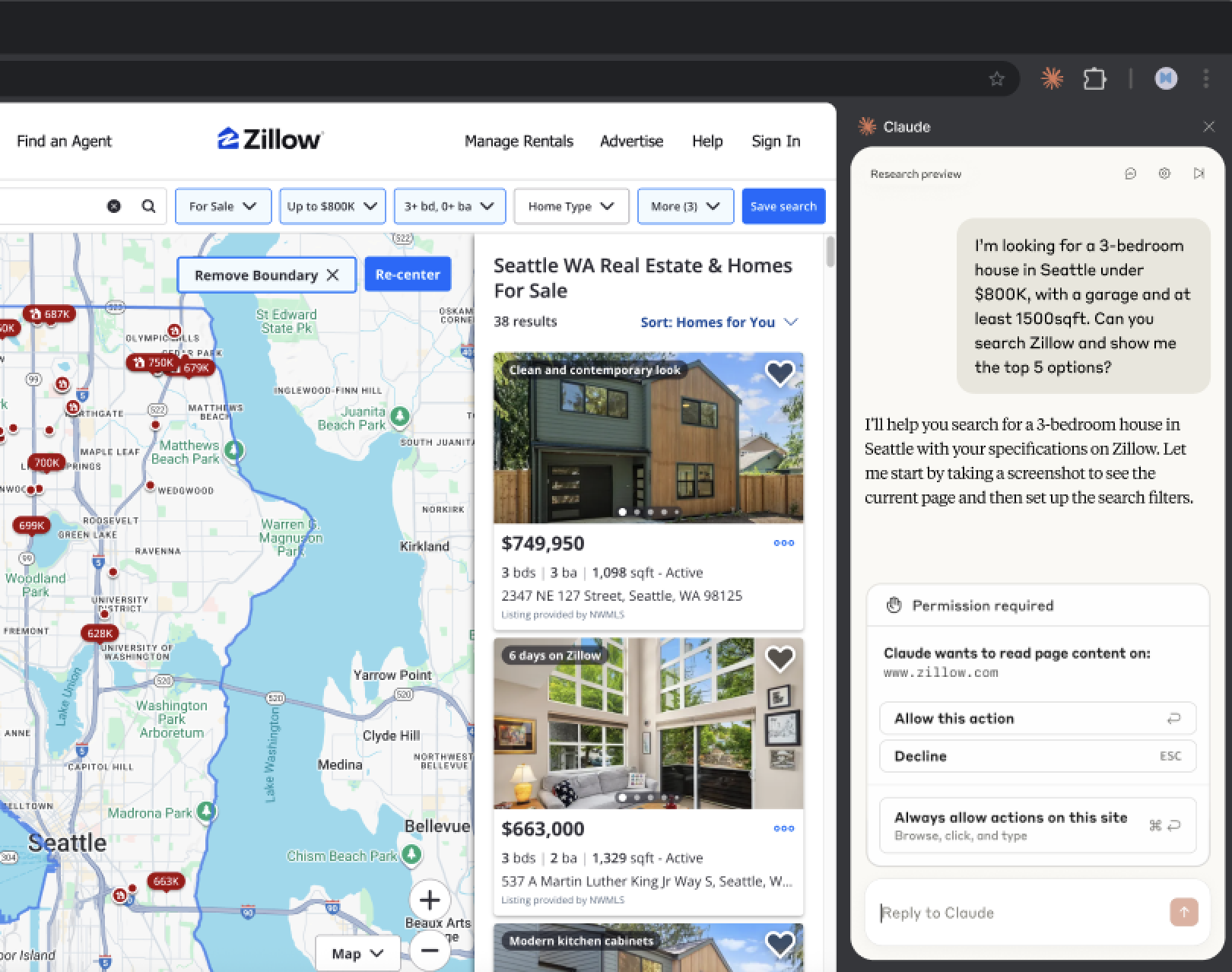
The Chrome extension brings Claude directly into your web workflow. Claude operates in your browser with your permissions, your logins, and your context to take action in the sites you use every day.

  • Visual Intelligence — Claude sees your browser and recognizes the interface the same way you do, through buttons, forms, navigation menus, and content areas.
  • Contextual Understanding - Claude understands what buttons on the page do. It knows that "Archive" in Gmail removes emails from the inbox, that "Share" in documents grants others access, that form fields labeled "Email" expect email addresses.
  • Tab Group Awareness — Claude can see and work across all tabs within the same tab group, providing larger context for its workflows. This means Claude can reference information and coordinate actions across multiple tabs.
  • Persistent Work Across Tabs — Claude continues working when you switch tabs. Start a research task, jump to email to handle something urgent and Claude keeps gathering information as long as Chrome is open. Turn on notifications and Claude will ping you when it needs your permission or a task is complete.

Note: Claude maintains context within a single task but doesn't remember information across sessions.

What makes a good browser task

Not every browser activity suits delegation to the Claude browser extension. Here are a few examples to help you understand which tool to use to work more effectively:

Ideal for Claude in Chrome:

  • Taking action on specific websites like filling forms, clicking buttons, navigating interfaces, making changes to live pages
  • Executing well-defined workflows using shortcuts you've created, repeating proven processes
  • Specific, targeted tasks or information gathering behind a login or using your permissions

Ideal for Claude apps:

  • Exploratory research when you don't know exactly where to look and need Claude to discover relevant sources
  • Complex synthesis across many sources like creating reports that pull from dozens of articles, academic research requiring extensive citations

Better handled yourself:

  • One-time tasks that are faster to do than explain like single clicks, simple copy-paste, quick edits
  • Highly subjective decisions requiring nuanced judgment
  • Learning through doing tasks like exploring new tools or understanding workflows

Repeat effective workflows with shortcuts

Once you create a successful workflow or find yourself repeating the same request to Claude, there are a few ways to save it as a shortcut for Claude to follow next time. From then on, type / to select your shortcut and trigger the workflow instantly.

Record a workflow to create a shortcut 

Teach Claude your task by demonstration. Click the cursor icon in the menu bar or type /  in the chat bar and select ‘Record workflow’. Perform the task, clicking, typing, and narrating, while Claude watches your screen and listens to your voice. When you finish, Claude generates a shortcut: a name, a prompt describing what you did, and the starting URL. 

Convert a conversation to a shortcut 

If you’ve completed a workflow across several chats, click Convert to task in the conversation header to save it as a repeatable shortcut. 

Save a prompt as a shortcut

If you've already sent a well-crafted prompt in chat, hover over it to reveal an icon that lets you save it directly as a shortcut.

Schedule recurring tasks using shortcuts

Once a workflow runs reliably — whether from a recording or a saved shortcut — schedule it to run automatically. When creating or editing a shortcut, toggle on Schedule. Choose the frequency, set the date and time, and select which model to use. Claude runs the workflow at the specified time and notifies you when it's done or needs input.

Good candidates for scheduling:

  • Email cleanup to archive promotional emails and flag items needing response
  • Data extraction that pulls weekly metrics from dashboards that don't offer exports
  • Calendar planning for your upcoming week by flagging which meetings need prep and finding the details.

Additional shortcuts to try:

Taking action:

  • /vendor-application: Fill out this vendor application using information from our company info document. Pause before submitting for my review
  • /inbox-cleanup: Go through my mail inbox: archive emails from these senders [list], star anything mentioning deadlines, delete obvious spam. Tell me what you archived and what needs my attention.

Research tasks:

  • /competitor-scan: Visit [competitor website]. Check: latest blog posts, pricing page updates, careers section for new roles. Note anything new or changed. Summarize in a brief.
  • /restaurant-finder:Search [food delivery site] for [cuisine type] restaurants. Filter by rating above 4 stars, check menus for [dietary preference]. Show me top 3 options with prices.

Communication prep:

  • /email-batch-draft: For unread emails tagged "needs response": draft replies maintaining my usual tone. Don't send, just stage them for my review. Note which ones need more context from me.
  • /stakeholder-map: For each person in this meeting invite: look up their professional background, note their role, identify their likely priorities, find any recent posts/articles. Create a pre-meeting brief.

Setting yourself up for success

As Claude in your browser has limitations that are helpful to understand.

Permission confirmations

Visit our help center to learn more about which actions Claude will always ask permission for, regardless of your settings.

Reduced functionality

Claude in Chrome is "pure Claude" without extended features of Claude.ai, such as Projects, MCP tool connections, or memory between sessions.

Blocked sites

For safety, Claude cannot access financial services, adult content, or pirated content sites.

Ready to practice?

Claude in your browser represents an early step in our work on AI that can handle increasingly complex workflows and work seamlessly where you do. Try our interactive demo to build confidence before working with real tasks.
Related tutorials

Thank you! Your submission has been received!
Oops! Something went wrong while submitting the form.
Write
  • Help me develop a unique voice for an audience

    Hi Claude! Could you help me develop a unique voice for an audience? If you need more information from me, ask me 1-2 key questions right away. If you think I should upload any documents that would help you do a better job, let me know. You can use the tools you have access to— like Google Drive, web search, etc.—if they’ll help you better accomplish this task. Do not use analysis tool. Please keep your responses friendly, brief and conversational.

    Please execute the task as soon as you can—an artifact would be great if it makes sense. If using an artifact, consider what kind of artifact (interactive, visual, checklist, etc.) might be most helpful for this specific task. Thanks for your help!

  • Improve my writing style

    Hi Claude! Could you improve my writing style? If you need more information from me, ask me 1-2 key questions right away. If you think I should upload any documents that would help you do a better job, let me know. You can use the tools you have access to— like Google Drive, web search, etc.—if they’ll help you better accomplish this task. Do not use analysis tool. Please keep your responses friendly, brief and conversational.

    Please execute the task as soon as you can—an artifact would be great if it makes sense. If using an artifact, consider what kind of artifact (interactive, visual, checklist, etc.) might be most helpful for this specific task. Thanks for your help!

  • Brainstorm creative ideas

    Hi Claude! Could you brainstorm creative ideas? If you need more information from me, ask me 1-2 key questions right away. If you think I should upload any documents that would help you do a better job, let me know. You can use the tools you have access to— like Google Drive, web search, etc.—if they’ll help you better accomplish this task. Do not use analysis tool. Please keep your responses friendly, brief and conversational.

    Please execute the task as soon as you can—an artifact would be great if it makes sense. If using an artifact, consider what kind of artifact (interactive, visual, checklist, etc.) might be most helpful for this specific task. Thanks for your help!

Learn
  • Explain a complex topic simply

    Hi Claude! Could you explain a complex topic simply? If you need more information from me, ask me 1-2 key questions right away. If you think I should upload any documents that would help you do a better job, let me know. You can use the tools you have access to— like Google Drive, web search, etc.—if they’ll help you better accomplish this task. Do not use analysis tool. Please keep your responses friendly, brief and conversational.

    Please execute the task as soon as you can—an artifact would be great if it makes sense. If using an artifact, consider what kind of artifact (interactive, visual, checklist, etc.) might be most helpful for this specific task. Thanks for your help!

  • Help me make sense of these ideas

    Hi Claude! Could you help me make sense of these ideas? If you need more information from me, ask me 1-2 key questions right away. If you think I should upload any documents that would help you do a better job, let me know. You can use the tools you have access to— like Google Drive, web search, etc.—if they’ll help you better accomplish this task. Do not use analysis tool. Please keep your responses friendly, brief and conversational.

    Please execute the task as soon as you can—an artifact would be great if it makes sense. If using an artifact, consider what kind of artifact (interactive, visual, checklist, etc.) might be most helpful for this specific task. Thanks for your help!

  • Prepare for an exam or interview

    Hi Claude! Could you prepare for an exam or interview? If you need more information from me, ask me 1-2 key questions right away. If you think I should upload any documents that would help you do a better job, let me know. You can use the tools you have access to— like Google Drive, web search, etc.—if they’ll help you better accomplish this task. Do not use analysis tool. Please keep your responses friendly, brief and conversational.

    Please execute the task as soon as you can—an artifact would be great if it makes sense. If using an artifact, consider what kind of artifact (interactive, visual, checklist, etc.) might be most helpful for this specific task. Thanks for your help!

Code
  • Explain a programming concept

    Hi Claude! Could you explain a programming concept? If you need more information from me, ask me 1-2 key questions right away. If you think I should upload any documents that would help you do a better job, let me know. You can use the tools you have access to— like Google Drive, web search, etc.—if they’ll help you better accomplish this task. Do not use analysis tool. Please keep your responses friendly, brief and conversational.

    Please execute the task as soon as you can—an artifact would be great if it makes sense. If using an artifact, consider what kind of artifact (interactive, visual, checklist, etc.) might be most helpful for this specific task. Thanks for your help!

  • Look over my code and give me tips

    Hi Claude! Could you look over my code and give me tips? If you need more information from me, ask me 1-2 key questions right away. If you think I should upload any documents that would help you do a better job, let me know. You can use the tools you have access to— like Google Drive, web search, etc.—if they’ll help you better accomplish this task. Do not use analysis tool. Please keep your responses friendly, brief and conversational.

    Please execute the task as soon as you can—an artifact would be great if it makes sense. If using an artifact, consider what kind of artifact (interactive, visual, checklist, etc.) might be most helpful for this specific task. Thanks for your help!

  • Vibe code with me

    Hi Claude! Could you vibe code with me? If you need more information from me, ask me 1-2 key questions right away. If you think I should upload any documents that would help you do a better job, let me know. You can use the tools you have access to— like Google Drive, web search, etc.—if they’ll help you better accomplish this task. Do not use analysis tool. Please keep your responses friendly, brief and conversational.

    Please execute the task as soon as you can—an artifact would be great if it makes sense. If using an artifact, consider what kind of artifact (interactive, visual, checklist, etc.) might be most helpful for this specific task. Thanks for your help!

More
  • Write case studies

    This is another test

  • Write grant proposals

    Hi Claude! Could you write grant proposals? If you need more information from me, ask me 1-2 key questions right away. If you think I should upload any documents that would help you do a better job, let me know. You can use the tools you have access to — like Google Drive, web search, etc. — if they’ll help you better accomplish this task. Do not use analysis tool. Please keep your responses friendly, brief and conversational.

    Please execute the task as soon as you can - an artifact would be great if it makes sense. If using an artifact, consider what kind of artifact (interactive, visual, checklist, etc.) might be most helpful for this specific task. Thanks for your help!

  • Write video scripts

    this is a test

© [year] Anthropic PBC
Products
Features
Models
Solutions
Claude Platform
Resources
Company
Help and security
Terms and policies
English (US)