
Other languages:
<nowiki>স্থাননির্দেশক সরঞ্জাম; Местоположбеник; സ്ഥാനനിർണ്ണയ ഉപകരണം; Locator tool; Локатор; Piranti pagenah; Локатор; ᬧᬶᬭᬦ᭄ᬢᬶᬧᬕᭂᬦᬄ; Locator tool; أداة تحديد الموقع; Locator tool; शोधक साधन; एक साधन जे विद्यमान प्रतिमांचे भौगोलिकरण करण्यात मदत करते; Werkzeug um {{Coordinate}} zu bestehenden Dateien auf Wikimedia Commons hinzuzufügen; a tool which helps geocoding existing images; നിലവിലുള്ള ചിത്രങ്ങളുടെ ജിയോകോഡിങ് സഹായ ഉപകരണം; nástroj, který pomáhá geokódovat existující obrázky; Locator tool; Locator-tool; Locator-tool; ᬮᭀᬓᬾᬢᭂᬃᬢᬸᬮ᭄; Locator tool</nowiki>
a tool which helps geocoding existing images | |||||
| Upload media | |||||
| Instance of |
| ||||
|---|---|---|---|---|---|
| Copyright license |
| ||||
| official website | |||||
| |||||
| 👁 Edit infobox data on Wikidata | |||||


| 👁 Image | Locator-tool 2019 Coolest Tool Award Winner |


Locator-tool is a tool which helps geocoding existing images, i.e., to add {{Location}} or {{Object location}} information and structured data to images on Wikimedia Commons.
The tool has been developed by Simon04 (talk), and is located at WMF Toolforge – locator-tool.
Wikidata Infobox
[edit]

Each Wikidata Infobox contains a link to launch locator-tool from that specific category.
Gadget
[edit]

In order to get the locator tool added to your toolbox, enable the Locator-tool gadget in your gadget preferences.
Tutorial
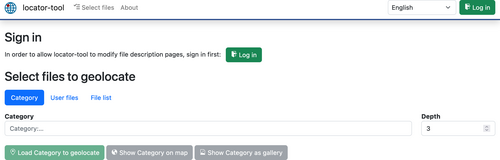
[edit]| 1. Navigate to WMF Toolforge – locator-tool, or, when you've activated the gadget, click on Locator-tool in toolbox. | 👁 Image |
| 2. Sign in using the button on the upper right corner. | |
| 3. Allow the locator-tool to edit existing pages. This is needed to automatically insert the {{Location}} or {{Object location}} information. | 👁 Image |
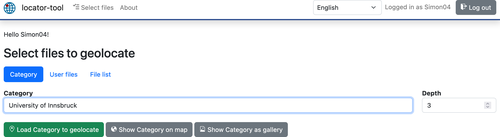
| 4. Click Select files and either provide a list of files to geocode or specify a category to fetch files from that. | 👁 Image |
| 5. Click load … to geolocate. | |
| 6. By default the list displays files lacking a {{Location}} information. Select one by clicking it. If this file already has {{Object location}} assigned, the object location field will be filled with included coordinates. |
👁 Image |
| 7. Select its location in the map. For object location press additionally the key. | 👁 Image |
8. Click the green button on right side of the according input field. If you want to clear added coordinates, press the x button to the left instead.
|
👁 Image |
| 9. The location of camera or object will be saved. To convince yourself view the history of the file description page. | 👁 Image |
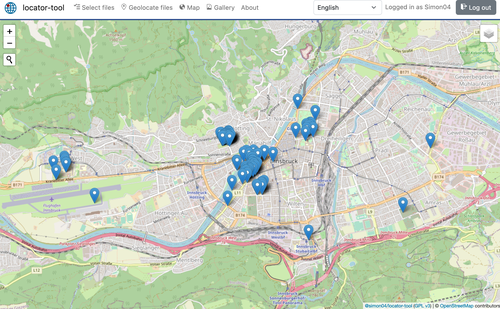
| In step 5, you can alternatively click "show … on map" in order to display all files on the map. This helps to spot files with incorrect/inaccurate coordinates. | 👁 Image |





Translate
[edit]Please help to translate locator-tool to your language: https://app.transifex.com/locator-tool/locator-tool/
Changelog
[edit]- 2024-02-04: Migrate frontend to Vue.js 3
- 2023-07-02: Update structured data on Commons
- 2022-04-21: Gallery of images (including metadata)
- 2020-06-30: Migrate to toolforge
- 2019-05-17: Round coordinates to 5 digits [1]
- 2018-11-01: Migrate source code to TypeScript
- 2018-03-11: Fetch {{Object location}} via GeoData; separate icons for {{Location}}/{{Object location}}
- 2018-03-11: Support fetching more than 500 user files
- 2018-02-02: Migrate frontend to Bootstrap version 4
- 2018-01-01: Display locator-tool build version in About page
- 2017-12-25: ↓/↑ keys select next/previous image
- 2017-06-07: Parse file list from HTML clipboard content (select images on Wikipedia pages, copy selection, paste selection to file list)
- 2017-06-05: Support limit/start/end for user files
- 2017-06-05: Display image categories as badges
- 2017-05-23: The locator-tool got its own icon: 👁 Image
- 2017-05-21: Image previews can be enlarged
- 2017-05-20: Locator-tool is an official gadget
- 2017-05-20: Markers can be dragged now
- 2017-05-14: Show a map of all selected images with coordinates
- 2017-02-26: Copy & paste of coordinates
- 2017-01-09: Support for {{Object location}} added
- 2016-12-31: French user language added
- 2016-12-20: German user language added
- 2016-05-18: First version (support for editing {{Location}})
