|
VOOZH | about |
|
VOOZH | about |
as
Amazon Device Messaging (ADM) lets you send messages to Amazon devices that run your app, so you can keep users up to date and involved. Whether you're giving a user a game update or letting them know that a message from their buddy has arrived, ADM helps you stay in touch.
If you have an existing Android app and it uses Google Firebase Cloud Messaging (FCM), follow the device messaging migration guide, or consider using the A3L Messaging SDK.
Note that ADM is not supported on Kindle Fire (1st Generation) devices.
You can download the ADM SDK here:
The download includes API reference documentation and an example app with ADM integrated. Note that by downloading the ADM SDK, you agree to our Program Materials License Agreement. Extract the SDK contents to a location of your choice.
The architecture of ADM follows several key principles:
Protected. As a sender, your servers are verified via the OAuth 2.0 client credentials flow. As your message is passed to a device, the endpoint connections are authenticated and protected with industry-standard SSL encryption. And ADM uses Android permissions on the device to direct the message to your app only.
Simple. ADM is a transport mechanism, delivering message data to your app. ADM does not provide any built-in user interface or other handling for the data. For example, upon receiving a message, your app might wake up the device, post a notification, display a custom user interface, or sync data.
Flexible. ADM doesn't process the data you send in any way. Your message is only required to be no greater than 6KB in size and to send data in the form of JSONObject key:value pairs.
The following characteristics also apply to messages you send via ADM:
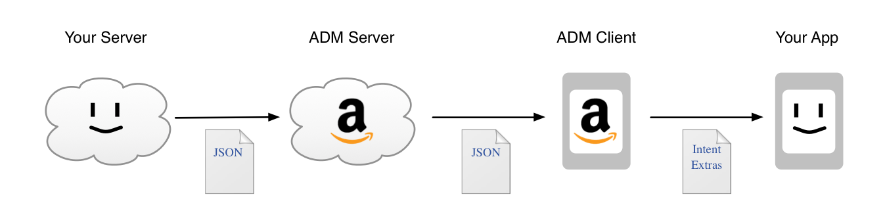
There are four components involved in sending a message with ADM, two of which you control.
Your servers
ADM servers
ADM client
Your app
At a high level, the delivery flow for a message that you send by ADM is as follows:
When working with ADM, you use the following elements to identify your servers, your app, and the destinations for your messages. Each of these works together to help ensure that your data belongs to you alone.
Registration ID. A registration ID identifies a unique instance of your app, running on a specific device, registered to a specific user. When it is first installed on a given device, your app requests a registration ID from ADM, as described in Integrate Your App. Your servers use the registration ID to direct messages to the correct device/user. If the user uninstalls then re-installs your app on the same device, your app's registration ID might change.
API key. An API key is metadata that ADM uses to differentiate between your app and other apps on a given device. The API key is assigned to you by Amazon; see Obtain Credentials for details.
OAuth Client Credentials. Your client credentials are two pieces of data: a "client identifier" and a "client secret" value. These credentials are assigned to you by Amazon; see Obtain Credentials for details. Your servers use both pieces of these credentials in their requests to obtain access tokens.
Access Token. An access token is short-lived metadata that confirms your server's identity to ADM, so that you can send messages. Your servers obtain their access tokens by providing your client credentials in a request call to ADM Servers. When one of your servers requests an access token, the response to that request includes both the access token and its lifespan in seconds. See Request an Access Token for more information.
The following table lists ADM identifiers and credentials.
| ID/Credential | Obtained by... | Obtained from... | Used by... | Uniqueness |
|---|---|---|---|---|
| Registration ID | A specific instance of your app | ADM servers, via the ADM client on the device on which the app instance is installed. | Your servers, ADM servers, and the ADM client, to route messages to the correct instance of your app. | Unique per install of the app, on a given device, for a specific user. If the registration ID becomes invalid or inactive, messages directed to the registration ID fail and ADM returns an appropriate error message. For example, if the user uninstalls then re-installs your app, you might receive a new registration ID. |
| API key | You, for your app | Amazon; see Obtain Credentials for details on this process. | The ADM client, to confirm your app's identity. | Different versions of your app (for example a debug version and a production version) each require their own API key. |
| OAuth client credentials | You, for your servers | Amazon; see Obtain Credentials for details on this process. | Your servers and ADM servers, to identify your servers for the purpose of obtaining an access token. | Unique to your app. |
| Access token | Your servers | ADM servers, in response to your request call. | Your servers and ADM servers, to verify your ability to send a message. | Each of your servers only uses one access token at a time. You must obtain a new access token when an old one expires. |
Last updated: May 18, 2022
Supported devices