VOOZH about

URL: https://dhtmlx.com/docs/products/dhtmlxDiagram/

โ‡ฑ JavaScript Diagram Library/HTML5 Diagram - DHTMLX JS Diagrams


DHTMLX Diagram 6.1 with a New PERT Mode and More Flexible Diagram Editor Configuration

JavaScript Diagram Library

DHTMLX Diagram is a JavaScript diagram library for building interactive org charts, flowcharts, mind maps, UML diagrams, swimlanes, timelines, network diagrams, and PERT charts in web apps.

JS Diagram Examples

Hospital Org Chart
A custom hospital org chart illustrating the medical hierarchy which allows users to reorganize departments via drag-and-drop.
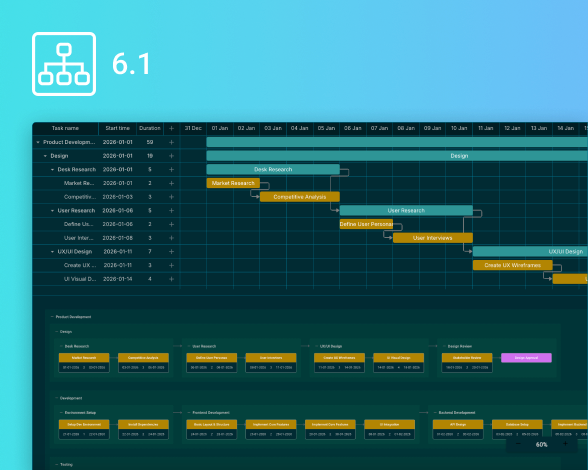
PERT Chart
A PERT diagram that organizes tasks into logical stages, highlighting estimated durations and dependency flow.
Radial Auto Layout
A radial auto-layout algorithm that arranges shapes on imaginary circles around the central shape evenly separated from one another.
Swimlane with 9 Sections
A template you can use to represent any process, e.g. business and manufacturing, or its separate parts from start to finish.
Virtual Cloud Architecture
Visualization of a virtual private cloud architecture. End-users can manipulate elements united in groups as a whole.
Emotions Mind Map
Illustrates the emotion classification by EARL as a core topic surrounded by the branches of 48 emotions as subtopics.
Wide Flowchart
A horizontal flowchart you can create to provide a detailed look into how users interact with a website.
Network Diagram
A server network system that shows connections between various network objects like remote computers, databases, etc.
DHTMLX Diagram is a proper choice for visualizing multiple data sets with minimum time and effort.

Improve User Experience with Our JavaScript Diagrams

๐Ÿ“Š Automatic diagram placement
Arrange shapes neatly with a single click via 2 smart algorithms.
๐Ÿงฉ Fully customizable Shapebar
Add custom sections with any shapes you want, set any size for preview.
๐ŸŽจ Fully customizable Editbar
Manage sections and settings for live editing.
๐Ÿ”ฎ Manipulate multiple items
Select several items, drag, align, distribute, or simply delete them.
Custom shapes
Create any new shape and add event handlers for custom shapes.
๐Ÿ“ Snap lines
Select and drag shapes in the grid with greater precision.
๐Ÿ“Œ Configurable Toolbar
Manage toolbar elements to help users to control the editing process.

Turn Natural Language into Structured Diagrams Instantly

DHTMLX Diagram lets you turn a text prompt into a structured diagram quickly. It's available under GPL v2 and installable via npm, so you can prototype AI-powered diagramming apps right away.
Free for open-source projects under the GNU GPL v2.0 license
AI-generated diagram structure from plain-language requests
Built-in editing flow for refining generated output
Suitable for org charts, flowcharts, mindmaps, and other structured diagramming use cases
PRO Edition includes a commercial license and dedicated support
npm
npm install @dhtmlx/diagram
Prompt
Run npm install @dhtmlx/diagram and build an org chart from a JSON data set in DHTMLX Diagram.

AI-Powered Org Chart Builder

Explore the online demo where AI works with DHTMLX Diagram to
instantly generate structured organizational charts and diagrams
from your natural-language input.

DHTMLX Diagram Library Features

Live Diagram, Org chart, and Mindmap editors for a quick diagram arrangement
Group work with multiple objects (select, copy, move, delete)
Aligning and distributing multiple items at once
Intuitive drag-n-drop behavior
Cross-browser support
Data import/export in JSON format
High performance with large datasets
2 auto layout (auto-placement) modes : Orthogonal and Radial
Localization for Org chart and Diagram editors
Easy customization according to your needs
Creating swimlanes and groups
Configurable Toolbar and shape toolbar
Inline editing
Touch support
Keyboard navigation

Diagram Types You Can Build with DHTMLX

Org Chart
Demonstrates hierarchicy or any other pecking order.
Flowchart
Communicates process steps and algorithms.
Mindmap
Logically outlines concepts and reflects ideas.
Tree
Illustrates possible paths and breaks down structures.
Network
Depicts and analyzes network structures.
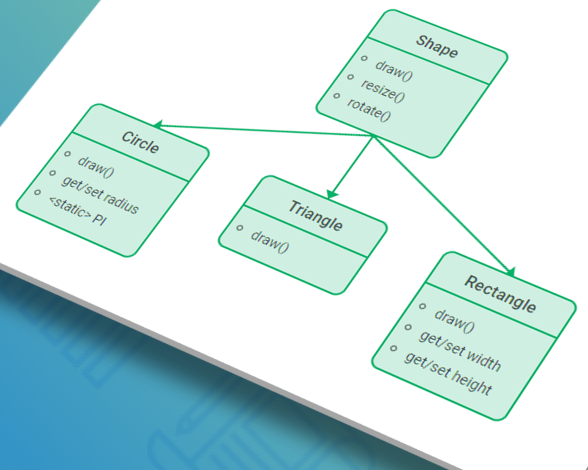
UML
Documents system requirements and design.
Swimlane
Divides content into horizontal and vertical bands.
Timeline
Displays events in chronological order along a line.
PERT Chart
Displays task timelines and project dependencies. Pair it with DHTMLX Gantt for a complete project overview. Plan, track, and optimize with ease.

How to Use JavaScript Diagram Editors

Smart diagram editor
Create flowcharts, decision trees, UML diagrams, etc. on the fly.
Choose from a variety of built-in figures or add your own custom ones.
Style elements by changing their size, color, and text decoration.
Save effort using the built-in auto-layout algorithm to put your diagram in order.
Editor for organization charts
Build org charts with a hierarchical layout to show who's on your team.
Apply styling options immediately, undo the undesired steps, or reset your chart any time.
Add images to the cards of your team members to make your chart look more vivid.
Editor for making clear mindmaps
Create mindmaps to visualize various ideas and concepts.
Add any desirable number of child shapes. You can drag a child item from one parent shape to another.
Style a shape by modifying options in the right panel or copy a shape's style and apply it to the chosen items using keyboard shortcuts.
Add custom shapes and set custom properties to style them via the Shapebar.

Why Choose DHTMLX JavaScript Diagram?

Flexible visualization
Using our diagram library JavaScript developers can easily visualize data with the help of predefined or custom elements. You can combine textual nodes, nodes with an image, or mixed types of nodes in one diagram.
High performance
You can visualize data with any amount of nodes and connectors. The library is lightweight and provides fast rendering and high performance. It works seamlessly in all modern web browsers, including Chrome, Firefox, and Safari.
Ease of use
Due to a short learning curve, you can easily integrate DHTMLX into any web app. The diagram framework is purely JavaScript with data loading in the JSON format. It can be flawlessly used with any server-side technology.
Export to PDF and PNG
With DHTMLX Diagram, you can export your diagrams to PDF or PNG online by default. Besides, we provide an export service supporting PDF and PNG formats you can get and install on your server.
Convenient live editors
You can change the appearance of all elements without coding in the edit mode. There are three types of editors available: for org charts, mind maps, and other JavaScript diagrams such as flowcharts, activity, block, tree diagrams, etc.
Start with a free trial
Download the DHTMLX Diagram trial version and start building flexible data visualization tools free of charge for 30 days. Youโ€™re also free to get help from the official technical support team.

DHTMLX Diagram Licensing and Pricing

Individual
Total: $599
Commercial
Total: $1299
Enterprise
Total: $2899
Ultimate
Total: $5799
License Terms Read License Agreement Read License Agreement Read License Agreement Read License Agreement
Developers 1 5 20
Projects 1 1 5
Use in SaaS (unlimited end-users)
Source code
Perpetual distribution rights
Support Plan
Standard Premium Premium Ultimate
Time Period 1 year 1 year 1 year 1 year
Updates Major, minor, and maintenance updates Major, minor, and maintenance updates Major, minor, and maintenance updates
Major, minor, and maintenance updates
Priority queue for bug fixing
Support requests 10 30 50
Response time 72h 48h 48h 24h
Personal Account Manager
Functionality
PRO PRO + 1 add-on PRO + 1 add-on PRO + 2 add-ons
Online export to PDF/PNG without watermark Free for 1 year Free for 1 year Free for 1 year Free for 3 years
Free local PDF/PNG export module

Unlock up to 65% Savings with DHTMLX Bundles

Complete pack
Gantt
Scheduler
Suite with Grid
Spreadsheet
Diagram
Pivot
Kanban
Event Calendar
To Do List
Rich Text Editor
Vault
Chatbot
Booking widget
What's in it for you:
  • The full power of all complex widgets combined with prime Suite UI controls
  • From $380 per developer (even less for big teams)
  • Save up to 65% compared to purchasing all components individually
PERT Chart + Gantt
Diagram
Gantt
What's in it for you:
  • Full picture for seamless project planning with DHTMLX Gantt and PERT Charts
  • Plentiful Diagram types from DHTMLX Diagram, alongside PERT charts
  • 20% off when using Gantt with DHTMLX Diagram to leverage PERT charts
Open-source Diagram Version - GPL Edition
The open source version of DHTMLX Diagram is distributed under the GPL v2.0 license. If you have an open-source project licensed under a GPLv2-compatible license, you may use DHTMLX Diagram GPL Edition for free. This version does not come with official technical support, but you can access assistance through the community forum.

Free Trial

Explore enterprise-grade features of DHTMLX Diagram with a 30-day trial.

Frequently Asked Questions About DHTMLX Diagram

What types of JavaScript diagrams can we create using DHTMLX?

You can create any possible diagram you would like with DHTMLX. We provide a set of ready-made figures for building org charts, flowcharts, mind maps, block diagrams, decision trees, activity diagrams, etc. Besides, you can easily develop network diagrams, UML class diagrams, entity-relationship diagrams, as well as any other type you need with the help of simple HTML templates.

Can we design our own special diagram shapes?

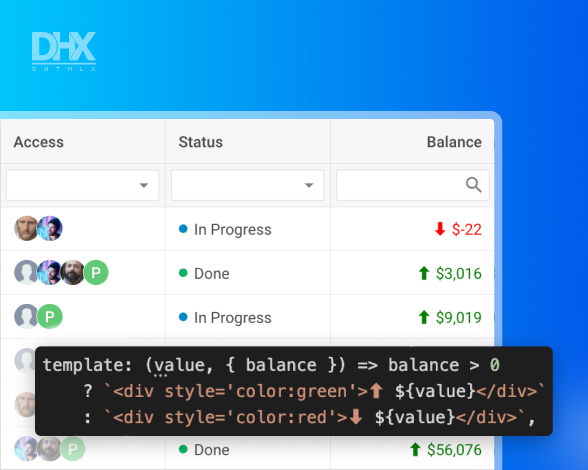
Yes, you can. You can design any imaginable shape you would like. It is possible due to our plain HTML templates, which enable developers to add any figure to the DHTMLX JavaScript diagram library. Thus, you can create network diagrams, sitemaps, Venn diagrams, hospital org charts, and whatnot.

Is there a layout algorithm for arranging diagram shapes automatically or should we do it manually?

DHTMLX Diagram library provides an auto-layout algorithm, so you don't have to arrange nodes and connectors by hand. You only need to pick the necessary shapes from the left panel and drag-and-drop them to the editing area. Then the algorithm will organize any number of chaotically placed nodes into a hierarchical layout at one click of a button.

Is it possible to print a diagram created with DHTMLX?

Yes, our JS diagram library supports PDF and PNG formats. You can either export a diagram online or with the help of a local export module, which you can install on your PC. Thus, you can easily export your diagram and then print it.

How can we load diagram data into the editor?

The process of loading data into the editor is simple. The editor as well as our Diagram JS library reads data in the JSON format. You have two options. You can either load data from an external file using the load method or a local data source using the parse method.

Is the JavaScript diagramming module zoomable?

Yes, you can change the scale of your HTML5 diagram programmatically. You can also create a convenient UI for zooming in and out in your web application. Moreover, you have an opportunity to specify how elements will look like when a user zooms in and out. It is possible via HTML templates. Thus, you can modify the appearance of your diagram for every zoom level.

Can I add more than a thousand shapes into an org chart?

Certainly, the DHTMLX Diagram library enables JavaScript developers to add as many org chart cards as they need. There are no limitations on their number. Branches can be collapsed and expanded in one click. Besides, you can add a search field to quickly find the needed part of your chart or a slider for zooming to navigate a large organization chart without effort.

Is it possible to integrate a diagram editor into our application to let users build their own graphs?

Sure, you can embed a JavaScript diagram editor into your web app and configure it entirely to the needs of your end-users. For instance, you can set up your own sections in the Shapebar and equip them with the required figures. You can also specify the necessary editing and styling options in the Editbar and fine-tune the editor's toolbar.

Latest DHTMLX Diagram News, Releases, and Tutorials

What's new
Discover the recently launched DHTMLX Diagram versions, fresh developer guides, and tutorials with code snippets and practical tips from our tech team.
Take your data visualization to the next level with DHTMLX Diagram
Download the DHTMLX trial version and evaluate it free of charge for 30 days benefiting from the official technical support of our team.
NO credit card required
Send
a Question
Send a Question

Use this form to send inquiries related to license and purchase process.

Message has been sent

Thank you for submitting your request.

You'll receive a reply from us shortly.

Got it