
This topic explains how to configure contexts in LaunchDarkly SDKs. This feature is available for all SDKs.
A context is a generalized way of referring to the people, services, machines, or other resources that encounter feature flags in your product. Feature flags use contexts during evaluation to determine which variation to use, based on your flag targeting rules.
Each context contains attributes that describe what you know about that context. Additionally, each context has a kind, so that you can group attributes together conceptually. For example, user contexts often include context attributes like name, email address, location, and so on. However, you can create other context kinds like organization or device. An organization context kind might include attributes like “name” or “address,” and a device context kind might include attributes like “type” or “operating system.” You can also create a context with a kind of “multi” and include several associated contexts together in a multi-context. To learn more, read Contexts.
Configuration for contexts
Every LaunchDarkly SDK lets you configure contexts to return specific data to LaunchDarkly. Any attributes you pass to LaunchDarkly as part of a context become available on the Contexts list. The attribute values determine which variation of a feature flag, or which version and prompt from a config, the customer receives.
Here is an image of the Contexts list:
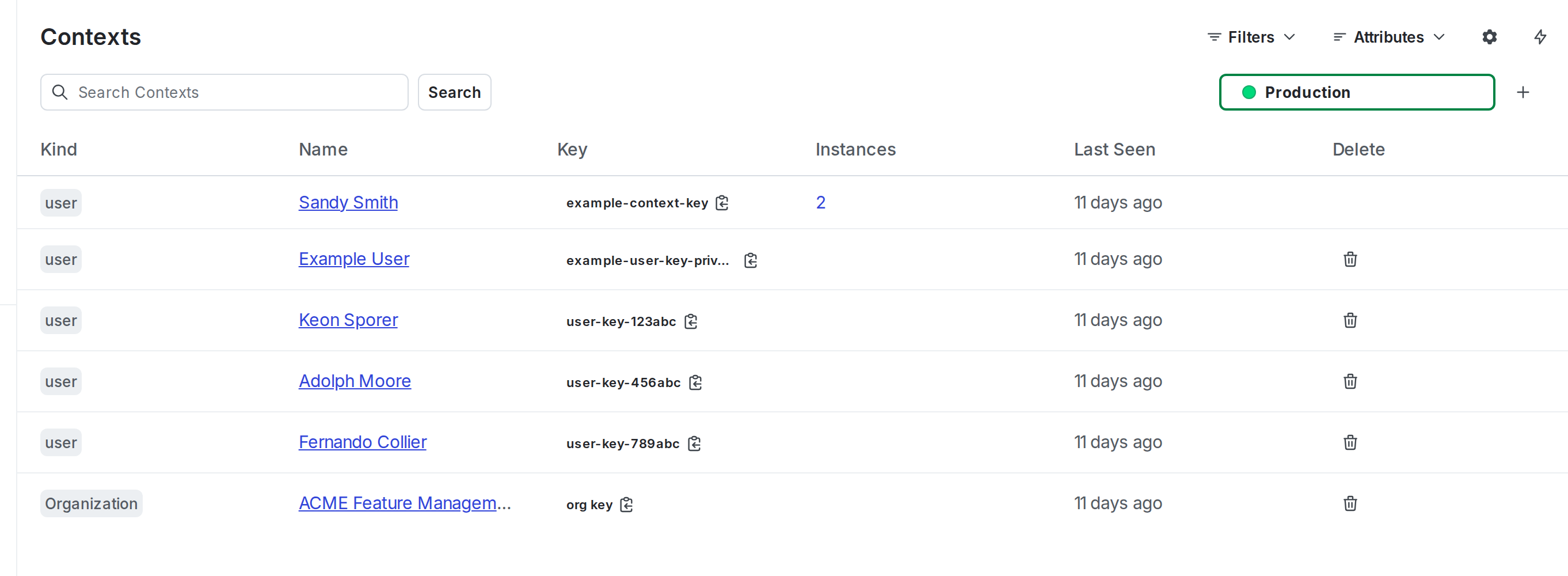
Every context is required to have a key. Keys are always transmitted to LaunchDarkly. Typically, you supply the key when you create the context. For some client-side SDKs, if you mark the context as anonymous then SDK can generate the key for you. To learn more, read Anonymous contexts and users.
Keys must be a string type. Keys must be unique, deterministic, and should not contain personally identifiable information (PII). Keys must be consistent, which means the same person must correspond to the same key across different services to contribute to consistent flag evaluations. You can use a primary key or a hash, as long as the same person always has the same key. We recommend using a hash if possible.
Only the context attributes you provide are available for targeting
The SDK only evaluates flags or customizes configs based on the context you define and then provide in the call. The SDK does not use the attributes shown on the Contexts list, and context attributes are not synchronized across SDK instances. You must provide all applicable attributes for each evaluation in the SDK for your targeting rules to apply correctly.
About built-in and custom attributes
Attributes other than the key are optional. There are two types of attributes: built-in attributes, which are LaunchDarkly names, and custom attributes, which you can name anything you choose.
The only built-in attributes for contexts are key, kind, name, and anonymous.
Only the key is required. It must be a string.
The value of kind can be:
- the key of an existing context kind that is already defined
- the key for a new context kind, which will be automatically created when this context is evaluated or identified
- the string
multi, if this is a multi-context - omitted, in which case, it defaults to
user
The value of name can be any string.
The value of anonymous can be true or false. If not specified, it defaults to false.
You can define additional attributes for a context by passing in a name and value for each. These additional attributes let you add targeting rules for your flags based on any data that you want to send to LaunchDarkly. Attribute values can be any JSON type, including boolean, number, string, array, or object. To learn more, read Context attributes.
Custom and built-in attributes cannot share names
If you create an attribute with a name already in use by a built-in attribute, the SDK will behave unpredictably.
The only built-in attributes for contexts are kind, key, name, and anonymous. If you work with an older SDK that only supports users, there are several additional built-in attributes.
To learn how to configure private attributes in your SDK, read Private attributes.
About context size
The SDK only evaluates flags or customizes configs based on the context you define and then provide in the call. You must provide all applicable attributes for each evaluation in the SDK for your targeting rules to apply correctly.
The context can include as many attributes as you like. However, we recommend that you take the following considerations into account:
- SDKs send events back to LaunchDarkly at flag evaluation. The size of the context affects the size of the event. This may be a concern on mobile devices, where bandwidth can be costly.
- For JavaScript-based client-side SDKs, if the context is large enough that it cannot be encoded in the URL, you’ll need to enable the
useReportoption. URLs in some browsers cannot exceed 2k characters in length. - As a general rule, if your context object ends up exceeding 1kb, we strongly recommend that you start a Support ticket to discuss your targeting use cases. Most customers do not need this amount of attribute data to target at their desired granularity.
Details about each SDK’s configuration are available in the SDK-specific sections below.
Client-side SDKs
Here are the configuration options for contexts in client-side SDKs:
- .NET (client-side)
- Android
- C++ (client-side)
- Electron
- Flutter
- iOS
- JavaScript
- Node.js (client-side)
- React Native
- React Web: The React Web SDK relies on the JavaScript SDK for context-related functionality.
- Roku
.NET (client-side)
Android
C++ (client-side)
Electron
Flutter
iOS
JavaScript
Node.js (client-side)
React Native
React Web
All context-related functionality provided by the JavaScript SDK is also available in the React Web SDK.
Unlike the JavaScript SDK, the React Web SDK does not require a context object for initialization. If you do not specify one, the React SDK uses an anonymous context by default.
Roku
Server-side SDKs
Here are the configuration options for contexts in server-side SDKs:
- .NET (server-side)
- Apex
- C++ (server-side)
- Erlang
- Go
- Haskell
- Java
- Lua
- Node.js (server-side)
- PHP
- Python
- Ruby
- Rust
.NET (server-side)
Apex
C++ (server-side)
Erlang
Go
Haskell
Java
Lua
Node.js (server-side)
PHP
Python
Ruby
Rust
Edge SDKs
Here are the configuration options for contexts in edge SDKs.
Akamai
Cloudflare
Fastly
Vercel
AI SDKs
Here are the configuration options for contexts in AI SDKs: