
Related
- Architecting Proactive IT: NinjaOne Remote Monitoring and Management
- Beyond Fail-Safe: Designing Fail-Operational State Machines for Physical AI
- From 13,000 to 20,000+ Endpoints: Architecting Forensics for the Remote Workforce
- Supercharge AI Workflows on Azure: Remote MCP Tool Triggers + Your First TypeScript MCP Server
Trending
- Observability for Agents and Workflows: Tracing Prompts, Tool Calls, and Business Outcomes End-to-End
- Engineering Closed-Loop Graph-RAG Systems, Part 3: Closing the Loop in Graph-RAG Systems
- The Big Data Architecture Blueprint: Core Storage, Integration, and Governance Patterns
- Prompt Injection Is Real, So I Built a Python Firewall for LLM Pipelines
- DZone
- Data Engineering
- AI/ML
- Access Minikube Using Kubectl From Remote Machine
Access Minikube Using Kubectl From Remote Machine
Check out this article if you want to learn how to access Minikube development cluster with kubectl client, just like your access Kubernetes cluster to test your deployments.
Join the DZone community and get the full member experience.
Join For FreeWhat Is Minikube?
Minikube is a tool that makes it easy to run Kubernetes locally. It runs a single-node Kubernetes cluster inside a Virtual Machine (VM) on your laptop for users looking to try out Kubernetes or develop with it day-to-day.
Installing Minikube
If you do not have a minikube setup just use the below link to setup.
https://kubernetes.io/docs/setup/learning-environment/minikube/
Install Kubectl
It will help you connect to the minikube API server and schedule deployments.
curl -LO "https://storage.googleapis.com/kubernetes-release/release/
$(curl -s https://storage.googleapis.com/kubernetes-release/release/
stable.txt)/bin/linux/amd64/kubectl"
Apply Port Forwarding in Network Settings
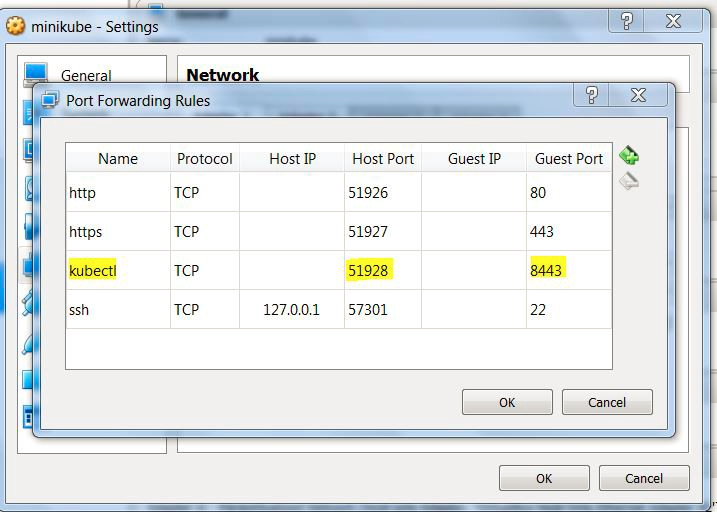
Once the setup is done open the network setting of minikube in VirtualBox and adds port forwarding to 8443. Port 51928 is mapped to 8443 of minikube in network settings below.
Start Minikube
The next step is to start a minikube. Take a note of the IP address of your machine, for me, it was 192.168.0.101.
minikube start — apiserver-ips=192.168.0.101
👁 minikube start --apiserver-ips=192.168.0.101

Copy the Certificates and Key Files To Remote Machine
Copy ca.crt, client.crt and client.key to the remote machine and it has kubectl client, they are marked as yellow below. Please note both machines should be on the same network.

Run Base64 Encode
On remote machine Base64 encode the 3 files ca.crt, client.crt and client.crt and create a config file(location of config file is $HOME/.kube/config) with following content.
apiVersion: v1
clusters:
- cluster:
certificate-authority-data: LS0tLS1CRUdJTiBDRVJUSUZJQ0FURS0tLS0tCk1JSUM1ekNDQWMrZ0F3SUJBZ0lCQVRBTkJna3Foa2lHOXcwQkFRc0ZBREFWTVJNd0VRWURWUVFERS0tLS0tCg==
server: https://192.168.0.101:51928
name: minikube
contexts:
- context:
cluster: minikube
user: minikube
name: minikube
current-context: minikube
kind: Config
preferences: {}
users:
- name: minikube
user:
client-certificate-data: LS0tLS1CRUdJTiBDRVJUSUZJQ0FURS0tLS0tCk1JSURBRENDQWVpZ0F3SUJBZ0lCQWpBTkJna3Foa2lHOXcwQkFRc0ZBREFWTVJNd0VRWURWUVFEBVEUtLS0tLQo=
client-key-data: LS0tLS1CRUdJTiBSU0EgUFJJVkFURSBLRVktLS0tLQpNSUlFcEFJQkFBS0NBUUVBcDM2eVJMNmt6cXVvQVBQWkxQNmlXNlZ1WHBteVZUeTBsR3pmUX0tLQo=
Replace Content of Following Keys With base64 Encoded Content in Kube Config File Above
certificate-authority-data: with base64 encoded ca.crt
client-certificate-data: with base64 encoded client.crt
client-key-data: with base64 encoded client.key
Access the Cluster
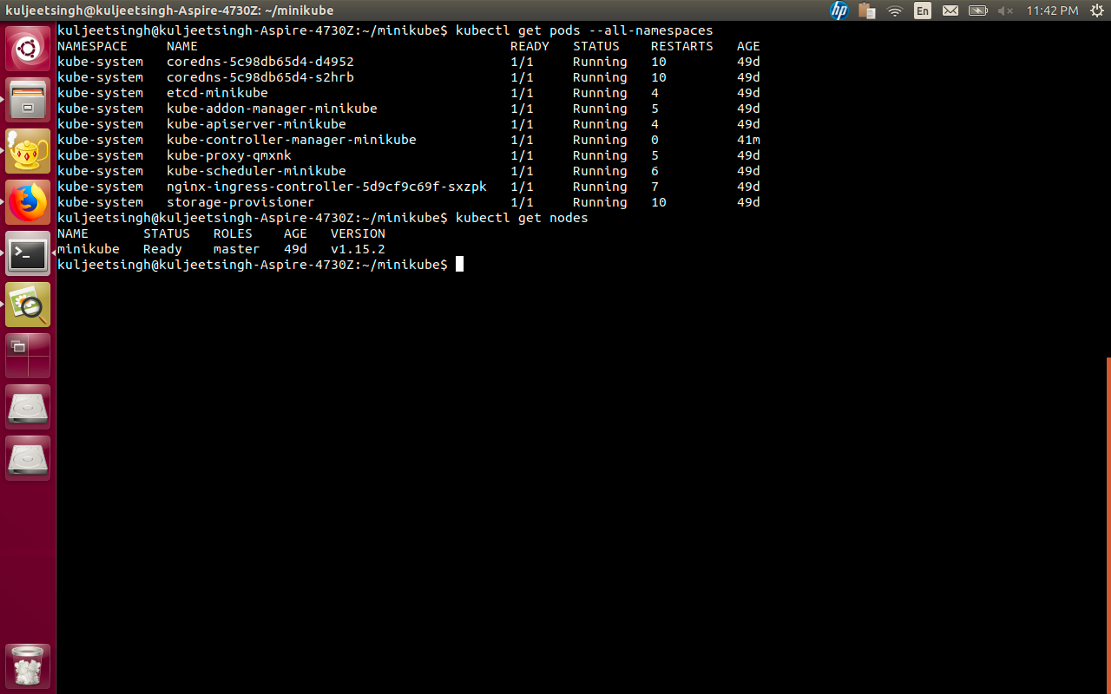
You can now run the kubectl command to access this minikube cluster.
Credits for help in starting minikube:
https://github.com/kubernetes/minikube/issues/1974#issuecomment-360197415
Opinions expressed by DZone contributors are their own.
Related
-
Architecting Proactive IT: NinjaOne Remote Monitoring and Management
-
Beyond Fail-Safe: Designing Fail-Operational State Machines for Physical AI
-
From 13,000 to 20,000+ Endpoints: Architecting Forensics for the Remote Workforce
-
Supercharge AI Workflows on Azure: Remote MCP Tool Triggers + Your First TypeScript MCP Server