
Related
- Spring Boot: Handle AWS RDS Password Change or Rotation Without Restarting
- A Guide to Using Amazon Bedrock Prompts for LLM Integration
- Building and Integrating REST APIs With AWS RDS Databases: A Node.js Example
- The Future of Rollouts: From Big Bang to Smart and Secure Approach to Web Application Deployments
Trending
- Beyond REST: Architecting High-Density Agentic Microservices With MCP and WASI-NN
- The Rise of Microservices Architecture in Scalable Applications
- Intelligent Matching and Semantic Search for Marketplace Applications Using OpenAI and .NET
- Prompt Injection Is Real, So I Built a Python Firewall for LLM Pipelines
- DZone
- Data Engineering
- Databases
- AWS Secret Manager: Protect Your Secrets in Applications
AWS Secret Manager: Protect Your Secrets in Applications
Secrets are frequently used to protect sensitive information and functionality.
Join the DZone community and get the full member experience.
Join For FreeMany applications use secrets for various use cases. Using an application ID and Secret key to generate a token or maybe the secret key itself to access APIs, a username, and password to create a database connection string to retrieve data from RDS. Maybe there are various security measurements and standards you've been enforced by your organization. One thing for sure is not storing passwords in configuration files or hard code them in plain texts. Storing and retrieving those secrets/passwords in a secure manner can be a challenging task, and in this post, we are going to discuss a more robust solution using AWS services.
You'll need an AWS account set up to follow this tutorial. Then, log into your AWS console and locate Secrets Manager service under the Security, Identity and Compliance category. Click on the "Store a new Secret." You'll get three options:
1. Credentials for RDS database
2. Credentials for other databases
3. Other Type of Secrets.
Option 1 and 2 are dedicated to database credentials. We'll select the "Other type of secrets" option since, in this post, we are going to demonstrate a more generalized solution. Now, add your secrets to store them securely. Use the DefaultEncryptionKeyoption for the demo purpose.


Hit Next and add a meaningful name for "Secret Name." We will be using this to retrieve secrets in the application. Other options are optional and you can proceed.


Hit Next and you'll get an option to enable Automatic rotation of the keys via a lambda function. Let's keep the automated key rotation disabled and proceed to the next step. Finally, you'll be redirected to the review and create a step. The important thing in this step is you'll get sample code snippets for Java, JavaScript, C#, Python 3, Ruby, and Go languages.
The following is a Java code snippet generated for our newly created "blog-sample" secret:
// Use this code snippet in your app.
// If you need more information about configurations or implementing the sample code, visit the AWS docs:
// https://docs.aws.amazon.com/sdk-for-java/v1/developer-guide/java-dg-samples.html#prerequisites

public static void getSecret () {

 String secretName = "blog-sample" ;
 String region = "us-east-1" ;

 // Create a Secrets Manager client
 AWSSecretsManager client = AWSSecretsManagerClientBuilder. standard ()
 . withRegion (region)
 . build ();

 // In this sample we only handle the specific exceptions for the 'GetSecretValue' API.
 // See https://docs.aws.amazon.com/secretsmanager/latest/apireference/API_GetSecretValue.html
 // We rethrow the exception by default.

 String secret, decodedBinarySecret;
 GetSecretValueRequest getSecretValueRequest = new GetSecretValueRequest()
 . withSecretId (secretName);
 GetSecretValueResult getSecretValueResult = null ;

 try {
 getSecretValueResult = client. getSecretValue (getSecretValueRequest);
 } catch (DecryptionFailureException e) {
 // Secrets Manager can't decrypt the protected secret text using the provided KMS key.
 // Deal with the exception here, and/or rethrow at your discretion.
 throw e;
 } catch (InternalServiceErrorException e) {
 // An error occurred on the server side.
 // Deal with the exception here, and/or rethrow at your discretion.
 throw e;
 } catch (InvalidParameterException e) {
 // You provided an invalid value for a parameter.
 // Deal with the exception here, and/or rethrow at your discretion.
 throw e;
 } catch (InvalidRequestException e) {
 // You provided a parameter value that is not valid for the current state of the resource.
 // Deal with the exception here, and/or rethrow at your discretion.
 throw e;
 } catch (ResourceNotFoundException e) {
 // We can't find the resource that you asked for.
 // Deal with the exception here, and/or rethrow at your discretion.
 throw e;
 }

 // Decrypts secret using the associated KMS CMK.
 // Depending on whether the secret is a string or binary, one of these fields will be populated.
 if (getSecretValueResult. getSecretString () != null ) {
 secret = getSecretValueResult. getSecretString ();
 }
 else {
 decodedBinarySecret = new String(Base64. getDecoder (). decode (getSecretValueResult. getSecretBinary ()). array ());
 }

 // Your code goes here.
}
If you check the code, you can see that it is using thesecretNameand the stored regionto fetch the secret data.


You can use either the secret name or secret ARN to retrieve the secrets. Now, let's try our sample code in our local environment to access secrets values.
1. To run the sample locally, you need to configure the AWS CLI, using [a]
[a]. https://docs.aws.amazon.com/cli/latest/userguide/cli-chap-configure.html
2. Add the following Maven dependency.
com.amazonaws
aws-java-sdk-secretsmanager
1.11.502
3. Build the project using the following command:
mvn clean install4. Run the assembly plugin:
mvn assembly:single5. Run the uber jar using the following command:
java -jar target/aws-secrets-manager-test-1.0-SNAPSHOT-jar-with-dependencies.jarYou'll get the secret as following in decrypted manner.
👁 Image
Now, you learned how to store secrets using AWS Secrets Manager and retrieve them in your Applications. But there is a catch here when configuring the AWS CLI tool — you have to store the AWS Access Key ID and the AWS Secret Access Key, which is not the best practice to host them in the AWS EC2 servers. If a server is compromised, the intruder can easily pick your AWS credentials stored in the ~/.aws/credentials file.

Overcome the Storing of Secret Keys
In the above use case, we have to hard code AWS credentials, which is not recommended. Let's spin up an ec2 instance and copy our sample app and see whether we can access the secrets we stored in the AWS Secrets Manager.
1. Spin up an ec2 t2 micro instance.
2. Then, copy the sample application to the new ec2 server.
scp -i ec2.pem ~/code-base/aws-secrets-manager-test/target/aws-secrets-manager-test-1.0-SNAPSHOT-jar-with-dependencies.jar ec2-user@ip-address:/home/ec2-user3. Install Java in your ec2 instance.
sudo yum install java-1.8.0-openjdk4. Run the application.
java -jar aws-secrets-manager-test-1.0-SNAPSHOT-jar-with-dependencies.jarYou'll be ended up with the following error.

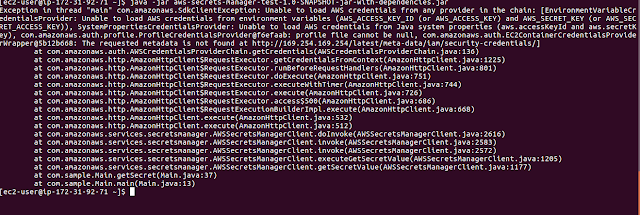
It complains that you don't have the AWS-ACCESS_KEY and AWS_SECRET_KEY unable to load AWS credentials.
Overcome the Issue Using IAM Roles
Now, let's create an IAM role so that my ec2 instance can access the AWS Secrets Manager and retrieve the stored secret values.
1. Go to Services -> IAM -> Roles → Create Role.
2. Select the type of trusted entity as an AWS service
3. Select EC2
4. Hit Next- Permissions.
5. Search for the permission policy "SecretsManagerReadWrite" and select.
6. Hit Next-Tags.
7. Add tags if you need hit Next.
8. Give a role name and hit Create Role.


Note: it would be if you can create a more granular role, which can only read the AWS Secrets Manager, since the SecretsManagerReadWritepolicy has more permissions than we required.
Next Goto → Services → EC2 → Instances → Actions → Instance Settings → Attach/Repalce IAM Role


Select the newly created role and apply.
Now, let's try to run our sample application copied to the AWS EC2 instance. You should be able to read the secrets.


In this post, we discussed an important aspect of storing and retrieving secrets required for your applications. As per my experience, this has become a chicken and the egg problem: when comes to security, it is essential that you secure both the secrets and the master key, which secures those secrets. I think using the Role approach will help to overcome this problem.
The source code for this example can be found on GitHub.
Please feel free to leave your thoughts and suggestions on how to overcome this in the comments below!
Published at DZone with permission of Aruna Karunarathna. See the original article here.
Opinions expressed by DZone contributors are their own.
Related
-
Spring Boot: Handle AWS RDS Password Change or Rotation Without Restarting
-
A Guide to Using Amazon Bedrock Prompts for LLM Integration
-
Building and Integrating REST APIs With AWS RDS Databases: A Node.js Example
-
The Future of Rollouts: From Big Bang to Smart and Secure Approach to Web Application Deployments