
Creating a Maven Archetype
Read this tutorial in order to learn how to create a Maven archetype from an existing project. This person uses Eclipse IDE to create the Maven project.
Join the DZone community and get the full member experience.
Join For FreeIntroduction
Many times we need to create a Maven archetype to distribute the project template. Here in this article, I am going to describe how easy it is to create a Maven archetype from an existing project.
Create a Maven Project
First of all, let's create a very simple Maven project. I am using Eclipse IDE to create the Maven project. Here is the pom.xml file of the project:
<project xmlns="http://maven.apache.org/POM/4.0.0" xmlns:xsi="http://www.w3.org/2001/XMLSchema-instance" xsi:schemaLocation="http://maven.apache.org/POM/4.0.0 http://maven.apache.org/xsd/maven-4.0.0.xsd">
 <modelVersion>4.0.0</modelVersion>
 <groupId>com.porua</groupId>
 <artifactId>archetype-porua</artifactId>
 <version>1.0.0</version>
 <dependencies>
 <dependency>
 <groupId>com.porua</groupId>
 <artifactId>porua-container</artifactId>
 <version>1.0.0</version>
 <scope>provided</scope>
 </dependency>
 <dependency>
 <groupId>com.h2database</groupId>
 <artifactId>h2</artifactId>
 <version>1.4.196</version>
 </dependency>
 </dependencies>
 <build>
 <plugins>
 <plugin>
 <groupId>org.apache.maven.plugins</groupId>
 <artifactId>maven-compiler-plugin</artifactId>
 <configuration>
 <source>1.8</source>
 <target>1.8</target>
 </configuration>
 </plugin>
 <plugin>
 <artifactId>maven-assembly-plugin</artifactId>
 <version>3.1.0</version>
 <executions>
 <execution>
 <id>make-fat-jar</id>
 <phase>package</phase>
 <goals>
 <goal>single</goal>
 </goals>
 <configuration>
 <descriptorRefs>
 <descriptorRef>jar-with-dependencies</descriptorRef>
 </descriptorRefs>
 <finalName>${project.artifactId}-${project.version}</finalName>
 <appendAssemblyId>false</appendAssemblyId>
 </configuration>
 </execution>
 <execution>
 <id>zip-all</id>
 <phase>package</phase>
 <goals>
 <goal>single</goal>
 </goals>
 <configuration>
 <descriptors>
 <descriptor>src/assembly/assembly.xml</descriptor>
 </descriptors>
 <finalName>${project.artifactId}-${project.version}</finalName>
 </configuration>
 </execution>
 </executions>
 </plugin>
 </plugins>
 </build>
 <repositories>
 <repository>
 <id>porua-repo</id>
 <name>Porua Repository</name>
 <url>https://github.com/anupamgogoi0907/porua-docs/raw/repo</url>
 <snapshots>
 <enabled>true</enabled>
 <updatePolicy>always</updatePolicy>
 </snapshots>
 <releases>
 <enabled>true</enabled>
 </releases>
 </repository>
 </repositories>
</project>
Now go to the root directory of the project and execute the following commands in sequence:
- mvn archetype:create-from-project
This command will generate the archetype from the existing Maven project. You can check the generated files at the following location:
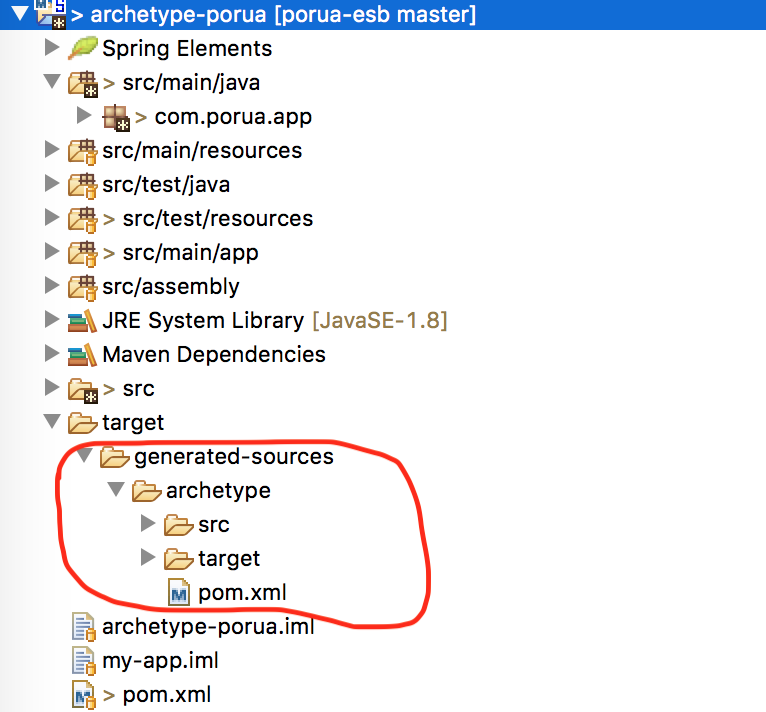
Now at this point, you can do two more important things:
- Modify the to add extra things if you need
- Modify to include/exclude files etc in the archetype. (Please read Maven's official documents for more information)
mvn clean install
Execute this command on It will install the plugin in your local repository.
mvn archetype:generate -DarchetypeCalalog=local
Execute this command to check your archetype available in the local repository.
Using The Archetype
At this point, our archetype is installed successfully in our local Maven repository. Let's try to make use of it. Use this command to make a project from the archetype:
mvn -B archetype:generate \
-DarchetypeGroupId=com.porua \
-DarchetypeArtifactId=archetype-porua-archetype
-DgroupId=com.mycompany.app \
-DartifactId=my-app
Conclusion
That's it. It's very simple to create a Maven archetype from an existing project.
Opinions expressed by DZone contributors are their own.
Related
-
From Repetition to Reusability: How Maven Archetypes Save Time
-
A Maven Archetype for Jakarta EE 10 Applications
-
Creating a Maven Archetype From an Existing Project
-
OpenAPI From Code With Spring and Java: A Recipe for Your CI