
- DZone
- Software Design and Architecture
- Integration
- Enforcing MuleSoft JWT Validation Policy Using API Manager API
Enforcing MuleSoft JWT Validation Policy Using API Manager API
Join the DZone community and get the full member experience.
Join For FreeIntroduction
JSON Web Token (JWT) is a compact, URL-safe means of representing claims to be transferred between the two parties. The claims in a JWT are encoded as a JSON object that is used as the payload of a JSON Web Signature (JWS) structure or as the plaintext of a JSON Web Encryption (JWE) structure, enabling the claims to be digitally signed or integrity protected with a Message Authentication Code (MAC) and/or encrypted.
- JWTs are stateless, making tokens easier to manage.
- JWTs can be used to transfer claims securely between parties.
- JWTs are scalable.
- JWTs are decoupled in nature allowing authentication to happen on a different server.
The tokens are compact. JSON format makes the token less verbose than XML. The smaller size allows easier transmission over HTTP. - JWTs are JSON-based and can be easily parsed by multiple receiving systems, especially mobiles. This enables industry-wide adoption.
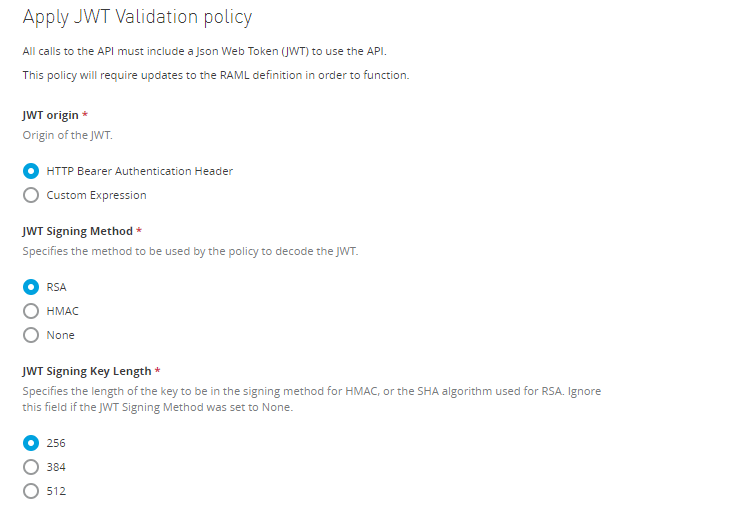
The JWT Validation policy validates the signature of the token and asserts the values of the claims of all incoming requests by using a JWT with JWS format. The policy does not validate JWT that uses JWE.
Validating Claims
Claim validations enable you to choose the conditions under which a token received in the policy is rejected. The following registered claim validations are provided by default:
- aud: The Audience validation specifies that a token must be rejected if it does not contain at least one of the values defined.
- exp: The Expiration validation specifies that a token must be rejected if its date is past the validation date.
- nbf: The Not before validation specifies that the token must be rejected if the validation time is before the time the token has.
In addition to these provided claims, you can also specify other claims to use in your validations. For all claims, Registered or Custom, you must provide the following details:
- The name of the claim you want to validate. For example, for the issuer of the token.
- The value used to test.
You can provide a simple literal value if you only need to verify it, or you can provide a DataWeave expression for more complex comparisons.
You can define each claim validation as mandatory or non-mandatory. If a claim is defined as mandatory and is not present in the incoming JWT, the policy rejects this token. If a claim is defined as non-mandatory and is not present in the incoming JWT, the policy does not reject the token for that specific validation.
For both cases, if a claim is present, the policy validates the token value. If the validation fails, the JWT will be rejected.
Element |
Description |
Example |
JWT Origin |
Specifies from where in the request the JWT will be extracted: * Bearer Authentication Header * Custom Expression If you set it to Bearer Authentication Header, the JWT will be expected as Bearer. If you set this field to Custom Expression, a DataWeave Expression returning the token must be provided. |
|
Token Expression |
If you set the JWT Origin to Custom Expression, type the DataWeave expression returning the JWT here. |
#[attributes.headers['jwt']] This expression searches the JWT in the header named ‘jwt’. |
JWT Signing Method |
Specify the signing method expected in the incoming JWT. The policy rejects the token if the JWT has a different signing method. |
RSA, HMAC, None |
JWT Signing Key Length |
Specify the length of the key (in the case of the HMAC algorithm) or the algorithm (in the case of RSA) used for the signing method. Ignore this field if you selected none as JWT Signing Method. |
|
JWT Key Origin |
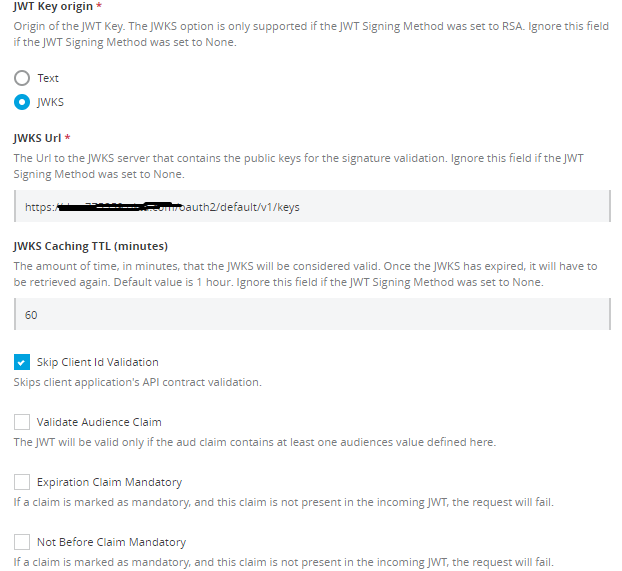
Specifies where to obtain the key for the Signature validation. You can provide the key in the policy selecting the Text option or obtain it from JWKS. Ignore this field if you selected none as the JWT Signing Method. |
|
JWT Key |
This field appears if you select Text as JWT Key Origin. Use this field to provide the key used to check the signature of the token. Ignore this field if you selected none as the JWT Signing Method. |
A 32, 48 or 64 characters long shared secret in case HMAC was the selected JWT Signing Method or the PEM Public Key without the header nor the footer in case of selecting RSA. |
JWKS URL |
This field appears if you selected the JWKS method as JWT Key Origin. Ignore this field if you selected none as the JWT Signing Method. |
The URL to the JWKS server. |
JWKS Caching Time To Live |
The URL to the JWKS server that contains the public keys for the signature validation. Ignore this field if you selected none as the JWT Signing Method. |
This field input is the amount of time, in minutes, during which the policy considers the JWKS valid. |
Skip Client ID Validation |
If you check this field, the policy does not verify that the client ID extracted from the JWT matches a valid client application of the API. |
By default, the value will be extracted using the expression #[vars.claimSet.client_id] |
Client ID Expression |
If Skip Client Id Validation is not set, the client ID needs to be extracted from the token. |
|
Validate Audience Claim |
Indicates that the policy should check for the validity of the audience claim. You can set this "Mandatory" if you select Audience Claim Mandatory. |
|
Validate Expiration Claim |
Indicates that the policy should check for the validity of the expiration claim. You can set this claim as "Mandatory" by selecting Expiration Claim Mandatory. |
|
Validate Not Before Claim |
Indicates that the policy should check for the validity of the Not Before claim. You can set this claim as "Mandatory" by selecting Not Before Claim Mandatory |
|
Validate Custom Claim |
Enables the usage of custom validations in the policy. The JWT will be valid only if all DataWeave expressions are fulfilled. |
The policy provides a claimSet variable that contains all the claims present in the incoming JWT. For example: foo : #[vars.claimSet.foo == 'fooValue'] |
There are various attributes required to enforce a JWT validation policy.
Applying the JWT Validation Policy Using API Manager API
First, we need to identify which API can be used to apply the policies. So, Mulesoft provided a developer portal that can be used to fetch details about the policies API.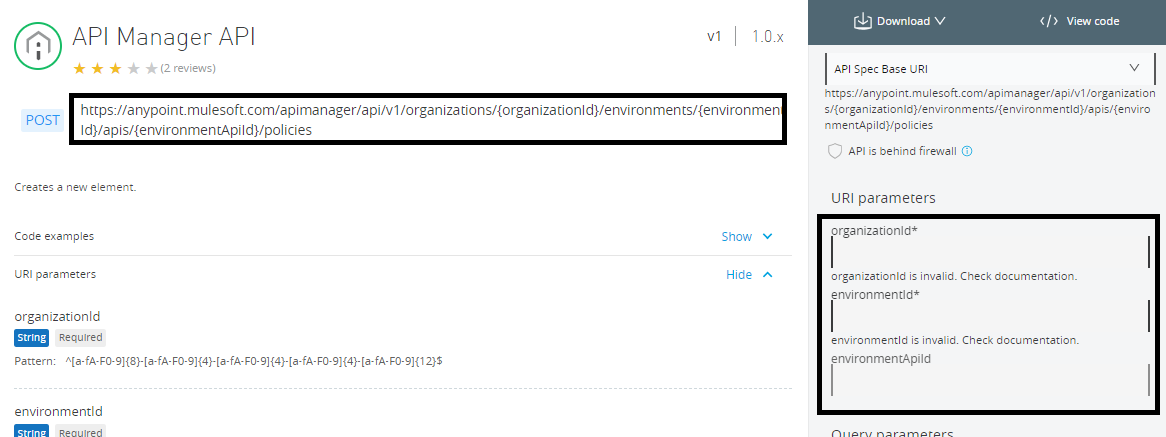
Policies API URL
We need to pass organizationId, environmentId, and apiId in the above URL as URI parameter.Fetching Organization Id
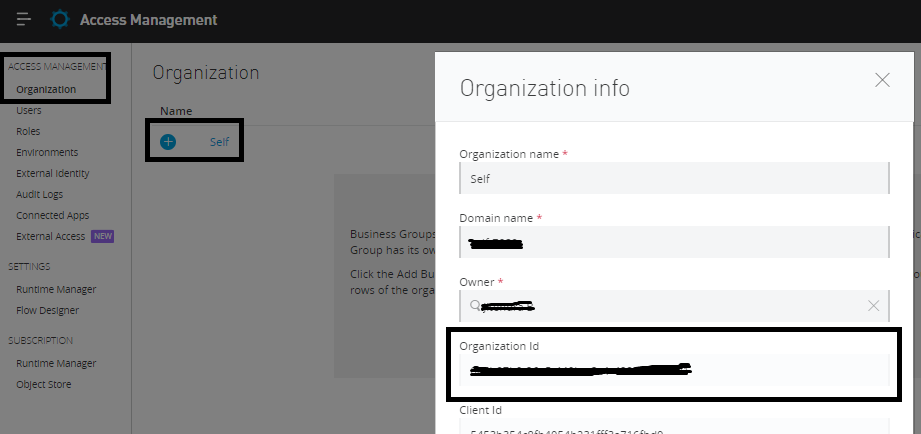
To fetch Organization Id, Navigate to Access Management ⇒ Organization, click on your organization, and it will open a pop-up window that provides the Organization Id. This can be used in the URI parameter of the policies API.
Fetching Environment Id
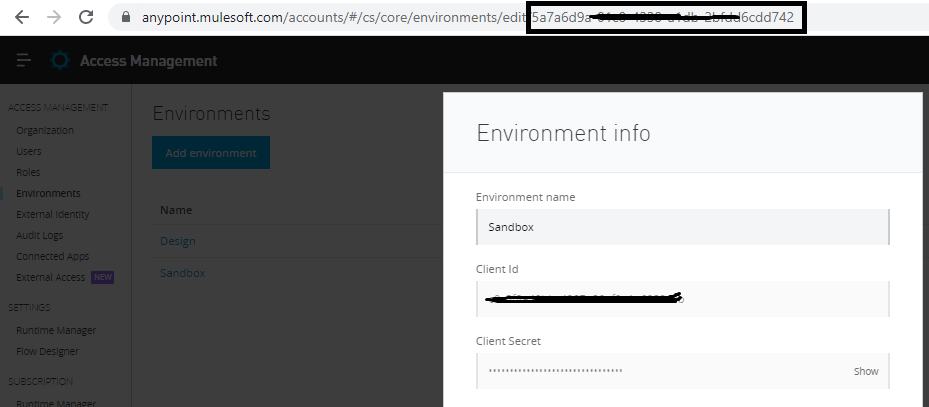
To fetch Environment Id, Navigate to Access Management ⇒ Environment, click on your environment (i.e. Sandbox), and it will open a pop-up window. From there, we can get the environment Id in URL, and it can be used in the URI parameter of the policies API.
Fetching API Id
For fetching API Id, Navigate to the API Manager in AnyPoint Platform and select the API for which you need to apply the policy, and you can see API Id.
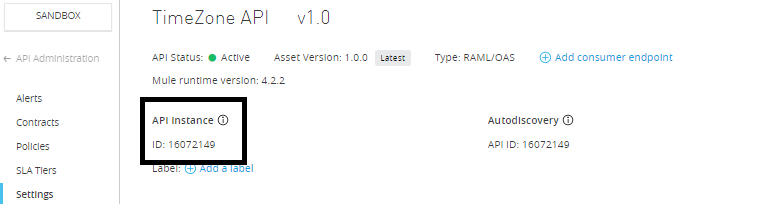
Now, we have the organizationId, environmentId, and apiId that need to be passed to the policies API as URI parameters.
We will also need an access token that we'll be pass in the Authorization header of Policies API request.
Generating Access Token
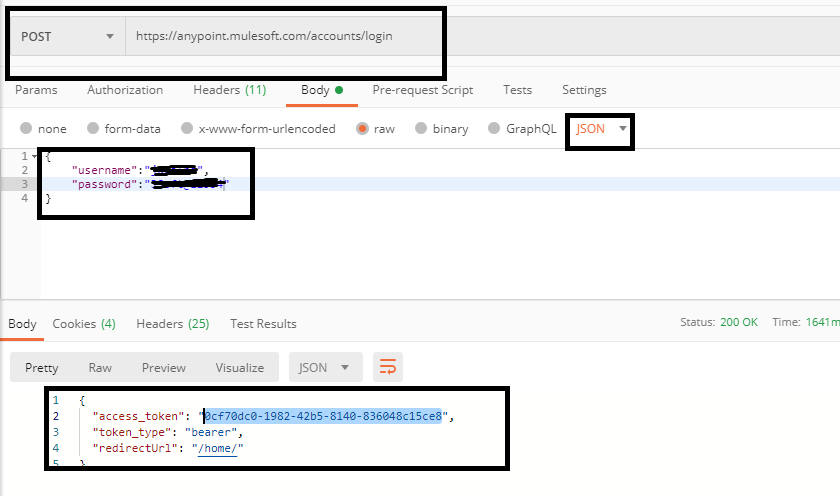
MuleSoft provides a separate API for generating access token. To do that, you need to pass your username and password in the request body.
You can use curl to generate the token:
xxxxxxxxxx
$ curl -H "Content-Type: application/json" -X POST -d '{"username":"<<Anypoint_Username>>","password":"<<Anypoint_Password>>"}' https://anypoint.mulesoft.com/accounts/login
Response
xxxxxxxxxx
{
"access_token": "0cf70dc0-1982-42b5-8140-836048c15ce8",
"token_type": "bearer",
"redirectUrl": "/home/"
}
You can also use Postman to generate the token.
👁 Generating token with Postman
Applying the Policy Using API Manager API
First, we need to identify what attributes we need to pass for applying the JWT validation policy. Go to exchange and search for “JWT Validation Policy Template”.
https://anypoint.mulesoft.com/exchange/68ef9520-24e9-4cf2-b2f5-620025690913/jwt-validation/
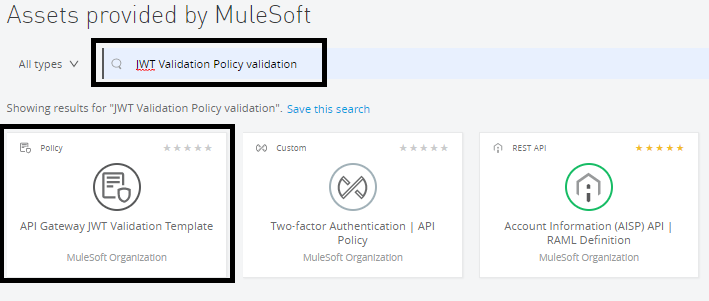
Click on API Gateway JWT Validation Template.
👁 API Gateway JWT Validation template
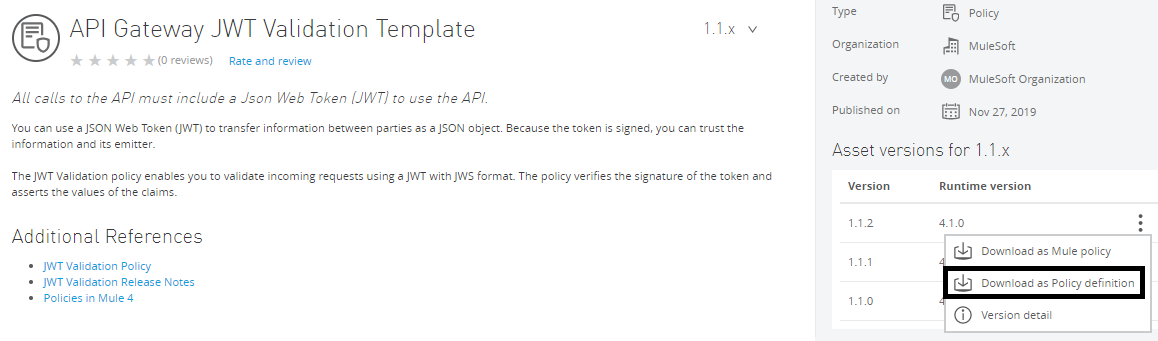
Now, download the Policy definition, which will give you a YAML file that will provide all attributes that we need to pass.
xxxxxxxxxx
id: jwt-validation
name: JWT Validation
supportedPoliciesVersions: '>=v1'
description: |
All calls to the API must include a Json Web Token (JWT) to use the API.
This policy will require updates to the RAML definition in order to function.
category: Security
type: system
encryptionSupported: true
violationCategory: authentication
resourceLevelSupported: true
standalone: true
requiredCharacteristics: []
providedCharacteristics:
- JWT Validation
configuration:
- propertyName: jwtOrigin
name: JWT origin
description: Origin of the JWT.
options:
- name: HTTP Bearer Authentication Header
value: httpBearerAuthenticationHeader
- name: Custom Expression
value: customExpression
type: radio
defaultValue: httpBearerAuthenticationHeader
optional: false
sensitive: false
allowMultiple: false
- propertyName: jwtExpression
name: Token Expression
description: Mule Expression to be used to extract the JWT from API requests
type: expression
defaultValue: "#[attributes.headers['jwt']]"
optional: false
sensitive: false
allowMultiple: false
dependsOnKey: jwtOrigin
dependsOnValue: customExpression
dependsOnUnfulfilledDefaultValue: "#[attributes.headers['jwt']]"
- propertyName: signingMethod
name: JWT Signing Method
description: Specifies the method to be used by the policy to decode the JWT.
options:
- name: RSA
value: rsa
- name: HMAC
value: hmac
- name: None
value: none
type: radio
optional: false
defaultValue: rsa
sensitive: false
allowMultiple: false
- propertyName: signingKeyLength
name: JWT Signing Key Length
description: |
Specifies the length of the key to be in the signing method for HMAC, or the SHA algorithm used for RSA.
Ignore this field if the JWT Signing Method was set to None.
options:
- name: 256
value: 256
- name: 384
value: 384
- name: 512
value: 512
type: radio
optional: false
defaultValue: 256
sensitive: false
allowMultiple: false
- propertyName: jwtKeyOrigin
name: JWT Key origin
description: |
Origin of the JWT Key.
The JWKS option is only supported if the JWT Signing Method was set to RSA.
Ignore this field if the JWT Signing Method was set to None.
options:
- name: Text
value: text
- name: JWKS
value: jwks
type: radio
defaultValue: text
optional: false
sensitive: false
allowMultiple: false
- propertyName: textKey
description: |
The shared secret in case the JWT Signing Method is set to HMAC.
Include the public PEM key without -----BEGIN PUBLIC KEY----- and -----END PUBLIC KEY----- for RSA signing.
Ignore this field if the JWT Signing Method was set to None.
name: JWT Key
type: string
sensitive: true
optional: false
defaultValue: your-(256|384|512)-bit-secret/your-public-pem-certificate
dependsOnKey: jwtKeyOrigin
dependsOnValue: text
dependsOnUnfulfilledDefaultValue: your-(256|384|512)-bit-secret
- propertyName: jwksUrl
name: JWKS Url
description: |
The Url to the JWKS server that contains the public keys for the signature validation.
Ignore this field if the JWT Signing Method was set to None.
type: string
optional: false
defaultValue: http://your-jwks-service.example:80/base/path
dependsOnKey: jwtKeyOrigin
dependsOnValue: jwks
dependsOnUnfulfilledDefaultValue: http://your-jwks-service.example:80/base/path
- propertyName: jwksServiceTimeToLive
name: JWKS Caching TTL (minutes)
description: |
The amount of time, in minutes, that the JWKS will be considered valid. Once the JWKS has expired,
it will have to be retrieved again. Default value is 1 hour.
Ignore this field if the JWT Signing Method was set to None.
type: int
optional: true
defaultValue: 60
minimumValue: 0
maximumValue: 2147483647
dependsOnKey: jwtKeyOrigin
dependsOnValue: jwks
dependsOnUnfulfilledDefaultValue: 60
- propertyName: skipClientIdValidation
name: Skip Client Id Validation
description: Skips client application's API contract validation.
type: boolean
optional: false
defaultValue: false
allowMultiple: false
- propertyName: clientIdExpression
name: Client ID Expression
description: Expression to obtain the Client ID from the request in order to validate it.
type: expression
optional: false
defaultValue: '#[vars.claimSet.client_id]'
allowMultiple: false
dependsOnKey: skipClientIdValidation
dependsOnValue: false
dependsOnUnfulfilledDefaultValue: '#[vars.claimSet.client_id]'
- propertyName: validateAudClaim
name: Validate Audience Claim
description: The JWT will be valid only if the aud claim contains at least one audiences value defined here.
type: boolean
optional: false
defaultValue: false
- propertyName: mandatoryAudClaim
description: If a claim is marked as mandatory, and this claim is not present in the incoming JWT, the request will fail.
name: Audience Claim Mandatory
type: boolean
optional: false
defaultValue: false
dependsOnKey: validateAudClaim
dependsOnValue: true
dependsOnUnfulfilledDefaultValue: false
- propertyName: supportedAudiences
name: Audience Claim Values
description: Comma separated list of supported audience values.
type: string
optional: false
defaultValue: aud.example.com
dependsOnKey: validateAudClaim
dependsOnValue: true
dependsOnUnfulfilledDefaultValue: aud.example.com
- propertyName: mandatoryExpClaim
name: Expiration Claim Mandatory
description: If a claim is marked as mandatory, and this claim is not present in the incoming JWT, the request will fail.
type: boolean
optional: false
defaultValue: false
- propertyName: mandatoryNbfClaim
name: Not Before Claim Mandatory
description: If a claim is marked as mandatory, and this claim is not present in the incoming JWT, the request will fail.
type: boolean
optional: false
defaultValue: false
- propertyName: validateCustomClaim
description: The JWT will be valid only if all DataWeave expressions defined here are valid.
name: Validate Custom Claim
type: boolean
optional: false
defaultValue: false
- propertyName: mandatoryCustomClaims
name: Mandatory Custom Claim Validations
description: |
Specify the Claim Name and the literal to validate the value of a claim E.g foo : fooValue
If more complex validations must be made or the claim value is an array or an object, provide Claim Name and DataWeave expression to validate the value of a claim. E.g. foo : #[vars.claimSet.foo == 'fooValue']
If a claim is marked as mandatory and this claim is not present in the incoming jwt, the request will fail.
type: keyvalues
optional: true
allowMultiple: true
dependsOnKey: validateCustomClaim
dependsOnValue: true
- propertyName: nonMandatoryCustomClaims
name: Non Mandatory Custom Claim Validations
description: |
Specify the Claim Name and the literal to validate the value of a claim E.g foo : fooValue
If more complex validations must be made or the claim value is an array or an object, provide Claim Name and DataWeave expression to validate the value of a claim. E.g. foo : #[vars.claimSet.foo == 'fooValue']
If a claim is marked as non-mandatory and this claim is not present in the incoming jwt, the request will not fail.
type: keyvalues
optional: true
allowMultiple: true
dependsOnKey: validateCustomClaim
dependsOnValue: true
Now, you can use CURL to apply a policy by calling policies API.
xxxxxxxxxx
curl -X POST \
https://anypoint.mulesoft.com/apimanager/api/v1/organizations/:organizationId/environments/:environmentId/apis/:apiInstanceId/policies \
-H 'authorization: Bearer 0cf70dc0-1982-42b5-8140-836048c15ce8 \
-H 'content-type: application/json' \
-d '{
"configurationData":{
"jwtOrigin":"httpBearerAuthenticationHeader",
"jwtExpression":"#[attributes.headers['jwt']]",
"signingMethod":"rsa",
"signingKeyLength":"256",
"jwtKeyOrigin":"jwks",
"textKey":"Text Data",
"jwksUrl":"https://example.okta.com/oauth2/default/v1/keys",
"jwksServiceTimeToLive":60,
"skipClientIdValidation":true,
"clientIdExpression":"#[vars.claimSet.client_id]",
"validateAudClaim":false,
"mandatoryAudClaim":false,
"supportedAudiences":"aud.example.com",
"mandatoryExpClaim":false,
"mandatoryNbfClaim":false,
"validateCustomClaim":true,
"mandatoryCustomClaims":[{"key":"scope","value":"#[vars.claimSet.scope='API_READ']"}]
},
"policyTemplateId":"jwt-validation",
"assetId":"jwt-validation",
"assetVersion":"1.1.2",
"groupId":"68ef9520-24e9-4cf2-b2f5-620025690913"
}'
You need to pass organizationId, environmentId and apiId that we have fetched above. Currently, we have a placeholder in the above call to the policies API.
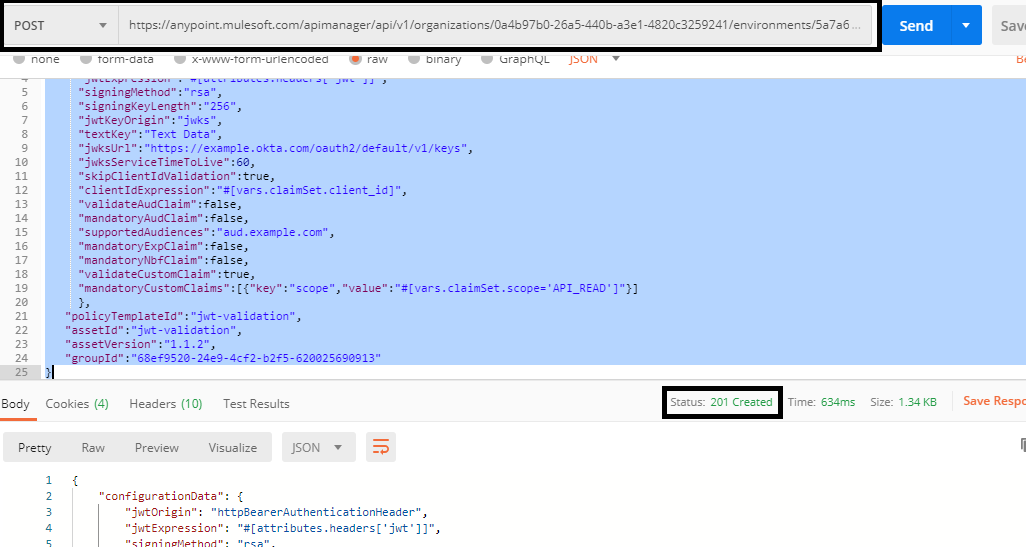
You can also use Postman also to call the policies API.
👁 Calling policies API with Postman
xxxxxxxxxx
{
"configurationData":{
"jwtOrigin":"httpBearerAuthenticationHeader",
"jwtExpression":"#[attributes.headers['jwt']]",
"signingMethod":"rsa",
"signingKeyLength":"256",
"jwtKeyOrigin":"jwks",
"textKey":"Text Data",
"jwksUrl":"https://example.okta.com/oauth2/default/v1/keys",
"jwksServiceTimeToLive":60,
"skipClientIdValidation":true,
"clientIdExpression":"#[vars.claimSet.client_id]",
"validateAudClaim":false,
"mandatoryAudClaim":false,
"supportedAudiences":"aud.example.com",
"mandatoryExpClaim":false,
"mandatoryNbfClaim":false,
"validateCustomClaim":true,
"mandatoryCustomClaims":[{"key":"scope","value":"#[vars.claimSet.scope='API_READ']"}]
},
"policyTemplateId":"jwt-validation",
"assetId":"jwt-validation",
"assetVersion":"1.1.2",
"groupId":"68ef9520-24e9-4cf2-b2f5-620025690913"
}
This is a very useful utility when you need to apply policies via CI/CD, and now, you know how to apply JWT validation policy using the API Manager API.
Opinions expressed by DZone contributors are their own.
Related
-
Implementing Secure API Gateways for Microservices Architecture
-
Secrets in Code: Understanding Secret Detection and Its Blind Spots
-
JWT Policy Enforcement, Rate Limiting, IP White Listing: Using Mulesoft, API Security, Cloudhub 2.0
-
Generic and Dynamic API: MuleSoft