
Java Message Service (JMS)—Explained
Join the DZone community and get the full member experience.
Join For FreeJava message service enables loosely coupled communication between two or more systems. It provides reliable and asynchronous form of communication. There are two types of messaging models in JMS.
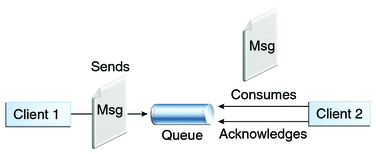
Point-to-Point Messaging Domain
Applications are built on the concept of message queues, senders, and receivers. Each message is send to a specific queue, and receiving systems consume messages from the queues established to hold their messages. Queues retain all messages sent to them until the messages are consumed by the receiver or expire. Here there is only one consumer for a message. If the receiver is not available at any point, message will remain in the message broker (Queue) and will be delivered to the consumer when it is available or free to process the message. Also receiver acknowledges the consumption on each message.
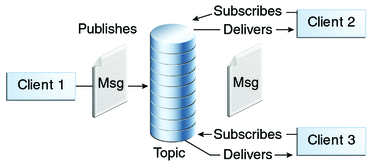
Publish/Subscribe Messaging Domain
Applications send message to a message broker called Topic. This topic publishes the message to all the subscribers. Topic retains the messages until it is delivered to the systems at the receiving end. Applications are loosely coupled and do not need to be on the same server. Message communications are handled by the message broker; in this case it is called a topic. A message can have multiple consumers and consumers will get the messages only after it gets subscribed and consumers need to remain active in order to get new messages.
Message Sender
Message Sender object is created by a session and used for sending messages to a destination queue. It implements the MessageProducer interface.
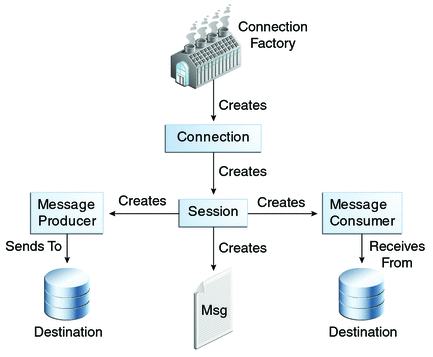
First we need to create a connection object using the ActiveMQConnectionFactory factory object. Then we create a session object. Using the session object we set the message broker (Queue) and create the message sender object. Here we are sending a map message object. Please see the code snippet for message sender.
public class MessageSender
{
	public static void main(String[] args)
	{
		Connection connection = null;
		try
		{
			Context ctx = new InitialContext();

			ActiveMQConnectionFactory cf = new ActiveMQConnectionFactory("tcp://localhost:61616");

			connection = cf.createConnection();

			Session session = connection.createSession(false, Session.AUTO_ACKNOWLEDGE);

			Destination destination = session.createQueue("test.message.queue");

			MessageProducer messageProducer = session.createProducer(destination);

			MapMessage message = session.createMapMessage();

			message.setString("Name", "Tim");
			message.setString("Role", "Developer");
			message.setDouble("Salary", 850000);

			messageProducer.send(message);

		}
		catch (Exception e)
		{
			System.out.println(e);
		}
		finally
		{
			if (connection != null)
			{
				try
				{
					connection.close();
				}
				catch (JMSException e)
				{
					System.out.println(e);
				}
			}
			System.exit(0);
		}


	}
}
Message Receiver
Message Receiver object is created by a session and used for receiving messages from a queue. It implements the MessageProducer interface. Please see the code snippet for message receiver. The process remains same in message sender and receiver. In case of receiver, we use a Message Listener. Listener remains active and gets invoked when the receiver consumes any message from the broker. Please see the code snippets below.
public class MessageReceiver
{
	public static void main(String[] args)
	{
		try
		{
			InitialContext ctx = new InitialContext();

			ActiveMQConnectionFactory cf = new ActiveMQConnectionFactory("tcp://localhost:61616");

			Connection connection = cf.createConnection();

			Session session = connection.createSession(false, Session.AUTO_ACKNOWLEDGE);

			Destination destination = session.createQueue("test.prog.queue");

			MessageConsumer consumer = session.createConsumer(destination);

			consumer.setMessageListener(new MapMessageListener());
			connection.start();
		}
		catch (Exception e)
		{
			System.out.println(e);
		}

	}
}
Please see the code snippet for a message listener receiving map message object.
public class MapMessageListener implements MessageListener
{
	public void onMessage(Message message)
	{
		if (message instanceof MapMessage)
		{
			MapMessage mapMessage = (MapMessage)message;

			try
			{
				String name = mapMessage.getString("Name");
				System.out.println("Name : " + name);
			}
			catch (JMSException e)
			{
				throw new RuntimeException(e);
			}
		}
		else
		{
			System.out.println("Invalid Message Received");
		}
	}
}
Hope this will help you to understand the basics of JMS and write a production ready message sender and receiver programs.
Opinions expressed by DZone contributors are their own.
Related
-
Getting Started With JMS-ActiveMQ: Explained in a Simple Way
-
Top Java Security Vulnerabilities and How to Prevent Them in Modern Java
-
A Spring Boot App With Half the Startup Time
-
Implementing the Planning Pattern With Java Enterprise and LangChain4j