
Mule 4 Message, Events, and Variables
Explore Mule 4 Message, events, and variables.
Join the DZone community and get the full member experience.
Join For FreeMule 4 has simplified the Mule message model in which each Mule event has a message and variables associated with it. A Mule message is composed of a payload and its attributes (metadata information, such as file size).
A Mule event contains the core information processed by the runtime. Mule events are immutable, so every change to an instance of a Mule event results in the creation of a new instance.
A Mule Event is composed of these objects:
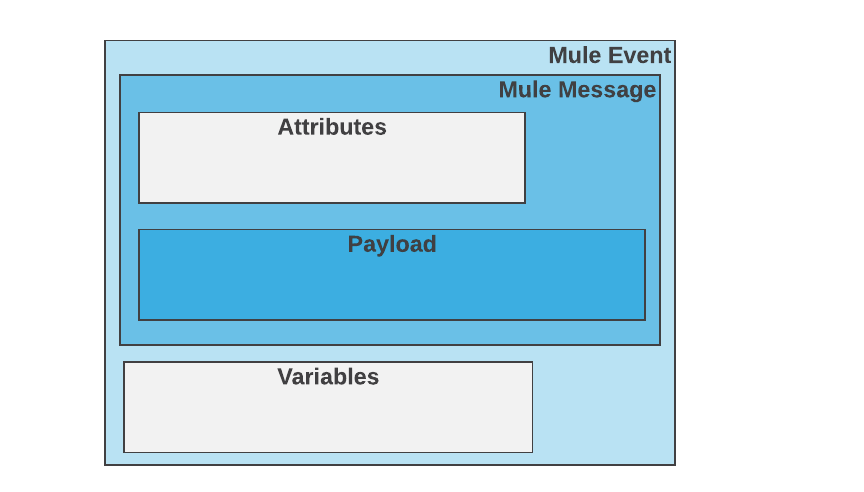
While we have already seen this in Mule 3, Mule message is, itself, embedded within a Mule message object and it may contain variables, attachments, and exception payloads.
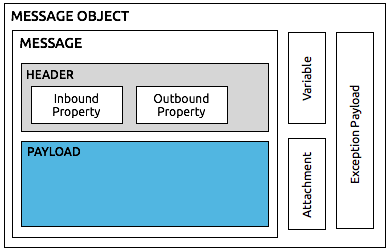
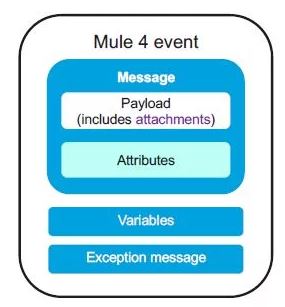
You can check out more about Mule 3 Message Structure here.
In Mule 3, when the request is received by Mule message source, it is converted into a Mule message or flow and starts processing it when it receives an inbound endpoint in a flow.
In Mule 4, flows triggered by an event are generated when a trigger reaches the event source of the flow. This trigger could be an external event triggered by a resource that might be external to the Mule app. The event source produces a Mule event. The Mule event travels sequentially through the components of a flow.
Each component interacts in a pre-defined manner with the Mule event.

Variables in Mule 4 Apps
Variables are used to store per-event values for use within a flow of a Mule app. We can store the current message (using the messagekeyword), the current message payload (using the payloadkeyword) or just the current message attributes (using thattributeskeyword).
You can create or update variables in these ways:
Using the Set Variable component.
Using a Target Variable from within an operation, such as the Read operation to the File connector or the Store operation to the Database connector.
Using the Datwave Transform Component (EE-Only).
Using Scripting Component (in scripting module)
You can also delete/remove:
Using the Remove Variable component.
After creating a variable, you can access and use it within the scope of a Mule flow where you created it, which includes any flows that are joined with it through a Flow Ref component.
vars: Keyword for accessing a variable, for example, if the name of your variable is myVar, you can access it like this: vars.myVar
Note that a variable in the Mule event is different from variables defined in a DataWeave script, which are local to the script and not accessible outside of it.
Message Collections
One of the major changes to the new Mule Message structure is when dealing with collections. In Mule 3, components that returned multiple payloads used a special structure called the MuleMessageCollection. But in Mule 4, any component that needs to deal with multiple messages can simply set the payload of the message to a List of Mule Messages. We can then iterate over these messages using DataWeave, For Each, or other components based on the requirements.
Comparison between Mule 3 Structure and Mule 4 Structure
Mule 3 |
Syntax |
Mule 4 |
Syntax |
Description |
Mule Message |
#[message] |
Simplified |
#[message] |
Consists of payload and attributes |
Inbound properties |
#[message.inboundProperties.'http.version'] |
Replaced by Attributes |
#[attributes.header] |
Replaced with attributes and have advantage that we can store it in variables to access throughout your flow. |
Outbound properties |
#[message.outboundProperties.'MULE_ENCODING'] |
Removed |
We can achieve it by using dataweave expression. |
|
Flow Variables |
#[flowVars.varName] |
Replaced |
#[vars.varName] |
Replaced with variables but acts same as Mule 3 |
| Session Variables | #[sessionVars.varName] |
removed | Removed as transport barriers are no more exists. We can store values in variables itselves. | |
| Record Variables | #[recordVars.varName] |
removed | Removed as batch jobs is a scope which lives inside flow, we can store in variables. | |
| Attachements | #[message.inboundAttachements] |
removed | Inbound and outbound attachments have been removed. The affected connectors now handles the attachment using Dataweave. |
Thanks for reading!
Opinions expressed by DZone contributors are their own.
Related
-
How To Use IBM App Connect To Build Flows
-
Enabling Business Transaction Monitoring for App Connect Enterprise
-
Data Mining in IoT: From Sensors to Insights
-
Error Handling Wikipedia in MuleSoft