
- DZone
- Software Design and Architecture
- Integration
- REST Webservices Using Jersey 2.x and Maven
REST Webservices Using Jersey 2.x and Maven
This article attempts to test a sample REST implementation using this update. It uses a single REST API operation.
Join the DZone community and get the full member experience.
Join For Free
An updated version of JAX-RS (Java API for RESTful Web Services) was released in August 2017 via JSR 370. A reference implementation was released by Jersey in April 2018, Jersey 2.27. This article attempts to test a sample REST implementation using this update. It uses a single REST API operation.
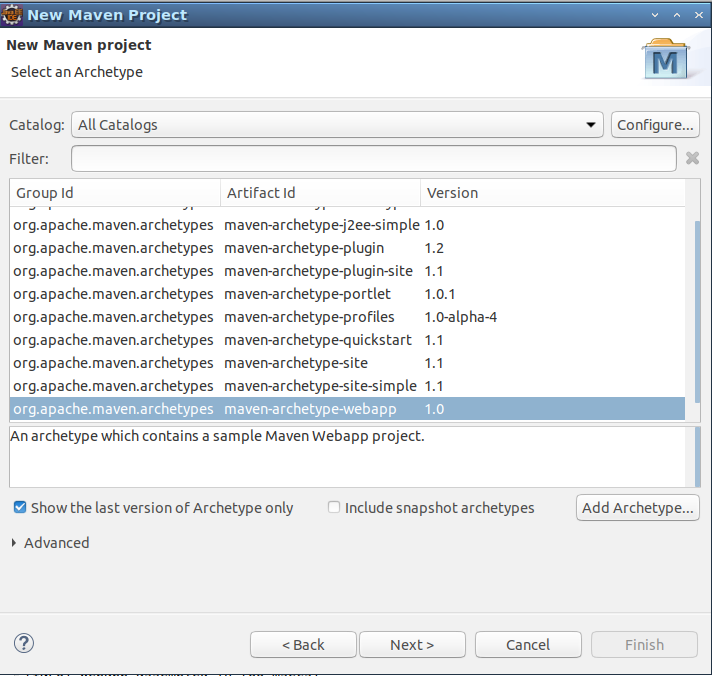
- Create a new Maven project in Eclipse. Make sure to choose “maven-archetype-webapp” as artifact ID from the catalog.
- Create a new Java class as follows:
package com.test;

import javax.ws.rs.GET;
import javax.ws.rs.Path;
import javax.ws.rs.Produces;
import javax.ws.rs.core.MediaType;

@Path(“/testservice”)
public class TestService {

@GET
@Produces(MediaType.TEXT_PLAIN)
public String getTestService() {
return “Hello World! This is coming from webservice!!”;
}

}- Update web.xml file with servlet, servlet mapping, and init param details as follows:
<!DOCTYPE web-app PUBLIC
 "-//Sun Microsystems, Inc.//DTD Web Application 2.3//EN"
 "http://java.sun.com/dtd/web-app_2_3.dtd" >

<web-app>
<display-name>Archetype Created Web Application</display-name>
<servlet>
<servlet-name>Test Jersey Service</servlet-name>
<!-- For Jersey 1.x -->
<!-- <servlet-class>com.sun.jersey.spi.container.servlet.ServletContainer</servlet-class> -->
<!-- For Jersey 2.x -->
<servlet-class>org.glassfish.jersey.servlet.ServletContainer</servlet-class>
<init-param>
 <!-- For Jersey 1.x -->
<!-- <param-name>com.sun.jersey.config.property.packages</param-name> -->
<!-- For Jersey 2.x -->
<param-name>jersey.config.server.provider.packages</param-name>
<param-value>com.test</param-value>
</init-param>
<load-on-startup>1</load-on-startup>
</servlet>
<servlet-mapping>
<servlet-name>Test Jersey Service </servlet-name>
<url-pattern>/rest/*</url-pattern>
</servlet-mapping>
</web-app>
Notice that the servlet-name and init-param in case of Jersey 1.x are also provided for references (commented out code).
- Update build.xml to include following Jersey dependencies:
<dependency>
<groupId>org.glassfish.jersey.core</groupId>
<artifactId>jersey-server</artifactId>
<version>2.27</version>
</dependency>
<dependency>
<groupId>org.glassfish.jersey.containers</groupId>
<artifactId>jersey-container-servlet</artifactId>
<version>2.27</version>
</dependency>
<dependency>
<groupId>org.glassfish.jersey.inject</groupId>
<artifactId>jersey-hk2</artifactId>
<version>2.27</version>
</dependency>
Following build.xml shows complete file after updating with dependencies. Notice that there are also dependencies for Jersey 1.x (commented out) for reference.
<project xmlns="http://maven.apache.org/POM/4.0.0"
xmlns:xsi="http://www.w3.org/2001/XMLSchema-instance"
xsi:schemaLocation="http://maven.apache.org/POM/4.0.0 http://maven.apache.org/maven-v4_0_0.xsd">
<modelVersion>4.0.0</modelVersion>
<groupId>test-jersey-rest-maven-tomcat</groupId>
<artifactId>test-jersey-rest-maven-tomcat</artifactId>
<packaging>war</packaging>
<version>0.0.1-SNAPSHOT</version>
<name>test-jersey-rest-maven-tomcat Maven Webapp</name>
<url>http://maven.apache.org</url>
<dependencies>
<dependency>
<groupId>junit</groupId>
<artifactId>junit</artifactId>
<version>3.8.1</version>
<scope>test</scope>
</dependency>
<!-- For Jersey 1.x -->
<!-- <dependency>
<groupId>com.sun.jersey</groupId>
<artifactId>jersey-server</artifactId>
<version>1.19</version>
</dependency>
<dependency>
<groupId>com.sun.jersey</groupId>
<artifactId>jersey-servlet</artifactId>
<version>1.19</version>
</dependency> -->
<!-- For Jersey 2.x -->
<dependency>
<groupId>org.glassfish.jersey.core</groupId>
<artifactId>jersey-server</artifactId>
<version>2.27</version>
</dependency>
<dependency>
<groupId>org.glassfish.jersey.containers</groupId>
<artifactId>jersey-container-servlet</artifactId>
<version>2.27</version>
</dependency>
<dependency>
<groupId>org.glassfish.jersey.inject</groupId>
<artifactId>jersey-hk2</artifactId>
<version>2.27</version>
</dependency>
</dependencies>
<build>
<finalName>test-jersey-rest-maven-tomcat</finalName>
</build>
</project>
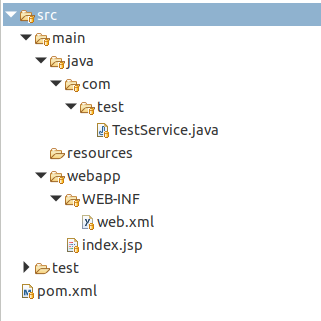
After making the above changes, the project structure should like below:
- Update Maven packages, clean, compile, package and test it by deploying in a servlet container, like Apache Tomcat-
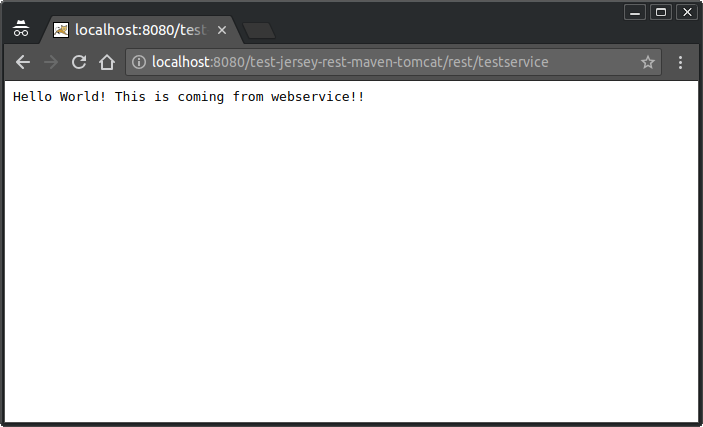
Please note that this code has been tested in Tomcat 9.0, under JDK 1.8.
This project is available on GitHub at this location: https://github.com/naveenvemulapalli/test-jersey-rest-maven-tomcat
Opinions expressed by DZone contributors are their own.
Related
-
GraphQL vs REST API: Which Is Better for Your Project in 2025?
-
Simplifying Database Operations With HarperDB SDK for Java
-
CRUD REST API With Jakarta Core Profile Running on Java SE
-
Exploring Hazelcast With Spring Boot