|
VOOZH | about |
|
VOOZH | about |
GitOps is an operational framework that leverages DevOps core practices used in application development, including version control, CI/CD, and collaboration, for infrastructure automation. This Refcard introduces the fundamentals of a mature GitOps model, the key benefits of GitOps, and the elements of a GitOps workflow for new feature deployment.
Written By
GitOps is an operational framework that utilizes Git as the single source of truth for managing various components of an application (e.g., infrastructure, configuration, etc.). Since its introduction in 2017, GitOps has become the de facto standard for managing and deploying cloud-native applications. At its core, GitOps marries the principles of X-as-Code paradigms (e.g., Infrastructure as Code, Configuration as Code, Policy as Code) for declarative management and continuous integration/delivery (CI/CD) for automated deployments. In GitOps, the state of a deployed system is always reflected in Git. Any changes to the system, including infrastructure, configuration, and policy components, must invoke a new commit to Git before being pushed out to deployed environments.
GitOps builds on DevOps best practices used for application development, such as version control, collaborative reviews via pull requests (PR), CI/CD, and compliance measures, and applies them to infrastructure automation. By tying the system state to Git, a versioned, immutable snapshot is created on every commit. This provides several benefits, including reliable deployments and rollbacks, a comprehensive audit trail for transparency and traceability, and stronger guardrails against drift in the system. Best of all, keeping the entire system definition in Git also means that your engineers can use familiar, Git-based tooling and workflows to manage both application and infrastructure changes.
Although the benefits of GitOps are well documented, the best practices for implementing GitOps in different organizations are still being formulated. In this Refcard, we’ll dive into the core principles of GitOps and its benefits, and introduce common tools and methods used to implement GitOps in practice.
GitOps practices aren't dependent on any specific technology. While logically GitOps is simply managing operations via Git, three core practices make up a mature GitOps practice: X-as-code (XaC), merge requests (MRs) as the request for change and system of record, and continuous integration/continuous delivery (CI/CD).
GitOps = XaC + MRs + CI/CD
X as Code (XaC) is the practice of keeping all components of the application, such as infrastructure, configurations, policies, and more, stored as code. By shifting your environment definitions from manual configuration to configuration by code, you gain access to an array of benefits such as version control, code collaboration, and auditability. You also unlock Git as the user interface for your infrastructure, thus leveraging developer tooling, training, and knowledge associated with Git for your infrastructure operations. It is important to note that while IaC is the most well-known practice, GitOps applies to any operation that can be defined as code (e.g., network, policy, security).
It may be surprising to learn that the underlying Git version control system used to power tools such as Bitbucket, GitHub, and GitLab doesn't include a way to request that your branch be merged back into the branch it was created or forked from. This was a later advancement introduced by Git management tools. GitHub and Bitbucket use the term pull request (PR) while GitLab uses the term merge request (MR), but functionally, they operate as a central point of developer collaboration for code review and change orchestration.
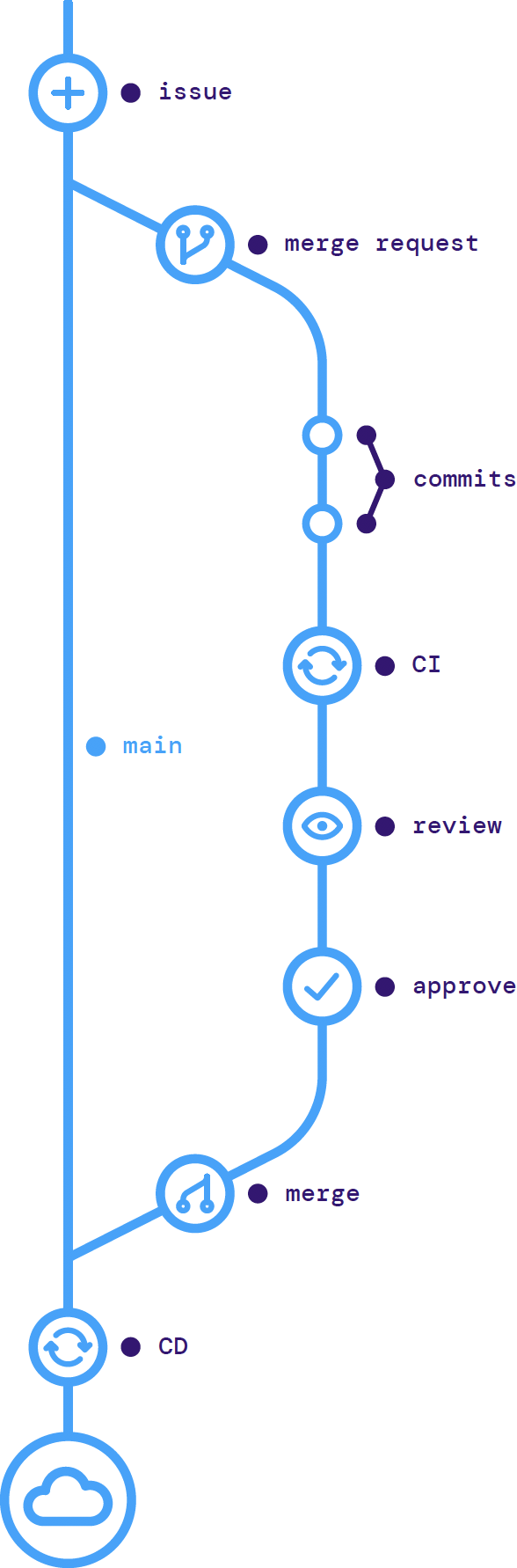
Without a proper version control and branching strategy, collaboration on new changes is a frustrating endeavor. When anyone can modify a file without a way to track who made which change, it can be almost impossible to ensure the correct version is used. A typical application development workflow uses a main branch as a centralized collaboration point. Feature branches are created from the main branch, where new work is developed, and merged back into the main branch using a pull request. Leveraging this best practice for all your infrastructure code nets you the same benefits that developers enjoy.
In an infrastructure model, the main branch represents a particular environment (e.g., dev or production), as well as the state running in that environment. Changes are proposed on a feature branch, and a PR is made to merge the changes into the main branch. This PR allows for collaboration between operations engineers for peer review, along with the development teams, security teams, and other stakeholders.
This powerful model for collaboration permits anyone to propose a change while also allowing you to maintain compliance by limiting the number of people who can merge the changes.
Figure 1: GitOps workflow
The final component of a robust GitOps strategy is automating all changes made to environments via CI/CD. In an ideal scenario, no manual changes are made to a GitOps-managed environment. Instead, CI/CD serves as a type of reconciliation loop. Each time a change is made, the automation tool compares the state of the environment to the source of truth defined in the Git repository. If the Git repository shows a change, the automation tool reconciles this difference by configuring the environment to match the canonical desired state.
This type of automation serves as a powerful protection against configuration drift. There are many reasons configurations can fall out of sync. It can occur when there is a manual change for a hotfix during an outage or from natural drift over time if there are no mechanisms in place to keep all state in sync. Regardless of the reason, GitOps can rectify the drift as it overwrites the existing state with the Git source of truth on every deployment.
Different models for GitOps automation have emerged, namely agentless and agent-based, each with its own pros and cons.
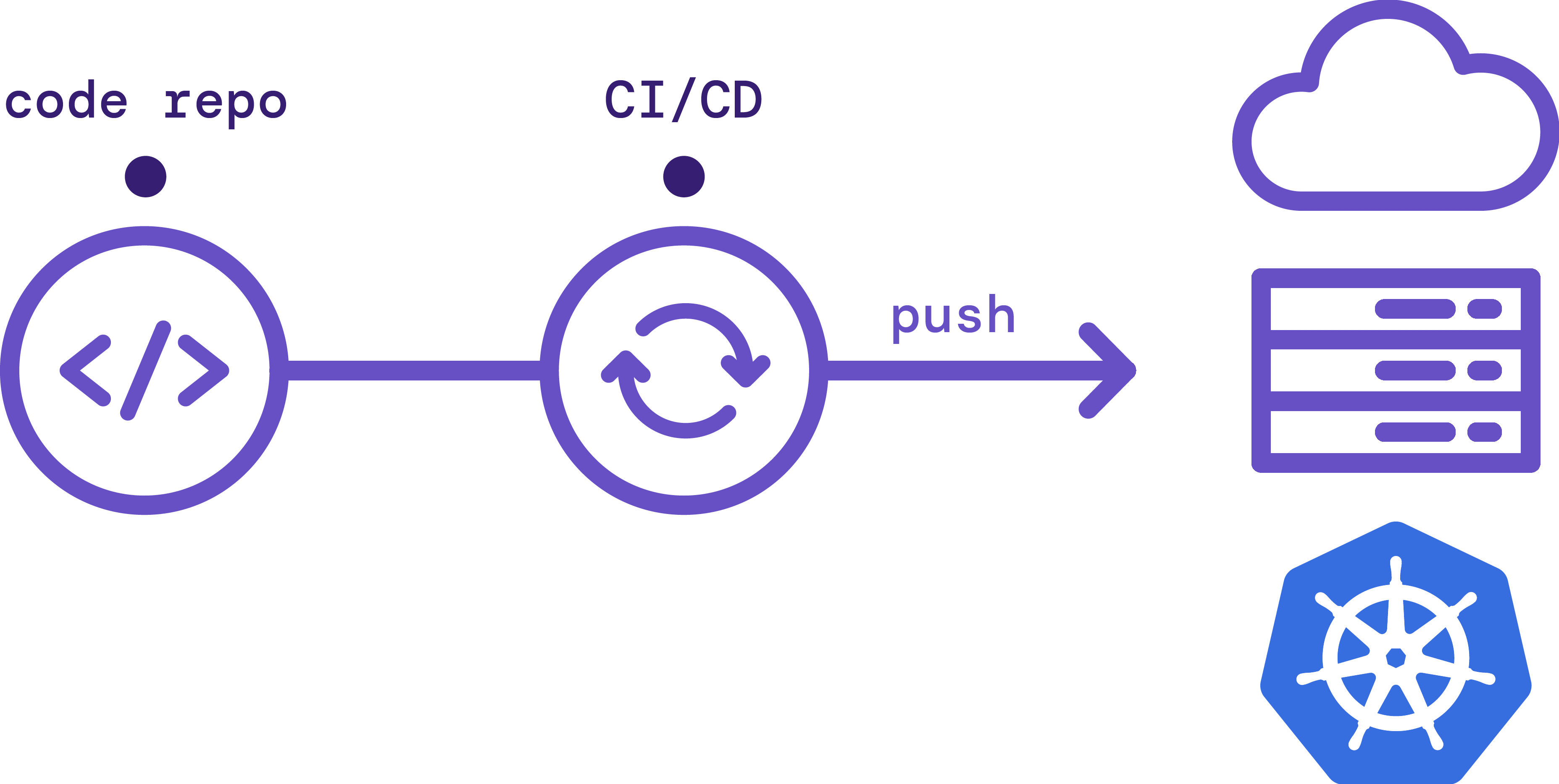
Agentless GitOps is a traditional model, also known as "push-based GitOps", in which your CI/CD tool reads from your Git repository and pushes changes into your environment.
Figure 2: Agentless GitOps model
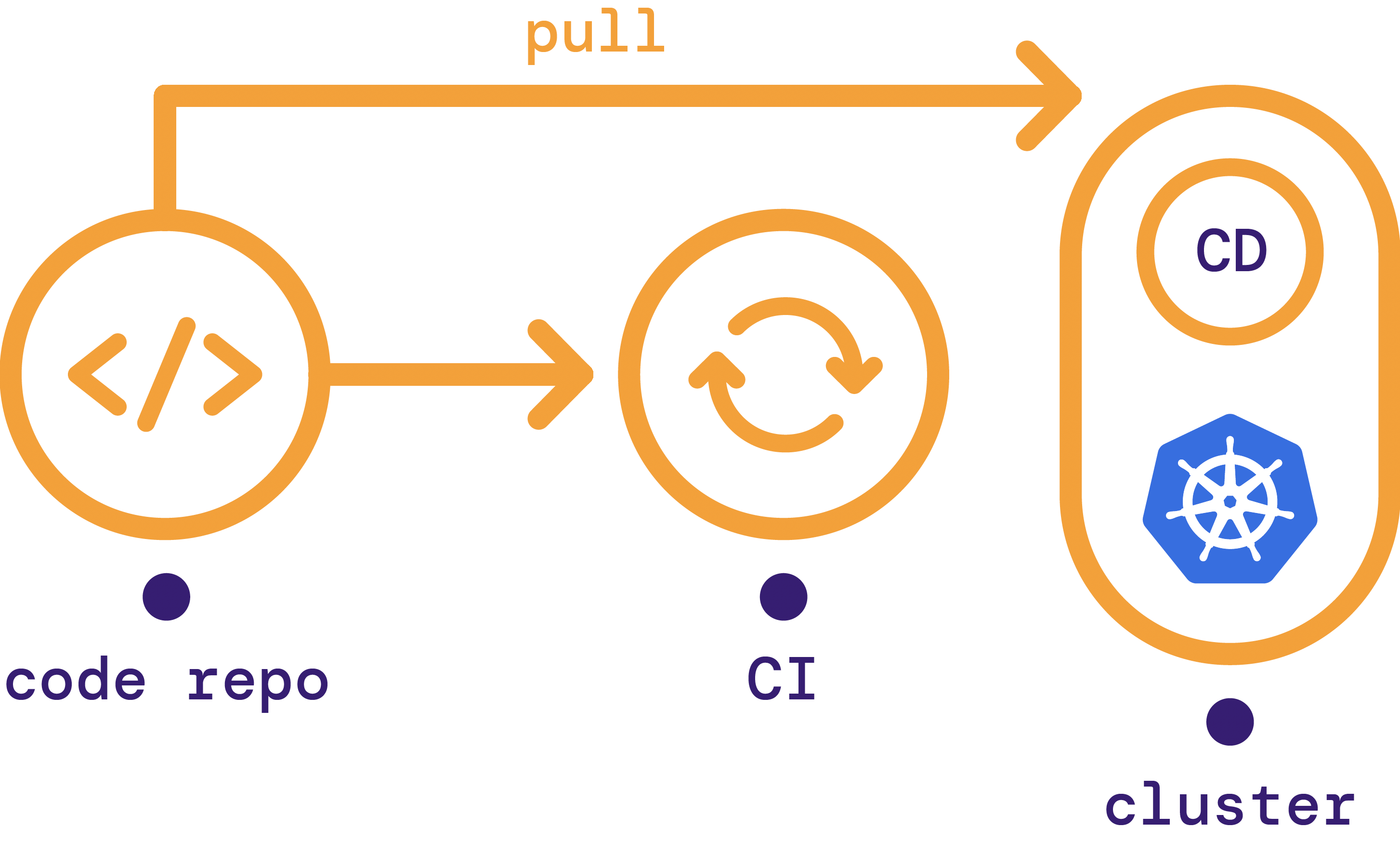
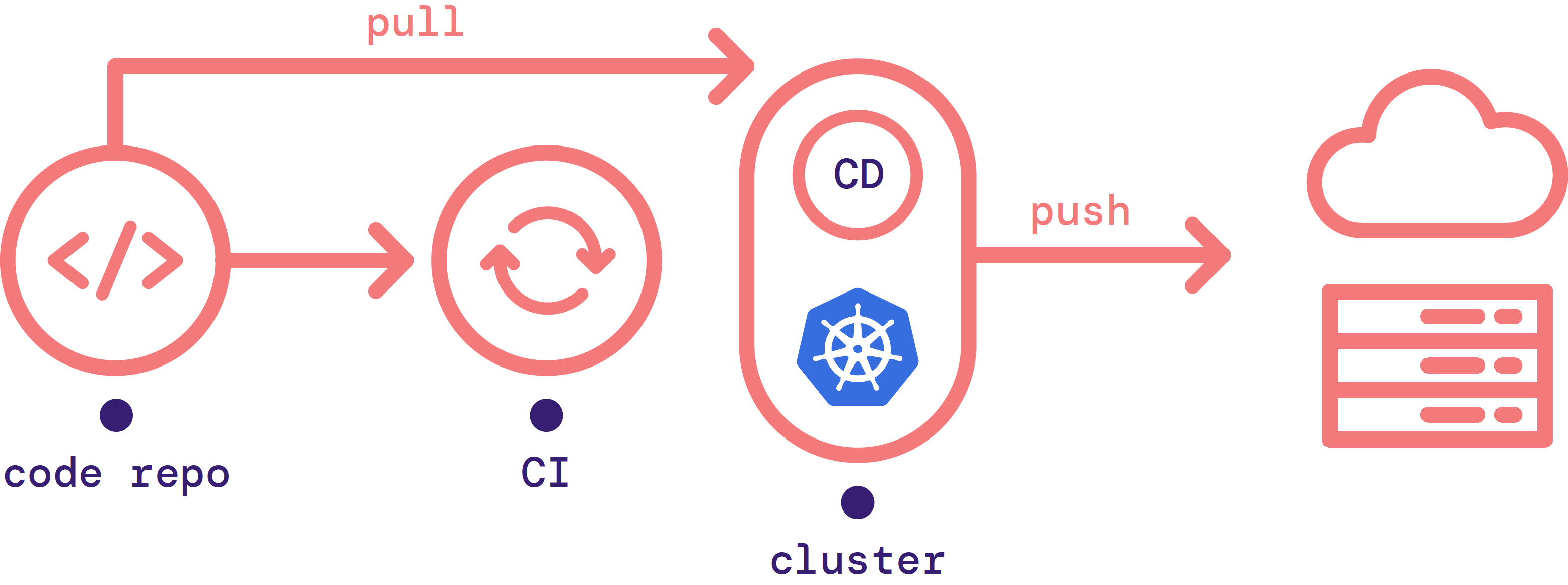
Agent-based GitOps, also known as pull-based GitOps, uses an agent that runs inside your infrastructure. This agent pulls changes in from an external Git repository when it detects that the state of the environment is out of sync with the source of truth.
Figure 3: Agent-based GitOps model
👁 Image
Today, most GitOps agents, such as the GitOps Engine, are designed specifically for Kubernetes. For example, these agents won't run inside a VM-based cluster. A workaround requires setting up a Kubernetes cluster dedicated to orchestration. The CD agent runs inside the orchestration cluster and enacts changes to external infrastructure.
Figure 4: GitOps Engine model
GitOps best practices are far-reaching and can provide the following benefits:
Since any changes to the application state requires a Git commit and a PR for review, GitOps enables developers a self-service model to make changes and deployments. Using the pull requests as a central point of collaboration also enables teams across the organization to work together fast, automated, and asynchronously. Best practices from one team can be easily shared and consumed across the organization because they are documented as code.
With automated application deployment and environment provisioning, you can do many small, frequent deployments rather than occasional large, risk-prone deployments. More minor changes are easier to reason about when troubleshooting and easier to roll back. Additionally, deploying features to your users sooner leads to happier users, more actionable feedback, and ultimately improved software.
A core benefit of keeping environment state in version control is that rolling back to the last known secure configuration when you experience problems is straightforward. This can dramatically reduce your mean time to recovery (MTTR) because you can fix issues quickly during an incident by rolling back, and then after your system is operating normally, you can troubleshoot.
Also, with GitOps automation, human error is greatly mitigated versus relying on manual changes from your infrastructure teams. Misconfigurations and dangerous changes can be caught earlier in the review process and are transparent to the entire team.
Since GitOps centralizes all code elements for a successful application deployment, a working model can be easily shared across the organization for a consistent end-to-end experience. New operational tasks can be codified as a new step in the standard GitOps model for your team, minimizing one-off configurations.
Too often organizations must trade off between moving fast and staying compliant. With GitOps, compliance and approvals can be automated, distributed, and conducted asynchronously, so the pace of innovation keeps moving forward.
With manual tools, auditing is highly painful, and pulling data from multiple places and trying to normalize it is extremely time-consuming. Having all operations in Git gives you a one-stop shop for audit logs with every change so that auditing can be effortless.
Leveraging Git’s robust permission model makes it simple to grant, revoke, and track permissions for each environment. Beyond read/write access, the Git merge request workflow unlocks an additional ability to grant proposal access. Many users can be granted the ability to propose changes, while simultaneously keeping the pool of people who can enact those changes small.
As a methodology, GitOps doesn’t require any specific technology to implement. The following table lists examples of the types of tooling that you’ll generally want to implement when adopting GitOps, along with some examples of each.
Table 1: Examples of GitOps tooling
|
Tooling Type |
Example |
|
Git code repository |
Git |
|
Git management tool |
Bitbucket, GitHub, GitLab |
|
Continuous integration tool |
CircleCI, Jenkins |
|
Continuous delivery tool |
ArgoCD, Flux, Spinnaker |
|
Container registry |
Docker Hub, AWS ECR |
|
Configuration manager |
Ansible, Chef, Puppet |
|
Infrastructure provisioning |
AWS CloudFormation, Pulumi, Terraform |
|
Container orchestration |
Kubernetes, Nomad |
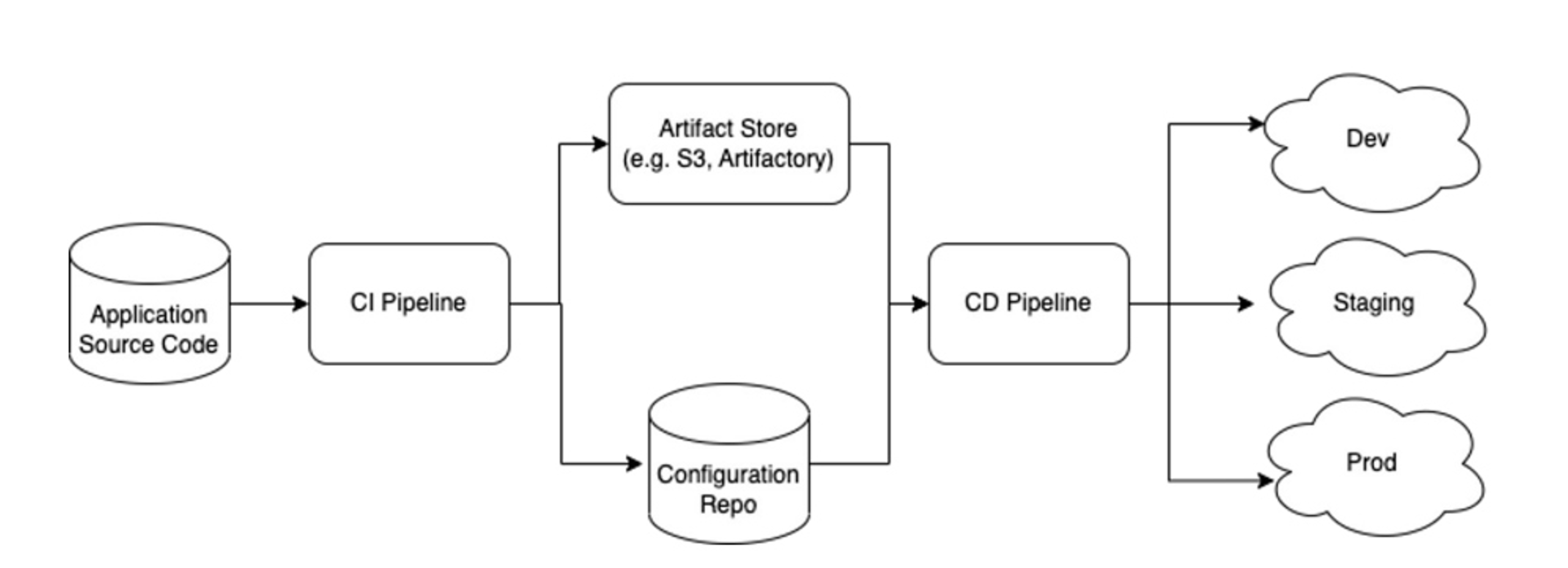
Even though the idea underlying GitOps is simple, implementing it successfully depends on many factors. First and foremost, GitOps procedures are necessarily tied to your organization’s Git structure. If you use a monorepo, you may need robust tooling such as Bazel to correctly build and deploy both application and infrastructure code. For others using multiple repos, the general recommendation is to separate application code from deployment artifacts.
Figure 5: Multi-repo GitOps model
Separating application and infrastructure code allows for different deployment cadences according to application and infrastructure changes. It also enables different levels of access and ownership if there is a compliance or regulatory requirement.
Next, determining what goes in the application source code repo versus the configuration repo will depend on the size and expertise of your team. Small startups without dedicated infrastructure teams may benefit from simply separating IaC code in the configuration repo, whereas larger teams may want more granular separation for Kubernetes components.
Finally, consider the number of deployment repositories based on your infrastructure topology. For smaller organizations with a few deployed environments, having a single repo to host all deployments with different directories for accounts or regions may suffice. For large enterprises, a different repo per product, team, or cloud may work better to implement security or compliance needs.
GitOps is an operational model that leverages DevOps best practices used in application development for infrastructure automation. By codifying infrastructure and configuration via Git, the entire environment definition is stored as the single source of truth. The pull request workflow is used for collaboration and compliance, while CI/CD automation not only deploys the application code but also configures and provisions the underlying environments in which the code runs.
Adopting GitOps best practices means that developers and operations engineers can use familiar Git tooling to manage updates to software environments. Automation — along with asynchronous collaboration at scale — speeds up the pace of innovation to decrease lead times and increase deployment frequency. This increased agility allows businesses to respond to customer and market demands to build and maintain a competitive advantage.
Whether you work on a small team or a large enterprise, GitOps offers plenty of benefits like increased collaboration, greater reliability, and simplified compliance to name a few. There are important considerations for setting up GitOps based on your team size and expertise, but at the end of the day, GitOps is a flexible model that can meet the needs of any modern software team to succeed.
ADVERTISE
CONTRIBUTE ON DZONE
LEGAL
CONTACT US
Let's be friends: