Help scout review for 2025: Is it worth the price?


Last edited December 5, 2025

Picking a new help desk feels like a massive commitment, doesn't it? The thought of moving your entire support history, retraining the team, and dealing with surprise costs is enough to make anyone stick with what they know, even if it’s not working perfectly. You’re looking for something powerful but not a nightmare to use, and affordable without feeling cheap.
This Help Scout review is an honest look at a platform that tons of small businesses really like. We’ll get into why it’s a favorite for its personal, human-first approach. But we’ll also dig into the real limitations, user frustrations, and confusing pricing details you probably won’t find on their homepage.
We're going to cover Help Scout's main features, make sense of its new pricing plans (including that paid AI add-on), point out the issues real users have run into, and show you a way to get a major support upgrade without the headache of a full migration.
What is Help Scout? An overview
Help Scout is a customer support tool built for small and medium-sized businesses that don’t want their support to feel cold and corporate. It’s known for being "customer-centric," and the whole platform is set up to feel more like a personal email conversation than a rigid ticketing system. A lot of teams choose it for exactly that reason, to dodge the impersonal vibe of ticket numbers and clunky software.
The basics of Help Scout include a shared inbox for your team to work together, a knowledge base tool called Docs, and a little website widget called Beacon that handles live chat and self-service.
Help Scout's main features
Help Scout’s biggest plus is its simple, collaborative toolkit that’s easy for just about anyone to pick up. But, and this is a big but, getting access to some of the best features really depends on which plan you’re on. It's good to know exactly what you’re getting for your money.
A shared inbox for team collaboration
The shared inbox is where you’ll spend most of your time in Help Scout. It pulls all your customer emails from different addresses (like "support@" or "info@") into one place where your team can tackle them together. Handy features like private notes let your team chat about an issue behind the scenes, collision detection stops two people from replying to the same customer at once, and saved replies help you answer common questions with a click.
It’s definitely a big improvement over a shared Gmail account. But if you want to connect it to other important tools, get ready to open your wallet. Key CRM integrations with platforms like Salesforce, Jira, and HubSpot are only available on the Plus plan and above.
Automated workflows for repetitive tasks
Help Scout lets you set up simple "if-this-then-that" rules, which they call workflows, to automate boring tasks. For example, you can create a rule that says, "If an email subject contains ‘refund,’ then add the ‘Urgent’ tag and assign it to the Billing team." It's a real time-saver for keeping your inbox organized without having to do it all by hand.
These workflows are useful, but they're not unlimited. You get a set number on the Standard and Plus plans, and you'll have to jump up to the pricey Pro plan to get unlimited automation.
Beacon live chat and the Docs knowledge base
Beacon is Help Scout’s widget that you can embed on your website. It’s a pretty smart tool that mixes live chat with self-service by suggesting helpful articles from your knowledge base before a customer even starts asking a question.
One of its best little features is how it manages expectations. The live chat option only shows up on your site if one of your agents is actually available to chat. If no one's online, it just shows an email form instead. This simple touch avoids that annoying feeling of starting a "live" chat only to be told you have to wait for an email. It’s a small detail, but a big win for the customer experience.
| Feature | What It Does | Best For | Plan Availability |
|---|---|---|---|
| Shared Inbox | Centralizes customer emails for team access. | Teams moving from a shared Gmail or Outlook account. | All Plans |
| Workflows | Automates repetitive actions like tagging and assigning. | Reducing manual work on common support requests. | Limited on Standard/Plus, Unlimited on Pro |
| Beacon Widget | Combines live chat with a self-service knowledge base. | Providing instant answers and managing live chat. | All Plans |
| Key Integrations | Connects to Salesforce, Jira, and HubSpot. | Teams needing a unified view of customer data. | Plus Plan & Higher |
Potential drawbacks: What users say
While Help Scout is a solid tool, no platform is perfect. We dug through user reviews on sites like Reddit and Trustpilot to get a realistic view of the frustrations you might run into.
The controversial new document editor
One of the most common complaints from people who’ve used Help Scout for a while is about the updated editor for their Docs knowledge base. In a Reddit thread talking about help desk software, one user called the new editor "hideous" and "barely usable." Apparently, the new block-style editor made it harder to manage and update articles. If you rely on self-service to keep your ticket volume down, a clunky editor is a serious problem that can mess up a core part of your support strategy.
Pricing concerns and unexpected increases
Help Scout often positions itself as an affordable option, but some users have been shocked by major price hikes. One person on Trustpilot said their plan cost jumped by over 400%, which turned an affordable tool into a huge line item on their budget.
The starting price might look good, but the costs can add up fast. According to their own pricing page, extra inboxes will set you back an extra $10/month and extra Docs sites are $20/month. On top of all that, their new AI feature is sold as a separate add-on where you pay per resolution, making it tough to predict your monthly bill. This visual breakdown shows how quickly the costs can accumulate.
Key features gated behind expensive plans
Help Scout has a lot of features, but many of the ones you'll need as your team grows are locked away in the more expensive plans. For example, HIPAA compliance is only offered on the Pro plan, which requires a minimum of 10 users at $75 per user each month. This pretty much prices out smaller businesses in the healthcare space that need to be compliant but don't have a big team.
It's a similar story for important integrations like Salesforce and Jira, which are only available on the Plus plan or higher. That attractive entry-level price might not be what you actually end up paying to get a setup that works with the tools you already use.
Help Scout's 2025 pricing plans
Help Scout’s pricing is broken into tiers, and the features and limits change as you go up. It’s really important to know that their most advanced AI tool, AI Answers, is not included in any of the monthly plans. It’s sold separately.
All prices here are for monthly billing, taken from their official pricing page.
-
Free Plan: For tiny teams just getting their feet wet.
- Cost: $0
- Includes: Up to 5 users, 1 inbox, and 1 Docs site. It’s a nice way to try out the basics, but it's very limited.
-
Standard Plan: For growing teams who need better organization.
- Cost: $25/user/month
- Includes: Up to 25 users, 2 inboxes, multiple knowledge bases, and basic workflows.
-
Plus Plan: For teams dealing with more support volume and complexity.
- Cost: $45/user/month
- Includes: Everything in Standard, plus 5 inboxes, advanced workflows, unlimited AI Drafts and Summaries, and integrations with Salesforce, Jira, and HubSpot.
-
Pro Plan: For larger teams that need top-tier scale and security.
- Cost: $75/user/month (with a 10-user minimum)
- Includes: Everything in Plus, plus 10 inboxes, unlimited workflows, SSO/SAML, and HIPAA compliance.
-
The AI Answers Add-On: Now for the interesting part.
- Cost: $0.75 per resolution
- Function: This is their AI chatbot that can answer routine questions on its own. Again, it is not included in the monthly plan fees.
- The Catch: This pay-per-resolution model means your costs can be all over the place. A sudden spike in support tickets could lead to a surprisingly big bill at the end of the month, which makes budgeting a real challenge.
Evaluating Help Scout's approach to AI
Help Scout splits its AI features into two different buckets: tools that help your agents work faster and a separate tool that automates replies completely. Knowing the difference is pretty important for understanding what you're actually paying for.
Agent assistance vs. paid automation
The Plus and Pro plans come with "AI Assist" features that can summarize long email threads or help draft replies. These tools are meant to make agents more efficient, but they don't actually reduce the number of tickets your team has to handle. A person still has to review, edit, and send every single response. This visual comparison breaks down the key differences between the two AI offerings.
Real automation, where an AI can close a ticket without a person getting involved, is only available through the AI Answers add-on. At $0.75 per resolution, you are literally paying every time the AI successfully deflects a ticket.
The gap between AI assistance and automation
Help Scout's included AI is a helper, not an autonomous agent. It can't sort incoming requests, perform actions in other apps, or solve problems that require multiple steps. It makes the manual work faster, but it doesn't get rid of it.
For teams who are trying to scale support and lighten their agents' workload, a simple AI assistant just doesn't cut it. And the pay-per-resolution model for their chatbot can become a huge, unpredictable expense that basically penalizes you for successfully deflecting more tickets.
The smarter path: Upgrading your help desk with AI without migrating
This Help Scout review shows that while it's a decent tool, its approach to automation and pricing can create real problems for growing teams. But what if you could get powerful, autonomous AI without having to switch help desks or pay for every single automated answer?
Instantly connect AI to your current system
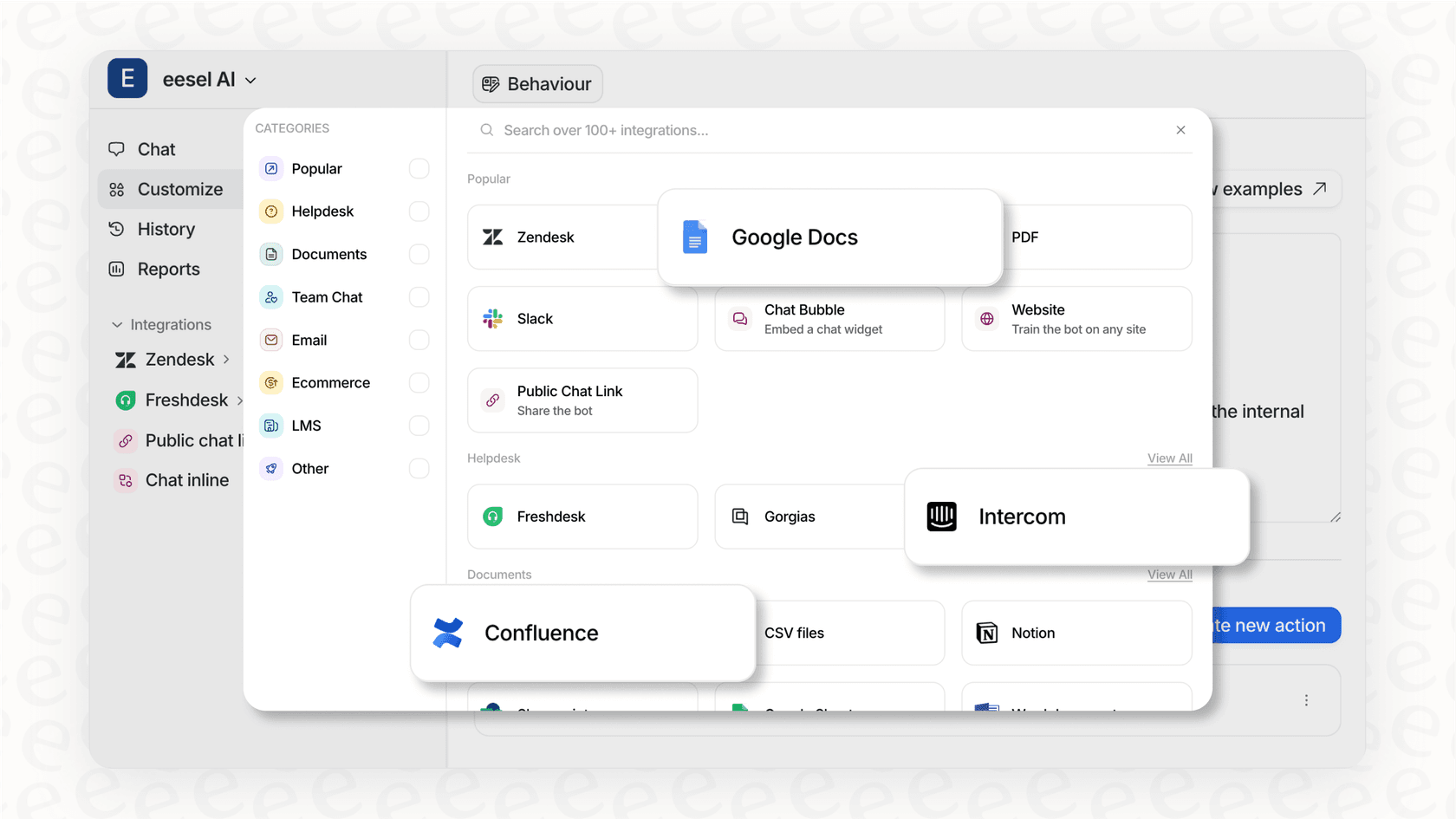
The biggest thing stopping most teams from getting better support tools is the fear of migration. Instead of ripping out your current system and starting over, you can just add an AI layer right on top of it. For example, a tool like eesel AI plugs into the help desk you already use, whether it’s Help Scout or Zendesk, and it only takes a few minutes to set up. You get powerful automation without the chaos and risk of a full migration project.
Go beyond basic assistance with an autonomous AI agent
Unlike Help Scout's pay-per-use model, eesel AI offers an autonomous AI agent that's built for actual automation. It learns from your past support tickets and knowledge base to answer up to 80% of common questions all by itself.
Even better, it can sort new tickets, send them to the right teams, and even take custom actions using APIs, like looking up order details in Shopify or updating a customer’s info. This is the kind of automation that actually reduces workload, and it comes with a flat, predictable monthly fee. There are no per-resolution charges.
Test with confidence using a risk-free simulation
One of the coolest things about eesel AI is that it can run a simulation on your past support tickets. Before you even turn the AI on for live customers, you can see exactly how it would have answered thousands of your past conversations. This takes all the guesswork out of the equation, gives you a clear idea of your potential ROI, and helps you trust the system in a way that just flipping a switch on a new platform never could.
Is Help Scout right for you?
Help Scout is a solid choice for small, customer-focused teams who need a simple shared inbox and care more about a personal touch than heavy-duty automation. It’s great when you want your support to feel like a friendly email, not a ticket number.
However, if you're starting to feel boxed in by its quirky doc editor, features locked behind expensive plans, and the pay-per-resolution AI model, you might feel a bit stuck. The idea of a full migration is a nightmare, but the day-to-day problems of trying to scale your support are very real.
A complete help desk switch isn't your only option. Before you sign up for a massive migration project, think about improving the setup you already have. Adding an intelligent AI layer from a tool like eesel AI can solve your biggest automation problems faster, for less money, and without all the risk.
Ready to see what real AI automation could do for your team? Connect eesel AI to your help desk in minutes and run a free simulation on your past tickets to see how much you could automate, completely risk-free.
Frequently asked questions


Automate your Help Scout with AI agents
Share this article

Article by
Stevia Putri
Stevia Putri is a marketing generalist at eesel AI, where she helps turn powerful AI tools into stories that resonate. She’s driven by curiosity, clarity, and the human side of technology.