





What is a LinkedIn Feed Aggregator
Add LinkedIn feed on your Wordpress website in just a few seconds!
With our powerful social media aggregator tool, you can embed LinkedIn feed widgets on any CMS or eCommerce platform, including WordPress.
It’s one of the most effective LinkedIn plugins for WordPress, available for both small and large brands.
EmbedSocial is a professional plugin that integrates with the official LinkedIn API. It allows you to easily create and showcase an engaging LinkedIn feed on your WordPress site.
If your company is already active on LinkedIn, don’t let that valuable content go unused.
Instead of manually updating your site with LinkedIn posts, simply publish them on LinkedIn, and they’ll automatically appear on your website.
No coding skills or technical knowledge is required!
From startups to enterprises, B2B brands use LinkedIn to share thought leadership, company culture, hiring updates, and industry insights. You can turn that content into a dynamic social feed and embed it on your WordPress site in just a few clicks.
To ensure your LinkedIn feed fits seamlessly into your website’s design, choose from multiple layouts that adapt perfectly to your WordPress theme and are fully responsive.
And to make integration even easier, we offer an official LinkedIn Feed Plugin for WordPress, built for fast setup and smooth performance.
Benefits of LinkedIn feed widget for your Wordpress website
-
Turns website visitors , into LinkedIn followers.
-
Adds fresh, engaging B2B content , to your site.
-
Increases time on site , with dynamic social updates.
-
Drives more traffic , from social to site.
-
Boosts conversions , with real-time company proof.
-
Amplifies the reach , of your LinkedIn presence.
LinkedIn Feed features for Wordpress
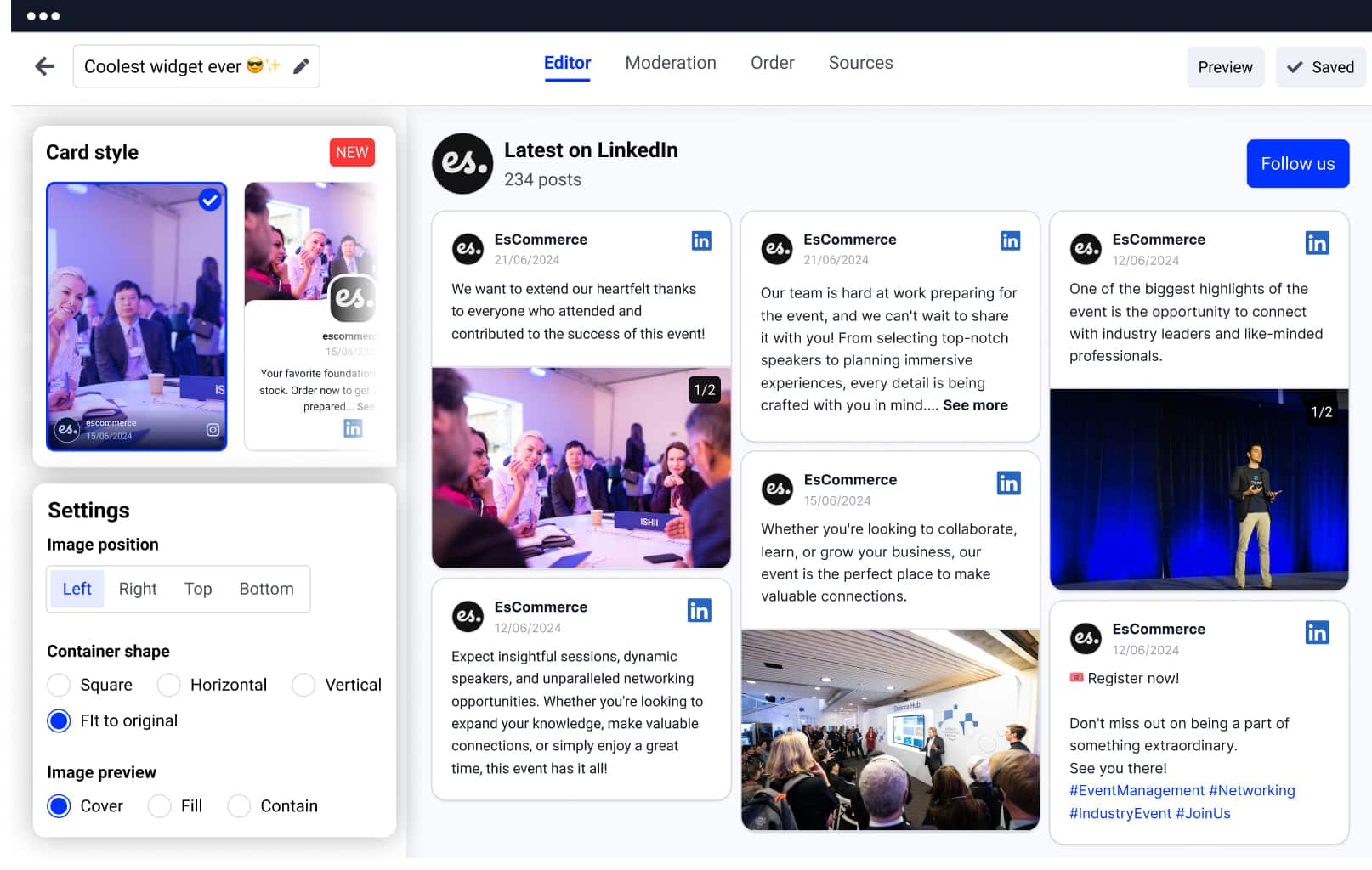
-
Mobile-responsive design , Looks great on phones, tablets, and desktops.
-
Post moderation and keyword filters , Curate what shows up on the feed.
-
Multiple layout options , Carousel, grid, masonry. pick what fits.
-
Lightbox view and “Load More” button , Keep visitors engaged longer.
-
Follow button integration , Convert visitors into LinkedIn followers.
-
Templates compatible with any WordPress theme , Drop in a clean look without custom design work.
-
Set the number of posts or columns , Tune the density to fit your layout.
-
Auto-sync with new LinkedIn posts , New posts show up automatically.
-
Google Analytics integration , Track widget engagement.
-
CTA buttons on posts , Drive clicks where they matter.
-
Custom CSS and color schemes , Match your brand exactly.
-
Lazy-loading and pagination options , Keep page speed snappy.
-
Multiple widgets , Run different feeds across pages or sites.
-
Combine with other social feeds , Instagram, Facebook, Twitter, and more.
Option 1: Using JavaScript code
Embedding a LinkedIn feed into your WordPress site is quick and straightforward. Choose between two methods. JavaScript code or the EmbedSocial WordPress LinkedIn plugin (shortcode).
-
Step 1: Start your EmbedSocial free trial
Start your EmbedSocial free trial.
-
Step 2: Connect your LinkedIn page
Select LinkedIn as your source and connect your company page.
-
Step 3: Choose the type of feed
Choose the type of feed (company updates, hashtag posts, employee content).
-
Step 4: Customize the design
Customize the design to match your site.
-
Step 5: Open WordPress and pick a page
Go to your WordPress admin panel and edit the desired page.
-
Step 6: Add a Custom HTML block
Add a “Custom HTML” block.
-
Step 7: Paste the embed code
Copy the embed code from the platform and paste it into the block.
-
Step 8: Set and Update
Click Set and then Update your page.
Option 2: Using the EmbedSocial WordPress plugin
-
Step 1: Start your free trial
Start your free trial.
-
Step 2: Connect your LinkedIn page
Connect your LinkedIn page.
-
Step 3: Choose your preferred feed type
Choose your preferred feed type.
-
Step 4: Customize your widget
Customize your widget.
-
Step 5: Install the WordPress plugin
In WordPress, go to Plugins > Add New, and install the EmbedSocial plugin.
-
Step 6: Add a Shortcode block
Edit your desired page and insert a Shortcode block.
-
Step 7: Paste the shortcode
Paste the generated shortcode from the platform.
-
Step 8: Set and Update
Click Set, then Update the page.
Once embedded, your LinkedIn feed will display immediately. You’ll have full control to adjust layouts, moderate posts, and optimize performance.
Best practices for displaying a LinkedIn Feed
Effectively showcasing your LinkedIn feed on your website can increase brand trust, reinforce your social proof, and drive B2B engagement. Here’s how to make the most of it:
-
Prioritize high-impact placement , Embed the LinkedIn feed in high-visibility areas, such as your homepage, About Us page, or Careers section, where visitors are actively seeking brand credibility, culture insights, or real-time updates.
-
Use a clear value-focused headline , Guide attention with a headline that communicates the benefit of engaging with the feed. For example: “See what we’re sharing on LinkedIn” or “Real-time insights from our LinkedIn community.”
-
Highlight authentic, brand-relevant content , Feature updates that reflect your brand values, such as employee stories, client wins, product innovations, or thought leadership posts. This gives visitors a reason to follow your company and trust your expertise.
-
Optimize for visual impact , Use layouts like sliders, grids, or masonry to make your feed more dynamic. Prioritize posts with high-quality visuals, images, video clips, event recaps, to increase time on site and interaction.
-
Encourage follows with integrated CTAs , Add a subtle but clear follow button or CTA below the feed to convert visitors into LinkedIn followers and keep them engaged beyond the site visit.