
Performs security scans including Software Composition Analysis (SCA) and Infrastructure as Code (IaC) security checks to identify vulnerabilities in dependencies and infrastructure configurations.
Conducts Dynamic Application Security Testing (DAST) to identify security vulnerabilities in running web applications through automated scanning.
Click on "Install Server".
Wait a few minutes for the server to deploy. Once ready, it will show a "Started" state.
In the chat, type
@followed by the MCP server name and your instructions, e.g., "@Security MCP Serverscan this codebase for secrets and vulnerabilities"
That's it! The server will respond to your query, and you can continue using it as needed.
Here is a step-by-step guide with screenshots.
Security MCP Server
Objectives
This repository is a simple MCP server's PoC to test and evaluate the Model Context Protocol (MCP) technology and integration. It facilitated the assessment of integrating security tools within an IDE environment and demonstrated the advantages of leveraging generative AI to support remediation workflows based on report findings.
Related MCP server: Security Scanner MCP
What is MCP?
The Model Context Protocol (MCP) is a standard that streamlines interaction between AI models and various tools via a client-server architecture:
MCP Clients (e.g., VSCode) connect to MCP Servers to request actions on behalf of the model.
MCP Servers provide tools with defined functionalities using a clear and structured interface.
MCP standardizes communication through message protocols for tool discovery, invocation, and response handling.
Example Use Case:
A file system MCP server might enable interaction with tools for reading, writing, or searching files and directories. Analogously, GitHub's MCP server can list repositories, create pull requests, or manage issues.
By standardizing model-tool interactions, MCP eliminates the need for custom integrations between each model and each tool. It also extends the capabilities of your AI assistant by allowing new MCP servers to integrate seamlessly into your workspace.
👉 For more details, explore the Model Context Protocol specification.
Features
MCP Server performing security scans:
Secret detection:
gitleaks
nosey_parker
titus
kingfisher
trufflehog
betterleaks
SCA (Software Composition Analysis):
trivy
osv-scanner
sca fixes
IaC misconfiguration:
trivy-misconfig (
trivy --scanners misconfig)
License compliance:
trivy-license (
trivy --scanners license)
SAST:
opengrep
codeql
DAST:
nuclei
zaproxy
Pipeline (CI/CD) security:
plumber
Aggregated scans —
static_scan(directory) anddynamic_scan(URL) MCP tools run every scanner of a mode, deduplicate findings across tools, and write a consolidatedreport.md/report.json/report.htmlunderreports/.Per-scanner toggles via
.env— disable any scanner with e.g.CODEQL=False,KINGFISHER=off(see.env.example). Applies to the MCP tools and the CLI.Remediation suggestions based on findings and leveraging genAI
CLI mode to run a full (or partial) scan and generate a dated, consolidated report
Every file-based scanner emits SARIF 2.1.0 (trufflehog's native JSON is converted to SARIF internally); zaproxy emits JSON (no native SARIF).
CLI mode
Beside the MCP server, cli.py runs the scanners directly and writes a consolidated,
dated report (Markdown + JSON + HTML) under reports/. Two modes are auto-detected
from the target:
static — the target is a local directory → SCA / Secret / SAST / Pipeline tools
dynamic — the target is an
http(s)URL → DAST tools (nuclei, zaproxy)
# full static scan of a project directory (all applicable tools)
uv run python cli.py ./my-project

# only some tools, explicit CodeQL language
uv run python cli.py ./my-project --tools trivy,gitleaks,codeql --language python

# dynamic (DAST) scan of a running app
uv run python cli.py https://example.com

# add a cross-tool deduplicated findings section to the report
uv run python cli.py ./my-project --dedupe

# pick report formats / output dir, or list tools (disabled tools are marked)
uv run python cli.py ./my-project --formats md,html --output-dir reports
uv run python cli.py --list
Each report contains the scanned directory/URL, the total scan + report-generation
duration, and findings grouped by tool with a severity breakdown. Raw per-tool SARIF/JSON
is kept alongside under reports/scan_<date>_<mode>/raw/. Generated reports are git-ignored.
Any scanner can be disabled with a .env variable named after it (uppercased, -→_),
e.g. CODEQL=False or KINGFISHER=off. See .env.example for the full list. The same
toggles apply to the MCP server tools.
Every file-based scanner emits SARIF 2.1.0 (trufflehog's native JSON is converted to SARIF internally); zaproxy emits JSON (no native SARIF).
codeqlneeds a language (auto-detected from the sources when omitted);nuclei/zaproxyneed network/Docker — zaproxy is skipped automatically if its image isn't pulled.
Tests
tests/test_scanners.py builds one example target per scanner family (under
tests/examples/), runs every scanner, and asserts each produces a valid report.
A small FastAPI app (tests/dast_target.py) is started automatically as the DAST target.
uv run python tests/test_scanners.pyExamples
Patch proposual
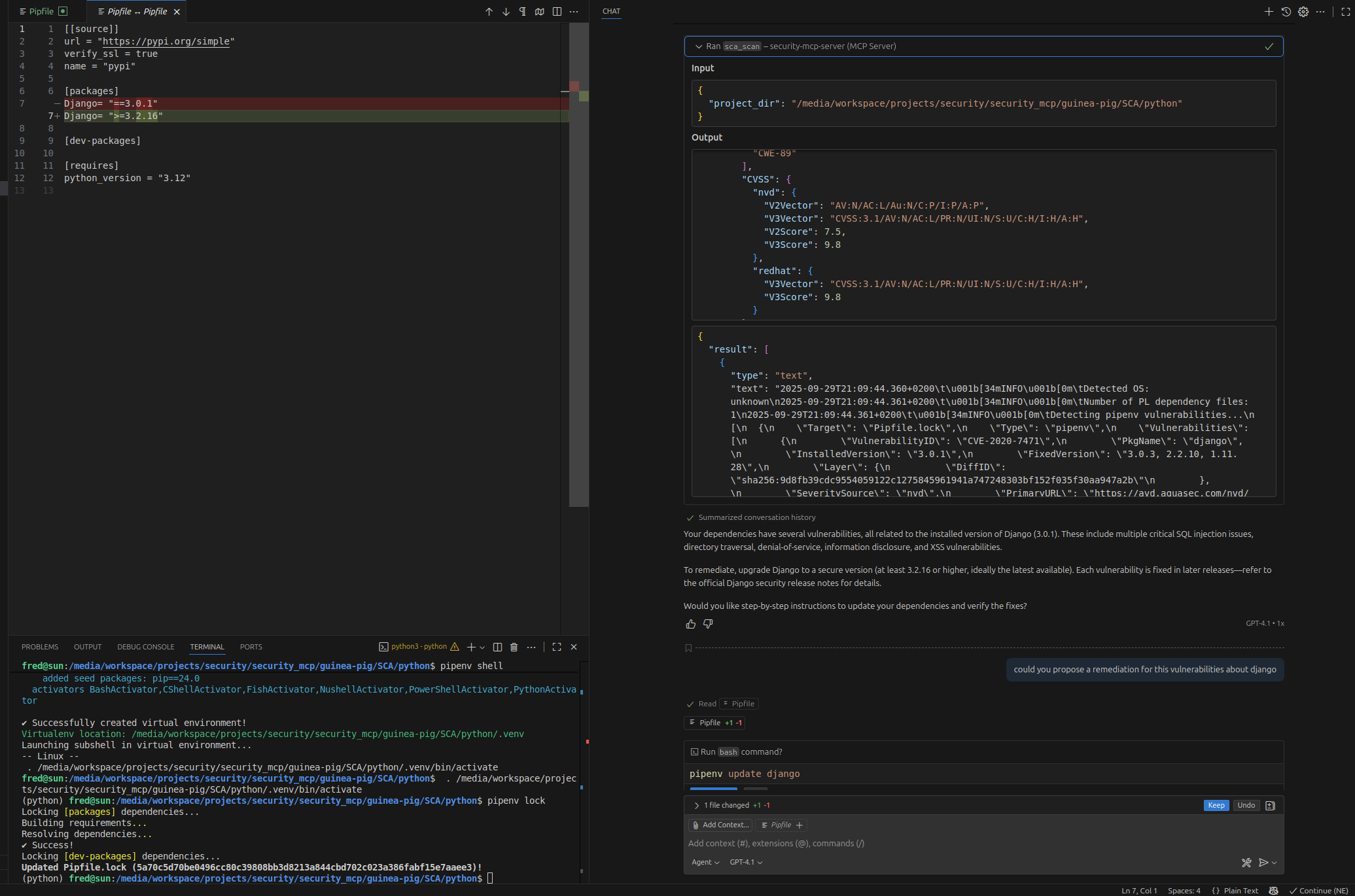
Full test report and recommendations

Security in MCP Server
MCP implementations focus on security to provide safe interactions between tools, clients, and servers. However, not all IDEs or MCP's server provide the same level of security.
To learn more about security considerations for MCP, refer to:
🔗 Security Tips for VSCode Extensions and Copilot
Installation
Prerequisites
You’ll need the following tools and packages:
UV package manager (already configured).
Steps
Set up the environment:
mkdir .venv
uv sync
Install the scanner binaries (downloaded into
tools/by each tool'sinstall.sh;tools/install-all.shruns them all):cd tools && ./install-all.sh # everything ./install-all.sh trivy nuclei # only some tools ./install-all.sh --list # list discovered toolsRun the server:
uv run server.py
# or
source .venv/bin/activate
python server.py
Once the server is running, it will be available on:
http://127.0.0.1:8000/mcpConfigure your MCP client:
Update the client settings to connect to the running MCP server.
Debugging the MCP Server with a Web Inspector
If you wish to debug or inspect your MCP server, you can use the MCP Inspector:
npx @modelcontextprotocol/inspectorThis launches a GUI-based tool for debugging and inspecting the behavior of your MCP server.
Guinea-pig
This is a dedicated project to test the MCP server.
IDE Compatibility and Recommendations
Visual Studio Code
GitHub Copilot:
Authenticate with GitHub Copilot.
Open the guinea-pig project in VSCode.
Enable the extension:
Navigate to Extensions → MCP Servers → Installed → Start Server.
Usability Note: Results are functional, but the user experience might need more refinement.
Local Ollama Integration:
To use Ollama with VSCode, install the Continue.dev plugin. Configuration is straightforward, but the experience might not be as seamless compared to Copilot.
Cursor IDE
Cursor works well in building plans, applying changes, and delivering detailed feedback.
👍 Best IDE experience so far in terms of usability and results!
PyCharm
Currently, MCP servers using HTTP are not compatible with PyCharm.
License
MIT License


This server cannot be installed
Maintenance
Resources
Unclaimed servers have limited discoverability.
Looking for Admin?
If you are the server author, to access and configure the admin panel.
Latest Blog Posts
MCP directory API
We provide all the information about MCP servers via our MCP API.
curl -X GET 'https://glama.ai/api/mcp/v1/servers/michoo/security_mcp'
If you have feedback or need assistance with the MCP directory API, please join our Discord server