
Enables natural language control of Autodesk Fusion 360, providing 64 CAD tools for sketching, parametric modeling, and the generation of JIS standard components like bolts, bearings, and O-ring grooves.
Supports importing SVG vector graphics into Fusion 360 to facilitate 3D modeling workflows from 2D designs.
TextToModel
Turn natural language into 3D models in Fusion 360.
An MCP (Model Context Protocol) server add-in that connects Claude to Autodesk Fusion 360 — giving you 64 CAD tools controllable through plain text.
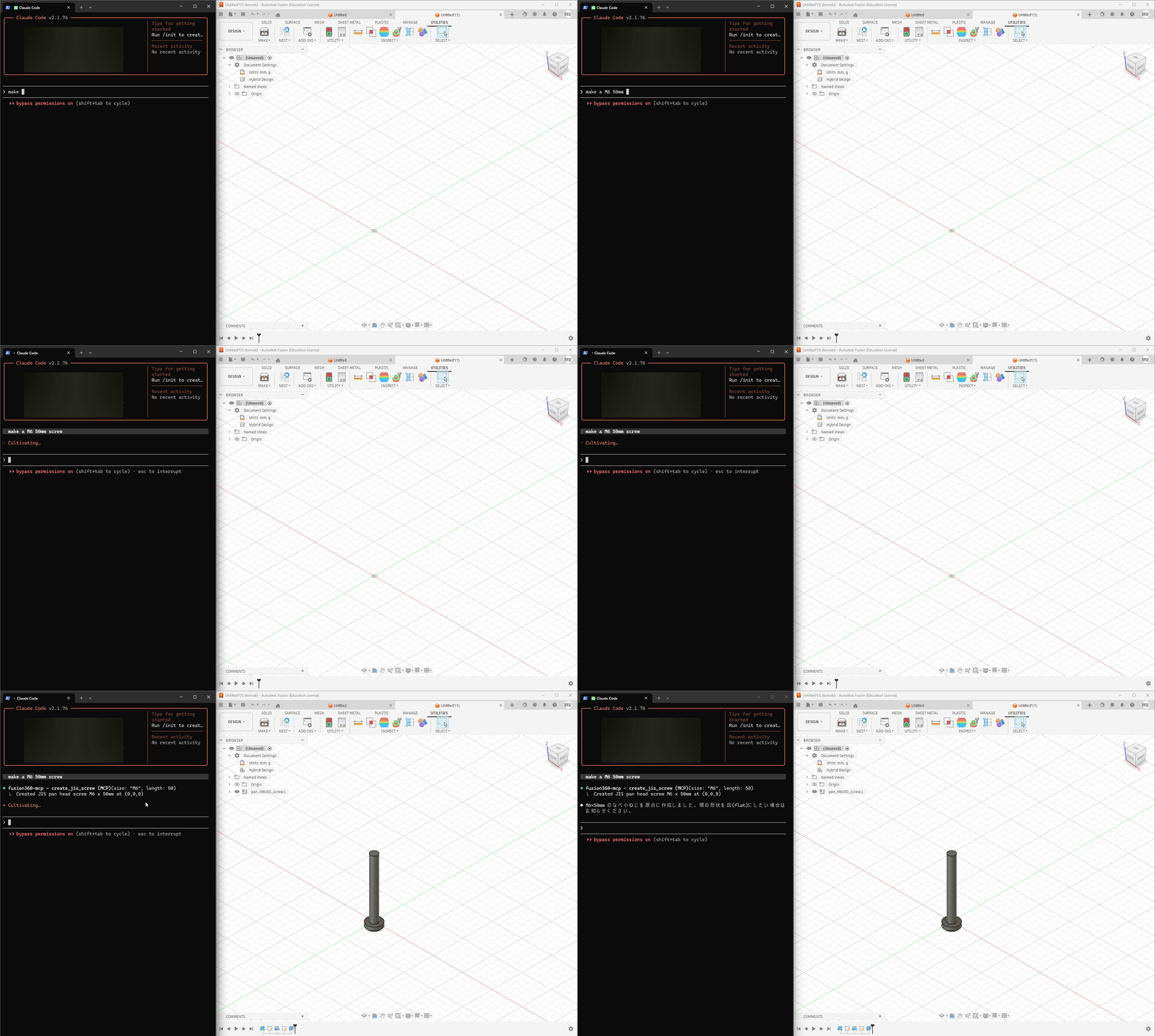
Highlights
Natural Language → CAD — Describe what you want, Claude builds it in Fusion 360
64 MCP Tools — Sketches, extrudes, fillets, sweeps, lofts, booleans, patterns, and more
JIS Standard Parts — Generate bolts, nuts, screws, washers, keyways, bearings, and O-rings with accurate JIS dimensions (ISO equivalents planned)
Full Parametric Workflow — Sketches → features → modifications → export (STEP/STL)
Works with Claude Desktop & Claude Code
Related MCP server: Fusion360 LLM Assistant
Quick Start
Prerequisites
Node.js (for
npx)
Installation
Clone this repo into Fusion 360's add-in directory:
# Windows
git clone https://github.com/mikan-atomoki/text-to-model.git "%APPDATA%\Autodesk\Autodesk Fusion 360\API\AddIns\TextToModel"

# macOS
git clone https://github.com/mikan-atomoki/text-to-model.git ~/Library/Application\ Support/Autodesk/Autodesk\ Fusion\ 360/API/AddIns/TextToModel
In Fusion 360: UTILITIES → ADD-INS → Scripts and Add-Ins → Run TextToModel
Connect to Claude:
Claude Desktop — add to your MCP config (claude_desktop_config.json):
{
 "mcpServers": {
 "fusion360": {
 "command": "npx",
 "args": ["-y", "mcp-remote", "http://127.0.0.1:13405/sse"]
 }
 }
}
Claude Code — run:
claude mcp add fusion360-mcp --transport sse http://127.0.0.1:13405/sseThat's it. Open Claude and start modeling.
Examples
Create an M8x30 hex socket head bolt at the originDraw a 50mm × 30mm rectangle on the XY plane, extrude it 20mm,
and add a 3mm fillet to the top long edgesDraw a 20mm diameter circle, create a revolve, then add a keywayTool Categories (64 tools)
Category | Count | Tools |
Sketch | 7 | circle, rectangle, line, arc, spline, polygon, create sketch |
Features | 4 | extrude, revolve, sweep, loft |
Modify | 6 | fillet, chamfer, shell, mirror, variable fillet, draft |
Patterns & Combine | 3 | circular/rectangular pattern, boolean combine |
JIS Fasteners | 4 | bolt, nut, screw, washer (with JIS standard dimensions) |
JIS Holes | 3 | threaded hole, counterbore, countersink |
Mechanical | 3 | keyway (B1301), bearing hole (B1520), O-ring groove (B2401) |
Construction | 4 | offset/angled/mid plane, construction axis |
Inspect | 5 | list edges/faces/sketches/planes, bounding box |
Surface | 4 | patch, thicken, offset, boundary fill |
Split | 2 | split body, split face |
Transform | 3 | move, scale, copy |
Import | 2 | SVG, DXF |
Constraints | 3 | geometric constraint, dimension, list entities |
Appearance | 2 | body color, rename body |
Utility | 9 | design info, list bodies/components, parameters, undo, export STEP/STL, execute code |
Architecture
Claude Desktop/Code ←→ MCP (HTTP/SSE) ←→ Bridge (CustomEvent) ←→ Fusion 360 APIThe add-in runs an HTTP/SSE server inside Fusion 360. Claude sends tool calls via MCP protocol, and the bridge executes them on Fusion's main thread using a CustomEvent-based synchronization mechanism.
License
MIT
Fusion 360 を Claude Desktop/Code から直接操作できる MCP サーバーアドイン。 テキストの指示だけで 3D モデリング・JIS 規格部品の生成が可能です。
64種類のMCPツールで、スケッチ作成・押し出し・フィレット・JIS ボルト生成など、幅広いCAD操作をテキスト指示で実行できます。
セットアップ方法や詳細は英語版をご参照ください。
Maintenance
Latest Blog Posts
MCP directory API
We provide all the information about MCP servers via our MCP API.
curl -X GET 'https://glama.ai/api/mcp/v1/servers/mikan-atomoki/text-to-model'
If you have feedback or need assistance with the MCP directory API, please join our Discord server