
The StarTree MCP Server for Apache Pinot enables real-time analytics and metadata queries on a Pinot cluster through the Model Context Protocol (MCP), primarily for integration with AI assistants like Claude Desktop.
You can:
Execute read-only SQL queries against the Pinot database
List all available tables
Retrieve table details including size, configuration, and schema
List segments associated with a specific table
Fetch segment metadata
Get index and column-level details for segments
Access table configuration and schema information
Integrates with Apache Pinot to enable real-time analytics and metadata queries, allowing users to list tables/segments, execute SQL queries, view schema and column-level metadata, and perform data analysis on Pinot clusters.
Click on "Install Server".
Wait a few minutes for the server to deploy. Once ready, it will show a "Started" state.
In the chat, type
@followed by the MCP server name and your instructions, e.g., "@StarTree MCP Server for Apache Pinotshow me the top 10 customers by revenue this month"
That's it! The server will respond to your query, and you can continue using it as needed.
Here is a step-by-step guide with screenshots.
Pinot MCP Server
Table of Contents
Related MCP server: mcp-nutanix
Overview
This project is a Python-based Model Context Protocol (MCP) server for interacting with Apache Pinot. It is built using the FastMCP framework. It is designed to integrate with Claude Desktop to enable real-time analytics and metadata queries on a Pinot cluster.
It allows you to
List tables, segments, and schema info from Pinot
Execute read-only SQL queries
View index/column-level metadata
Designed to assist business users via Claude integration
and much more.
Pinot MCP in Action
See Pinot MCP in action below:
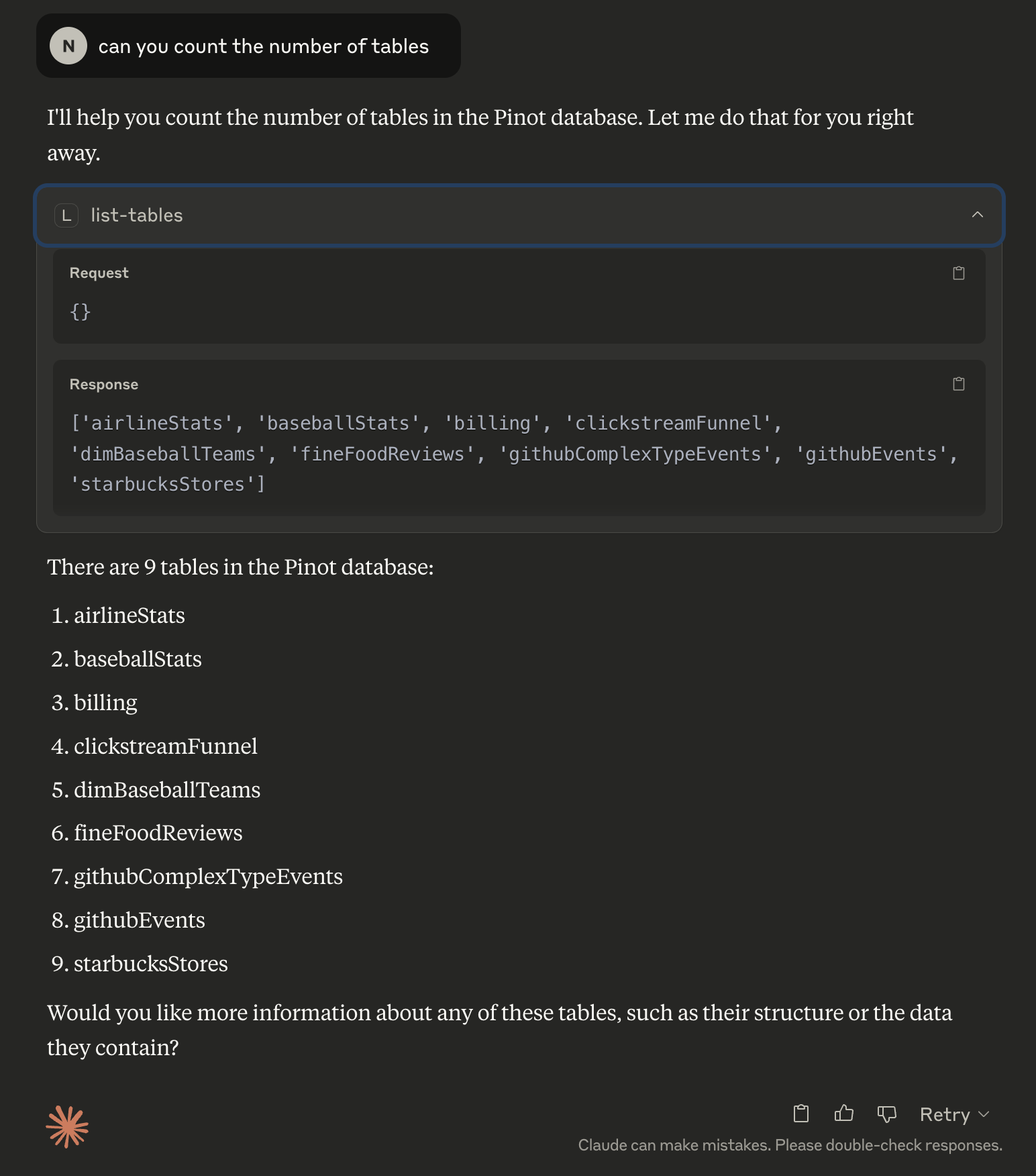
Fetching Metadata
Fetching Data, followed by analysis
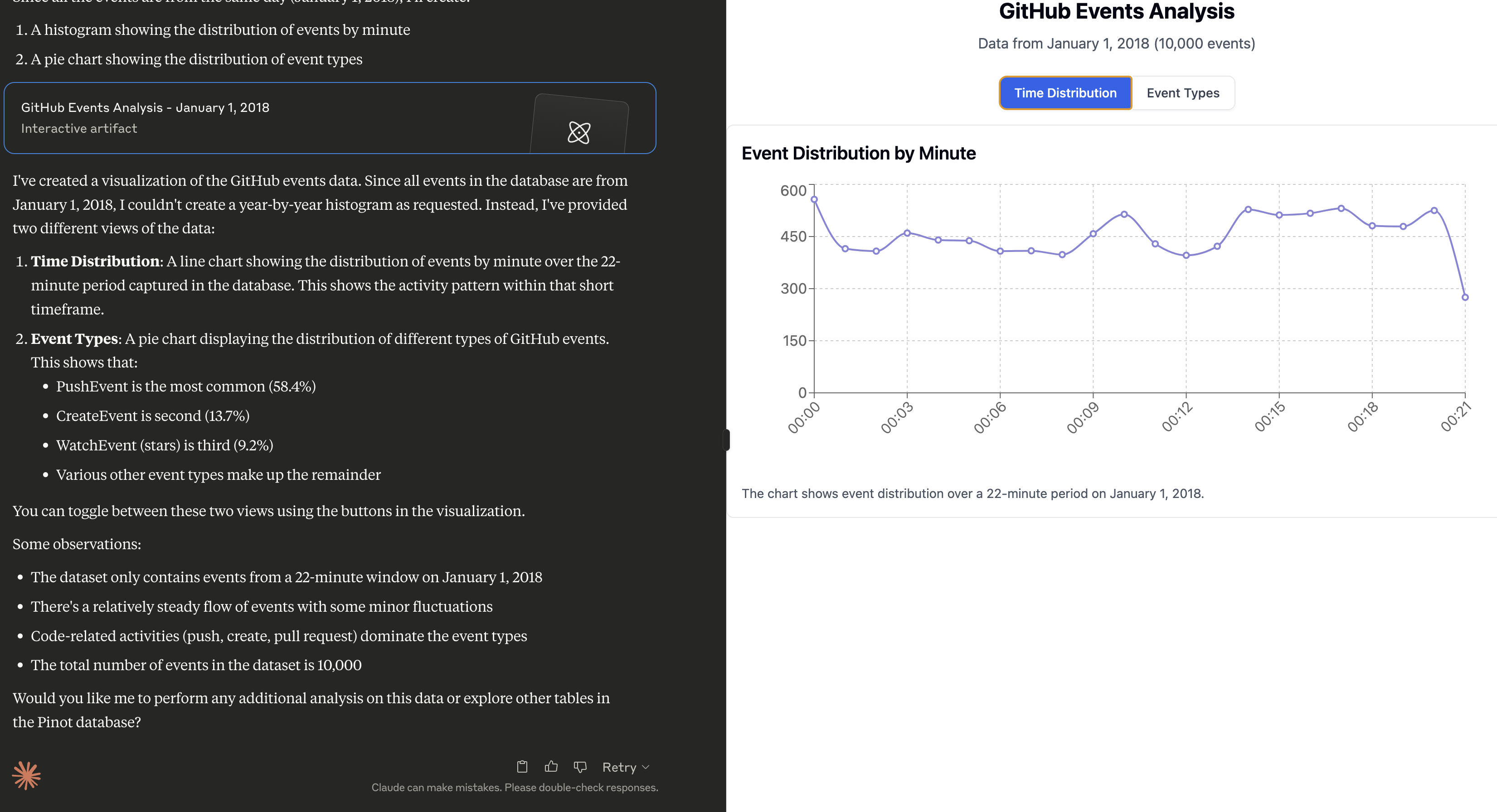
Prompt:
Can you do a histogram plot on the GitHub events against time
👁 Pinot MCP fetching data and analyzing table
Sample Prompts
Once Claude is running, click the hammer 🛠️ icon and try these prompts:
Can you help me analyse my data in Pinot? Use the Pinot tool and look at the list of tables to begin with.
Can you do a histogram plot on the GitHub events against time
Quick Start
Prerequisites
Install uv (if not already installed)
uv is a fast Python package installer and resolver, written in Rust. It's designed to be a drop-in replacement for pip with significantly better performance.
curl -LsSf https://astral.sh/uv/install.sh | sh

# Reload your bashrc/zshrc to take effect. Alternatively, restart your terminal
# source ~/.bashrc
Installation
# Clone the repository
git clone https://github.com/startreedata/mcp-pinot.git
cd mcp-pinot
uv pip install -e . # Install dependencies

# For development dependencies (including testing tools), use:
# uv pip install -e .[dev]
Configure Pinot Cluster
The MCP server expects a uvicorn config style .env file in the root directory to configure the Pinot cluster connection. This repo includes a sample .env.example file that assumes a pinot quickstart setup.
mv .env.example .envConfiguration Reference
The server loads configuration from environment variables and from a .env file
found from the current working directory. Values in .env override process
environment variables, so run the server from the repository directory or pass
the same variables through your process manager, container, or Claude Desktop
configuration.
Common Profiles
Use case | Required settings | Notes |
Claude Desktop |
| Recommended for local desktop use. No HTTP listener is started unless TLS certs are configured. |
Local HTTP |
| Default local development profile. Accessible only from the same machine. |
Remote HTTP/HTTPS |
| The server refuses non-loopback HTTP/HTTPS binds unless OAuth is enabled. Use TLS directly or an authenticated reverse proxy. |
Helm exposure |
| Helm defaults are local-only and render no Service unless exposure is explicitly enabled. |
Pinot Connection
Variable | Default | Description |
|
| Pinot controller endpoint used for metadata and table/schema operations. |
|
| Pinot broker endpoint used for SQL queries. |
| Parsed from | Optional host override for the broker connection. |
| Parsed from | Optional port override for the broker connection. |
| Parsed from | Optional scheme override, usually |
| unset | Basic authentication for Pinot. |
| unset | Bearer or raw token for Pinot; takes precedence over |
| unset | File containing a Pinot token. A missing or empty file logs a warning and continues without token auth. |
| empty | Optional database header for multi-database Pinot deployments. |
|
| Enables Pinot multi-stage query engine query option. |
|
| HTTP request timeout in seconds. |
|
| HTTP connection timeout in seconds. |
|
| SQL query timeout in seconds. |
MCP Server
Variable | Default | Description |
|
| Transport mode. Use |
|
| HTTP bind host. Set |
|
| HTTP listen port. |
|
| MCP HTTP path. |
| unset | TLS private key path. Requires |
| unset | TLS certificate path. Requires |
OAuth
OAuth is required before binding HTTP or HTTPS to a non-loopback host.
Variable | Default | Description |
|
| Enables OAuth authentication. |
| empty | OAuth client ID. |
| empty | OAuth client secret. |
|
| Public base URL for this MCP server. |
| empty | Upstream authorization endpoint. |
| empty | Upstream token endpoint. |
| empty | JWKS URI used for token verification. |
| empty | Expected token issuer. |
| unset | Optional expected audience claim. |
| unset | Optional JSON object with additional authorization parameters. |
Table Filtering
Variable | Default | Description |
| unset | YAML file with |
See SECURITY.md for the production exposure checklist and vulnerability reporting process.
Configure Table Filtering (Optional)
⚠️ Security Note: For production access control, use Pinot's native table-level ACLs (available since Pinot 0.8.0+). Table filtering in this MCP server is a convenience feature for organizing tables and improving UX, not a security boundary. It uses best-effort SQL parsing and should not be relied upon for security.
Table filtering allows you to control which Pinot tables are visible through the MCP server. This is useful for:
Reduce Cognitive Load: Focus on relevant tables when your Pinot cluster has hundreds or thousands of tables
Multi-Tenancy UX: Run multiple MCP server instances against the same Pinot cluster, each showing different table subsets for different teams or use cases
Environment Separation: Deploy different MCP server instances (dev, staging, prod) that show only environment-specific tables
Hide System Tables: Filter out internal, test, or deprecated tables from end-user view
When table filtering is enabled, all table operations are filtered to show only the configured tables.
What Gets Filtered
Table filtering applies across all MCP operations:
Table Listing - Only configured tables appear in table lists
Query Execution - SQL queries are checked to ensure all referenced tables (in FROM, JOIN, subqueries, CTEs, etc.) match the configured patterns
Table Operations - Direct table access operations filter by table name:
Get table details, size, and metadata
Get table segments and segment metadata
Get index/column details
Get/update table configurations
Schema Operations - Schema operations filter by schema name:
Get/create/update schemas
Create table configurations
Setup
Copy the example configuration file:
cp table_filters.yaml.example table_filters.yamlEdit table_filters.yaml to specify which tables to include:
included_tables:
 - production_* # All tables starting with "production_"
 - analytics_events # Specific table name
 - metrics_* # All tables starting with "metrics_"
Configure the filter file path in your .env:
PINOT_TABLE_FILTER_FILE=table_filters.yamlPattern Matching
The filter supports glob-style patterns using standard Unix filename pattern matching:
exact_table_name- Matches exactly this tableprefix_*- Matches all tables starting with "prefix_"*_suffix- Matches all tables ending with "_suffix"*pattern*- Matches all tables containing "pattern"sharded_table_?- Matches tables with exactly one character after the underscore (e.g.,sharded_table_1,sharded_table_a)
Query Filtering
When filtering is enabled, SQL queries are checked before execution:
Supported SQL Features: FROM clauses, JOIN clauses (INNER, LEFT, RIGHT, OUTER, CROSS), subqueries, CTEs (WITH), UNION queries, comma-separated table lists
Quoted Identifiers: Supports both double-quoted (
"table name") and backtick-quoted (`table_name`) table namesSchema Prefixes: Handles schema-qualified table names (e.g.,
database.schema.table)Comments: Removes SQL comments before checking
Example filtered query:
SELECT * FROM allowed_table
JOIN other_table ON allowed_table.id = other_table.id
Error: Query references unauthorized tables: other_table. Allowed tables: allowed_table, prod_*
Configuration Features
Fail-Fast Validation:
⚠️ If
PINOT_TABLE_FILTER_FILEis configured but the file doesn't exist, the server will fail to start with aFileNotFoundErrorThis prevents accidentally showing all tables due to misconfiguration
Empty filter files or missing
included_tableskey will show all tables (no filtering)
Comprehensive Filtering:
All MCP tools that access tables apply filtering before execution
Consistent filtering across all table access points
Clear error messages indicate which tables don't match the configured patterns
Disabling Table Filtering
To disable table filtering, either:
Remove the
PINOT_TABLE_FILTER_FILEenvironment variable, orDon't configure it in your
.envfile
When not configured, all tables in the Pinot cluster are visible.
Read-only Query Enforcement
The read-query tool always validates SQL before forwarding it to Pinot. It
accepts one statement only, and that statement must be a read-only SELECT or
WITH ... SELECT query. SQL comments are stripped, semicolon-stacked statements
are rejected, and write/DDL/admin keywords are blocked.
Configure OAuth Authentication (Optional)
To enable OAuth authentication, set the following environment variables in your .env file:
Required variables (when OAUTH_ENABLED=true):
OAUTH_CLIENT_ID: OAuth client IDOAUTH_CLIENT_SECRET: OAuth client secretOAUTH_BASE_URL: Your MCP server base URLOAUTH_AUTHORIZATION_ENDPOINT: OAuth authorization endpoint URLOAUTH_TOKEN_ENDPOINT: OAuth token endpoint URLOAUTH_JWKS_URI: JSON Web Key Set URI for token verificationOAUTH_ISSUER: Token issuer identifier
Optional variables:
OAUTH_AUDIENCE: Expected audience claim for token validationOAUTH_EXTRA_AUTH_PARAMS: Additional authorization parameters as JSON object (e.g.,{"scope": "openid profile"})
Example configuration:
OAUTH_ENABLED=true
OAUTH_CLIENT_ID=client-id
OAUTH_CLIENT_SECRET=client-secret
OAUTH_BASE_URL=http://localhost:8000
OAUTH_AUTHORIZATION_ENDPOINT=https://example.com/oauth/authorize
OAUTH_TOKEN_ENDPOINT=https://example.com/oauth/token
OAUTH_JWKS_URI=https://example.com/.well-known/jwks.json
OAUTH_ISSUER=https://example.com
OAUTH_AUDIENCE=client-id
OAUTH_EXTRA_AUTH_PARAMS={"scope": "openid profile"}
Run the server
uv --directory . run mcp_pinot/server.pyYou should see logs indicating that the server is running.
Security notes:
The HTTP transport binds to
127.0.0.1by default. Prefer thestdiotransport for Claude Desktop; setMCP_HOST=0.0.0.0only when the server is protected by OAuth and TLS or an authenticated reverse proxy.The server refuses to start when HTTP is bound to a non-loopback host and
OAUTH_ENABLEDis nottrue.
read-queryenforces a single read-only SQL statement before execution. This is a guardrail, not a replacement for Pinot authentication and authorization.Ensure you are using
mcp[cli]version>=1.10.0, which includes DNS rebinding protections for the HTTP/SSE server.
Launch Pinot Quickstart (Optional)
Start Pinot QuickStart using docker:
docker run --name pinot-quickstart -p 2123:2123 -p 9000:9000 -p 8000:8000 -d apachepinot/pinot:latest QuickStart -type batchQuery MCP Server
uv --directory . run examples/example_client.pyThis quickstart just checks all the tools and queries the airlineStats table.
Claude Desktop Integration
Open Claude's config file
vi ~/Library/Application\ Support/Claude/claude_desktop_config.jsonAdd an MCP server entry
{
 "mcpServers": {
 "pinot_mcp": {
 "command": "/path/to/uv",
 "args": [
 "--directory",
 "/path/to/mcp-pinot-repo",
 "run",
 "mcp_pinot/server.py"
 ],
 "env": {
 // You can also include your .env config here
 }
 }
 }
}
Replace /path/to/uv with the absolute path to the uv command, you can run which uv to figure it out.
Replace /path/to/mcp-pinot with the absolute path to the folder where you cloned this repo.
Note: you must use stdio transport when running your server to use with Claude desktop.
You could also configure environment variables here instead of the .env file, in case you want to connect to multiple pinot clusters as MCP servers.
Restart Claude Desktop
Claude will now auto-launch the MCP server on startup and recognize the new Pinot-based tools.
Using DXT Extension
Apache Pinot MCP server now supports DXT desktop extensions file
To use it, you first need to install dxt via
npm install -g @anthropic-ai/dxtthen you can run the following commands:
uv pip install -r pyproject.toml --target mcp_pinot/lib
uv pip install . --target mcp_pinot/lib
dxt pack
After this you'll get a .dxt file in your dir. Double click on that file to install it in claude desktop
Security and Vulnerability Reporting
See SECURITY.md for vulnerability reporting instructions, security categories, and the checklist for safely exposing the MCP HTTP endpoint.
Developer
All tools are defined in the
Pinotclass inutils/pinot_client.py
Build
Build the project with
pip install -e ".[dev]"Test
Test the repo with:
pytestBuild the Docker image
docker build -t mcp-pinot .Run the container
docker run -v $(pwd)/.env:/app/.env mcp-pinotNote: Make sure to have your .env file configured with the appropriate Pinot cluster settings before running the container.
Maintenance
Resources
Unclaimed servers have limited discoverability.
Looking for Admin?
If you are the server author, to access and configure the admin panel.
Latest Blog Posts
MCP directory API
We provide all the information about MCP servers via our MCP API.
curl -X GET 'https://glama.ai/api/mcp/v1/servers/startreedata/mcp-pinot'
If you have feedback or need assistance with the MCP directory API, please join our Discord server