


Expanding the Frontier of Document Parsing with Under-Optimized Region Refinement and Progressive Post-Training • 5 items • Updated • 13
PaddleOCR-VL-1.6: Expanding the Frontier of Document Parsing with Under-Optimized Region Refinement and Progressive Post-Training
👁 repo
👁 HuggingFace
👁 ModelScope
👁 HuggingFace
👁 ModelScope
👁 Discord
👁 X
👁 License
Introduction
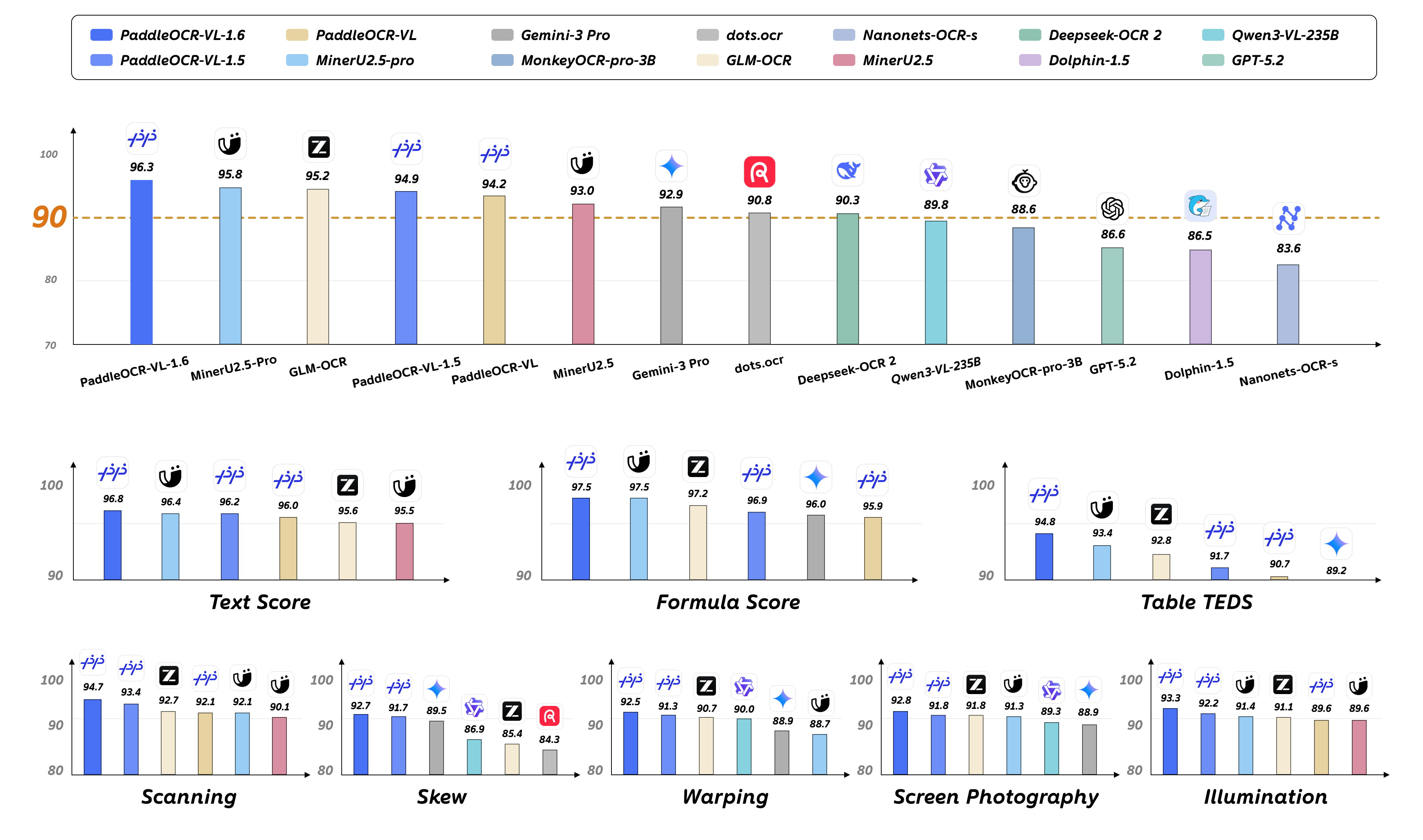
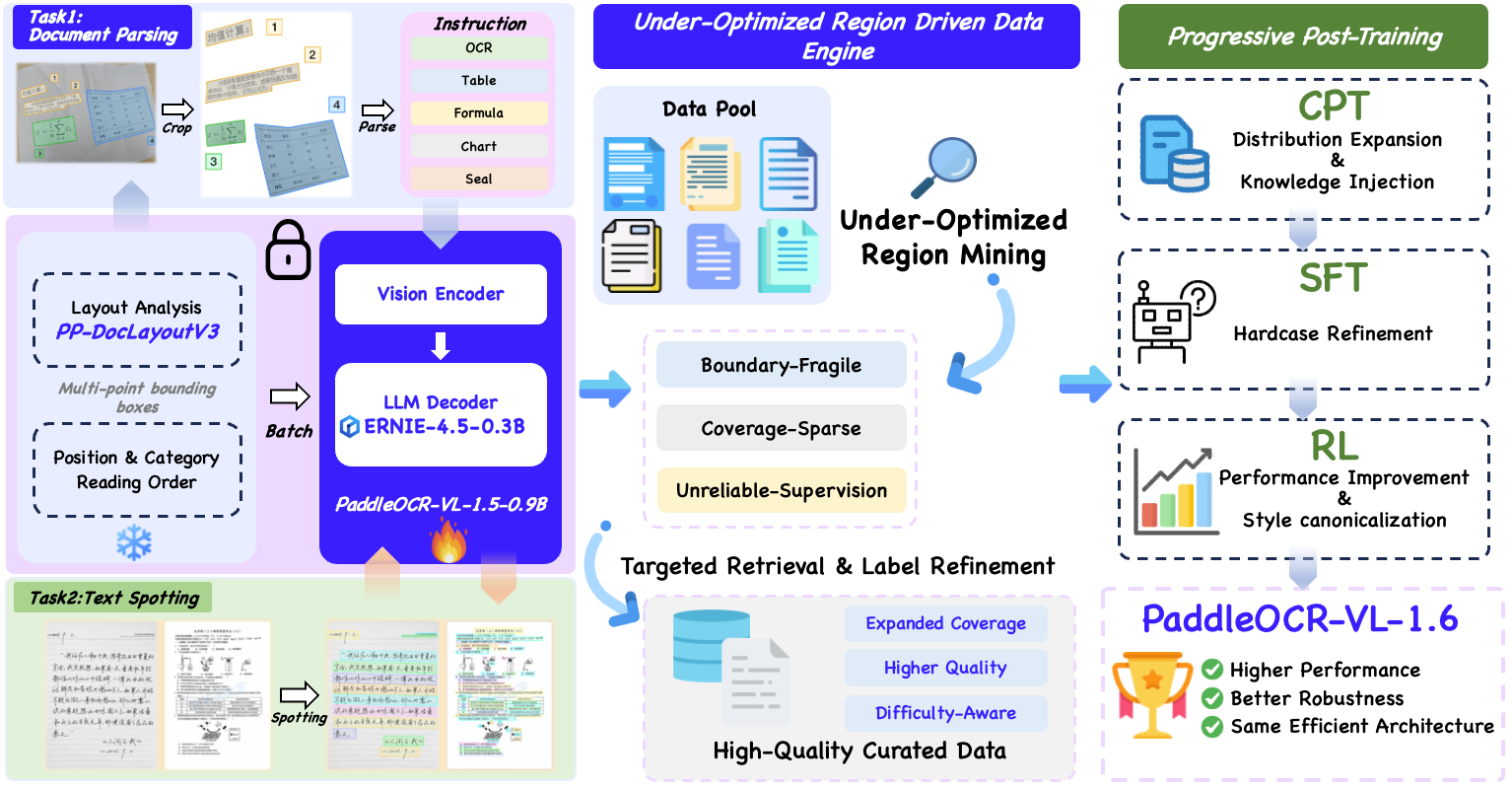
We introduce PaddleOCR-VL-1.6, an upgraded compact document parsing model built upon PaddleOCR-VL-1.5. PaddleOCR-VL-1.6 introduces a region-aware data optimization framework that identifies weak regions from the previous model, applies targeted enhancement to those regions, and improves the reliability of supervision signals. It further adopts a progressive post-training recipe based on curated data selection and reinforcement learning, pushing model performance to a higher level through staged optimization. PaddleOCR-VL-1.6 achieves a new state-of-the-art score of 96.33% on OmniDocBench v1.6, sets new records on OmniDocBench v1.5 and Real5-OmniDocBench as well, and demonstrates strong competitiveness against top-tier VLMs. The model architecture is fully compatible with PaddleOCR-VL-1.5, enabling zero-cost plug-and-play migration.
Model Architecture
PaddleOCR-VL-1.6 Usage with llama.cpp
Install Dependencies
Install PaddlePaddle and PaddleOCR:
# The following command installs the PaddlePaddle version for CUDA 12.6. For other CUDA versions and the CPU version, please refer to https://www.paddlepaddle.org.cn/en/install/quick?docurl=/documentation/docs/en/develop/install/pip/linux-pip_en.html
python -m pip install paddlepaddle-gpu==3.2.1 -i https://www.paddlepaddle.org.cn/packages/stable/cu126/
python -m pip install -U "paddleocr[doc-parser]>=3.6.0"
Please ensure that you install PaddlePaddle framework version 3.2.1 or above, along with the special version of safetensors. For macOS users, please use Docker to set up the environment.
Basic Usage
Start the VLM inference server:
llama-server \
 -m /path/to/PaddleOCR-VL-1.6-GGUF.gguf \
 --mmproj /path/to/PaddleOCR-VL-1.6-GGUF-mmproj.gguf \
 --port 8080 \
 --host 0.0.0.0 \
 --temp 0
Call the PaddleOCR CLI or Python API:
paddleocr doc_parser \
 -i https://paddle-model-ecology.bj.bcebos.com/paddlex/imgs/demo_image/paddleocr_vl_demo.png \
 --pipeline_version v1.6 \
 --vl_rec_backend llama-cpp-server \
 --vl_rec_server_url http://127.0.0.1:8080/v1
from paddleocr import PaddleOCRVL pipeline = PaddleOCRVL(pipeline_version="v1.6", vl_rec_backend="llama-cpp-server", vl_rec_server_url="http://127.0.0.1:8080/v1") output = pipeline.predict("https://paddle-model-ecology.bj.bcebos.com/paddlex/imgs/demo_image/paddleocr_vl_demo.png") for res in output: res.print() res.save_to_json(save_path="output") res.save_to_markdown(save_path="output")
For more usage details and parameter explanations, see the documentation.
PaddleOCR-VL-1.6-0.9B Usage with llama.cpp
Currently, the PaddleOCR-VL-1.6-0.9B model facilitates seamless inference via the transformers library, supporting comprehensive text spotting and the recognition of complex elements including formulas, tables, charts, and seals. Below is a simple script we provide to support inference using the PaddleOCR-VL-1.6-0.9B model with llama.cpp.
Usage Tips
We have six types of element-level recognition:
Text recognition, indicated by the prompt
OCR:.Formula recognition, indicated by the prompt
Formula Recognition:.Table recognition, indicated by the prompt
Table Recognition:.Chart recognition, indicated by the prompt
Chart Recognition:.Seal recognition, indicated by the prompt
Seal Recognition:.Spotting, indicated by the prompt
Spotting:, and need to setimage_max_pixelsto1605632:git clone https://github.com/ggml-org/llama.cpp.git cd llama.cpp python -m pip install gguf python ./gguf-py/gguf/scripts/gguf_set_metadata.py /path/to/PaddleOCR-VL-1.6-GGUF/PaddleOCR-VL-1.6-mmproj.gguf clip.vision.image_max_pixels 1605632 --force # back to default value (1003520): # python ./gguf-py/gguf/scripts/gguf_set_metadata.py /path/to/PaddleOCR-VL-1.6-GGUF/PaddleOCR-VL-1.6-mmproj.gguf clip.vision.image_max_pixels 1003520 --force
llama-cli Usage
llama-cli \
 -m /path/to/PaddleOCR-VL-1.6-GGUF/PaddleOCR-VL-1.6.gguf \
 --mmproj /path/to/PaddleOCR-VL-1.6-GGUF/PaddleOCR-VL-1.6-mmproj.gguf \
 -p 'OCR:' \
 --image 'test_image.jpg'
llama-server Usage
llama-server -m /path/to/PaddleOCR-VL-1.6.gguf --mmproj /path/to/PaddleOCR-VL-1.6-GGUF/PaddleOCR-VL-1.6-mmproj.gguf --temp 0
Acknowledgements
We extend our gratitude to @megemini for their significant pull request, which adds support for PaddleOCR-VL-1.5-0.9B and PaddleOCR-VL-0.9B models to llama.cpp.
- Downloads last month
- 589,643
GGUF
Model size
0.5B params
Architecture
paddleocr
Hardware compatibility
Log In to add your hardware
We're not able to determine the quantization variants.
Inference Providers NEW
This model isn't deployed by any Inference Provider. 🙋 Ask for provider support