


Be it Nvidia or Radeon or Intel, they all may have some issues with Linux. When you are on your way to troubleshoot the graphics problem, the first thing you want to know is which graphics card do you have in your system.
Linux has several commands to check hardware information. You can use them to check what graphics card (also referred to as video card) do you have.
Let me show you a couple of commands to get GPU information in Linux.
Use lspci command to find graphics card
The lspci command displays the information about devices connected through PCI (peripheral Component Interconnect) buses. Basically, this command gives you the detail about all the peripheral devices to your system from keyboard and mouse to sound, network and graphics cards.
By default, you’ll have a huge list of such peripheral devices. This is why you need to filter the output for graphics card with grep command in this manner:
lspci | grep VGAThis should show a one line information about your graphics card:
abhishek@itsfoss:~$ lspci | grep VGA
00:02.0 VGA compatible controller: Intel Corporation HD Graphics 620 (rev 02)
As you can see, my system has Intel HD 620 video card.
inxi -G if you have inxi installed on your system.Get detailed graphics card information with lshw command in Linux
The lspci command is good enough to see what graphics card you have but it doesn’t tell you a lot. You can use lshw command to get more information on it.
You may have to install lshw on Fedora, Manjaro and a few non-Ubuntu distributions.
This command requires you to have root access. You need to specify that you are looking for video card (graphics card) information in this fashion:
sudo lshw -C videoAnd as you can see in the output below, this command gives more information on the graphics card such as clock rate, width, driver etc.
abhishek@itsfoss:~$ sudo lshw -C video
[sudo] password for abhishek:
 *-display
 description: VGA compatible controller
 product: HD Graphics 620
 vendor: Intel Corporation
 physical id: 2
 bus info: pci@0000:00:02.0
 version: 02
 width: 64 bits
 clock: 33MHz
 capabilities: pciexpress msi pm vga_controller bus_master cap_list rom
 configuration: driver=i915 latency=0
 resources: irq:139 memory:db000000-dbffffff memory:90000000-9fffffff ioport:f000(size=64) memory:c0000-dffff
Bonus Tip: Check graphics card details graphically
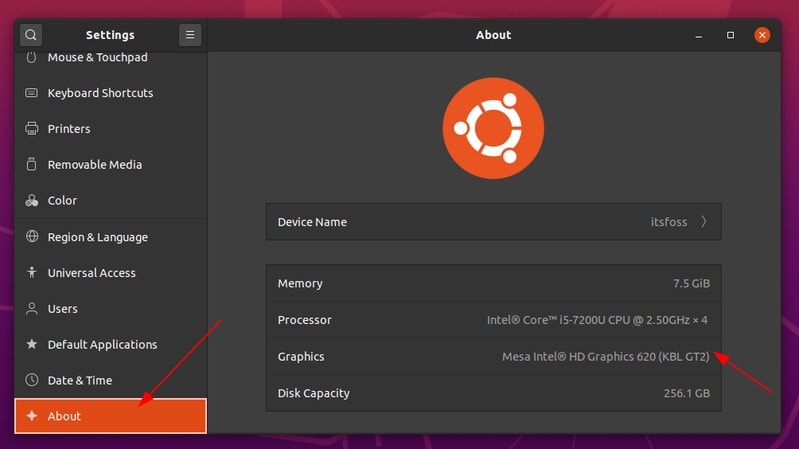
It’s not that you must use the command line to find graphics card details in Linux. Most Linux distributions (or should I say desktop environments) provide essential details in the settings application.
For example, if you are using GNOME desktop environment, you can check the details by going to About section of Settings. Here’s what it looks like in Ubuntu 20.04:
I hope you find this quick tip helpful. You can also use the same commands to find your network adapter and CPU information in Linux.
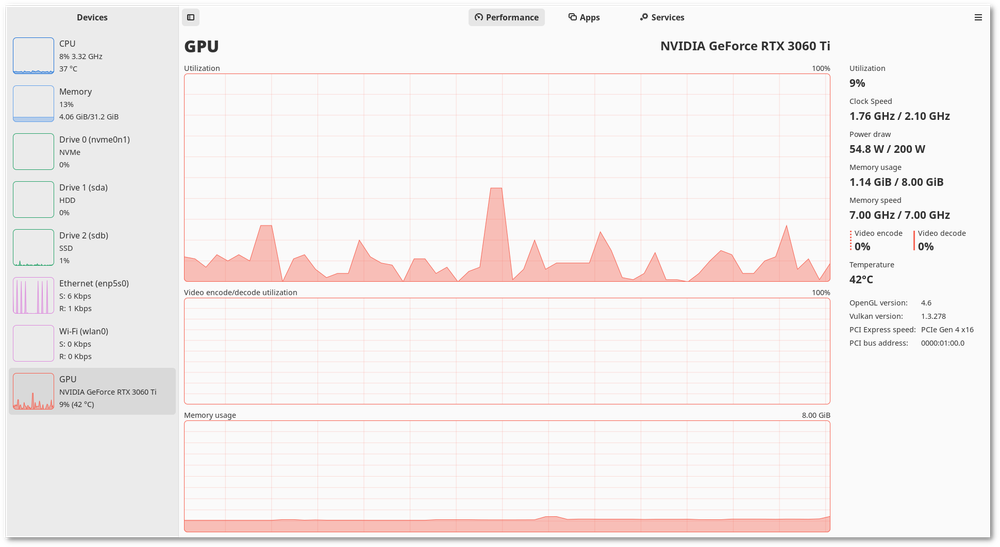
Checking GPU usage
Next, you may also want to check GPU usage. I strongly recommend the GUI tool Mission Center that supports NVIDIA, AMD and Intel GPUs.
You can also try Python-based CLI tool gpustat for this purpose.

If you have questions or suggestions, don’t hesitate to write a comment.
