

Brief: Filmulator is an open source raw photo editing application with library management focusing on simplicity, ease of use and streamlined workflow.
Filmulator: Raw Image Editor for Linux (and Windows)
There are a bunch of raw photo editors for Linux. Filmulator is one of them. Filmulator aims to make raw image editing simple by giving only the essential elements. It also adds the feature of library handling which is a plus if you are looking for a decent application for your camera images.
For those unaware, raw image file is a minimally processed, uncompressed file. In other words, it is untouched digital file with no compression and minimal processing applied to it. Professional photographers prefer to capture photos in raw file and process it themselves. Normal people take photos from their smartphones and it is usually compressed in JPEG format or filtered.
Let’s see what features you get in the Filmulator editor.
Features of Filmulator
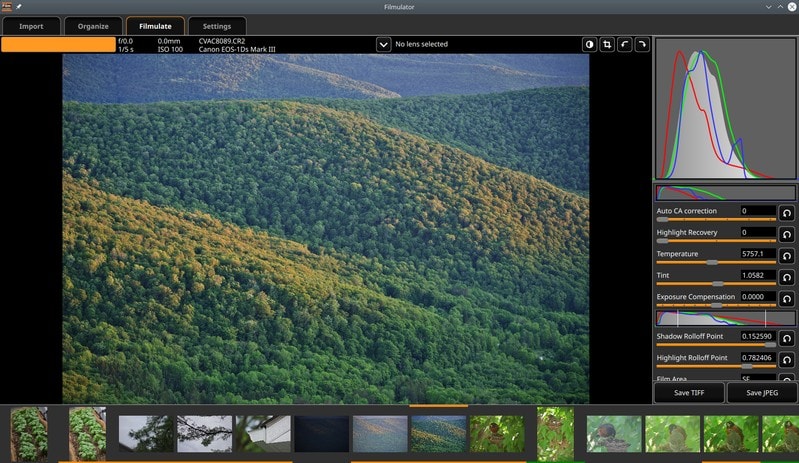
Filmulator claims that it is not the typical “film effect filter” that merely copies the outward characteristics of film. Instead, Filmulator gets to the root of what makes film so appealing: the development process.
It simulates film development process: from “exposure” of film, to the growth of “silver crystals” within each pixel, to the diffusion of “developer” both between neighboring pixels and with the bulk developer in the tank.
Fimulator developer says that the simulation brings about the following benefits:
- Large bright regions become darker, compressing the output dynamic range.
- Small bright regions make their surroundings darker, enhancing local contrast.
- In bright regions, saturation is enhanced, helping retain color in blue skies, brighter skin tones, and sunsets.
- In extremely saturated regions, the brightness is attenuated, helping retain detail e.g. in flowers.
Here’s a comparison of a raw image processed by Filmulator to enhance colors in a natural manner without inducing color clipping.


Installing Filmulator on Ubuntu/Linux
There is an AppImage available for Filmulator so that you can use it easily on Linux. Using AppImage files is really simple. You download it, make it executable and make it run by double-clicking on it.
There is also a Windows version available for Windows users. Apart from that, you can always head over to its GitHub repository and peek into its source code.
There is a little documentation to help you get started with Fimulator.
Conclusion
Fimulator’s design ideology is to have the best tool for any job, and only that one tool. This means compromising flexibility, but gaining a greatly simplified and streamlined user interface.
I am not even an amateur photographer, let alone be a professional one. I do not own a DSLR or other high-end photography equipments. For this reason, I cannot test and share my experience on the usefulness of Filmulator.
If you have more experience dealing with raw images, I let you try Filmulator and share your opinion on it. There is an AppImage available so you can quickly test it and see if it fits your needs or not.
