


If you use Ubuntu and Debian-based distros, you may encounter various update errors. One of the less frequent and peculiar errors I encountered with elementary OS the other day.
Failed to fetch cdrom Please use apt-cdrom to make this CD-ROM recognized by APT. apt-get update cannot be used to add new CD-ROMs.
The complete error looked like this after running the apt-get update command:
W: Failed to fetch cdrom://elementary OS 0.3 _Freya_ – Daily amd64 (20150208)/dists/trusty/restricted/binary-amd64/Packages Please use apt-cdrom to make this CD-ROM recognized by APT. apt-get update cannot be used to add new CD-ROMs
E: Some index files failed to download. They have been ignored, or old ones used instead.
In this post, I’ll show you how to fix this error.
Fixing "Failed to fetch cdrom apt-get update cannot be used to add new CD-ROMs" error
This error is because CD-ROM has been included as one of the sources here. This means your system is trying to look for software updates from the ISO image or live CD of your Linux system.
If the ISO or CD is plugged in, it could work, but it’s not how it should be used.
And to fix this issue, you need to remove this from the list of software sources.
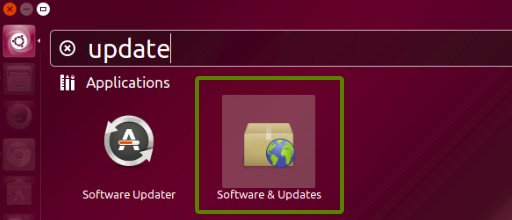
In Ubuntu, look for Software & Updates:
In the first tab Ubuntu Software, look for the cdrom; if it’s checked, uncheck it.
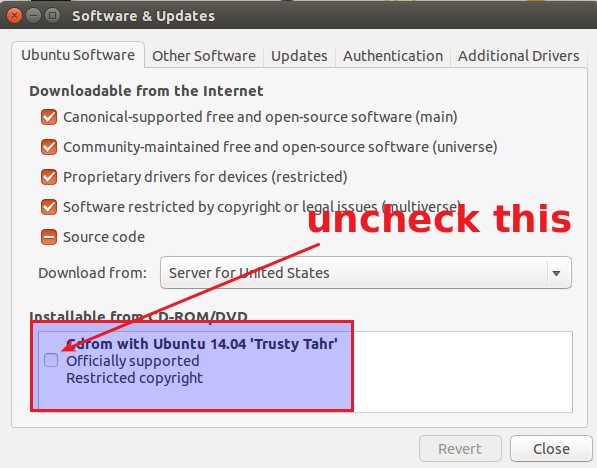
Close the Software Sources and run the update again. It should work fine now.
Further troubleshoot
The method described above should have fixed this apt-get update cannot be used to add new CD-ROMs error. But this was not the case for me because the option of cdrom was already grayed out as I was using a live session.
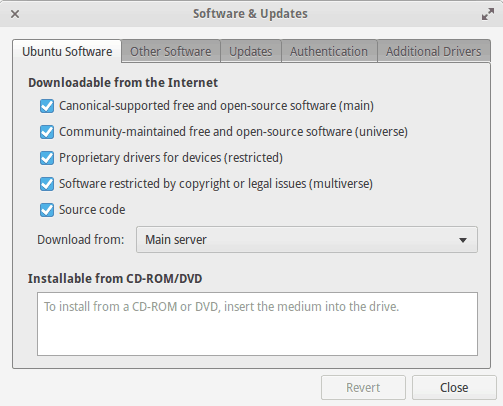
Now to fix our error, you can take the command line route. Open a terminal and use the following line to see what is included in sources list:
cat /etc/apt/sources.listThe output for me was as following:
deb cdrom:[elementary OS 0.3 _Freya_ – Daily amd64 (20150208)]/ trusty main restricted
deb http://archive.ubuntu.com/ubuntu/ trusty main restricted universe multiverse
deb-src http://archive.ubuntu.com/ubuntu/ trusty main restricted universe multiverse
deb http://security.ubuntu.com/ubuntu/ trusty-security main restricted universe multiverse
deb-src http://security.ubuntu.com/ubuntu/ trusty-security main restricted universe multiverse
deb http://archive.ubuntu.com/ubuntu/ trusty-updates main restricted universe multiverse
deb-src http://archive.ubuntu.com/ubuntu/ trusty-updates main restricted universe multiverse
Look at the first line in the above list. It includes cdrom. We need to comment out this line by adding # in front of it to make it look like this:
#deb cdrom:[elementary OS 0.3 _Freya_ – Daily amd64 (20150208)]/ trusty main restricted
To do that use the command below:
sudo gedit /etc/apt/sources.listOnce you have edited the sources.list, run the apt-get update once again. The error ‘apt-get update cannot be used to add new CD-ROMs’ should have been fixed.
If you are facing any other update issue, do look at this article which is a collection of most common Ubuntu update error fixes.
I hope you found this tutorial helpful. If you have any questions or suggestions, feel free to drop a comment.
