Download SFTP files using ssis

reddy421 26 Reputation points

I have files sitting in an SFTP location and I am trying to bring them to a shared drive using SSIS.
The problem with SSIS is that it has a task for FTP but not for SFTP.

Here is what I did for now.
I created an SSIS Package and used an execute process task to get this working.
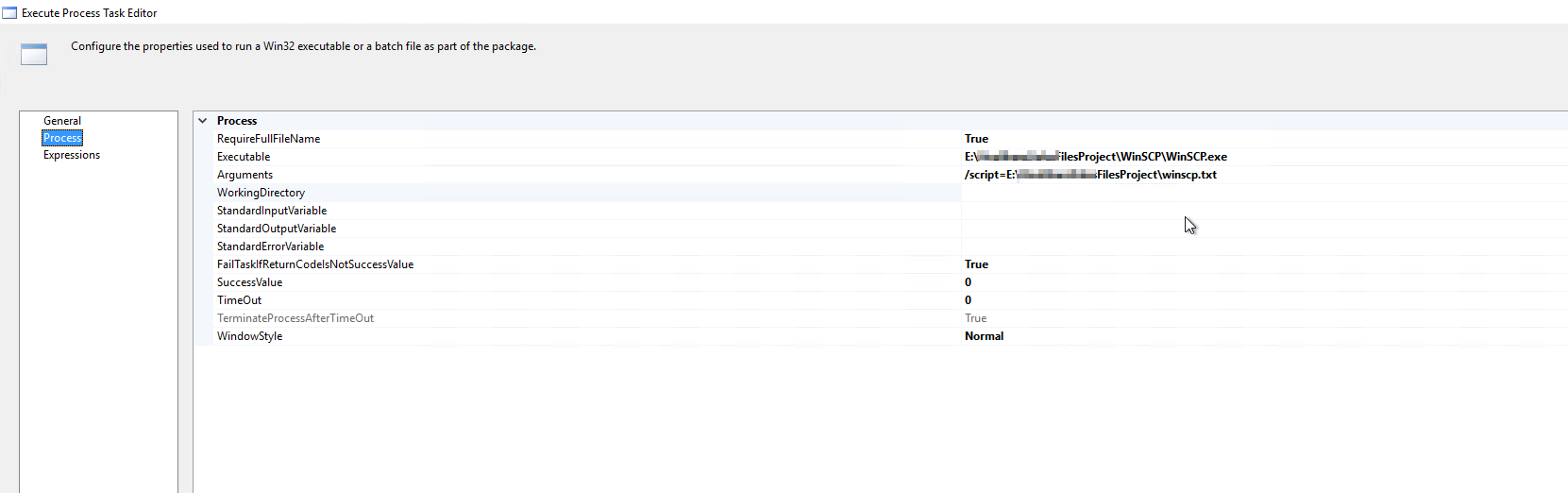
I copied the WinSCP executable on my DEV server and I am using this in my Executable as shown in the pic below.
πŸ‘ 262758-1.png

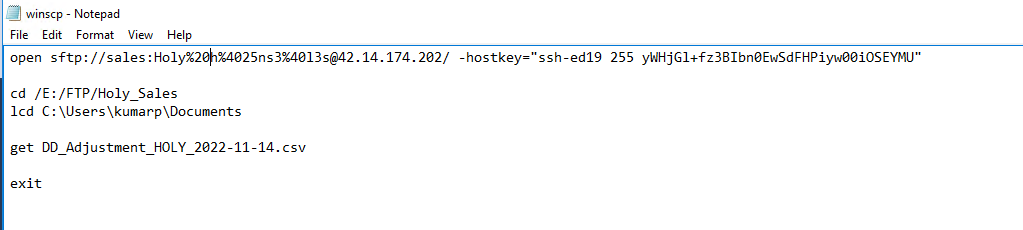
In my Arguments, I am using a txt file that has the SFTP HostName, Password, Source Path, TargetPath, and FileName to get the files downloaded.
When I run this, my SFTPfiles are getting downloaded in the specified path(C:\Users\kumarp\Documents)
My File names will be dynamic every day. For today it is DD_Adjustment_HOLY_2022-11-21.csv and tomorrow it will be DD_Adjustment_HOLY_2022-11-22.csv.
Can you help me with how I can change the file names in the .txt dynamically daily if this is the right approach to download the files from SFTP?
πŸ‘ 262801-2.png

If not I will also welcome any better ideas.

Locked Question. You can vote on whether it's helpful, but you can't add comments or replies or follow the question.

0 comments No comments

Answer accepted by question author

ZoeHui-MSFT 41,551 Reputation points

Hi @reddy421 ,

You may try to use script task to do that.

Define the file name with expression as below

"DD_Adjustment_HOLY_"+SUBSTRING((DT_WSTR, 30)getdate(),1,4)+"-"+SUBSTRING((DT_WSTR, 30)getdate(), 6,2)+"-"+SUBSTRING((DT_WSTR, 30)getdate(), 9,2) 

Reference here: https://stackoverflow.com/questions/66242015/download-sftp-file-using-ssis-package

Regards,

Zoe Hui


If the answer is helpful, please click "Accept Answer" and upvote it.

  1. reddy421 26 Reputation points

    Quick Question @ZoeHui-MSFT ... I was able to achieve what I wanted with your help.
    Can you help me how to send an email with the file name that was downloaded in the script task, please?
    Should I do that in the Script task only? If so can you help me with this?

1 additional answer

  1. Deleted

    This answer has been deleted due to a violation of our Code of Conduct. The answer was manually reported or identified through automated detection before action was taken. Please refer to our Code of Conduct for more information.


    Comments have been turned off. Learn more