
Answer accepted by question author

See the answers to these posts. It appears to be the result of how it's calculated.
 |
VOOZH | about |
Hello!
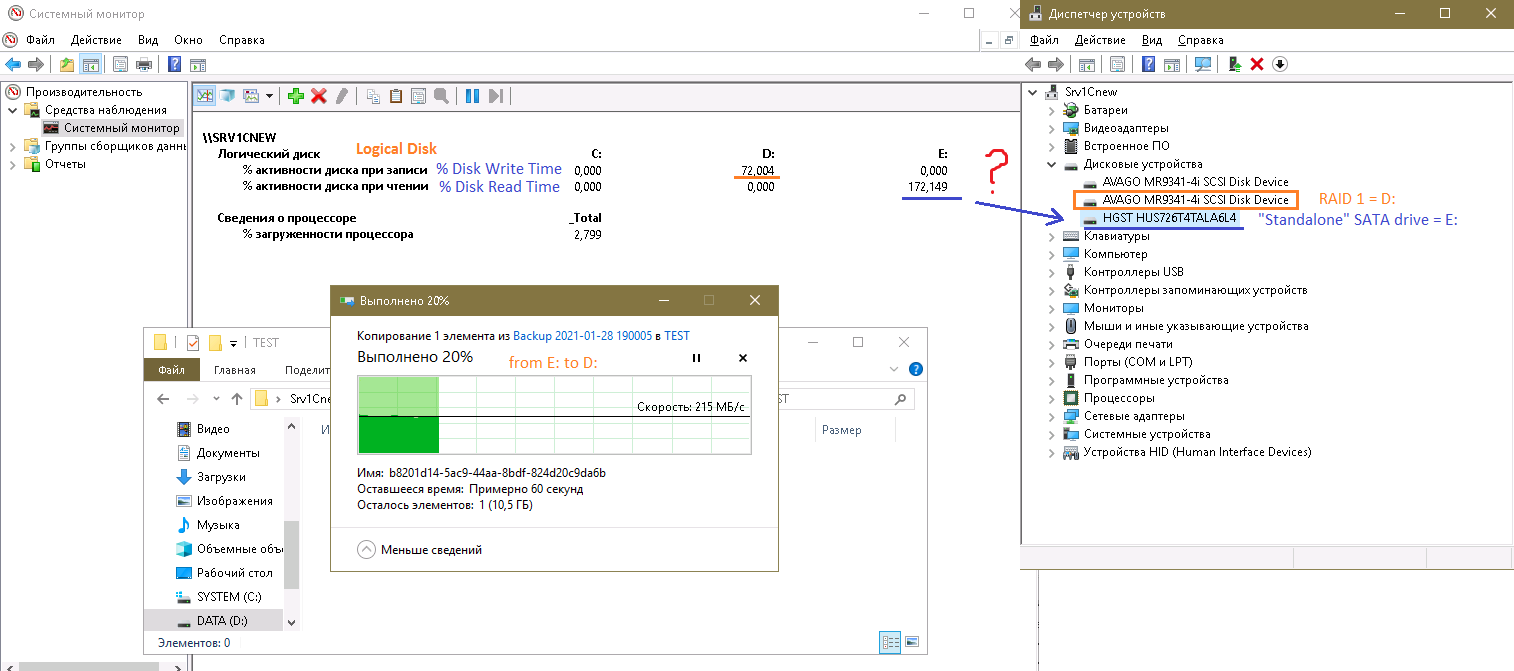
While monitoring my new server(2019) I was puzzled by the following fact: when I'm coping files from my "standalone" hard drive( logival disk E:_ - the drive connected to the mothebords' SATA controller - not a raid member, to the logical drive (D:) which is the RAID1 volume I see this:
👁 65770-test1.png
As far as I know the % (either read or write) can not be > 100 for a single drive - how in this case E: shows 172% ???
Thank you in advance,
Michael
Answer accepted by question author
See the answers to these posts. It appears to be the result of how it's calculated.
I thought this "The % Disk Read Time and % Disk Write Time counters can exaggerate disk time. ..." this does not apply to my server as this article is about VM, not a physical machine. 346% on a single drive... no comments - it means this counter is completely useless.
Thank you for the help!
Regards,
Michael
Seems the overlapping can happen only with RAID-ed disks:
"If you have multiple disks in a Raid arrangement, the overlapped input/output happens because the OS can read and write to multiple disks, and this could show value that are higher than 100 percent for this counter." - but my volume E: is the single hdd! :(
The % Disk Read Time and % Disk Write Time counters can exaggerate disk time. This is because they report busy time based on the duration of the I/O request, which includes time spent in activities other than reading to or writing from the disk. It then sums up all busy time for all requests and divides it by the elapsed time of the sample interval. If multiple requests are in process at a time, the total request time is greater than the time of the sample interval; as a result, reported disk utilization can exceed actual utilization.
I have a Win10 laptop with a single HDD. Running chkdsk with a perfmon interval at 10 seconds shows this below. The disk queue length counters might be better to watch to see if your drive is overloaded.
Sorry - didn't notice your answer :(
"This is because they report busy time based on the duration of the I/O request, which includes time spent in activities other than reading to or writing from the disk." ??? - sounds weird to me...if your goal is to measure reading or writing activities why should you include any other activities in your measurement?
...o maybe I'm missing something...
"The disk queue length counters might be better to watch to see if your drive is overloaded." - agree.
Regards,
Michael Firsov
