
Answer accepted by question author
Hi @Anonymous ,
What's the version of your Outlook? (File > Office Account > About Outlook). Please make sure you have upgraded your Outlook to the latest version.
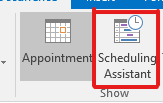
According to your description, I tested on my outlook 2016 but didn't reproduce your issue. When I modified an individual occurrence of a meeting series, the Scheduling Assistant was displayed in the red box as shown in the figure below. Do you mean this?
👁 109738-1.png
👁 109767-2.png

If so, does this issue exist all the time or just occur recently? If it occurred recently, did you have any special operations before?
Through my research, as a workaround, it is suggested that you could reset all customizations or add the option mentioned above by customizing ribbon. Please refer to the following steps:
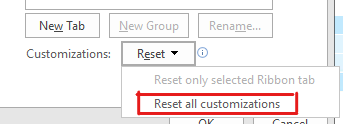
Reset all customizations(Because resetting will cause the existing settings to be lost, please make a backup before you start):
File>Options>Customize Ribbon>Under Customizations on the right, choose Reset all customizations>OK.
👁 109801-3.png
Add the option:
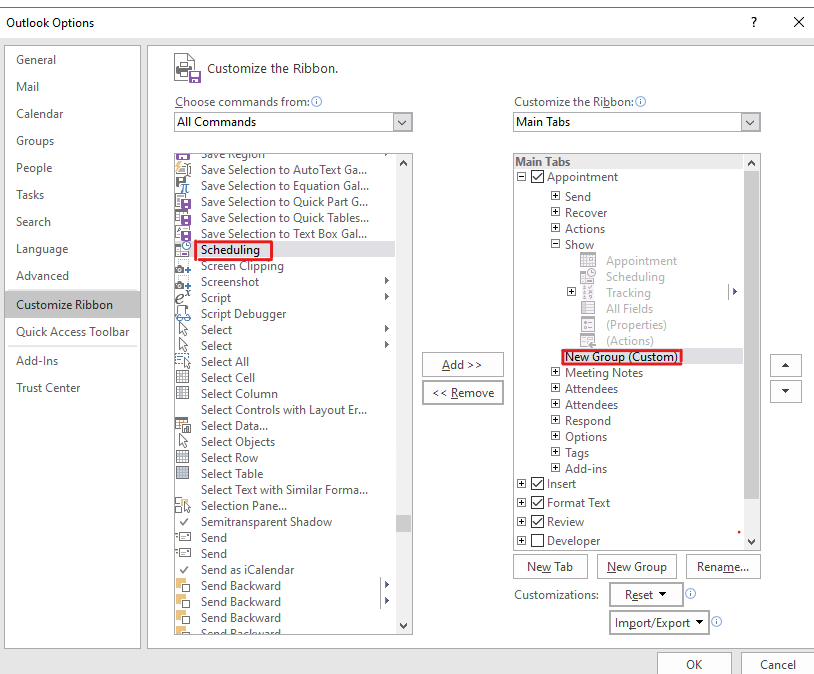
- File>Options>Customize Ribbon;
- Under Customize the Classic Ribbon on the right, choose Main Tabs>Appointment>Show, right click the new group and rename it;
- Under Choose commands from on the left, choose All Commands>Scheduling, and click Add;
👁 109739-4.png
- Click OK.
If the above is invalid, considering that the outlook program is damaged, it is suggested that you could try to fix the outlook program and check if there're any difference.
Hope to help you!
If the response is helpful, please click "Accept Answer" and upvote it.
Note: Please follow the steps in our documentation to enable e-mail notifications if you want to receive the related email notification for this thread.
-
Anonymous
Thanks, Christy! I am running Office 365 apps. My Outlook updated automatically last week and a few things disappeared, then today they were fixed. Not sure what the issue was, but it is resolved now!
-
ChristyZhang-MSFT 26,226 Reputation points • Microsoft External Staff
Hi @Anonymous ,
I'm glad your problem has been solved! Have a happy day!
Sign in to comment