I have successfully utilised NateRickard's three year old Nuget Plugin.AudioRecorder to make audio recordings and play them back.
I have been careful to set both StopRecordingOnSilence and StopRecordingAfterTimeout to false to allow extended recordings that can only finish on a button click.
The app works perfectly on my physical iOS device, but not on my Android device.
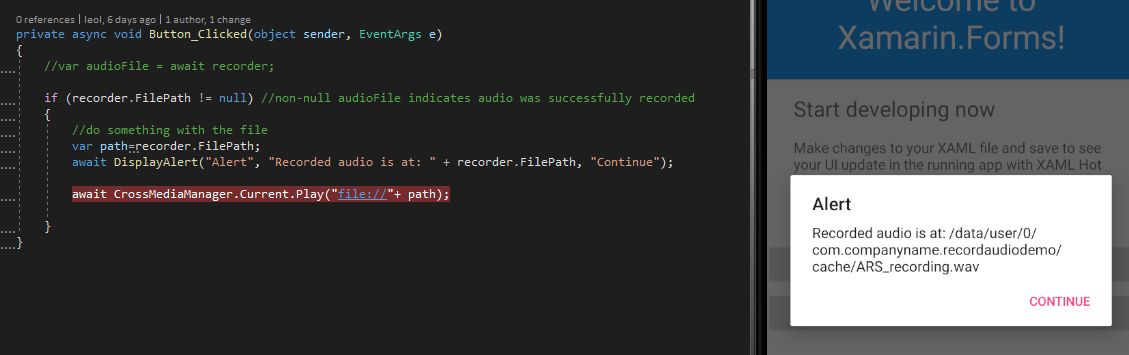
I have a DisplayAlert that shows the file path to the newly recorded audio, which on the Android device comes up as blank.
I will post here my AudioPage.xaml.cs, MainActivity.cs and AndroidManifest.xml as I believe my issue lies somewhere here. Any help would be greatly appreciated.
AudioPage.xaml.cs
using System;
using System.Collections.Generic;
using System.Linq;
using System.Text;
using System.Threading.Tasks;

using Xamarin.Forms;
using Xamarin.Forms.Xaml;
using Xamarin.Essentials;
using Plugin.AudioRecorder;

namespace HandsFreeNotes.View
{
 [XamlCompilation(XamlCompilationOptions.Compile)]
 public partial class AudioPage : ContentPage
 {
 private readonly AudioRecorderService audioRecorderService = new AudioRecorderService()
 {
 StopRecordingOnSilence = false,
 StopRecordingAfterTimeout = false
 };
 private readonly AudioPlayer audioPlayer = new AudioPlayer();

 public AudioPage()
 {
 // add a bit of padding to cater to the "notch" on the iPhone.
 if (Device.RuntimePlatform == Device.iOS) { Padding = new Thickness(0, 40, 0, 0); }

 InitializeComponent();
 }

 private async void BackButton_Clicked(object sender, EventArgs e)
 {
 await Navigation.PopModalAsync();
 }

 async void RecordNewAudio_Clicked(object sender, EventArgs e)
 {
 var status = await Permissions.RequestAsync<Permissions.Microphone>();

 if (status != PermissionStatus.Granted)
 return;

 if (audioRecorderService.IsRecording)
 {

 await audioRecorderService.StopRecording();

 AudioImage.Source = "flatlineblue.png";
 RecordNewAudio.Text = "Record New Audio";
 RecordNewAudio.TextColor = Color.Black;

 try
 {
 // Use default vibration length
 Vibration.Vibrate();
 }
 catch (FeatureNotSupportedException ex)
 {
 // Feature not supported on device
 // await DisplayAlert("Alert", "Vibrate is not supported on this device", "Continue");
 }
 catch (Exception ex)
 {
 // Other error has occurred.
 // await DisplayAlert("Alert", "Vibrate is not supported on this device", "Continue");
 }

 // audioPlayer.Play(audioRecorderService.GetAudioFilePath());
 await DisplayAlert("Alert", "Recorded audio is at: " + audioRecorderService.GetAudioFilePath(), "Continue");
 }
 else
 {
 try
 {
 // Use default vibration length
 Vibration.Vibrate();
 }
 catch (FeatureNotSupportedException ex)
 {
 // Feature not supported on device
 // await DisplayAlert("Alert", "Vibrate is not supported on this device", "Continue");
 }
 catch (Exception ex)
 {
 // Other error has occurred.
 // await DisplayAlert("Alert", "Vibrate is not supported on this device", "Continue");
 }

 AudioImage.Source = "audiocrop.gif";
 RecordNewAudio.Text = "Recording... Press to Finish";
 RecordNewAudio.TextColor = Color.Red;

 await audioRecorderService.StartRecording();

 }

 }

 private void PlaySelectedAudioButton_Clicked(object sender, EventArgs e)
 {
 try
 {
 Vibration.Vibrate();
 audioPlayer.Play(audioRecorderService.GetAudioFilePath());
 }
 catch (Exception ex)
 {
 // an error has occurred.
 }


 }
 }
}
MainActivity.cs
using System;

using Android.App;
using Android.Content.PM;
using Android.Runtime;
using Android.OS;
using AndroidX.Core.Content;
using Android;
using AndroidX.Core.App;

namespace HandsFreeNotes.Droid
{
 [Activity(Label = "HandsFreeNotes", Icon = "@drawable/hfn256x256", Theme = "@style/MainTheme", MainLauncher = false, ConfigurationChanges = ConfigChanges.ScreenSize | ConfigChanges.Orientation | ConfigChanges.UiMode | ConfigChanges.ScreenLayout | ConfigChanges.SmallestScreenSize )]
 public class MainActivity : global::Xamarin.Forms.Platform.Android.FormsAppCompatActivity
 {
 protected override void OnCreate(Bundle savedInstanceState)
 {
 base.OnCreate(savedInstanceState);

 // Added these lines for RecordAudio Permissions per LeonLu-MSFT 22/07/2021

 if (ContextCompat.CheckSelfPermission(this, Manifest.Permission.RecordAudio) != Permission.Granted)
 {
 ActivityCompat.RequestPermissions(this, new String[] { Manifest.Permission.RecordAudio }, 1);
 }
 // CrossMediaManager.Current.Init(this); // I'm not using CrossMediaManager


 Xamarin.Essentials.Platform.Init(this, savedInstanceState);
 global::Xamarin.Forms.Forms.Init(this, savedInstanceState);
 LoadApplication(new App());
 }
 public override void OnRequestPermissionsResult(int requestCode, string[] permissions, [GeneratedEnum] Android.Content.PM.Permission[] grantResults)
 {
 Xamarin.Essentials.Platform.OnRequestPermissionsResult(requestCode, permissions, grantResults);

 base.OnRequestPermissionsResult(requestCode, permissions, grantResults);
 }
 }
}
AndroidManifest.xml
<?xml version="1.0" encoding="utf-8"?>
<manifest xmlns:android="http://schemas.android.com/apk/res/android" android:versionCode="1" android:versionName="1.0" package="net.grime.apps.handsfreenotes">
 <uses-sdk android:minSdkVersion="21" android:targetSdkVersion="30" />
 <application android:label="HandsFreeNotes.Android" android:theme="@style/MainTheme"></application>
 <uses-permission android:name="android.permission.ACCESS_NETWORK_STATE" />

 <!-- Added these lines to cater to collecting Geolocation through Xamarin Essentials. GMB 11/06/2021, then 25/06/2021
 https://learn.microsoft.com/en-us/xamarin/essentials/geolocation?context=xamarin%2Fxamarin-forms&tabs=android-->

 <uses-permission android:name="android.permission.ACCESS_COARSE_LOCATION" />
 <uses-permission android:name="android.permission.ACCESS_FINE_LOCATION" />
 <uses-feature android:name="android.hardware.location" android:required="false" />
 <uses-feature android:name="android.hardware.location.gps" android:required="false" />
 <uses-feature android:name="android.hardware.location.network" android:required="false" />

 <!-- Added the following lines to allow for the sending of email through Xamarin Essentials. GMB 13/05/2021
 https://learn.microsoft.com/en-us/xamarin/essentials/email?context=xamarin%2Fxamarin-forms&tabs=android -->

 <queries>
 <intent>
 <action android:name="android.intent.action.SENDTO" />
 <data android:scheme="mailto" />
 </intent>
 </queries>

 <!-- Added the following lines to allow for the recording and playback of audio. GMB 07/07/2021
 Gerald Versluis: https://www.youtube.com/watch?v=2V8J7v3FP78 -->

 <uses-permission android:name="android.permission.MODIFY_AUDIO_SETTINGS" />
 <uses-permission android:name="android.permission.WRITE_EXTERNAL_STORAGE" />
 <uses-permission android:name="android.permission.READ_EXTERNAL_STORAGE" />
 <uses-permission android:name="android.permission.RECORD_AUDIO" />

 <!-- Added the following lines to allow for Vibrate through Xamarin Essentials. GMB 08/07/2021
 https://learn.microsoft.com/en-us/xamarin/essentials/email?context=xamarin%2Fxamarin-forms&tabs=android -->

 <uses-permission android:name="android.permission.VIBRATE" />

</manifest>