XA0137: The 'run-as' command failed with 'run-as: couldn't stat /data/user/0/com.test.demo: No such file or directory '.
Hi all,
My app not installing in release mode, Even I tried generating apk and installing but app is crashing every time.
I'm getting following error
Start debugging Android application failed
Start debugging Android application ...
am start -a "android.intent.action.MAIN" -c "android.intent.category.LAUNCHER" -n "com.test.demo/crc6409718adb1cab00c7.SplashActivity"
Starting: Intent { act=android.intent.action.MAIN cat=[android.intent.category.LAUNCHER] cmp=com.test.demo/crc6409718adb1cab00c7.SplashActivity }
Error type 3
Error: Activity class {com.test.demo/crc6409718adb1cab00c7.SplashActivity} does not exist.
The application could not be started. Ensure that the application has been installed to the target device and has a launchable activity (MainLauncher = true).
Additionally, check Build->Configuration Manager to ensure this project is set to successfully
for this configuration.
Start debugging Android application failed
-
Anonymous
Please set
MainActivityasMainLauncher = true, then generate a apk, if you have same issue. -
Nagarjuna Gadikota 1 Reputation point
Hi @Anonymous
Thanks for your response,
I'm getting this issue only for Andoid11 Devices onlyI'm targeting to android11 also
-
Anonymous
Did you test it in android emulator? Is that worked?
-
Денис Шишпор 10 Reputation points
I came across this error due to carelessness. I set up a pin code and fingerprint on the emulator. And I tried to deploy the application without unlocking the device and received this error
-
Daniel Towers 0 Reputation points
The comment above is correct - you must unlock the Emulator with a PIN before Visual Studio can deploy the app
Sign in to comment
7 answers
-
mheraltoonian 21 Reputation points
I got this error while trying out a new MAUI project. My first deployment (through VS) went ok, and the application was functioning fine.
It's when I uninstalled the app manually from my device, and then tried to redeploy it with VS that I started to get this error.
XA0137: The 'run-as' command failed with 'run-as: couldn't stat /data/user/0/com.companyname.mauiappshell: No such file or directory
The only way that I could bypass this deployment error was to manually rename the ApplicationId from within the MAUI project file.
So, if your application id is like
<ApplicationId>com.companyname.appname</ApplicationId>rename it to something like
<ApplicationId>com.companyname.1.appname</ApplicationId>and try to re-deploy the app to your device.
Hope this will help!
-
Rafael Gomez 16 Reputation points
This happened to me as well when manually uninstalling the app and re-deploying it via VS.
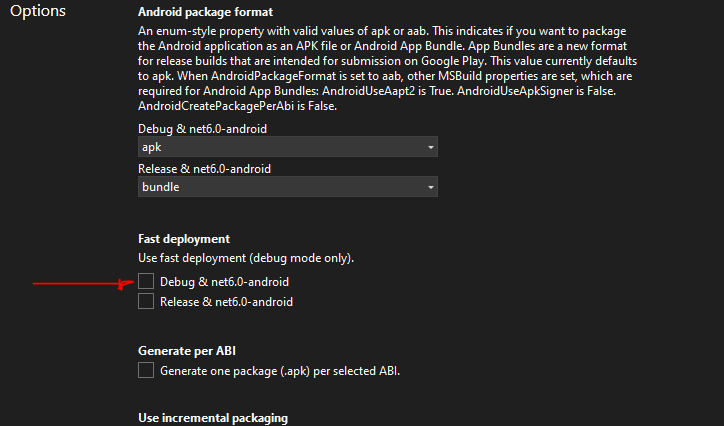
The solution is to turn off "fast deployment" in the project settings - Options
-
Reza Pourzia 0 Reputation points
this worked for me. Thanks
-
John van der Linden 0 Reputation points
I cannot find this Fast deployment setting option in VS22
Sign in to comment -
-
I also got the error: run-as with Studio On MAC
For my case. When I copy a new Page. Then change namePage.xaml, NamePage.xaml.cs, Name ModelPage.cs, there is an error always occurs at the line InitializeComponent();
Although everything is always correct, it seems that there is still a problem with Visual Studio.
So the first solution is to Close Visual Studio -> Save Solution. Then reopen the Project.
The second solution is to Rebuild Solution.
Hopefully those 2 ways will
-
Alan Franco 0 Reputation points
To Xiaomi users: if you have second space activated on your phone and you've uninstalled the app that you're debugging, you also have to uninstall it on your second space (if it is installed there) or else you won't able to redeploy the app.
-
Blanda, Christine 1 Reputation point
I got this error, went into Settings, Apps, found the app in question, it said 'not installed for this user' I tapped on it, from the menu chose 'uninstall for all users' Then I was able to run it again.
-
Will Autio 5 Reputation points
I was getting the same error in a Maui app trying to load onto an Android via VS 2022. In my case the test Android had been left on and connected all weekend. It turned out that when I rebooted it, things worked.
Sign in to comment -