How to copy VS2019 Solution Folder from location one to another by drag and drop
I have a VS2019 solution in a Desktop Folder that compiles/deploy successfully. I copied/move this folder in my Document Folder. This copied Solution has error saying Android Namespace is not defined.
There are many post regarding this that are confusing. One article talked about opening .SLN file in text editor which I have no clue how to do. Is there a very simple drag and drop method.
3 answers
-
Michael Taylor 61,226 Reputation points
A solution folder is self contained, or should be. Therefore you should be able to copy the entire solution directory (the folder containing the .sln file and having a separate folder for each project) and put it anywhere you want. Then when you open the solution up in Visual Studio it'll reload all the projects normally. Then recompile the solution and there shouldn't be any issues.d
If you are getting build errors then most likely your project has hard coded references to stuff outside the solution directory. That will be on a per-project basis though so you'll have to look at which project is failing to compile.
You shouldn't have to open the .sln file in a text editor unless you moved your project folders outside the solution directory or renamed them.
Yes, drag and drop works for solutions. We do it all the time without any issues. Just be sure you're moving the entire solution directory and not a single project in it (which won't work).
-
Universal Camera 276 Reputation points
Drag and Drop is what I always done. This error is occurring
"The type or namespace name 'Android' could not be found"
I just clean install my Windows and installed VS2019. If I as a User in a Local Account have a error free solution on Desktop and I move it to Document Folder then I get the error. However if I move it to Public Document Folder then there are no errors. So obviously its an Permission issue. Not sure how to fix it??? -
Michael Taylor 61,226 Reputation points
Run the build using verbose logging. Unless your project has a relative path to something then it should work. Nothing outside the solution directory matters to the build process unless you explicitly create a relative link yourself.
It would be useful to see the actual lines of code that is causing the error, the actual error message from the compiler (including error code and other information that it provides, and any errors from the verbose log.
-
Charlie Cartmel 0 Reputation points
After copying the whole top level folder and contents a dialogue tells me it cannot find the '.vb' files amongst others after examining (opening) a file in new location. .
Sign in to comment -
-
Bruce (SqlWork.com) 84,086 Reputation points
In vs project files, dependencies are referenced via relative paths. If all the dependencies are child folders of the project there is no issue coping the folder. But if the dependencies require accessing a parent folder, the copying the folder will have path errors. You need to manually update the project file.
-
Universal Camera 276 Reputation points
Namespace like Android you can imagine would be prevalent. In-fact there are 147 errors. Interestingly the code compiles and deploy despite these error. I don't want to see these errors!
-
Michael Taylor 61,226 Reputation points
Without seeing an example of the errors it is hard to say. You also haven't shown the build verbose log which would be helpful. If the code compiles without errors then it isn't a compiler error. Could be related to an extension or perhaps a corrupt cache. Clean builds generally solve that issue. Alternatively delete the
.vs,binandobjfolders (if any) and rebuild again. -
Universal Camera 276 Reputation points
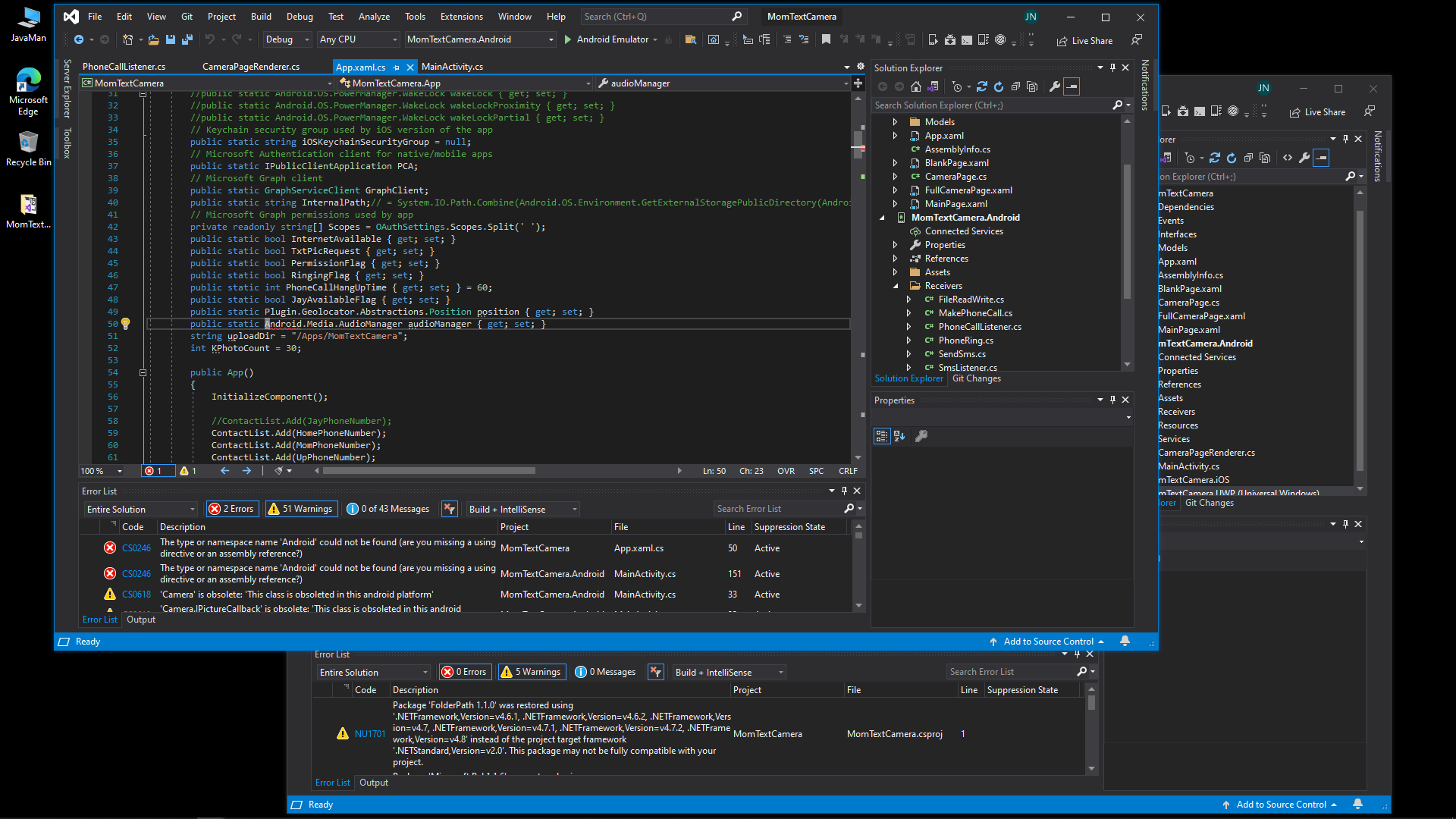
We all have been using VS for decades and yes copy/move have worked. However something is escaping all of us. I have included a screen shot of SAME solution from Desktop vs Document Folder. As you can see Namespace Android is missing for Document Folder. but not for Desktop Folder Both solutions compile and Deploy on Android successfully.
-
Michael Taylor 61,226 Reputation points
At this point I'm thinking it is an Intellisense issue. Change the output filter in the Error List to just Build Only and see if it goes away. If it does then I'm leaning toward the cache folder under
.vs. Did you try a clean build along with deleting this folder after the move?When you say "Documents" I assume you mean your profile's documents? You said it worked under
Public Documentsas well. Theoretically it shouldn't be a permissions issue but you never know so you could try dropping the solution into your profile's Documents folder and then resetting the folder's security to inherit from parent which would give your local profile full privileges. I would be surprised if it suddenly worked though. But then again you are probably using NuGet and possibly thepackages.configfile so that means your solution has aPackagesfolder. Deleting that folder and rebuilding may provide different behavior as well.
Sign in to comment -