FCM notification not received when app is terminated

Adrian Jakubcik 121 Reputation points

I'd like to ask a question regarding Firebase Cloud Messaging. So recently, I've implemented FCM notifications into my app, created the API to send notifications, etc. But I came to a halt regarding the notifications when the app is closed or terminated ... simply not running in the background. If I send a notification to my app while it is in the foreground or background it shows up as it should and gets processed however, if I terminate the app, stop it, or just remove it from the background and send a notification it is never received, it never shows up, etc. until I start the app again and wait around 5 - 10mins only then it arrives. I do want to point out that I'm testing it in a debug mode so if that is the problem I will be very pleased to hear that. In advance, I would like to say that yes I am sending the notification to a certain topic, and yes I am subscribed to that topic, and the notification that I am sending is a payload.

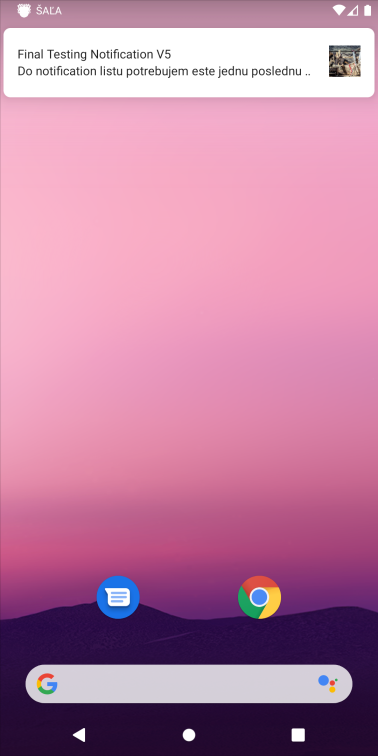
Also, one side question, when creating a local notification and showing it is there a way to customize the way it is shown? Because for some bizarre reason it shows the Icon and App name in the Taskbar and in the notification box only the Title, Message, and LargeIcon is shown. As so
πŸ‘ 162939-screenshot-1641494709.png

If possible I'd like to have it all in the notification box because else it can be a little harder to understand where the notification is from.
Also, I tried but failed to create a local notification with vibration and sound. I tried searching and doing what ppl have suggested but I just can't make the phone vibrate and it only makes a sound even when I set the defaults to sound only. Yeah I know emulators won't vibrate so I tested it on a real physical device, no vibration just the default android sound.

  1. Adrian Jakubcik 121 Reputation points

    For some very interesting reasons the website doesn't let me post the local notification code in here so I have no way to show what it looks like. Idk why this bamboozle happens but it's very frustrating... it's just a sample of how the local notification builder code looks like... I just don't understand.

  2. JarvanZhang 23,971 Reputation points

    when creating a local notification and showing it is there a way to customize the way it is shown?

    Hi, AdrianJakubcik-3866. What message type do you send as the notification? There are two message types: Notification and Data. The first one is handled by the FCM SDK automatically, it doesn't support to change the layout of the notification. Data messages are handled by the client app, you could customize the nofication in OnMessageReceived event.

    However if your app is in the background, the notification is delivered to the device’s system tray, the FireBaseMessagingService will not be called.
    Here is the related doc, you could refer to: https://firebase.google.com/docs/cloud-messaging/android/receive#handling_messages

    if I terminate the app, stop it, or just remove it from the background and send a notification it is never received, it never shows up

    FCM may not deliver messages to apps which were put into background restriction. Try to remove the app from background restriction, and the new messages to the app will be delivered as before. Here is the related doc: https://firebase.google.com/docs/cloud-messaging/android/receive#restricted

  3. Adrian Jakubcik 121 Reputation points

    I indeed send a Data message and handle it in onMessageReceived

    public override void OnMessageReceived(RemoteMessage p0)
     {
     Log.Debug("Firebase::Received", $"Message type: {p0.MessageType}\n" + p0.Data.ToList().ConvertAll(kp => $"Key: {kp.Key} | Value: {kp.Value} | Type: {kp.Value.GetType().Name}").Aggregate((c, n) => c + "\n" + n));
     if (p0.Data != null && p0.Data.ContainsKey("messageType"))
     {
     var notification = new Notification(p0.Data.ToDictionary(kp => kp.Key, kp => (object)kp.Value));
     SendLocalNotification(notification);
     AddNotification(notification);
     }
     else
     AddNotification(new Notification(p0.Data.ToDictionary(kp => kp.Key, kp => (object)kp.Value)));
     }
    
  4. Adrian Jakubcik 121 Reputation points

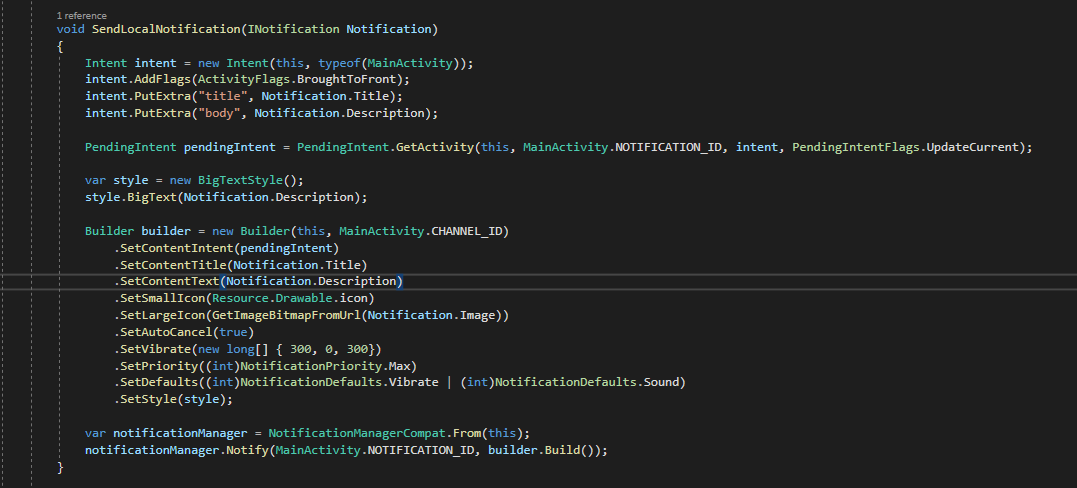
    And then I create local notification as so

    πŸ‘ ![163118-image.png
    ]1

  5. JarvanZhang 23,971 Reputation points

    Hi, AdrianJakubcik-3866 . Did you try moving the app from background restriction? Does it work?


Sign in to comment

Answer accepted by question author

JarvanZhang 23,971 Reputation points

handling it there must be performed by doing a navigation command after LoadApplication()

Do you want to display a different main page for the user? Try to perform the navigation in the shared project instead.

Pass a parameter when calling LoadApplication method.

protected override void OnCreate(Bundle savedInstanceState)
{
 base.OnCreate(savedInstanceState);
 Xamarin.Essentials.Platform.Init(this, savedInstanceState);
 global::Xamarin.Forms.Forms.Init(this, savedInstanceState);
 LoadApplication(new App(parameter));
}

Then detect the value to show a different page.

public partial class App : Application
{
 public App(bool parameter)
 {
 InitializeComponent();

 if (parameter)
 {
 MainPage = new NavigationPage(new MainPage());
 }
 else 
 {
 MainPage = new NavigationPage(new TestPage());
 }
 }
}
  1. Adrian Jakubcik 121 Reputation points

    Do you want to display a different main page for the user?

    No, I'm trying to load the same MainPage, but as it loads up and the app was started up by tapping a local notification I would like it to navigate to a subpage.
    I will try to do it by passing a parameter to the App it's the only workaround for my situation as it seems.
    @JarvanZhang Thanks for the support.


Sign in to comment
4 additional answers

  1. Adrian Jakubcik 121 Reputation points

    Long story short anyone who's experiencing the same problem as the title of this post says the original problem that was discussed here. The solution for me was that after closing the app the debug session in Visual Studio is terminated thus also the google service which is responsible for receiving the notifications. Now to start it up again all I had to do is go to my emulator or physical device and start up the app manually not through Visual Studio, after it's fully loaded you can close it down or remove it from the background processes, and now your notifications should be coming once again. This may, however, be individual for every developer since nearly every developer has his own ways of implementing push notifications with Firebase Cloud Messaging.

    The vibration and sound problem was solved by creating a channel and setting the vibration to true for that channel, however, don't set the pattern of the vibration there. Enable lights if you'd like to set light color for your notifications, and set the sound that you'd want for your notifications. Like so

    void CreateNotificationChannel()
     {
     //No need for Notification Channel creation on devices under the Oreo version API 26
     if (Build.VERSION.SdkInt < BuildVersionCodes.O) return;
    
     var channel = new NotificationChannel(CHANNEL_ID, "Firebase Cloud Messaging Notifications", NotificationImportance.Max)
     {
     Description = "Firebase Cloud Messages are handled by this channel.",
     LightColor = Android.Graphics.Color.OrangeRed,
     LockscreenVisibility = NotificationVisibility.Public,
     };
     channel.EnableLights(true);
     channel.EnableVibration(true);
     channel.SetSound(
     RingtoneManager.GetDefaultUri(RingtoneType.Notification),
     new AudioAttributes.Builder().SetUsage(AudioUsageKind.Notification).Build());
    
     manager = (NotificationManager)GetSystemService(NotificationService);
     manager.CreateNotificationChannel(channel);
     }
    

    Then when building the local notification you have to set the vibration pattern, set the defaults, and set the priority. Like so

    NotificationCompat.Builder builder = new NotificationCompat.Builder(this, MainActivity.CHANNEL_ID)
     .SetContentIntent(pendingIntent)
     .SetContentTitle(Notification.Title)
     .SetContentText(Notification.Description)
     .SetSmallIcon(Resource.Drawable.icon)
     .SetAutoCancel(true)
     .SetVibrate(new long[] { 300, 0, 300 })
     .SetPriority((int)NotificationPriority.Max)
     .SetDefaults((int)NotificationDefaults.All)
    

    And that's pretty much it for this problem.

    1. Mike Sharp 1 Reputation point

      Genius.

      It is indeed a Visual studio interaction.

      Restarting the app once on the phone after VS is closed makes the notifications start working again, even when the app is closed.


    Sign in to comment
  2. Adrian Jakubcik 121 Reputation points

    @JarvanZhang I have created a Github repo with a sample app to show you what I mean, the steps to reproduce this problem are in the README
    Github repo: XamarinForms-NavigationBug

    1. JarvanZhang 23,971 Reputation points

      Hi, AdrianJakubcik-3866. Please don't add navigation command after 'LoadApplication' method. The sample works as expected when removing this line.

      protected override void OnCreate(Bundle savedInstanceState)
      {
       base.OnCreate(savedInstanceState);
      
       Xamarin.Essentials.Platform.Init(this, savedInstanceState);
       global::Xamarin.Forms.Forms.Init(this, savedInstanceState);
       LoadApplication(new App());
      
       //App.Current.MainPage.Navigation.PushAsync(new Page2()); //remove this line
      }
      
    2. Adrian Jakubcik 121 Reputation points

      @JarvanZhang Yes indeed I know it does work without the line, that's exactly what I'm trying to point out. There's a bug in the navigation as soon as you try to perform a navigation command after loading the application. This is quite a problem for me since I startup a SplashScreen with my intent and then I pass the intent from SplashScreen to my MainActivity and handling it there must be performed by doing a navigation command after LoadApplication() and since that breaks the app I consider it a bug and would like to ask if there is any other way of doing this.


    Sign in to comment
  3. JarvanZhang 23,971 Reputation points

    This is very strange because the navigation sets as root the first page ...

    This is because the application is reloaded when clicking the notifiation. To avoid this, try setting the LaunchMode of MainActivity to SingleTop, and add ActivityFlags.ClearTop flag to the intent.

    Here is the sample code, you could refer to it.

    [Activity(Label = "TestApplication1", MainLauncher = true, LaunchMode = LaunchMode.SingleTop, ...)]
    public class MainActivity : global::Xamarin.Forms.Platform.Android.FormsAppCompatActivity
    {
     protected override void OnCreate(Bundle savedInstanceState)
     {
     base.OnCreate(savedInstanceState);
    
     Xamarin.Essentials.Platform.Init(this, savedInstanceState);
     global::Xamarin.Forms.Forms.Init(this, savedInstanceState);
     LoadApplication(new App());
     }
    
     protected override void OnNewIntent(Intent intent)
     {
     base.OnNewIntent(intent);
    
     if (intent.HasExtra("the_key") && intent.GetStringExtra("the_key") == "the_value")
     {
     App.Current.MainPage.Navigation.PushAsync(new TestPage());
     }
     }
    }
    ...
    
    Intent intent = new Intent(context, typeof(MainActivity));
    intent.AddFlags(ActivityFlags.ClearTop);
    intent.PutExtra("the_key", "the_value");
    
    1. Adrian Jakubcik 121 Reputation points

      @JarvanZhang Yes indeed, that's precisely what I do. I set the LaunchMode flag of MainActivity to SingleTop and also in SplashScreen I do set the MainActivity Intent flags to SingelTop. It works correctly when the App is running when it's loaded the OnNewIntent does what it is supposed to and everything works fine. But if I close/terminate the app and start it up by the Pending Intent, it Navigates in the OnCreate() method of MainActivity. Whenever I navigate in the MainActivity.cs in one of the overriding methods the Navigation gets messed up and doesn't let me reach the root page of the Navigation Stack.


    Sign in to comment
  4. Adrian Jakubcik 121 Reputation points

    @JarvanZhang So after few tests and debugging I found out that the way Navigation handles navigation from MainActivity is very interesting... If my MainActivity looks like this

    protected override void OnCreate(Bundle savedInstanceState) 
     { 
     base.OnCreate(savedInstanceState); 
     
     Xamarin.Essentials.Platform.Init(this, savedInstanceState); 
     global::Xamarin.Forms.Forms.Init(this, savedInstanceState); 
     LoadApplication(new App()); 
     if(Intent.Extras != null) 
     ProcessIntent(Intent); 
     
     
     IsGooglePlayServiceAvailable = IsPlayServicesAvailable(); 
     if (IsGooglePlayServiceAvailable) 
     { 
     CreateNotificationChannel(); 
     } 
     } 
     
     protected override void OnNewIntent(Intent intent) 
     { 
     base.OnNewIntent(intent); 
     ProcessIntent(intent); 
     } 
     
     protected void ProcessIntent(Intent intent, App app = null) 
     { 
     var type = (IntentTypes)intent.GetIntExtra("type", 1); 
     if (type == IntentTypes.Notification) 
     { 
     var action = (NotificationActionTypes)intent.GetIntExtra("action", (int)NotificationActionTypes.OpenNotificationCenter); 
     if (app == null) NotificationAction(action); 
     else NotificationAction(action, app); 
     } 
     } 
     
     protected async void NotificationAction(NotificationActionTypes action, bool PopToRoot = true, Intent intent = null) 
     { 
     switch (action) 
     { 
     case NotificationActionTypes.OpenNotificationCenter: 
     //if(PopToRoot) await App.Current.MainPage.Navigation.PopToRootAsync(); 
     App.Current.MainPage.Navigation.PushAsync(new Views.NotificationsListPage()); 
     await App.Current.MainPage.Navigation.PopToRootAsync(); 
     await App.Current.MainPage.DisplayAlert("Count", $"Navigation Stack: {App.Current.MainPage.Navigation.NavigationStack.Count}", "OK"); 
     break; 
     case NotificationActionTypes.OpenDirectByType: 
     break; 
     } 
     } 
    

    For debugging purpose after loading the specific View I added code to PopToRoot just to see what happens, because the Alert displays there are 2 pages in Navigation Stack, and the one I land on is the NotificationListPage so theoretically poping to root should take me to the App.Current.MainPage however, instead the Application crashes or backs out. If the await App.Current.MainPage.Navigation.PopToRootAsync(); Was to be removed you'd land on NotificationListPage... but you won't be abe to use the back button nor the device back button it doesn't do anything. So, I don't know whether this is a bug in the Navigation itself since I am pushing to navigation stack of the MainPage but it looks like it overwrites it yet there are 2 pages in the stack but I can't navigate backwards.

    1. Adrian Jakubcik 121 Reputation points

      @JarvanZhang Well looking into the problem there seems to be problem with Navigation... after countless hours of trying I found out that if I try to Navigate in MainActivity in any Override that is invoked when the Activity starts it breaks my application. See code below

      [Activity(Icon = "@mipmap/myicon", Theme = "@style/MainTheme", ConfigurationChanges = ConfigChanges.ScreenSize | ConfigChanges.Orientation | ConfigChanges.UiMode | ConfigChanges.ScreenLayout | ConfigChanges.SmallestScreenSize, ScreenOrientation = ScreenOrientation.SensorPortrait, LaunchMode = LaunchMode.SingleTop)] 
      
       public class MainActivity : global::Xamarin.Forms.Platform.Android.FormsAppCompatActivity 
       { 
       protected override void OnCreate(Bundle savedInstanceState) 
       { 
       base.OnCreate(savedInstanceState); 
       
       Xamarin.Essentials.Platform.Init(this, savedInstanceState); 
       global::Xamarin.Forms.Forms.Init(this, savedInstanceState); 
       LoadApplication(new App()); 
       
       App.Current.MainPage.Navigation.PushAsync(new Views.NotificationsListPage()); 
       } 
       } 
      

      This will navigate only to the page and you can't go backwards.

    2. Adrian Jakubcik 121 Reputation points

      However to point out that the following code works...

      protected override void OnCreate(Bundle savedInstanceState)
       {
       base.OnCreate(savedInstanceState);
      
       Xamarin.Essentials.Platform.Init(this, savedInstanceState);
       global::Xamarin.Forms.Forms.Init(this, savedInstanceState);
       LoadApplication(new App());
      
       App.Current.MainPage.Navigation.PushAsync(new Views.Menu());
       App.Current.MainPage.Navigation.PushAsync(new Views.NotificationsListPage());
       App.Current.MainPage.DisplayAlert("Count", $"Navigation Stack: {App.Current.MainPage.Navigation.NavigationStack.Count}", "OK");
       }
      

      This is very strange because the navigation sets as root the first page which I navigate to in the OnCreate() method however before navigating there's the LoadApplication(new App()) and inside that I have

      public App()
       {
       InitializeComponent();
       //F this sh** not useful at all.
       MenuPage = new Views.Menu();
       MainPage = new NavigationPage(MenuPage);
      
       InitializeHandlers();
       InitializeEvents();
       }
      

      And as you can see I do define and initialize the root NavigationPage... but it's not there after the navigation in MainActivity.

    3. Adrian Jakubcik 121 Reputation points

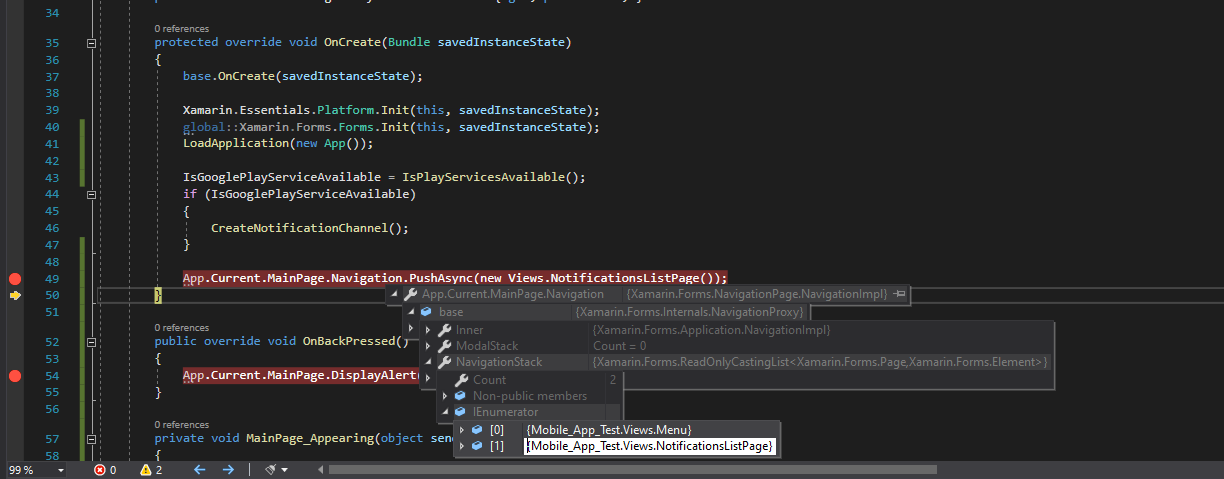
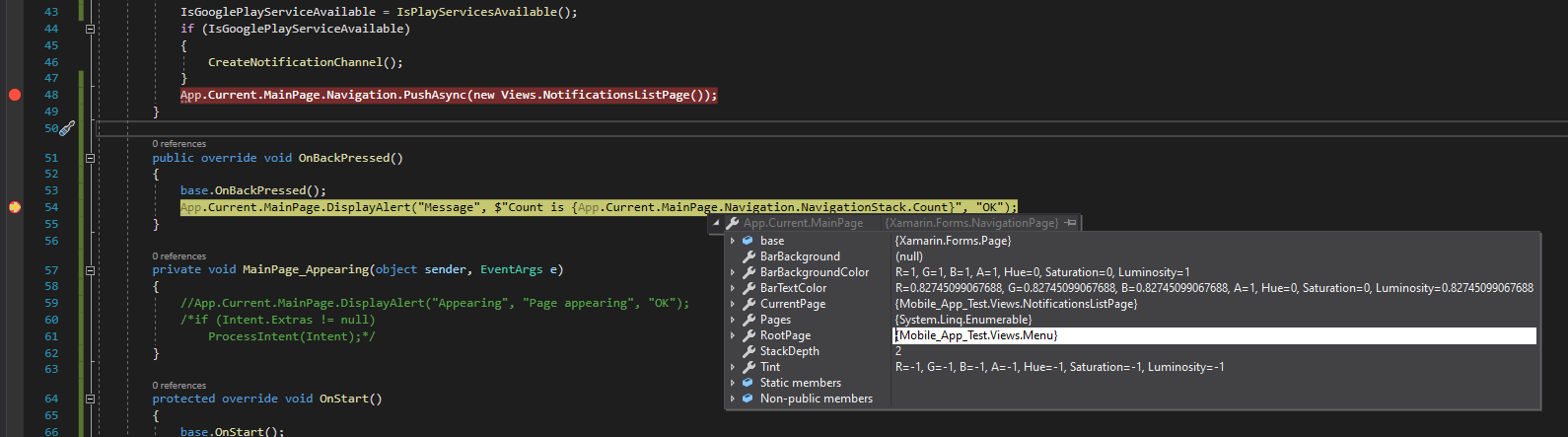
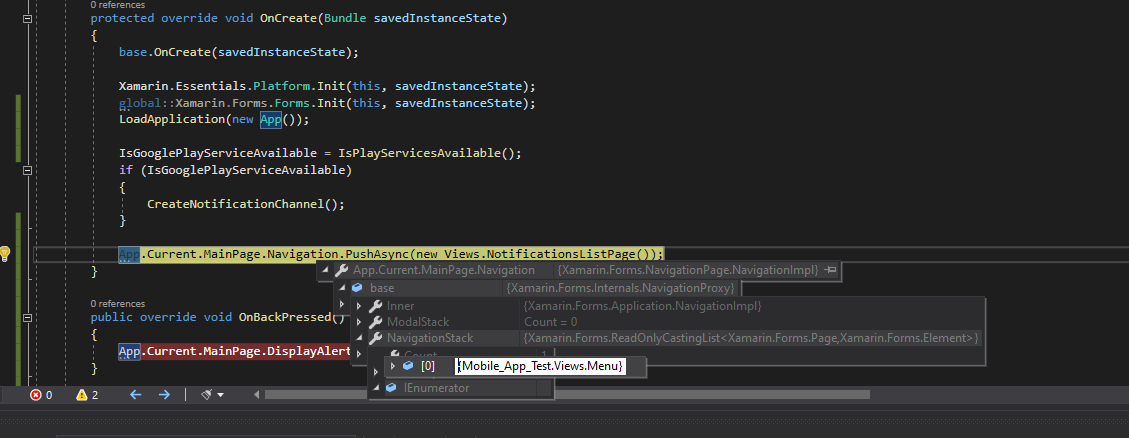
      Even when debugging you can clearly see that the root page is there but is being ignored...
      πŸ‘ 164398-image.png

      πŸ‘ 164447-image.png


    Sign in to comment
Sign in to answer

Your answer