
Windows Performance Analyzer doesn't show CPU usage sampled data in my profiles

Tony Grey 21 Reputation points

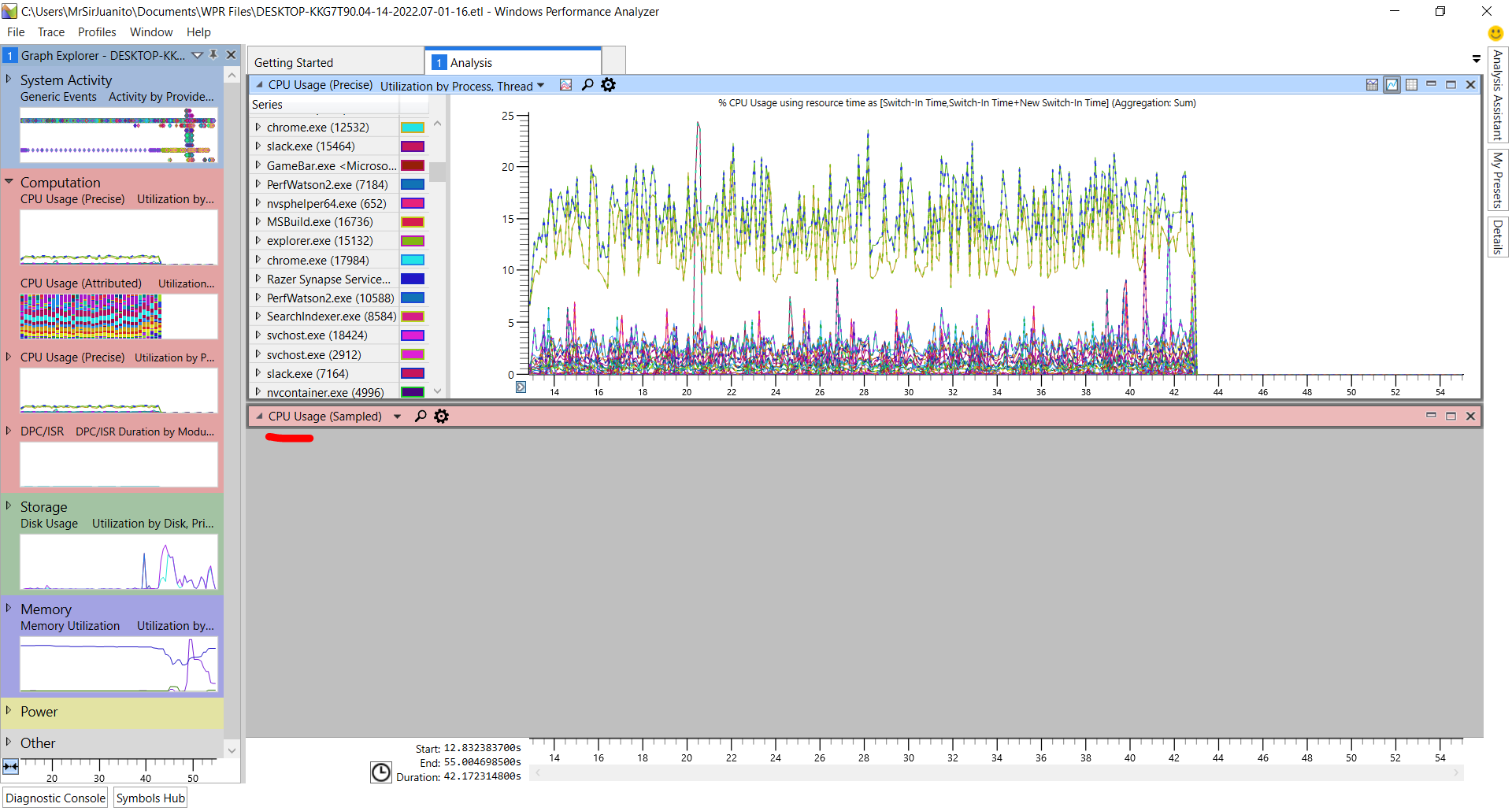
Hello! It started a few months ago, but I don't have any sampled CPU usage data when I view my ETW profiles in Windows Performance Analyzer. It looks like this:
๐Ÿ‘ 192926-image.png

Notice that the preset is configured in a way to show the sample CPU usage (because I used to have it), but now it shows nothing.
Also, in the left panel, you can see that the Computation menu doesn't contain CPU usage (Sampled) as an option.
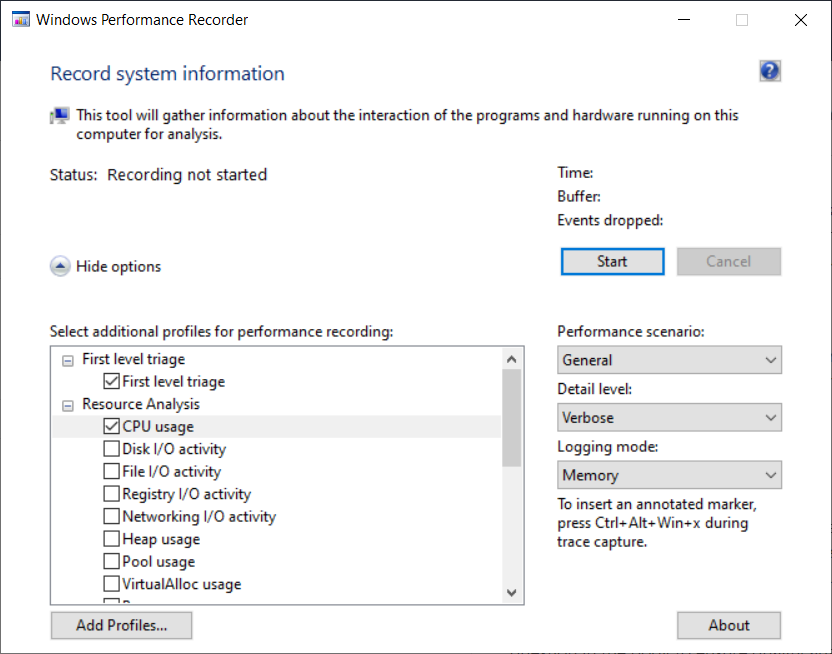
I tried everything (purged the perf tools), but can't make it collect the sampled data. I also tried to enable this CPU usage flag in the perf recorder, but didn't have luck either:
๐Ÿ‘ 192927-image.png

The weirdest thing is that I'm able to get the sampled data on another machine, with the same exact options.
How can I fix this?

  1. Alois Kraus 1 Reputation point

    I have the same issue with specific Intel CPUs. A call with MS did not get me a solution. They suspected that it might be an Intel device driver which somehow kills CPU sampling. I did boot trace profiling which did show that the first 5-6s CPU sampling did work perfectly but then it suddenly stopped. Context Switch profiling did continue to work though.

    I have played a bit with PMC sampling profiling and got it working. What is the difference between Timer and TimerFixed by the way?

     <!-- wpr -pmcsources
     Id Name Interval Min Max
     0 Timer 10000 1221 1000000
     2 TotalIssues 65536 4096 2147483647
     36 TimerFixed 10000 1221 1000000
     -->
    

    Is there any documentation about the others like TotalIssues which can be used as guidance to check if something is hot?

  2. Gary Nebbett 6,476 Reputation points

    Hello Alois,

    As I mentioned in an response to the original question, there is a lack of coordination over use of the Performance Management unit; at one time there was a conflict between Microsoft profiling tools and a "threat detection" component in Windows Defender - this should now be resolved.

    The answer from Zhendar in this post discusses the naming of the PMC sources: https://stackoverflow.com/questions/53840322/difference-between-llcmisses-and-cachemisses-on-hardware-counters. Essentially the list consists of "generic" names for some counters and machine architecture specific names for actual counters.

    For Intel processors, Table 19-1 of "Intelยฎ 64 and IA-32 Architectures, Software Developerโ€™s Manual, Volume 3 (3A, 3B, 3C & 3D): System Programming Guide" lists Architectural Performance Events and Table 19-2 lists Fixed-Function Performance Counter and Pre-defined Performance Events. The meaning of "fixed" can be inferred from this information.

    Gary

  3. Alois Kraus 1 Reputation point

    Submitting to this website seems to be impossible.

  4. Gary Nebbett 6,476 Reputation points

    Hello Alois,

    Think of that as a "badge of honour" :-)

    About 5 to 10 percent of my posts are referred for review before being published...

    Gary


Sign in to comment

Answer accepted by question author

Gary Nebbett 6,476 Reputation points

Hello Tony,

The command wpr -profiles lists the predefined profiles (the same as the list in the WPR UI) and wpr -profiledetails CPU (for example) gives an overview of what is collected by the profile. wpr -exportprofile CPU cpu.wprp exports the profile, which can then be edited.

For sample profiling, the minimum set of keywords for use with WPA is Loader, ProcessThread and SampledProfile; the minimum set of stacks is SampledProfile.

None of the EventProvider items are needed (although some might be useful if focusing on .NET or JScript code).

Starting from cpu.wprp and removing what I think is not essential gives:

<WindowsPerformanceRecorder Version="1.0">
 <Profiles>
 <SystemCollector Id="WPR_initiated_WprApp_WPR_System_Collector" Name="WPR_initiated_WprApp_WPR System Collector">
 <BufferSize Value="1024" />
 <Buffers Value="813" />
 </SystemCollector>
 <SystemProvider Id="WPR_initiated_WprApp_WPR_System_Collector_Provider">
 <Keywords>
 <Keyword Value="Loader" />
 <Keyword Value="ProcessThread" />
 <Keyword Value="SampledProfile" />
 </Keywords>
 <Stacks>
 <Stack Value="SampledProfile" />
 </Stacks>
 </SystemProvider>
 <Profile Id="CPU.Verbose.Memory" Name="CPU" Description="RunningProfile:CPU.Verbose.Memory" LoggingMode="Memory" DetailLevel="Verbose">
 <Collectors>
 <SystemCollectorId Value="WPR_initiated_WprApp_WPR_System_Collector">
 <SystemProviderId Value="WPR_initiated_WprApp_WPR_System_Collector_Provider" />
 </SystemCollectorId>
 </Collectors>
 </Profile>
 </Profiles>
</WindowsPerformanceRecorder>

If something useful seems to be missing when analysing with WPA, then just add back items that seem possibly relevant and then collect new data.

Let us know about the reliability of capturing profiling data - I am still intrigued by what you are observing.

Gary

  1. Tony Grey 21 Reputation points

    Hello again, Gary! And thanks for keeping this long conversation.
    So with the profile we proposed I am able to get the CPU sampled data on every of my captures!
    I'm still curious about why they weren't working before though. Can it be because the sampled data was too big to keep in the captures and was just being cut away?

  2. Gary Nebbett 6,476 Reputation points

    Hello Tony,

    From my understanding of how this all works, size itself was/is not an issue. The underlying/true cause of what you have observed is still a big (and interesting) mystery to me. There is no guarantee that you won't encounter the same symptoms again. For my own interest, I am still working on investigating what might explain the behaviour. Please keep me/us informed of any "oddities" that you notice.

    Gary

  3. Gary Nebbett 6,476 Reputation points

    Hello Tony,

    I think that this message contains the explanation for the behaviour: https://developercommunity.visualstudio.com/t/No-Data-in-CPU-Usage-Tool-Windows-Updat/1384519#T-N1447286

    Essentially, a lack of coordination over use of the Performance Monitoring features of the CPU. A potential source of conflict was added as part of a Windows Defender update.

    Ensuring that Windows Defender is up-to-date and reviewing the list of installed software that may potentially use performance monitoring (such as other performance tuning tools) would be reasonable steps.

    Gary

  4. Schutz Clark 0 Reputation points

    When I ran wpr -exportprofile CPU cpu.wprp on Administraitor CMD, it said Invavlid option: -exportprofile . Is it no longer an option, or is there another reason? Is there another way to export a built-in profile?


  5. Gary Nebbett 6,476 Reputation points

    Hello Schutz Clark,

    The -exportprofile option was not available in early versions of wpr; I don't know when it was first introduced.

    The command wpr -profiledetails CPU shows the essential information. It is relatively straightforward to construct a .wprp file from the output.

    Gary


Sign in to comment

2 additional answers

  1. Gary Nebbett 6,476 Reputation points

    Hello Tony,

    If you are prepared to share data, you could try the following. Save the XML below as a file, named (for example) test.wprp.

    <?xml version="1.0" encoding="utf-8"?>
    <!-- wpr -start test.wprp!PMC -filemode -->
    <!-- wpr -stop ?.etl -->
    <WindowsPerformanceRecorder Version="1.0" Author="Gary">
     <Profiles>
     <SystemCollector Id="NTKL" Name="NT Kernel Logger">
     <BufferSize Value="64" />
     <Buffers Value="128" />
     </SystemCollector>
     <EventCollector Id="ETW" Name="ETW">
     <BufferSize Value="64" />
     <Buffers Value="128" />
     </EventCollector>
     <SystemProvider Id="WMI">
     <Keywords>
     <Keyword Value="PmcProfile" />
     <Keyword Value="SampledProfile" />
     </Keywords>
     </SystemProvider>
     <HardwareCounter Id="PMC">
     <SampledCounters>
     <SampledCounter Value="Timer" Interval="600000" />
     <SampledCounter Value="TotalIssues" Interval="100000000" />
     </SampledCounters>
     </HardwareCounter>
     <Profile Id="PMC.Verbose.File" Name="PMC" Description="PMC" DetailLevel="Verbose" LoggingMode="File">
     <Collectors>
     <SystemCollectorId Value="NTKL">
     <SystemProviderId Value="WMI" />
     <HardwareCounterId Value="PMC" />
     </SystemCollectorId>
     </Collectors>
     </Profile>
     </Profiles>
    </WindowsPerformanceRecorder>
    

    Then issue the commands wpr -start test.wprp!PMC -filemode and (a second or two later) wpr -stop why.etl. On my PC, when compressed with ZIP, the resulting trace data in why.etl was about 40 kilobytes.

    If you can make why.etl available to me, I will see what can be inferred about the state of sampled profiling on your system.

    Gary

    1. Tony Grey 21 Reputation points

      Thank you, Gary!
      Ok, the interesting thing is it works if I run WPR with your profile. But still doesn't work every time with mine.
      Here is the file you asked for (I can see the CPU sampled data there):
      https://drive.google.com/file/d/1sDW2T81BCD5EHv9OjiYtDUBYUe_ERPF9/view?usp=sharing
      And here is mine (no CPU sampled data):
      https://drive.google.com/file/d/1YHYNgVu5n47HJztoqdsXMjWBhw-qySCJ/view?usp=sharing
      Mine worked 1 time out of a few.
      Should I configure WPR differently or anything maybe?
      Thanks,
      Anton

    2. Gary Nebbett 6,476 Reputation points

      Hello Tony,

      It looks as though all the necessary options for sampled profile tracing are set and the trace even shows that the timer source has been configured and started, but there are no sampled profile events in the trace file.

      The one odd thing that I did notice is that there are events from the Microsoft-Antimalware-Engine provider in the log with lots of BmEtw events with Channel "ThreatIntel".

      The Microsoft-Antimalware-Engine provider is included in the GeneralProfile, but I don't see any BmEtw events when I trace on my system.

      This is complete speculation at the moment, but there is a small chance that something is indeed blocking sampled profile event generation. I will think about possible next steps in try to understand what might be happening.

      Gary

    3. Gary Nebbett 6,476 Reputation points

      Hello Tony,

      The Microsoft-Antimalware-Engine idea turned out to be a dead-end.

      Depending on what you are trying to do, it might be worthwhile reducing the types of events that are recorded. "First level triage" defines one set of providers to trace and "CPU usage" defines another set; checking both boxes causes the "union" of the two sets to be traced.

      If you are just interested in sample based profiling, then just checking the "CPU usage" item would be helpful. Even this predefined set of providers includes some high event volume providers, so it would be even better to define a custom profile that just includes event providers that you actually need for analysis with WPA (let me know if you need help with this).

      Gary

    4. Tony Grey 21 Reputation points

      Hello Gary!
      Yes, I'm mainly interested in sample based profiling. Does it mean that I should have the CPU sampled data if I just check the "CPU usage"? I tried that and I still didn't have the data on my performance capture though (I can send a sample file if it helps).
      Is there any tool to create custom profiles or should I just create them as XML files? Yes, I'd appreciate help with the profiles, I want to try selecting different things to capture to maybe find some workable combination.


    Sign in to comment
  2. Tony Grey 21 Reputation points

    Tried to update to Windows 11, but the issue still persists. Even though sometimes I can get the CPU sampled data, I can't specify any pattern of whether it's shown or not. Of course, I also tried to purge Windows ADK - no luck.
    Can somebody give me a clue on how to fix it?

    1. Gary Nebbett 6,476 Reputation points

      Hello Tony,

      What does the output of the command wpr -pmcsources look like on the system?

      On my PC, that command shows:

      Id Name Interval Min Max
      --------------------------------------------------------------
       0 Timer 10000 1221 1000000
       2 TotalIssues 65536 4096 2147483647
       6 BranchInstructions 65536 4096 2147483647
       10 CacheMisses 65536 4096 2147483647
       11 BranchMispredictions 65536 4096 2147483647
       19 TotalCycles 65536 4096 2147483647
       25 UnhaltedCoreCycles 65536 4096 2147483647
       26 InstructionRetired 65536 4096 2147483647
       27 UnhaltedReferenceCycles 65536 4096 2147483647
       28 LLCReference 65536 4096 2147483647
       29 LLCMisses 65536 4096 2147483647
       30 BranchInstructionRetired 65536 4096 2147483647
       31 BranchMispredictsRetired 65536 4096 2147483647
       32 LbrInserts 65536 4096 2147483647
       33 InstructionsRetiredFixed 65536 4096 2147483647
       34 UnhaltedCoreCyclesFixed 65536 4096 2147483647
       35 UnhaltedReferenceCyclesFixed 65536 4096 2147483647
       36 TimerFixed 10000 1221 1000000
      

      Gary

    2. Tony Grey 21 Reputation points

      Hi Gary! Thanks for your answer. My output looks the same as yours:
      Id Name Interval Min Max
      0 Timer 10000 1221 1000000
      2 TotalIssues 65536 4096 2147483647
      6 BranchInstructions 65536 4096 2147483647
      10 CacheMisses 65536 4096 2147483647
      11 BranchMispredictions 65536 4096 2147483647
      19 TotalCycles 65536 4096 2147483647
      25 UnhaltedCoreCycles 65536 4096 2147483647
      26 InstructionRetired 65536 4096 2147483647
      27 UnhaltedReferenceCycles 65536 4096 2147483647
      28 LLCReference 65536 4096 2147483647
      29 LLCMisses 65536 4096 2147483647
      30 BranchInstructionRetired 65536 4096 2147483647
      31 BranchMispredictsRetired 65536 4096 2147483647
      32 LbrInserts 65536 4096 2147483647
      33 InstructionsRetiredFixed 65536 4096 2147483647
      34 UnhaltedCoreCyclesFixed 65536 4096 2147483647
      35 UnhaltedReferenceCyclesFixed 65536 4096 2147483647
      36 TimerFixed 10000 1221 1000000

    3. Gary Nebbett 6,476 Reputation points

      Hello Tony,

      So the Timer Performance Monitoring Counter (PMC) is reported.

      There is a bit of uncertainty in my mind as to whether "sampled profile" events are missing from your collected data or are just not being shown in WPA.

      Can you please just be explicit about that? There are strong hints in the text that the events are not being generated/recorded, but it would be helpful to be certain.

      Gary

    4. Tony Grey 21 Reputation points

      So while the PMC is being reported, I still can't see (or even select) the CPU sampled data on my performance profiles most of the time.
      I tried to record profiles 3 times (with the same setting in the Window Performance Recorder):

      • First time I did see the CPU sampled data
      • Second time I didn't see it. The only difference during that time was the third-party app running (and maxing out the resources)
      • Third time I didn't see it again. Even though that time the setup was the same as for the 1st time, which means there is no real pattern of how to reproduce the issue for me
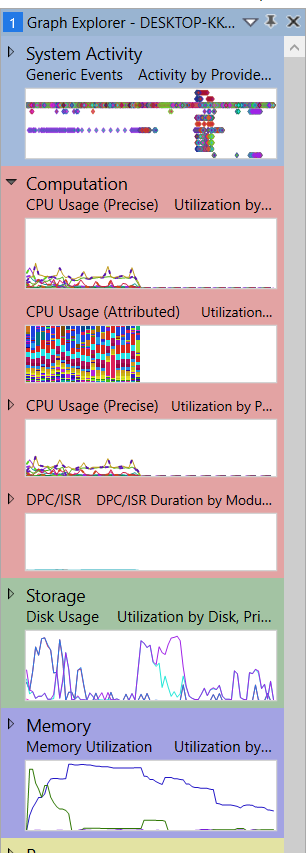
        When I'm saying "WPA doesn't show the CPU sampled data", I mean I don't even see it among the Computation options, like this:
        ๐Ÿ‘ 198250-image.png
    5. Gary Nebbett 6,476 Reputation points

      Hello Tony,

      Sorry, but that does still not provide the level of confidence that I was looking for. I am still not certain about what type of problem needs investigation.

      You seem to have at least two systems - one where things seem to work and one where there are problems.

      If you capture data on both systems, and view the captured data on both systems (i.e. view 4 captures: local and remote captures viewed on both local and remote systems), can you tabulate what is visible and where?

      Gary


    Sign in to comment
Sign in to answer

Your answer