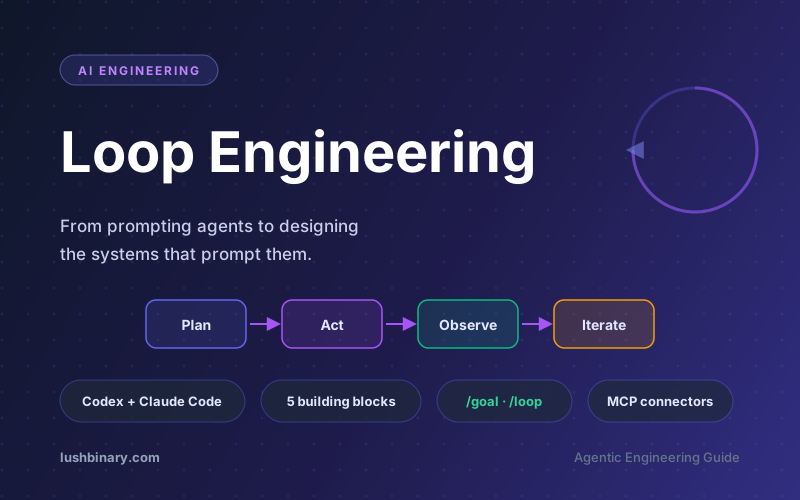

For about two years, the way you got value out of a coding agent was simple: write a good prompt, share enough context, read what came back, and type the next thing. You held the tool the entire time, one turn after another. In June 2026 that posture started to change. "Loop engineering" is the name now attached to the shift, and it captures a real change in where the leverage lives: you stop being the person who prompts the agent and start being the person who designs the system that prompts it.
The phrase was popularized by Google engineer Addy Osmani, echoing Peter Steinberger's line that "you should be designing loops that prompt your agents" and Anthropic Claude Code lead Boris Cherny's comment that his job is now to write loops rather than to prompt the model directly. It is still early, the token economics can swing wildly, and verification is harder than ever. But the building blocks now ship inside the products you already use, so the pattern is worth understanding whether or not you adopt it fully.
This guide breaks down what loop engineering actually is, how it differs from prompt and context engineering, the Ralph technique that proved the idea before it had a name, the five building blocks (plus memory) that make a loop hold together, how Claude Code and OpenAI Codex implement each piece, how to write a stop condition the loop cannot fake, a maturity ladder for adopting loops safely, what one realistic loop looks like end to end, and the failure modes that get sharper, not easier, as the loop improves. If you write code with agents, this is the next layer of the craft.
🔁 What This Guide Covers
- What Loop Engineering Actually Means
- From Prompt Engineering to Loop Engineering
- The Ralph Technique: Where the Loop Started
- The Five Building Blocks (Plus Memory)
- Automations: The Heartbeat of a Loop
- Worktrees: Parallel Agents Without Collisions
- Skills & Memory: Stop Re-Explaining Your Project
- Sub-Agents: Separate the Maker From the Checker
- What One Loop Looks Like, End to End
- The Risks Loop Engineering Does Not Solve
- Why Lushbinary for Agentic Engineering
- FAQ
1What Loop Engineering Actually Means
Loop engineering is replacing yourself as the person who prompts the agent, and designing the system that does it instead. A loop here is a recursive goal: you define a purpose once, and the agent iterates until the work is actually complete. Instead of you typing the next instruction after every response, a small system finds the work, hands it out, checks the result, writes down what is done, and decides the next thing to do. You let that system poke the agent instead of poking it yourself.
The mental model that helps most: a coding agent already runs an inner loop on every turn. It reasons about what to do, takes an action (calls a tool, edits a file, runs a test), observes the result, and loops back to reason again against the new state. That perceive, reason, act, observe cycle is the agentic loop. Loop engineering sits one floor above it. You are no longer steering each turn by hand. You are building an outer loop that runs on a schedule, spawns helpers, feeds itself work, and keeps going across many of those inner cycles without you in the seat for each one.
💡 The one-sentence definition
Loop engineering is building a system that prompts your agent on a schedule and against a goal, instead of typing each prompt yourself. The leverage moves from the quality of a single prompt to the design of the system that generates and verifies prompts.
What surprised early adopters is that this is no longer a build-it-yourself effort. A year ago, a loop meant a pile of bash scripts you maintained forever and that only you understood. As of mid 2026, the pieces ship inside the products. Peter Steinberger's checklist of what a loop needs maps almost exactly onto the OpenAI Codex app, and nearly the same list onto Anthropic's Claude Code. Once you notice the shape is identical across tools, you stop arguing about which agent is best and start designing a loop that works no matter which one you happen to be sitting in.
Loop engineering is the agentic sibling of two ideas you have probably already met. If you are coming from vibe coding, loop engineering is what happens when the vibes need to run unattended and survive your laptop closing. If you have read about multi-agent development with Claude Code agent teams, loop engineering is the discipline of wiring those agents into a self-running cycle.
2From Prompt Engineering to Loop Engineering
It helps to see loop engineering as the third layer in a stack that has been building for a few years. Each layer wraps the one inside it, and each one moves the leverage point a little further away from the raw model call.
| Layer | What you optimize | Unit of work |
|---|---|---|
| Prompt engineering | How you phrase a single instruction | One turn you type by hand |
| Context engineering | What else goes in the window: docs, history, tool definitions | The conditions around one answer |
| Loop engineering | The system that decides what to prompt and when, and whether the result is acceptable | A self-running cycle across many turns |
Prompt engineering never goes away. A loop is built out of prompts, and a sloppy prompt inside a loop just produces sloppy work faster. Context engineering does not go away either: the loop still has to put the right files, history, and tool definitions in front of the model on each turn. What loop engineering adds is the autonomous control structure around all of that. The harness runs the single agent. The loop runs the harness on a timer, spawns helpers, and feeds itself.
⚠️ The leverage moved, the work did not get easier
Boris Cherny's point is not that coding got easier. It is that the highest-value thing you can do shifted from writing prompts to designing loops. A well-designed loop multiplies a good engineer. A badly designed loop multiplies a bad decision just as fast, with less of you watching.
For a deeper look at the day-to-day craft of working turn by turn with agents, see our comparison of AI coding agents. Loop engineering is what you reach for once a single agent is no longer the bottleneck.
3The Ralph Technique: Where the Loop Started
Before anyone called it loop engineering, there was Ralph. In early 2026 Geoffrey Huntley described running a coding agent inside a plain while loop: feed the agent the same prompt against a written spec, let it pick one task and implement it, then start a fresh instance and feed the identical prompt again. Repeat until the work is done. He named it after Ralph Wiggum, the Simpsons character, because the technique is, in his words, deterministically simple in an unpredictable world. It looks too dumb to work, and it works.
The non-obvious insight is the context reset. A long agent session degrades as the window fills with old reasoning, dead ends, and stale file contents. Ralph sidesteps that entirely: every iteration is a new agent with a clean context that reads the current state of the repo and the task list from disk, does exactly one unit of work, commits it, and exits. The intelligence does not live in a heroic single run. It lives in clear, granular specifications and verifiable outcomes, applied over and over against an external memory the model cannot pollute.
In its rawest form a Ralph loop is a few lines of shell. The agent itself supplies the intelligence; the loop just supplies persistence and a clean slate on every pass.
# The original Ralph loop: same prompt, fresh context, until done
while ! grep -q "ALL TASKS DONE" STATUS.md; do
 # each pass is a brand-new agent with an empty context window
 claude -p "Read PLAN.md and STATUS.md. Pick the next unchecked
 task, implement it, run the tests, commit on success,
 and update STATUS.md. Then stop." \
 --dangerously-skip-permissions
done

# PLAN.md and STATUS.md are the durable memory. The agent forgets
# everything between passes; the files remember what is done.
💡 Loop engineering is Ralph, productized
Ralph is the proof of concept that you do not need a clever harness, just persistence, an external state file, and verifiable stopping criteria. Loop engineering is what happens when those exact ideas move inside the tools: the while loop becomes a scheduled automation, the context reset becomes a worktree and a sub-agent, and the "ALL TASKS DONE" check becomes a /goal condition graded by a separate model. Same shape, fewer sharp edges.
4The Five Building Blocks (Plus Memory)
A working loop needs five things, and then one place to remember state. The names differ slightly between tools, but the capability is the same. Here is the list, and then the diagram of how the pieces fit into a single self-running cycle.
- Automations that fire on a schedule and do discovery and triage by themselves.
- Worktrees so two agents working in parallel do not step on each other's files.
- Skills to write down the project knowledge the agent would otherwise guess at every session.
- Plugins and connectors to plug the agent into the tools you already use.
- Sub-agents so one of them has the idea and a different one checks it.
The sixth piece is memory: a markdown file, a Linear or GitHub board, anything that lives outside a single conversation and holds what is done and what is next. It sounds too simple to matter, but it is the trick every long-running agent depends on. The model forgets everything between runs, so the state has to live on disk, not in the context window. The agent forgets. The repo does not.
The reassuring part of mid-2026 is that you no longer assemble this from scratch. Both Claude Code and OpenAI Codex ship all five blocks plus durable memory, with different command names but the same shape. The next sections walk through each block, what it does, and how the two leading tools implement it, so you can design a loop that survives a switch between them.
If you want the per-tool mechanics of splitting work across multiple autonomous agents, our guide to OpenAI Codex sub-agents and autonomous coding teams covers the orchestration layer in depth.
5Automations: The Heartbeat of a Loop
Automations are what make a loop an actual loop and not just one run you did once. They are the heartbeat: a recurring trigger that surfaces work without you asking. Everything else in the loop reacts to what the automation finds.
In OpenAI Codex
The Codex app has an Automations tab where you pick the project, the prompt to run, the cadence, and whether it runs on your local checkout or a background worktree. Runs that find something land in a Triage inbox; runs that find nothing archive themselves. OpenAI describes using Automations internally for routine work like issue triage, alert monitoring, summarizing CI failures, and writing commit briefings. An automation can call a skill, so the recurring instruction stays maintainable: you fire a named skill instead of pasting a wall of instructions into a schedule nobody will ever update.
In Claude Code
Claude Code reaches the same place through scheduling and hooks. The /loop command schedules a recurring prompt on an interval (it turns your cadence into a cron job and confirms a job ID), hooks fire shell commands at points in the agent lifecycle, and you can push the whole thing to GitHub Actions so it keeps running after you close the laptop. The second in-session primitive is the one closest to loop engineering: /goal keeps working across turns until a condition you wrote is verifiably true, and after every turn a separate, smaller model checks whether you are done, so the agent that wrote the code is not the one grading it.
# Claude Code: run a recurring triage prompt every weekday at 9am
/loop "Read yesterday's CI failures and open issues, write findings
 to TODO.md, and draft fixes for anything labeled quick-win"
 --schedule "0 9 * * 1-5"

# Claude Code: run until a verifiable stopping condition holds
/goal "All tests in test/auth pass and lint is clean"

# OpenAI Codex: persisted long-running objective (CLI 0.128.0+)
codex /goal "Migrate the billing module to the new pricing API,
 keep all existing tests green"
💡 Where these primitives stand in mid-2026
Claude Code shipped /goal in v2.1.139 (May 11, 2026) and now runs on the 2.1.x line with Opus 4.8 as the default model, alongside dynamic workflows that orchestrate large fleets of subagents. OpenAI Codex added its matching /goal in CLI 0.128.0. The capability is real enough that practitioners have reported agents working tens of hours unattended on a single objective, which makes the stop condition below the most important thing you write.
⚠️ Watch the token bill
A scheduled loop with a verifier model running after every turn can burn tokens fast, and usage varies wildly depending on how often the automation fires and how many sub-agents it spawns. Start with a slow cadence and a tight goal condition, watch the cost for a few days, and scale up only once the loop is producing work you actually merge.
The shape is identical across both tools: define an autonomous task, give it a cadence, and let the findings come to you instead of going around checking yourself. The /goal primitive in particular has become the most discussed agent primitive of 2026, precisely because it is the piece that lets a loop decide it is finished without a human in the seat.
Write the stop condition like a contract, not a wish
A goal is only as good as the evidence that proves it. "Make the checkout flow better" gives the loop nothing to grade itself against, so it stops whenever it feels like it. The practitioners running long, unattended agents have converged on the same fix: specify the desired end state, the evidence required to prove success, the constraints that must not be violated, and a hard ceiling on turns or budget. The agent stays the executor; you write the acceptance test it has to pass before it is allowed to claim done.
| Contract field | Weak version | Verifiable version |
|---|---|---|
| End state | "Improve test coverage" | "Coverage for src/billing is at or above 90%" |
| Evidence | "It looks done" | "npm test exits 0 and the coverage report confirms the number" |
| Constraints | (unstated) | "Do not touch public APIs or delete existing tests" |
| Budget | (unbounded) | "Stop after 25 turns or $5, whichever comes first" |
💡 Three changes that make a loop trustworthy
The Claude Code team frames a reliable loop around three habits: preserve mistakes so the loop can learn from them instead of repeating them, build verification into the loop rather than bolting it on after, and treat the failing test or red CI as the signal that keeps the agent honest. A loop with no evidence to fail against will always think it succeeded.
6Worktrees: Parallel Agents Without Collisions
The moment you run more than one agent, files start colliding. Two agents writing the same file is the same headache as two engineers committing to the same lines without talking first. A git worktree solves it: a separate working directory on its own branch that shares the same repo history, so one agent's edits literally cannot touch another agent's checkout.
Codex builds worktree support in directly, so several threads can hit the same repo at once without bumping into each other. Claude Code gives you the same isolation through git worktree, a --worktree flag to open a session in its own checkout, and an isolation: worktree setting you put on a subagent so each helper gets a fresh checkout that cleans itself up afterward.
Under the hood it is plain git. If you want to see the mechanism the tools wrap, run two worktrees by hand: each is a real directory on its own branch, so two agents can build in parallel and you merge the branches like any other PR.
# Spin up two isolated checkouts from the same repo, one per agent
git worktree add ../app-fix-login -b fix/login-flake
git worktree add ../app-bump-deps -b chore/bump-deps

# Agent A works in ../app-fix-login, Agent B in ../app-bump-deps.
# Neither can touch the other's files; history is shared.

# When each branch is green, merge and clean up its worktree
git merge fix/login-flake
git worktree remove ../app-fix-login

# Claude Code does the same automatically per subagent:
# .claude/agents/fixer.md -> isolation: worktree
💡 You are still the ceiling
Worktrees remove the mechanical collision, but they do not remove the review bottleneck. Your bandwidth to read and approve merged work decides how many parallel agents you can actually run, not the number of worktrees the tool will spin up. Ten agents producing changes you cannot review is worse than two you can.
7Skills & Memory: Stop Re-Explaining Your Project
A skill is how you stop re-explaining the same project context every session. Both tools use the same format: a folder with a SKILL.md file holding instructions and metadata, plus optional scripts, references, and assets. Codex runs a skill when you call it with $ or /skills, or on its own when a task matches the skill description, which is why a tight, boring description beats a clever one. Claude Code works the same way. When you want to share a skill across repos or bundle several together, you package them as a plugin: the skill is the authoring format, the plugin is how you ship it.
A skill is small and boring on purpose. Here is a real one: a triage skill the morning automation can call by name, so the recurring instruction lives in version control instead of pasted into a schedule.
# .claude/skills/triage-ci/SKILL.md
---
name: triage-ci
description: Read overnight CI failures and open issues, then write
 a prioritized findings list to TODO.md. Read-only on code.
---
1. Run `gh run list --status failure --limit 20` and read the logs.
2. Cross-reference open issues with `gh issue list --label bug`.
3. Group failures by root cause, not by individual test.
4. Append findings to TODO.md under "## Open", newest first.
5. Label anything fixable in one file as "quick-win".
6. Do NOT edit application code. This skill only triages.
Skills are where intent stops costing you over and over. An agent starts every session cold and will fill any gap in your intent with a confident guess. A skill is that intent written down on the outside: the conventions, the build steps, the "we do not do it this way because of that one incident." Without skills, the loop re-derives your whole project from zero every cycle. With skills, knowledge compounds across runs.
Memory is the close cousin of skills, and it is the spine of any loop that runs longer than a single conversation. Skills hold durable knowledge (how we build, what our conventions are). Memory holds changing state (what got tried, what passed, what is still open). It can be a markdown file, a Linear board, or a GitHub issue list. The only requirement is that it lives outside the context window, because the model forgets everything between runs. Tomorrow morning's run reads the state file and picks up exactly where today stopped.
| Mechanism | Holds | Lives in |
|---|---|---|
| Skill | Durable project knowledge and conventions | SKILL.md in the repo |
| Memory | Changing state: what is done, what is next | Markdown file or issue board |
| Connector | Access to external tools and data | MCP server config |
Plugins and Connectors: The Loop Touches Your Real Tools
A loop that can only see the filesystem is a tiny loop. Connectors, which are built on the Model Context Protocol (MCP), let the agent read your issue tracker, query a database, hit a staging API, or drop a message in Slack. Codex and Claude Code both speak MCP, so a connector you wrote for one usually works in the other. This is the difference between an agent that says "here is the fix" and a loop that opens the PR, links the ticket, and pings the channel once CI is green, all on its own.
If you are new to MCP, our MCP developer guide covers how connectors are built and secured, which matters a great deal once a loop can act inside your real environment unattended.
8Sub-Agents: Separate the Maker From the Checker
The single most useful structural move in a loop is splitting the agent that writes from the agent that checks. The model that wrote the code is far too generous grading its own homework. A second agent with different instructions, and sometimes a different model, catches the things the first one talked itself into.
In Codex, you define sub-agents as TOML files in .codex/agents/, each with a name, description, instructions, and optional model and reasoning effort. Your security reviewer can be a strong model on high effort while your explorer is a fast, read-only one. Codex spawns sub-agents when you ask, runs them in parallel, and folds the results back into a single answer. Claude Code does the same with sub-agents in .claude/agents/ and agent teams that pass work between them. The usual split in both: one agent explores, one implements, one verifies against the spec.
A Codex sub-agent is just a small TOML file. This one is the checker half of a maker-checker pair: a strong model on high reasoning effort, told to be adversarial and to trust tests over its own read of the diff.
# .codex/agents/verifier.toml
name = "verifier"
description = "Adversarial reviewer. Gates a draft before it reaches a human."
model = "gpt-5.5"
reasoning_effort = "high"
instructions = """
Run the full test suite and lint before forming any opinion.
Check the diff against CONVENTIONS.md and the issue's acceptance criteria.
Reject anything that is not verifiably done: no green tests, no approval.
Report findings as a short PASS/FAIL list with the evidence for each.
"""
💡 Why the split matters inside a loop
The loop runs while you are not watching, so a verifier you actually trust is the only reason you can walk away. This is also what Claude Code's /goal does under the hood: a fresh model decides whether the loop is done, not the one that did the work. The maker-checker split is applied to the stop condition itself. Sub-agents do burn more tokens, since each runs its own model and tool calls, so spend them where a second opinion is worth paying for.
For the full mechanics of organizing several agents into a reviewing team, see our guide to Claude Code agent teams.
9What One Loop Looks Like, End to End
Put the pieces together and a single thread turns into a small control panel. Here is a shape that works well as a first loop, and that maps cleanly onto both Codex and Claude Code because the primitives are the same.
- An automation runs every weekday morning on the repo. Its prompt calls a triage skill.
- The skill reads yesterday's CI failures, the open issues, and recent commits, then writes findings into a memory file or a Linear board.
- For each finding worth doing, the thread opens an isolated worktree and sends a sub-agent to draft the fix.
- A second sub-agent reviews that draft against the project skills and the existing tests.
- Connectors open the PR and update the ticket. Anything the loop cannot handle lands in the triage inbox for you.
The state file is the spine of the whole thing. It remembers what got tried, what passed, and what is still open, so tomorrow morning the run picks up where today stopped. Look at what you actually did: you designed the system once. You did not prompt any of those steps by hand. That is the entire point of loop engineering, and it is the same loop whether you run it in Codex or Claude Code.
# .claude/agents/reviewer.md (the checker, separate from the maker)
---
name: spec-reviewer
description: Reviews a draft change against project skills and tests.
model: opus # strong model for the verifier
isolation: worktree # fresh checkout, no collisions
---
You are an adversarial reviewer. Run the test suite, check the diff
against CONVENTIONS.md, and reject anything that is not verifiably done.

# TODO.md (the memory: survives every run)
## Open
- [ ] flaky test in test/auth/login.spec.ts (CI run #4821)
## Done
- [x] bump axios to patched version (PR #312, merged)
Start smaller than this if it is your first loop. A single automation that triages CI failures into a markdown file every morning, with no auto-merge, already removes a recurring chore and lets you watch how the loop behaves before you trust it to open PRs.
A maturity ladder for adopting loops
You do not jump straight to an auto-merging loop. Earn trust one rung at a time, and only climb when the current rung is producing work you would have done by hand anyway. Each level adds exactly one new power and keeps a human in the path until the evidence says you can step back.
| Level | What the loop does | Human still in the path |
|---|---|---|
| 0. Manual | You prompt the agent turn by turn | Every turn |
| 1. Triage | Scheduled run writes findings to a markdown file, no code changes | You read and act on the findings |
| 2. Draft | Loop drafts fixes on a branch in an isolated worktree | You review and merge every PR |
| 3. Verified PR | A verifier sub-agent gates the PR before it reaches you | You approve, the verifier filters |
| 4. Auto-merge | Low-risk classes (dep bumps, lint, flaky-test retries) merge on green | You audit the log, not each change |
10The Risks Loop Engineering Does Not Solve
A loop changes the work; it does not delete you from it. Three problems actually get sharper as the loop gets better, not easier. Loop engineering is partly the discipline of designing around them.
1. Verification is still on you
A loop running unattended is also a loop making mistakes unattended. The whole reason you split the verifier sub-agent from the maker is to make the loop's "it is done" mean something. Even then, "done" is a claim, not a proof. Your job is to ship code you confirmed works, which is why human review of merged changes stays in the loop no matter how good the verifier gets.
2. Comprehension debt grows faster
The faster the loop ships code you did not write, the bigger the gap between what exists in the repo and what you actually understand. A smooth loop just makes that gap grow faster, unless you read what the loop produced. This is the same comprehension debt that AI-assisted coding has always carried, accelerated.
3. Cognitive surrender is the comfortable failure
When the loop runs itself, it is tempting to stop having an opinion and accept whatever it returns. Designing the loop is the cure when you do it with judgment, and the accelerant when you do it to avoid thinking. Same action, opposite result. Two people can build the exact same loop and get opposite outcomes: one moves faster on work they understand deeply, the other avoids understanding the work at all. The loop does not know the difference. You do.
⚠️ Build the loop, stay the engineer
Loop engineering is still early, and prompting agents directly by hand is still effective. The goal is balance: set up loops for the recurring, verifiable work, and keep direct control for the parts where your judgment is the value. Build the loop like someone who intends to stay the engineer, not just the person who presses go.
The security dimension deserves its own attention: an autonomous loop with connector access can touch production systems. Our AI agent security guide covers the guardrails, permissions, and audit logging a loop needs before you let it run unattended against real infrastructure.
11Why Lushbinary for Agentic Engineering
Loop engineering is powerful, but designing a loop that ships reliable code without quietly accumulating risk is genuinely hard. It takes good skills authoring, a verifier you can trust, sensible cadence and cost controls, and the security plumbing to let a loop touch real systems safely. Lushbinary has been building production AI integrations and agentic workflows since the GPT-4 era, across healthcare, fintech, SaaS, and e-commerce.
Here is what we bring to an agentic engineering setup:
- Loop and harness design - we set up automations, worktrees, skills, connectors, and maker-checker sub-agent splits that work across Codex and Claude Code.
- Skills and memory authoring - we capture your conventions, build steps, and project knowledge so the loop stops guessing and starts compounding.
- Verifier and evaluation design - we build the verifiable stop conditions and adversarial review agents that make "done" mean something.
- Cost and cadence tuning - we instrument token usage and tune schedules so the loop pays for itself instead of surprising you on the invoice.
- Security and AWS infrastructure - connector permissions, audit logging, and production deployment on AWS with the guardrails an unattended loop demands.
🚀 Free Agentic Workflow Consultation
Want to put loop engineering to work without the runaway token bills or the unreviewed merges? Lushbinary will review your current agent setup, design a loop tuned to your codebase, and recommend the verification and cost controls to run it safely - no obligation.
12Frequently Asked Questions
What is loop engineering?
Loop engineering is the practice of designing the system that prompts an AI agent on a schedule, instead of typing each prompt yourself. You define a recursive goal, give the agent a way to find work, act on it, verify the result, and remember what is done, then let that system drive the agent. The term was popularized in June 2026 by Addy Osmani, building on points from Peter Steinberger and Anthropic's Boris Cherny.
How is loop engineering different from prompt engineering?
Prompt engineering optimizes a single instruction you type by hand, one turn at a time. Loop engineering optimizes the autonomous system that decides what to prompt, when to prompt it, and whether the result is acceptable. Prompt engineering treats the agent as a tool you hold; loop engineering treats it as a long-running process with memory, scheduling, evaluation, and orchestration.
What is the Ralph technique (Ralph Wiggum loop)?
The Ralph technique, named by Geoffrey Huntley in early 2026 after the Simpsons character Ralph Wiggum, runs a coding agent inside a plain while loop: feed the same prompt against a written spec, let the agent do one task and commit it, then start a fresh instance with a clean context and feed the identical prompt again, repeating until success criteria are met. The intelligence comes from clear specifications and verifiable outcomes plus an external state file, not from one long session. Loop engineering is the same idea moved inside tools like Claude Code and Codex, where the while loop becomes a scheduled automation and the done check becomes a verifiable goal condition.
What are the building blocks of an agent loop?
A practical loop has five pieces plus a memory store: scheduled automations that do discovery and triage, git worktrees so parallel agents do not collide, skills that capture project knowledge, plugins and MCP connectors that wire the agent into your real tools, and sub-agents that split the maker from the checker. The sixth piece is durable memory on disk (a markdown file or an issue board) that survives between runs.
Do Claude Code and OpenAI Codex support loop engineering?
Yes. Both ship the core primitives. Claude Code has /loop for recurring scheduled prompts and /goal to run until a verifiable condition holds, plus hooks, subagents, and worktree isolation. OpenAI Codex has Automations for unprompted recurring work, a /goal command (added in Codex CLI 0.128.0 on April 30, 2026), built-in worktrees, skills, and TOML-defined subagents. Connectors in both are built on MCP.
What are the risks of loop engineering?
An unattended loop is also a loop that makes mistakes unattended. The main risks are weak verification (the agent claims done without proof), comprehension debt (code ships faster than you can understand it), and cognitive surrender (accepting whatever the loop returns without judgment). Mitigations include a separate verifier sub-agent, human review of merged code, and keeping the engineer in the design and review path.
📚 Sources
- Addy Osmani - Loop Engineering
- Addy Osmani - Agent Harness Engineering
- Geoffrey Huntley - Ralph Wiggum as a "software engineer"
- Addy Osmani - Self-Improving Coding Agents
- OpenAI - Codex (Automations, skills, sub-agents)
- Anthropic - Claude Code documentation
- Model Context Protocol - Official documentation
Content was rephrased for compliance with licensing restrictions. Definitions, command behavior, and product capabilities sourced from official Anthropic and OpenAI documentation and from Addy Osmani's writing as of June 2026. Tool commands and pricing may change - always verify on the vendor's website before relying on a specific capability.
Ready to Engineer Your First Loop?
From automations and verifier sub-agents to the security plumbing that lets a loop run unattended, Lushbinary designs agentic workflows that ship reliable code. Let's talk about your setup.
Ready to Build Something Great?
Get a free 30-minute strategy call. We'll map out your project, timeline, and tech stack - no strings attached.
Prefer email? Reach us directly: